

The Java Writer class is an abstract class in the java.io package used for writing character-based data to an output destination. It serves as the base class for character output classes such as FileWriter, BufferedWriter, and StringWriter.
- Supports writing characters, character arrays, and strings.
- Provides common operations such as write(), append(), flush(), and close().
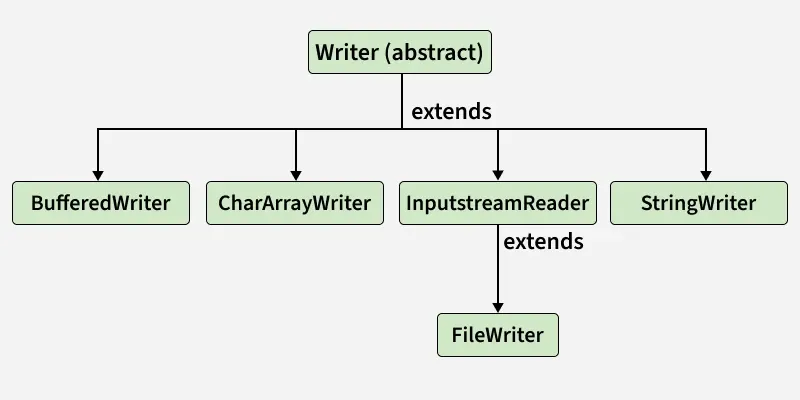
Declaration of the Writer Class
public abstract class Writer implements Appendable, Closeable, Flushable
Since it’s an abstract class, we can’t instantiate it directly; instead, we use concrete subclasses like FileWriter, BufferedWriter or PrintWriter.
import java.io.FileWriter;
import java.io.IOException;

public class Geeks {
    public static void main(String[] args)
    {
        try {

            // Create a FileWriter to write to a file named "example.txt"
            FileWriter w = new FileWriter("example.txt");

            // Write a simple message to the file
            w.write("Hello, World!");

            // Close the writer
            w.close();

            System.out.println("Message written");
        }
        catch (IOException e) {
            System.out.println("An error occurred: " + e.getMessage());
        }
    }
}
Output
Message written
Explanation: Creates a FileWriter object to write "Hello, World!" into example.txt. After writing, it closes the stream to ensure data is saved and resources are released.
Constructors of the Writer Class
The Writer class in Java has two protected constructors that allow for the creation of character streams with synchronization capabilities.
- Protected Writer(): Creates a new character stream that can itself synchronize on the writer.
- protected Writer(Object obj): Creates a new character stream that can itself synchronize on the given object – ‘obj’.
Example: Writing Characters to a File
import java.io.*;

public class GFG{
    public static void main(String[] args)
    {
        try {
            Writer writer = new FileWriter("example.txt");
            writer.write("Hello, Java Writer Class!");
            writer.close();
            System.out.println(
                "Data written successfully.");
        }
        catch (IOException e) {
            e.printStackTrace();
        }
    }
}
Output
Data written successfully.
Output File: example.txt

Explanation: Creates a FileWriter instance to write text data to example.txt. Writes the message "Hello, Java Writer Class!" and closes the writer to finish safely.
Example: Using BufferedWriter for Efficiency
import java.io.*;

public class GFG{
    public static void main(String[] args)
    {
        try (Writer writer = new BufferedWriter(
                 new FileWriter("buffered.txt"))) {
            writer.write(
                "BufferedWriter makes writing more efficient.");
            writer.write(
                "\nIt reduces disk I/O by using a buffer.");
            System.out.println(
                "Data written using BufferedWriter.");
        }
        catch (IOException e) {
            e.printStackTrace();
        }
    }
}
Output
Data written using BufferedWriter.
Output File: buffered.txt

Explanation: Uses BufferedWriter to improve performance by temporarily storing data before writing it. Writes two lines of text into buffered.txt and automatically closes the stream using try-with-resources.
Example: Appending Data to a File
import java.io.*;

public class GFG{
    public static void main(String[] args) {
        try (Writer writer = new FileWriter("example.txt", true)) {
            writer.write("\nThis line was appended later.");
            System.out.println("Data appended successfully.");
        } catch (IOException e) {
            e.printStackTrace();
        }
    }
}
Output
Data appended successfully.
Output File: example.txt
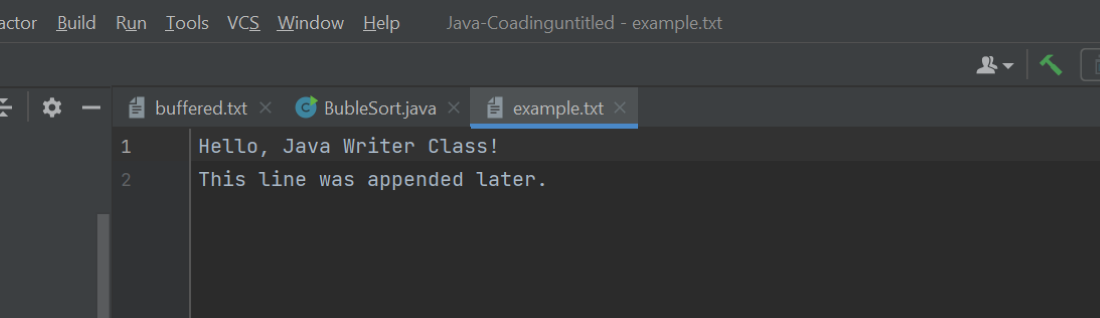
Explanation: Opens the existing file example.txt in append mode by passing true to FileWriter. Adds a new line "This line was appended later." without overwriting the previous data.
Java Writer Class Methods
There are certain methods associated with the Java Writer class as mentioned below:
| Method | Description |
|---|---|
| write(int c) | Writes a single character using the lower 16 bits of the integer value. |
| write(String str) | Writes the specified string to the character stream. |
| write(String str, int offset, int len) | Writes len characters from the string starting at the specified offset. |
| write(char[] cbuf) | Writes the specified character array to the character stream. |
| write(char[] cbuf, int offset, int len) | Writes len characters from the array starting at the specified offset. |
| close() | Closes the writer after flushing it. |
| flush() | Flushes buffered output to the underlying destination. |
| append(char c) | Appends the specified character to the writer. |
| append(CharSequence csq) | Appends the specified character sequence. If csq is null, the four characters "null" are appended. |
| append(CharSequence csq, int start, int end) | Appends the subsequence from start (inclusive) to end (exclusive). |
