New to Rust? Grab our free Rust for Beginners eBook Get it free →
Wikipedia Python: An in-depth guide

Wikipedia python integrations let you pull summaries, page content and metadata from Wikipedia inside a script.
The wikipedia package wraps the official MediaWiki API in a few simple functions. Fetching an article takes one line of code instead of a hand-built HTTP request.
This guide covers installation, search, summaries, page data, error handling and a comparison with the newer Wikipedia-API library, plus a short project that saves results to a file.
An introduction to Wikipedia module in Python
Wikipedia is a big online encyclopedia where people can work together to write and edit articles on many subjects. It’s a widely used reference site available in multiple languages.
Wikipedia module is a Python tool that makes it easy to work with Wikipedia using code.
It helps you find articles, get content and summaries, and access different details about Wikipedia entries.
This tool lets you include Wikipedia information in your Python programs for various uses. Let’s learn about its installation and import.
Every method in this library wraps an HTTP request to the same API behind Wikipedia’s own search box.
That’s worth remembering once you pull many pages in a loop, since each call still costs a network trip.
Installation statement
To get data from Wikipedia, start by installing the Wikipedia library. It wraps up the official Wikipedia API.
Use the command below in your command prompt or terminal to install it:
pip install wikipedia
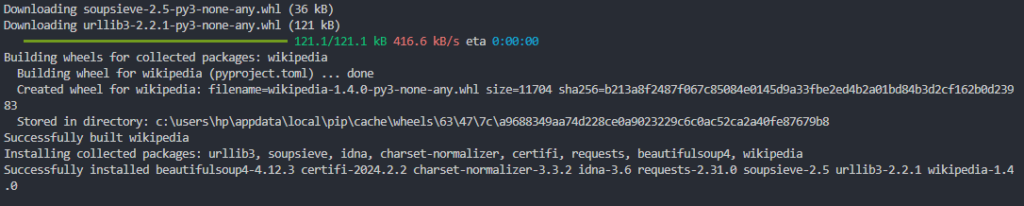
After installing, we can utilize the Wikipedia API in Python to gather information from Wikipedia. To access the methods of the Wikipedia module, simply import it using the following command:
import wikipedia
The package has no heavy dependencies beyond requests and a small HTML parser, so it installs in seconds.
If pip reports a permissions error, add --user or use a virtual environment instead of sudo.
Getting started with the Wikipedia Python module
Let’s now look at different use cases of what we can do using this Wikipedia module.
Getting Wikipedia articles summary
Now, we will see how to use the Wikipedia module in Python. Let’s start with the basics.
We can use the summary() method to extract a Wikipedia article’s summary in Python.
We provide the article title as a parameter to this method, and it returns a specified number of sentences for the given title.
To limit the stored data, you can include the desired number of sentences as a parameter, as shown in the following code.
Example:
import wikipedia

Title = "A. P. J. Abdul Kalam"

# Extract the summary with a specified number of sentences
Summary = wikipedia.summary(Title, sentences=5)
print("According to wikipedia : ")
print(Summary)
Output:
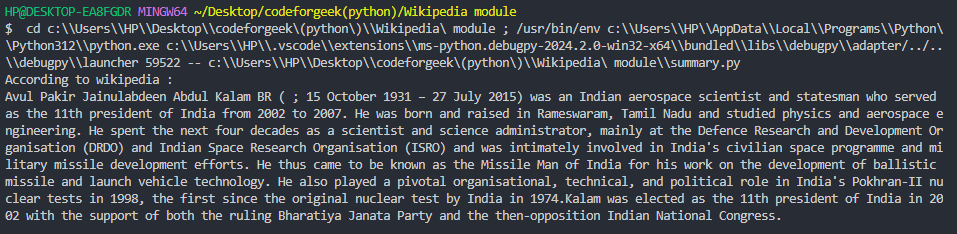
The summary for the given title will be printed in a specified number of sentences i.e. 5.
However, it is very important to note that the title provided must match the exact wording of the Wikipedia page’s title.
If not, it will throw an error, which means that the page does not exist.
For example, if the title were:
Title = "Dr APJ Abdul Kalam"

If there are many different articles with different meanings for the same title word, for example, ‘com,’ where the page is disambiguated, it will show a disambiguation error.
Title = "com"
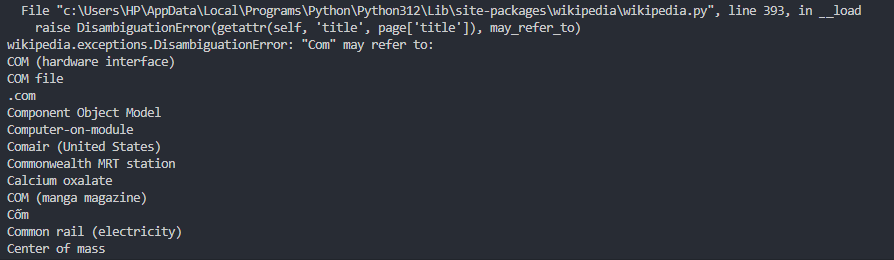
Many results match the title ‘com’. Suppose we want to summarize ‘Center of mass’, then, we need to specify it in the title to get accurate results, like:
Title = "Center of mass"

Now, with a more specific query, the output displays the accurate summary.
The next section fixes this guesswork directly with a method built for typos and rough titles.
Getting search suggestions with the suggest method
Bad titles are the most common cause of failed lookups. The suggest() method fixes this by returning the closest matching title, or None if nothing is close.
Example:
import wikipedia

Query = "Barak Obama"
Suggestion = wikipedia.suggest(Query)
print("Did you mean : ")
print(Suggestion)
Feed that corrected string straight into summary() or page() instead of hardcoding a guess.
If you only need titles containing one word, a plain substring check on the list from search() works just as well.
Customizing the page language
The set_lang function in the Python Wikipedia module is used to choose the language for future queries.
You can specify the Wikipedia edition’s language from which you want to get information.
Example:
import wikipedia
# Set the language to Hindi
wikipedia.set_lang("hi")

Summary = wikipedia.summary("Tiger")
print("According to wikipedia : ")
print(Summary)
Output:

In this example, using wikipedia.set_lang(“hi”) sets the language to Hindi. Afterwards, any queries with the Wikipedia module will get information from the Hindi edition.
The summary function is then used to fetch a summary for the Hindi Wikipedia page titled “Tiger.”
Every call after set_lang keeps that language until you change it again. Reset it with wikipedia.set_lang("en") once you’re done.
Listing every supported language
Check a language code exists before passing it to set_lang. The languages() function returns every supported edition as a dictionary of code to native name.
Example:
import wikipedia

Codes = wikipedia.languages()
print("hi" in Codes)
print(Codes["hi"])
Checking membership with in first avoids a silent fallback to English on a bad code.
Getting Wikipedia page data
We utilize the page function to obtain an entire Wikipedia page by providing the page title as a parameter.
To extract specific information from the page object, we specify the exact details needed.
The page function enables us to retrieve contents, categories, coordinates, images, links, and other metadata from a Wikipedia page. Let’s see the use of each page object one by one.
1) .content
When we use the page function, we retrieve the main content of a Wikipedia page using the .content attribute.
Keep in mind that this content may include not only the main text but also sections, references, and other information from the page.
Example:
import wikipedia

Title = "William Shakespeare"

Content = wikipedia.page(Title).content
print("According to wikipedia : ")
print(Content)
Output:

2) .url
If you wish to obtain the URL of the given page, you can use the .url attribute to fetch and display it.
Example:
import wikipedia

Title = "Walt Disney World"

URL = wikipedia.page(Title).url
print("According to wikipedia : ")
print(URL)
Output:

3) .references
When we use the page function, employing the .references attribute is intended to retrieve the reference links or citations from a Wikipedia page.
Example:
import wikipedia

Title = "International Women's Day"

References = wikipedia.page(Title).references
print("According to wikipedia : ")
print(References)
Output:

In this example, you have a list of URLs or identifiers representing the references or citations from the Wikipedia page for “International Women’s Day.”
This is helpful if you want to analyze or display the sources used in creating the Wikipedia page content.
4) .links
The .links attribute is used to retrieve a list of links present on a Wikipedia page.
Example:
import wikipedia

Title = "Santorini"

Connected_links = wikipedia.page(Title).links
print("According to wikipedia : ")
print(Connected_links)
Output:

In this example, using wikipedia.page(Title).links gives you a list of links from the Wikipedia page for “Santorini.” Each element in the list represents a link found on the page.
This information is helpful if you want to extract and analyze the links within the Wikipedia page or explore related topics.
Note that the list may include internal links, external links, and references.
5) .categories
The .categories attribute is used to get a list of categories to which a Wikipedia page belongs.
Example:
import wikipedia

Title = "Hill Forts of Rajasthan"

Belonged_categories = wikipedia.page(Title).categories
print("According to wikipedia : ")
print(Belonged_categories)
Output:

In this example, using wikipedia.page(Title).categories gives you a list of categories related to the Wikipedia page for “Hill Forts of Rajasthan.” Each element represents a category the page belongs to.
This is useful if you want to categorize Wikipedia pages based on their topics.
6) .section()
The .content attribute returns the whole page, which is overkill when you only need one part.
.section() returns just the text under one heading, matched by its exact name.
Example:
import wikipedia

Title = "Mahatma Gandhi"

Page = wikipedia.page(Title)
Early_life = Page.section("Early life")
print("According to wikipedia : ")
print(Early_life)
It returns None if the heading doesn’t match, so check the result before printing it.
Getting a random Wikipedia page
The random method in Python’s Wikipedia module is used to get a random Wikipedia page.
When you use wikipedia.random(), it gives you the title of a randomly chosen Wikipedia page, letting you explore various topics.
Example:
import wikipedia

Random = wikipedia.random()

Title = wikipedia.page(Random).title
Summary = wikipedia.summary(Random)
print("According to wikipedia : ")
print(Title)
print(Summary)
The code randomly selects a Wikipedia page title using the wikipedia module, retrieves the title and a summary of the corresponding Wikipedia page, and prints this information to the console.
Output:

The above result shows that the program has randomly selected the topic “Stielgranate 41” and has displayed the summary for the same.
Getting a list of titles
The search method in Python’s Wikipedia module is used for searching on Wikipedia and getting a list of titles that match the query.
It helps find Wikipedia pages related to a specific topic.
Example:
import wikipedia

Query = wikipedia.search("Rajasthan")

print("Search results:")
for result in Query:
    print(result)
Output:
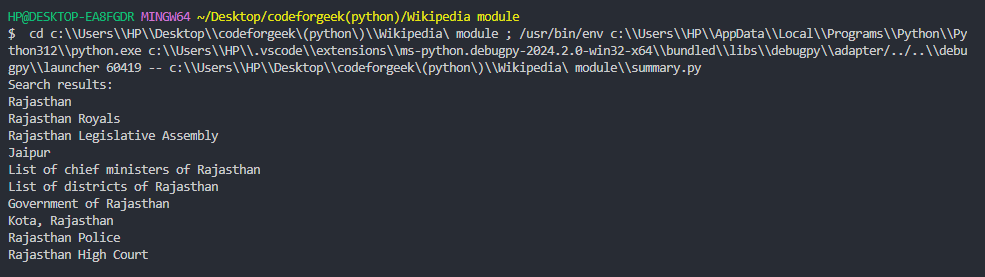
In this example, using wikipedia.search(“Rajasthan”) gives a list of Wikipedia page titles related to “Rajasthan.” The titles can then be used to get more detailed information about the corresponding pages.
Pass results=5 to shorten a long list, or combine search() with random() above when you need a batch of topics rather than one page you already know.
Handling errors in the Wikipedia module
A missing, ambiguous or mistyped title can crash any of the methods above. The wikipedia package raises one exception class per failure, so you can catch each separately.
import wikipedia.exceptions

# DisambiguationError -> title matches more than one page
# PageError -> no page matched, even after suggest/search fallback
# HTTPTimeoutError -> the request to Wikipedia timed out
Example:
import wikipedia

Title = "Mercury"

try:
    Summary = wikipedia.summary(Title)
    print(Summary)
except wikipedia.exceptions.DisambiguationError as error:
    print("Multiple matches, try one of:")
    print(error.options)
except wikipedia.exceptions.PageError:
    print("No Wikipedia page matched that title.")
except wikipedia.exceptions.HTTPTimeoutError:
    print("The request timed out, try again.")
This turns an unhandled crash into a message you control. That matters the moment this code runs inside a web app or a chatbot.
Wikipedia vs Wikipedia-API: choosing the right Python library
The wikipedia package is not the only Python wrapper for the MediaWiki API. A second, actively maintained library called Wikipedia-API often shows up in the same search results.
# wikipedia (this article)
wikipedia.summary("Python (programming language)")

# Wikipedia-API (separate package, needs pip install wikipedia-api)
import wikipediaapi
wiki = wikipediaapi.Wikipedia(user_agent="MyApp ([email protected])", language="en")
page = wiki.page("Python (programming language)")
print(page.summary)
wikipedia is a thin, sync-only wrapper. It’s the fastest way to get a summary in a short script or a notebook.
Wikipedia-API ships a sync client and an async client, so it fits a scraper fetching hundreds of pages at once.
It requires a user_agent string under Wikimedia’s policy, not as optional boilerplate.
Wikipedia-API also adds retry handling, typed sort enums for search and batch fetching for images or coordinates across many pages.
Pick wikipedia for a quick script or class assignment. Pick Wikipedia-API once you need async requests or production-grade retries.
Prefer raw HTTP calls instead of either wrapper? Python’s requests module can hit the MediaWiki endpoints directly, though you lose the built-in disambiguation help.
Saving Wikipedia data to a file
A console print is easy to lose. Most real projects save the title, summary and URL somewhere reusable.
Example:
import wikipedia
import json

Title = "Albert Einstein"
Page = wikipedia.page(Title)

Data = {
    "title": Page.title,
    "summary": wikipedia.summary(Title, sentences=3),
    "url": Page.url
}

with open("wiki_data.json", "w") as output_file:
    json.dump(Data, output_file, indent=4)

print("Saved wiki_data.json")
See this guide to working with JSON files in Python for reading the file back or nesting more fields.
Want a shareable document instead of a data file? fpdf turns the same summary into a PDF in a few lines:
from fpdf import FPDF

Document = FPDF()
Document.add_page()
Document.set_font("Arial", size=12)
Document.multi_cell(0, 10, Data["summary"])
Document.output("wiki_summary.pdf")
Run this after the JSON example above, since it reuses Data["summary"]. The fpdf module guide covers fonts and multi-page layouts in more depth.
Key takeaways
- The wikipedia package wraps the MediaWiki API in simple sync-only functions like summary, page and search.
- summary() and page() both raise a disambiguation error on titles with more than one match.
- suggest() corrects typos and returns the closest matching title as a plain string.
- .section() pulls one heading’s text instead of the entire page content.
- Wrap risky lookups in try/except to catch DisambiguationError, PageError and HTTPTimeoutError separately.
- Wikipedia-API suits async apps, retries or Wikimedia’s user agent policy better.
- json and fpdf turn a lookup into a saved file or a shareable document.
Frequently asked questions
Is the Python wikipedia module still maintained?
The original wikipedia package has not seen a major update in years, though it still works for basic lookups. For active maintenance and async support, Wikipedia-API is the better pick.
Why does wikipedia.summary() raise a DisambiguationError?
It raises this error when a title matches more than one page, such as “Mercury” matching the planet and the element. Catch it and read error.options to see every match.
How do I fix a DisambiguationError without crashing my script?
Wrap the call in a try/except block, catch wikipedia.exceptions.DisambiguationError and either print error.options for the user to pick from or automatically select the first option.
Can I get just one section of a Wikipedia page instead of the whole article?
Yes, call .section(“Heading name”) on a page object returned by wikipedia.page(). It returns None if no section matches that exact heading text.
Does the wikipedia module support every language on Wikipedia?
Yes, call wikipedia.languages() to see every supported code, then pass the code you want to wikipedia.set_lang() before running your query.
What is the difference between wikipedia and Wikipedia-API in Python?
wikipedia is a simple synchronous wrapper suited to quick scripts. Wikipedia-API adds an async client, retry handling, typed search sorting and a required user agent string for production use.
How do I save Wikipedia data to a file in Python?
Build a dictionary from page.title, page.url and wikipedia.summary(), then write it with Python’s built-in json.dump() to a .json file, or use fpdf to export the summary as a PDF.