1. X
  2. Defensive CSS
Log inSign up
Defensive CSS
40 posts
Image
user avatar
Defensive CSS
@DefensiveCSS
Practical CSS and design tips that helps in building future-proof user interfaces. A project by @shadeed9
The Browser
defensivecss.dev
Joined December 2021
1
Following
6,061
Followers
RepliesRepliesMediaMedia
  • user avatar
    Defensive CSS
    @DefensiveCSS
    Oct 18, 2022
    It was an honor talking about Defensive CSS @ParisWeb. You can watch the talk here (It's a part of a live stream): youtube.com/watch?v=ym2sI8…
    user avatar
    Ahmad Shadeed
    @shadeed9
    Oct 10, 2022
    Hello 👋 I got back home today from my trip to @ParisWeb! It was a great experience for a first-time speaker! I learned a lot, and glad that I met @mmatuzo, @klohFR, and @ffoodd_fr in person 🤩 Photo credit: the amazing @mmatuzo
    Image
  • user avatar
    Defensive CSS
    @DefensiveCSS
    Sep 30, 2022
    Looking forward to speak about Defensive CSS next week in Paris! 🤩
    user avatar
    Paris Web
    @ParisWeb
    Sep 22, 2022
    Designer et développeur front-end, @shadeed9 nous fera l'honneur de partager son expertise #CSS pour la toute première fois en France. Et ce sera à #ParisWeb le 7 octobre prochain ! paris-web.fr/2022/conferenc… Inscrivez-vous pour assister à sa conférence : inscriptions.paris-web.fr
    « Defensive CSS » par Ahmad Shadeed
  • user avatar
    Defensive CSS
    @DefensiveCSS
    Sep 9, 2022
    🌟 New Tip When working with multilingual websites, make sure to account for short content lengths by setting a minimum size. In this example, the button "Done" become too small in Arabic. We can fix that by setting a min-width in CSS. Read more: defensivecss.dev/tip/button-min…
    Image
    00:00
  • user avatar
    Defensive CSS
    @DefensiveCSS
    Aug 24, 2022
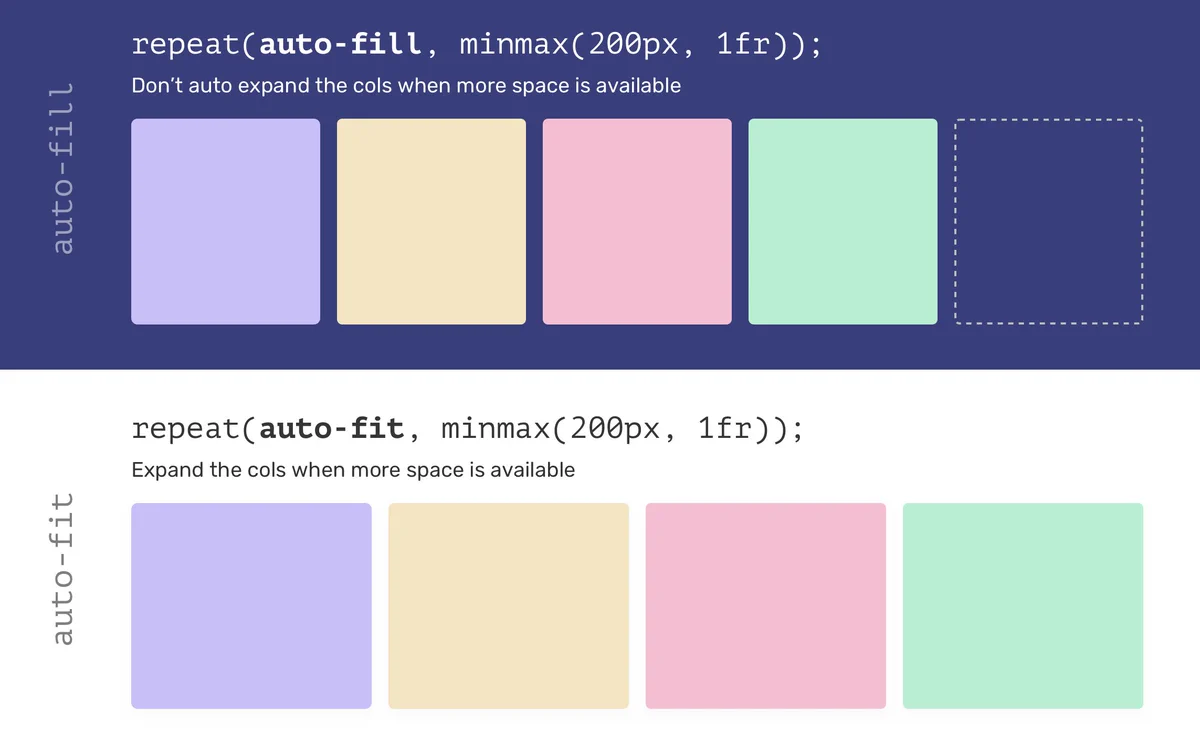
    💡 In CSS grid, we can choose between auto-fill and auto-fit for how a grid item should behave. The keyword auto-fit is risky, specially when we don't know the number of grid items. Read more in this defensive CSS tip: defensivecss.dev/tip/auto-fit-f…
    Image
  • user avatar
    Defensive CSS
    @DefensiveCSS
    Jul 14, 2022
    It's a common mistake to use display: flex and forget about it. When the content gets longer, flex items will stretch to fill the parent. That's what happened to the image here. The fix is to use align-items or align-self depending on the use case. 🔗 defensivecss.dev/tip/default-fl…
    Image

Log in or sign up for X

See what’s happening and join the conversation

Continue with phone
or
Log in with username or email
Terms·Privacy·Cookies·Accessibility·Ads Info·© 2026 X Corp.
Advertisement
Advertisement