

Python’s flexibility and dynamism are encapsulated in its variable system, fundamental elements for storing and manipulating data within a program. Understanding how variables work is pivotal for any Python developer, influencing the efficiency and readability of their code. In this comprehensive guide, we embark on an exploration of Python variables, from the basics of assignment to the nuances of scoping and dynamic typing. Whether you’re a novice or a seasoned coder, join us on a journey through the intricacies of Python variables, unlocking the key to effective data handling in your Python scripts.
What are Python Variables?
In Python, variables serve as containers for storing and managing data during program execution. Simply put, a variable is a named reference to a memory location holding a value. This value can be of various types, such as integers, floats, strings, or more complex objects.
Variables play a crucial role in programming by enabling developers to store, retrieve, and manipulate data dynamically. They act as symbolic labels, making code more readable and adaptable. As the backbone of data management, variables empower programmers to create dynamic and responsive applications, facilitating efficient interactions with data throughout the program’s lifecycle. In essence, mastering the use of variables is foundational to harnessing the full power and flexibility of Python programming.
How can you name Python Variables?
In Python, adhering to proper variable naming conventions is essential for writing clear, maintainable, and understandable code. Here are the key rules and best practices:
- Alphanumeric and Underscore Characters:
- Variables must begin with a letter (a-z, A-Z) or an underscore (_).
- Subsequent characters can be letters, digits (0-9), or underscores.
- Case Sensitivity:
- Python is case-sensitive, meaning
myVarandmyvarare treated as different variables.
- Python is case-sensitive, meaning
- Reserved Keywords:
- Avoid using reserved keywords like
if,else,while, etc., as variable names.
- Avoid using reserved keywords like
- Descriptive and Meaningful:
- Choose names that reflect the purpose or content of the variable.
- Be descriptive and avoid single-letter names unless represent a well-known convention (e.g., loop counters).
- Use underscores for Readability:
- For multi-word variable names, use underscores to enhance readability (e.g.,
user_ageinstead ofuserage).
- For multi-word variable names, use underscores to enhance readability (e.g.,
- Avoid Confusing Similar Characters:
- Avoid using names with similar characters like lowercase ‘l’ and uppercase ‘I’ to prevent confusion.
- Follow PEP 8 Guidelines:
- Adhere to Python Enhancement Proposal 8 (PEP 8) guidelines, a style guide for Python code.
- PEP 8 recommends using lowercase for Python variables with underscores for improved consistency.
- Consistency Across Projects:
- Maintain consistency in naming conventions across your projects or adhere to the standards established by the development community.
- Update Names as Needed:
- Refactor variable names when the code evolves or when a more descriptive name becomes relevant.
- Avoid Abbreviations Without Clarity:
- While abbreviations can save keystrokes, prioritize clarity over brevity. Only use abbreviations that are widely understood in the context.
By following these rules and best practices, developers can create code that is not only syntactically correct but also readable and maintainable. Choosing meaningful and descriptive variable names enhances collaboration and reduces the chances of errors or misunderstandings in the codebase.
What are Data Types and Dynamic Typing in Python?
Python boasts a dynamic typing system, a distinctive feature that adds a layer of flexibility to variable management. In Python, variables are not bound to a specific data type during declaration. Instead, they dynamically adapt to the assigned value’s type during runtime.
Python supports a range of fundamental data types, including integers, floats, strings, lists, tuples, dictionaries, and more. Each data type serves a unique purpose, from numerical calculations to text manipulation and complex data structures.
Unlike statically typed languages, Python allows variables to seamlessly change their data type as the program executes. For instance, a variable initially holding an integer can transform into a string or any other valid type based on the assigned value.

This dynamic nature enhances Python’s expressiveness and simplifies code development. However, it also requires developers to exercise caution and ensure consistency in variable usage to avoid unexpected behavior. Understanding the interplay between dynamic typing and diverse data types is fundamental for harnessing Python’s versatility in building robust and adaptable applications.
How are values assigned to Python Variables?
The act of assigning values to Python variables is a fundamental aspect of programming. Let’s delve into the intricacies of this process, exploring multiple assignments, simultaneous assignments, and augmented assignments.
Single Assignment:
The simplest form involves assigning a single value to a variable, like so:

Multiple Assignment:
Python allows multiple variables to be assigned in a single line, providing a concise and readable way to initialize values:

Simultaneous Assignment:
This feature enables the swapping of values between Python variables without the need for a temporary variable:

Augmented Assignment:
Augmented assignment combines an operation with assignment, offering a concise syntax for operations like addition, subtraction, etc.:

Understanding these assignment techniques enhances code readability and efficiency. Multiple and simultaneous assignments streamline variable initialization, while augmented assignment simplifies the updating of variable values during the program’s execution. Mastery of these techniques empowers Python developers to write expressive and concise code.
What are the scope and lifetime of Python Variables?
Understanding the scope and lifetime of Python variables is akin to navigating the various realms where these entities exist. Let’s embark on a journey through the concepts of variable scope and lifetime, unraveling their impact on accessibility and modification.
Variable Scope:
Scope refers to the region of the code where a variable is visible and accessible. Python variables can exist in two primary scopes: local and global.
- Local Scope:
Variables defined within a function have a local scope. They are accessible only within that specific function and cease to exist once the function completes its execution.

- Global Scope:
Variables defined outside any function or block have a global scope. They are accessible throughout the entire code, both inside and outside functions.

Lifetime of Variables:
The lifetime of a variable corresponds to the duration it exists in the program’s memory. Local variables have a shorter lifetime, limited to the duration of their function’s execution. In contrast, global variables persist throughout the program’s execution.
Understanding scope and lifetime is pivotal for writing maintainable and bug-free code. Properly managing variable scope ensures that variables are used where they are intended, preventing unintended modifications or conflicts. As you navigate the realms of scope and lifetime, you gain the power to craft Python code that is both efficient and logically structured.
Immutable vs. Mutable Objects
In Python, the classification of objects into immutable and mutable plays a pivotal role in understanding how variables interact with the underlying data. Let’s unravel the distinctions between these two categories and explore the implications for variable behavior.
Immutable Objects:
Immutable objects, once created, cannot be modified. Any operation that appears to modify an immutable object creates a new object. Common examples of immutable objects in Python include integers, floats, strings, and tuples.

Mutable Objects:
Mutable objects, on the other hand, can be altered after creation. Lists, dictionaries, and sets are examples of mutable objects. Modifying a mutable object directly affects its content.

Variable Behavior:
Understanding whether an object is mutable or immutable is crucial for predicting variable behavior. When an immutable object is manipulated, a new object is created, and the variable is updated to reference the new object. In contrast, operations on mutable objects modify the existing object, impacting all variables that reference it.

Recognizing the immutability or mutability of objects guides developers in writing code that behaves predictably and avoids unexpected side effects. This nuanced understanding contributes to the robustness and clarity of Python programs.
How can you reassign values to Python Variables?
In Python, the ability to reassign variables adds a dynamic dimension to programming. Let’s delve into the intricacies of variable reassignment, exploring scenarios, potential side effects, and essential considerations.
Scenarios of Variable Reassignment:
Variable reassignment occurs when a new value is assigned to an existing variable. This flexibility allows developers to adapt variables to changing conditions and update their values as needed.

Potential Side Effects:
While variable reassignment provides adaptability, it comes with considerations. Reassigning a variable affects its reference, potentially impacting other variables that reference the same object.

Considerations when Reassigning:
- Memory Usage:
Reassigning variables may lead to increased memory usage, especially when dealing with large objects. Be mindful of memory implications in scenarios involving frequent reassignment. - Readability:
Excessive reassignment can make code harder to follow. Strive for clarity and readability, favoring meaningful variable names and minimizing unnecessary reassignments. - Avoiding Unintended Consequences:
When multiple variables reference the same mutable object, modifications to the object may have unintended consequences. Understand the nature of the objects being reassigned to mitigate unexpected behavior.
Guiding through Dynamic Adaptation:
Variable reassignment is a powerful tool for dynamic adaptation in Python. However, wield it judiciously, considering the potential side effects and aligning its use with the overall design and readability goals of your code. As you navigate the shifting sands of variable reassignment, strike a balance that promotes flexibility without compromising code clarity.
What is the difference between local and global Python Variables?
In Python, understanding variable scope is essential for writing maintainable and error-free code. Let’s explore the distinction between global and local Python variables, unraveling the nuances of their scope and the role of the global keyword.
Local Variables:
Local variables are those defined within a specific function or block of code. They are accessible only within that particular scope. Once the function completes execution, the local variables are typically discarded, and their values are no longer available.

Global Variables:
Global variables, as the name suggests, are defined at the global level, making them accessible from any part of the code, including within functions. While global variables provide broader accessibility, they require careful management to avoid unintended side effects.

The global Keyword:
If you want to modify the value of a global variable within a function, you need to use the global keyword. This indicates that the variable being referred to is a global one, preventing the creation of a local variable with the same name.

Implications and Best Practices:
- Avoid Excessive Use of Global Variables:
While global Python variables offer broad accessibility, excessive reliance on them can lead to code that is harder to understand and maintain. Favor encapsulation and limit the use of global variables to cases where they genuinely enhance the design. - Careful Modification with
global:
When modifying global variables within functions using theglobalkeyword, exercise caution to ensure clarity and prevent unintentional side effects. - Use Descriptive Variable Names:
Whether global or local, opt for descriptive variable names to enhance code readability and understanding.
By grasping the distinctions between global and local Python variables and judiciously employing the global keyword, you empower yourself to write Python code that balances flexibility and maintainability.
How can you delete Python Variables?
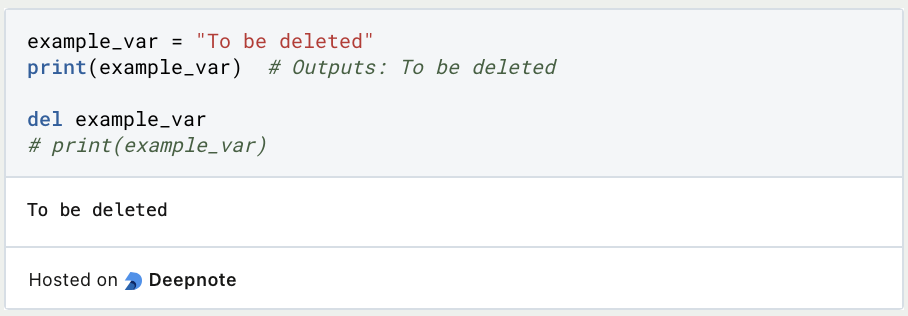
In Python, the del statement serves as a tool for variable deletion, allowing developers to release resources and manage memory effectively. Let’s delve into the intricacies of variable deletion, exploring its usage, implications, and scenarios where it proves beneficial.
Using the del Statement:
The del statement is employed to remove a variable, freeing up the associated memory. This statement is versatile, as it can be used to delete Python variables, items from lists, slices of arrays, or even entire arrays.
Scenarios for Variable Deletion:
- Memory Management:
Deleting Python variables becomes crucial when dealing with large datasets or objects. By releasing memory usingdel, you can optimize your program’s performance and prevent potential memory leaks.

- Security Considerations:
In scenarios where a variable holds sensitive information, such as passwords or temporary tokens, usingdelcan mitigate security risks. It ensures that the sensitive data is removed from memory promptly.

- Variable Cleanup in Functions:
When working within functions, particularly those with significant memory usage, deleting Python variables at the end of the function can be a good practice to manage resources efficiently.

Implications and Best Practices:
- Avoid Excessive Deletion:
Whiledelis a powerful tool, excessive use can lead to code that is harder to understand. In most cases, Python’s automatic garbage collection suffices without explicit variable deletion. - Consider Global vs. Local Impact:
Deleting a variable within a function affects only its local scope. If the variable is global, its deletion influences the entire program. Exercise caution and consider the broader implications. - Leverage Garbage Collection:
Python’s garbage collector automatically reclaims memory from objects that are no longer in use. Explicit use ofdelis often unnecessary for routine memory management.
By understanding when and why to use the del statement, Python developers can optimize memory usage, enhance security, and foster cleaner, more efficient code. Carefully applying variable deletion contributes to robust memory management strategies within Python programs.
This is what you should take with you
- Python variables are the cornerstone of programming, serving as dynamic containers for data and facilitating the creation of versatile and expressive code.
- Understanding variable types, naming conventions, and dynamic typing enables developers to handle diverse data with ease, fostering flexibility and adaptability.
- Proficiency in variable scoping and lifetime management empowers developers to write modular and scalable code, enhancing the robustness of their applications.
- Distinguishing between mutable and immutable objects provides insights into memory management, contributing to optimized performance and resource utilization.
- The ability to dynamically reassign Python variables, both simultaneously and augmentedly, showcases Python’s flexibility in handling evolving data requirements.
- The
delstatement emerges as a potent tool for memory management and security, offering precise control over variable deletion in scenarios ranging from large datasets to sensitive information handling. - Practical examples demonstrate how Python variables seamlessly integrate into real-world scenarios, from file handling to exception management, showcasing their practicality and relevance.
- Mastery of Python variables not only enhances functionality but also contributes to code readability and maintainability, reflecting the hallmarks of a proficient Python programmer.

Python Programming Basics: Learn it from scratch!
Master Python Programming Basics with our guide. Learn more about syntax, data types, control structures, and more. Start coding today!

What is Jenkins?
Mastering Jenkins: Streamline DevOps with Powerful Automation. Learn CI/CD Concepts & Boost Software Delivery.

What are Conditional Statements in Python?
Learn how to use conditional statements in Python. Understand if-else, nested if, and elif statements for efficient programming.

What is XOR?
Explore XOR: The Exclusive OR operator's role in logic, encryption, math, AI, and technology.

How can you do Python Exception Handling?
Unlocking the Art of Python Exception Handling: Best Practices, Tips, and Key Differences Between Python 2 and Python 3.

What are Python Modules?
Explore Python modules: understand their role, enhance functionality, and streamline coding in diverse applications.
Other Articles on the Topic of Python Variables
Here you can find a detailed article about Python Variables.

Niklas Lang
I have been working as a machine learning engineer and software developer since 2020 and am passionate about the world of data, algorithms and software development. In addition to my work in the field, I teach at several German universities, including the IU International University of Applied Sciences and the Baden-Württemberg Cooperative State University, in the fields of data science, mathematics and business analytics.
My goal is to present complex topics such as statistics and machine learning in a way that makes them not only understandable, but also exciting and tangible. I combine practical experience from industry with sound theoretical foundations to prepare my students in the best possible way for the challenges of the data world.
