Summary: in this tutorial, you will learn how to use the JavaScript Array filter() method to filter elements in an array.
Introduction to JavaScript Array filter() method #
The filter() method creates a new array with elements from the original array, which passes a test function.
Here’s the syntax of the filter() method:
const newArray = array.filter(callbackFn, thisArg);In this syntax:
callbackFnis a function that thefilter()method executes for each element of thearray.
The callbackFn has the following form:
function callback(currentElement, index, array) {
// ...
}The callback function takes three arguments:
- The
currentElementis the current element in thearraythat is being processed by thecallbackFnfunction. - The
indexis the index of thecurrentElement. - The
arrayobject being processed.
The index and array arguments are optional.
- The
thisArgargument is optional. It is referenced asthisinside thecallbackFnfunction.
If the callbackFn function returns true, the filter() function includes the elements in the result array.
One tip to remember this rule is to look at the Filter method: Filter keeps true (letters F and t).
JavaScript Array filter() method examples #
Let’s take some examples of using the filter() method.
1) Basic JavaScript array filter() example #
The following example uses the filter() method to return an array of numbers that are greater than 2:
const numbers = [1, 3, 2, 7];
const results = numbers.filter((n) => n > 2);
console.log({ results });Output:
{ results: [ 3, 7 ] }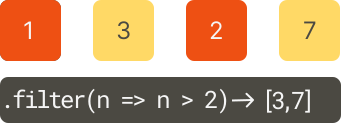
How it works.
First, define an array of numbers:
const numbers = [1, 3, 2, 7];Second, use the filter() method to return an array of numbers that are greater than 2:
const results = numbers.filter((n) => n > 2);The filter() method executes the following callback function for each number in the numbers array:
(n) => n > 2- n = 1: the callback function returns false. The
filter()method does not include the number1in the result array. - n = 3: the callback function also returns true. The
filter()method includes the number3in the result array. - n = 2: the callback function also returns false. The
filter()method does not include the number2in the result array. - n = 7: the callback function also returns true. The
filter()method includes the number7in the result array.
As a result, the filter() method returns an array that includes two numbers 3 and 7.
{ results: [ 3, 7 ] }2) Using the filter() method with an array objects #
The following example uses the filter() method returns an array of cities that have a population greater than 3 million:
const cities = [
{ name: 'Los Angeles', population: 3_792_621 },
{ name: 'New York', population: 8_175_133 },
{ name: 'Chicago', population: 2_695_598 },
{ name: 'Houston', population: 2_099_451 },
{ name: 'Philadelphia', population: 1_526_006 },
];
const bigCities = cities.filter((city) => city.population > 3_000_000);
console.log(bigCities);Output:
[
{ name: 'Los Angeles', population: 3792621 },
{ name: 'New York', population: 8175133 }
]3) Chaining the filter() method with other array methods #
Since the filter() method returns a new array, you can chain its result (which is an array) with other array methods such as sort(),map() , and forEach().
For example, the following shows how to chain three array methods: filter(), map(), and forEach():
const cities = [
{ name: 'Los Angeles', population: 3_792_621 },
{ name: 'New York', population: 8_175_133 },
{ name: 'Chicago', population: 2_695_598 },
{ name: 'Houston', population: 2_099_451 },
{ name: 'Philadelphia', population: 1_526_006 },
];
cities
.filter((c) => c.population < 3_000_000)
.map((c) => c.name)
.forEach((c) => console.log(c));Output:
Chicago
Houston
PhiladelphiaHow it works.
First, filter the cities whose populations are less than 3 million using the filter() method.
Second, returns a new array of city names using the map() method.
Third, display each city name in the console using the forEach() method.
4) Using the thisArg argument #
The following example shows how to use the filter() method with the thisArg argument:
function isInRange(value) {
if (typeof value !== 'number') {
return false;
}
return value >= this.lower && value <= this.upper;
}
let range = {
lower: 1,
upper: 10,
};
let data = [10, 20, '30', 1, 5, 'JS', undefined];
let results = data.filter(isInRange, range);
console.log({ results });Output:
{ results: [ 10, 1, 5 ] }How it works.
First, define the isInRange() function that checks if its argument is a number and in the range specified by the lower and upper properties of an object (this):
function isInRange(value) {
if (typeof value !== 'number') {
return false;
}
return value >= this.lower && value <= this.upper;
}Next, define the range object with two properties lower and upper:
let range = {
lower: 1,
upper: 10,
};Then, define an array of mixed data that contains numbers, strings, and undefined:
let data = [10, 20, '30', 1, 5, 'JS', undefined];After that, call the filter() methods of the data array and pass in the isInRange() function and the rangeobject. Because we pass in the range object, inside the isInRange() function, the this keyword references to the range object:
let results = data.filter(isInRange, range);Finally, show the result array in the console:
console.log({ results });Summary #
- Remember the rule: Filter keeps true.
- Use the array
filter()method to return an array of elements that pass a test function.
Thank you for your feedback!
