Summary: in this tutorial, you will learn about the JavaScript variable scope that determines the visibility and accessibility of variables.
What is variable scope #
Scope determines the visibility and accessibility of a variable. JavaScript has three scopes:
- The global scope
- Local scope
- Block scope (started from ES6)
The global scope #
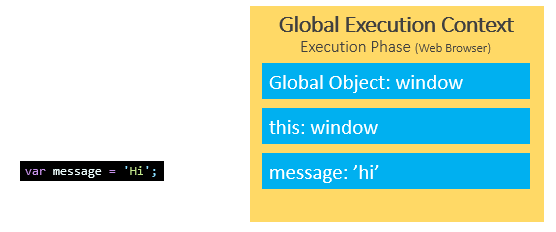
When the JavaScript engine executes a script, it creates a global execution context.
Also, it also assigns variables that you declare outside of functions to the global execution context. These variables are in the global scope. They are also known as global variables.
See the following example:
var message = 'Hi';The variable message is global-scoped. It can be accessible everywhere in the script.
Local scope #
The variables that you declare inside a function are local to the function. They are called local variables. For example:
var message = 'Hi';
function say() {
var message = 'Hello';
console.log(message);
}
say();
console.log(message);Output:
Hello
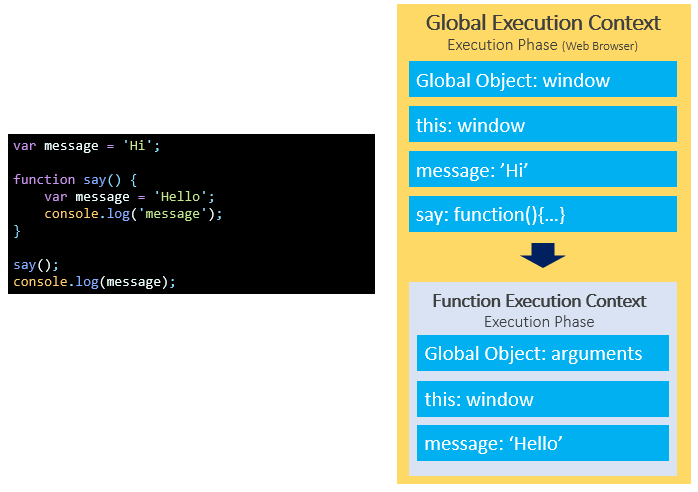
HiWhen the JavaScript engine executes the say() function, it creates a function execution context. The variable message declared inside the say() function is bound to the function execution context of the function, not the global execution context.
Scope chain #
Consider the following example:
var message = 'Hi';
function say() {
console.log(message);
}
say();Output:
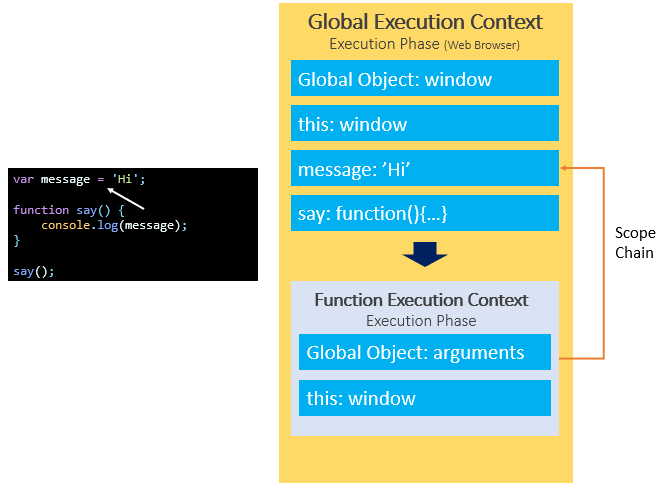
HiIn this example, we reference the variable message inside the say() function. Behind the scenes, JavaScript performs the following:
- Look up the variable
messagein the current context (function execution context) of thesay()function. It cannot find any. - Find the variable
messagein the outer execution context which is the global execution context. It finds the variablemessage.
The way that JavaScript resolves a variable is by looking at it in its current scope, if it cannot find the variable, it goes up to the outer scope, which is called the scope chain.
More scope chain example #
Consider the following example:
var y = 20;
function bar() {
var y = 200;
function baz() {
console.log(y);
}
baz();
}
bar();Output:
200In this example:
- First, the JavaScript engine finds the variable y in the scope of the
baz()function. It cannot find any. So it goes out of this scope. - Then, the JavaScript engine finds the variable y in the
bar()function. It can find the variable y in the scope of thebar()function so it stops searching.
Global variable leaks: the weird part of JavaScript #
See the following example:
function getCounter() {
counter = 10;
return counter;
}
console.log(getCounter());Output:
10In this example, we assigned 10 to the counter variable without the var, let, or const keyword and then returned it.
Outside the function, we called the getCounter() function and showed the result in the console.
This issue is known as the leaks of the global variables.
Under the hood, the JavaScript engine first looks up the counter variable in the local scope of the getCounter() function. Because there is no var, let, or const keyword, the counter variable is not available in the local scope. It hasn’t been created.
Then, the JavaScript engine follows the scope chain and looks up the counter variable in the global scope. The global scope also doesn’t have the counter variable, so the JavaScript engine creates the counter variable in the global scope.
To fix this “weird” behavior, you use the 'use strict' at the top of the script or at the top of the function:
'use strict'
function getCounter() {
counter = 10;
return counter;
}
console.log(getCounter());Now, the code throws an error:
ReferenceError: counter is not definedThe following shows how to use the 'use strict' in the function:
function getCounter() {
'use strict'
counter = 10;
return counter;
}
console.log(getCounter());Block scope #
ES6 provides the let and const keywords that allow you to declare variables in block scope.
Generally, whenever you see curly brackets {}, it is a block. It can be the area within the if, else, switch conditions or for, do while, and while loops.
See the following example:
function say(message) {
if(!message) {
let greeting = 'Hello'; // block scope
console.log(greeting);
}
// say it again ?
console.log(greeting); // ReferenceError
}
say();In this example, we reference the variable greeting outside the if block that results in an error.
In this tutorial, you have learned about the JavaScript variable scopes including function scope, global scope, and block scope.
Thank you for your feedback!
