Summary: in this tutorial, you will learn about the path module in Node.js
Node.js offers a path module that allows you to interact with file paths easily.
The path module has many useful properties and methods to access and manipulate paths in the file system.
The path is a core module in Node.js, therefore, you can use it without installing:
const path = require('path');If you use the ES module, you can import the path as follows:
import path from 'path';Useful path properties #
The path object has the sep property that represents the platform-specific path separator:
path.sepThe path.sep returns \ on Windows and / on Linux and macOS.
The path object also has the delimiter property that represents the path delimiter:
path.delimiterThe path.delimiter returns ; on Windows and : on Linux and macOS.
Handy path methods #
The following shows some handy methods for the path module that you probably use very often:
path.basename(path, [,ext])
path.dirname(path)
path.extname(path)
path.format(pathObj)
path.isAbsolute(path)
path.join(...path)
path.normalize(path)
path.parse(path)
path.relative(from, to)
path.resolve(...path)path.basename(path[, ext]) #
The path.basename() returns the last portion of a specified path. For example:
import path from 'path';
let result = path.basename('/public_html/home/index.html');
console.log(result);Output:
index.htmlThe ext parameter filters out the extension from the path:
import path from 'path';
let result = path.basename('/public_html/home/index.html', '.html');
console.log(result);Output:
indexpath.dirname(path) #
The path.dirname() method returns the directory name of a specified path. For example:
import path from 'path';
let result = path.dirname('/public_html/home/index.html');
console.log(result);Output:
/public_html/homeNote that the path.dirname() ignores the trailing directory.
path.extname(path) #
The path.extname() returns extension of the path. For example:
import path from 'path';
console.log(path.extname('index.html'));
console.log(path.extname('app.js'));
console.log(path.extname('node.js.md'));Output:
.html
.js
.mdpath.format(pathObj) #
The path.format() method returns a path string from a specified path object.
import path from 'path';
let pathToFile = path.format({
dir: 'public_html/home/js',
base: 'app.js',
});
console.log(pathToFile);Output (on Linux or macOS):
public_html/home/js/app.jspath.isAbsolute(path) #
The path.isAbsolute() returns true if a specified path is an absolute path.
For example, on Windows:
import path from 'path';
let result = path.isAbsolute('C:\\node.js\\');
console.log(result); // true
result = path.isAbsolute('C:/node.js/');
console.log(result); // true
result = path.isAbsolute('/node.js');
console.log(result); // true
result = path.isAbsolute('home/');
console.log(result); // false
result = path.isAbsolute('.');
console.log(result); // falseOn Linux & macOS:
import path from 'path';
let result = path.isAbsolute('/node/js/');
console.log(result); // true
result = path.isAbsolute('/node/..');
console.log(result); // true
result = path.isAbsolute('node/');
console.log(result); // false
result = path.isAbsolute('.');
console.log(result); // falsepath.join(…paths) #
The path.join() method does two things:
- Join a sequence of path segments using the platform-specific separator as a delimiter
- Normalize the resulting path and return it.
For example:
import path from 'path';
let pathToDir = path.join('/home', 'js', 'dist', 'app.js');
console.log(pathToDir);Output (on Windows):
\home\js\dist\app.jspath.parse(path) #
The path.parse() method returns an object whose properties represent the path elements. The returned object has the following properties:
- root: the root
- dir: the directory path from the root
- base: the file name + extension
- name: the file name
- ext: the extension
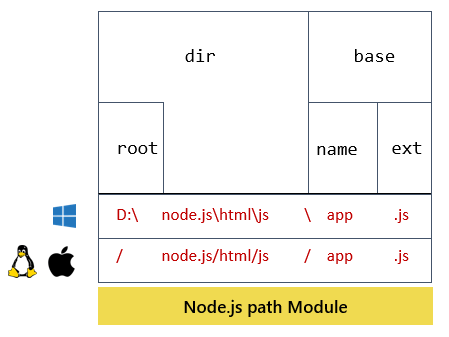
For example, on Windows:
import path from 'path';
let pathObj = path.parse('d:/nodejs/html/js/app.js');
console.log(pathObj);Output:
{
root: 'd:/',
dir: 'd:/nodejs/html/js/',
base: 'app.js',
ext: '.js',
name: 'app'
}On Linux or macOS:
import path from 'path';
let pathObj = path.parse('/nodejs/html/js/app.js');
console.log(pathObj);Output:
{
root: '/',
dir: '/nodejs/html/js',
base: 'app.js',
ext: '.js',
name: 'app'
}path.normalize(path) #
The path.normalize() method normalizes a specified path. It also resolves the '..' and '.' segments.
For example, on Windows:
import path from 'path';
let pathToDir = path.normalize('C:\\node.js/module/js//dist');
console.log(pathToDir);Output:
C:\node.js\module\js\distpath.relative(from, to) #
The path.relative() accepts two arguments and returns the relative path between them based on the current working directory.
For example, on Linux or macOS:
import path from 'path';
let relativePath = path.relative('/home/user/config/', '/home/user/js/');
console.log(relativePath);Output:
../jspath.resolve(…paths) #
The path.resolve() method accepts a sequence of paths or path segments and resolves it into an absolute path. The path.resolve() method prepends each subsequent path from right to left until it completes constructing an absolute path.
If you don’t pass any argument into the path.resolve() method, it will return the current working directory.
For example, on Linux or macOS:
import { fileURLToPath } from 'url';
import path, { dirname } from 'path';
const __filename = fileURLToPath(import.meta.url);
const __dirname = dirname(__filename);
console.log('Current working directory:', __dirname);
console.log(path.resolve());Output:
/home/john
/home/johnIn this example, the path.resolve() method returns a path that is the same as the current working directory.
See another example on Linux or macOS:
import path from 'path';
// Resolve 2 segments with the current directory
const path1 = path.resolve('html', 'index.html');
console.log(path1);
// Resolve 3 segments with the current directory
const path2 = path.resolve('html', 'js', 'app.js');
console.log(path2);
// Treat of the first segment as root and ignore
// the current working directory
const path3 = path.resolve('/home/html', 'about.html');
console.log(path3);Output:
/home/john/html/index.html
/home/john/html/js/app.js
/home/html/about.htmlSummary #
- Use the
pathcore module to manipulate the file path effectively. - The
pathmodule is platform-specific.
Thank you for your feedback!
