Block-Based WordPress Popup & CTA Plugin

Convert visitors into customers.
Without the bloat.

Build notification bars, popups, and slide-ins right inside the WordPress block editor. No page builder, no shortcodes, no database bloat.

Lightbox
Popups

Notification
Bars

Slide-In
Popups

Floating
Buttons

Sales
Banners

Image & Video
Popups

50% off launch pricing · from $49 $24.50 · 30-day money-back guarantee

Live preview
yourstore.com/yourstore.com/cartyourstore.com/products/linen-shirt
Free shipping on every order this weekend
Before you goGet 20% off your first orderEnds Sunday. Use code SPRING20 at checkout.
★★★★★“Ordered on Monday, wearing it by Wednesday. Easiest checkout I’ve had.”MRSample customer · Verified buyer
TypeNotification BarTriggerOn page load (Free)PositionTop · sticky
TypeLightbox PopupTriggerExit intent (Pro)PositionCenter · overlay
TypeSlide-InTriggerScroll 50% (Pro)PositionBottom right

Independently benchmarked by WP Hive

Top 1%

for memory usage

Top 5%

for page speed impact

+11 KB

total frontend footprint

0

new database tables

Campaign types

Three ways to say the right thing at the right moment.

Each campaign type fits a different conversion moment. All three are built with the same blocks you already use for posts and pages.

01 / Notification Bar

Always visible. Never in the way.

Pin a slim announcement to the top or bottom of the page for sales, shipping offers, cookie notices, or a product launch. Visitors see it without losing their place.

  • Top or bottom, sticky or static
  • Stays dismissed once a visitor closes it
  • Ready patterns: Cookie Bar, Sale, Free Shipping

Flash sale · 24 hours only −30%

02 / Lightbox Popup

One message. Full attention.

Dim the page and bring one offer forward. Use it for newsletter signups, time-sensitive deals, or the exit-intent nudge that brings an abandoning shopper back.

  • Embed any form with the Custom HTML block
  • Image and video popups
  • Exit intent on Pro

Explore lightbox popups

Join the newsletter

One useful email a week.

you@email.com

Subscribe

03 / Slide-In

A quiet tap on the shoulder.

Slide a small card into a corner while visitors keep reading. Ideal for testimonials, trust badges, star ratings, and related-content prompts.

  • Any corner, any screen size
  • Social proof without interrupting
  • Scroll-depth trigger on Pro

★★★★★ Loved by shoppers

See why people keep coming back.

How it works

From blank canvas to live campaign in five steps.

No separate builder to learn. If you can write a post in Gutenberg, you can ship a campaign.

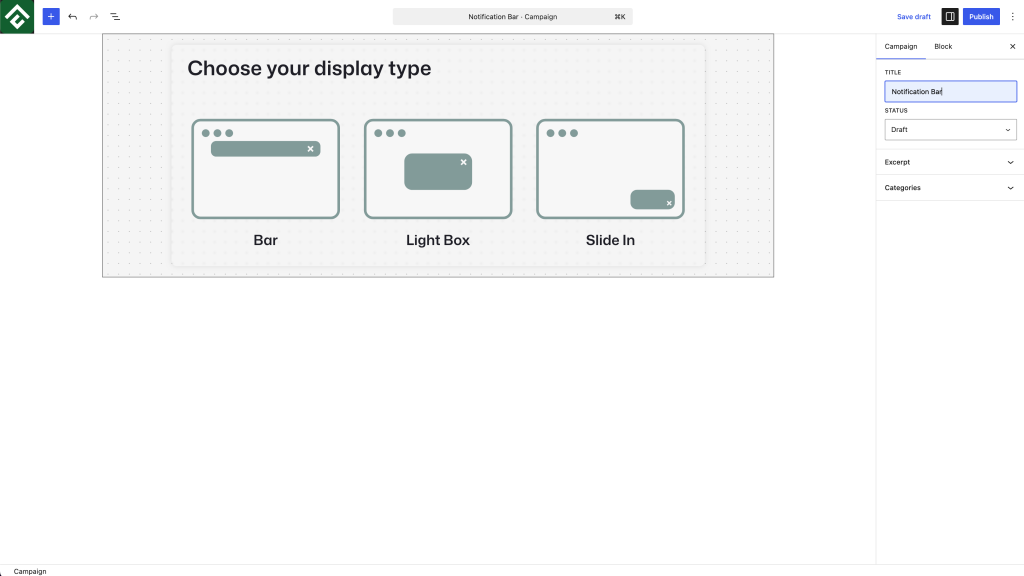
Choose your display type

Pick a notification bar, lightbox popup, or slide-in. Each one is made for a different conversion moment.

Image
Start from a pattern

Begin with ready patterns like Cookie Bar, Sale Notification, or Free Shipping, or start from a blank canvas.

Image
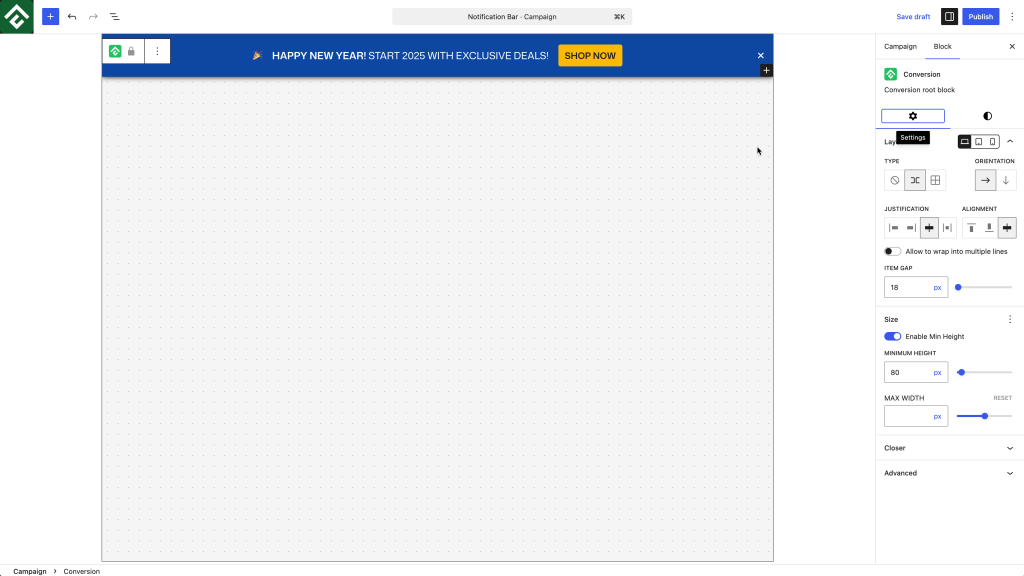
Design with blocks

Customize colors, spacing, borders, and type with the same Gutenberg blocks you use every day.

Image
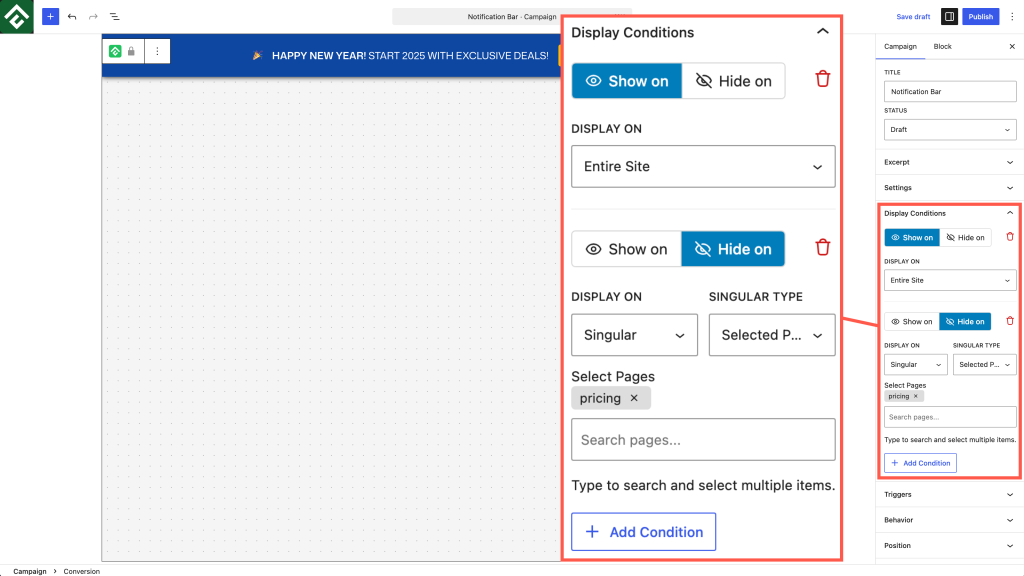
Set display conditions

Choose where it appears: entire site, selected posts or pages, or categories, plus 37 targeting conditions.

Image
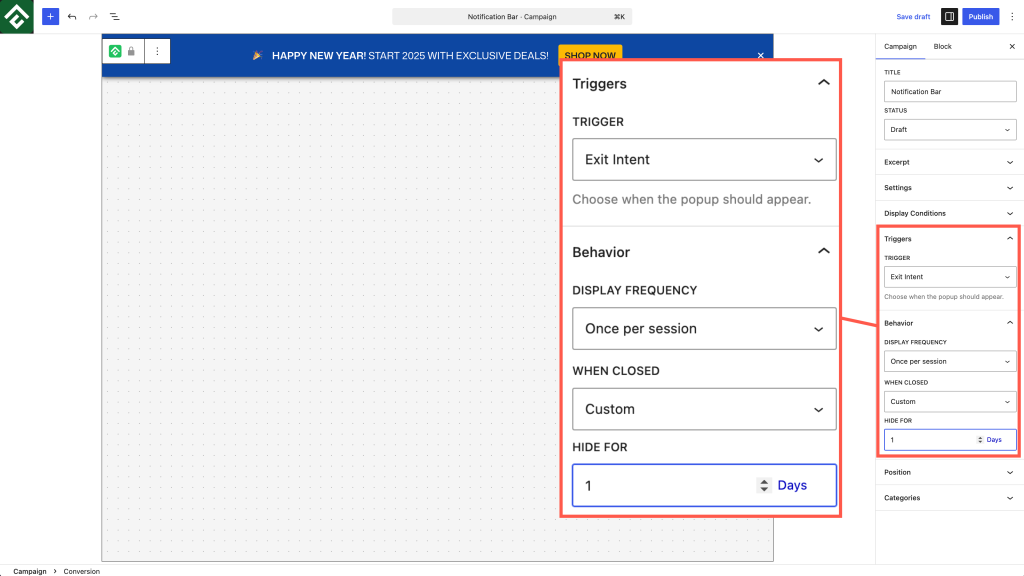
Pick a trigger and publish

Time delay on Free. Exit intent, scroll depth, and inactivity on Pro. Then hit publish.

Image

Triggers & targeting

Show the right campaign to the right visitor.

Honest about what’s free and what’s Pro.

Smart trigger library

Fire campaigns on time, intent, scroll, or idleness. Pick the moment that matches your goal.

See exit-intent popups

Time delay

Free

Exit intent

Pro

Scroll depth

Pro

User inactivity

Pro

37

Targeting conditions

Across 8 categories: device, browser, referrer, cookie, URL, user role and more.

Block editor native

Design campaigns with the Gutenberg blocks you already know. Colors, spacing, borders, type.

Display rules

Entire site, selected posts or pages, or chosen categories. Show campaigns only where they belong.

Fully responsive

Every campaign adapts to mobile, tablet, and desktop with no extra setup.

Performance · Verified

Popups that don’t cost you page speed.

Most popup plugins add 200–400 KB to every page. ConvertForce adds about 11 KB, creates zero database tables, and writes nothing to wp_options.

View the public WP Hive report

Frontend weight added per page

ConvertForce

~11 KB

Typical popup plugin

200–400 KB

0

database tables

0

wp_options entries

Use cases

Built for the moments that move revenue.

Notification Bar

Run a flash sale

Announce a 24-hour discount with a sticky top bar that disappears when the sale ends.

Lightbox Popup

Capture leads

Show a signup form after 30 seconds on a blog post, right where readers are engaged.

Lightbox Popup

Recover abandoned carts

Fire an exit-intent offer the moment a shopper heads for the close button.

Slide-In

Show social proof

Slide a customer quote onto product pages without breaking the browsing flow.

Notification Bar

Show a cookie notice

A sitewide bar that stays dismissed once a visitor closes it.

Notification Bar

Launch a product

Tell every visitor about a new feature, no email list required.

Why ConvertForce

The new generation of popup plugins.

FeatureConvertForceLegacy popup builders
Frontend weight added~11 KBOften 200+ KB
Database tables01–5
Built for the block editorNativeCompatible at best
WP Hive memory rankingTop 1%Varies
Free on WordPress.orgYesFreemium with limits

Legacy values reflect typical ranges across older WordPress popup plugins. ConvertForce values verified by WP Hive.

A great and useful tool – you can edit the content using Gutenberg. I used to use Easy Notification Bar, but this plugin is much better.

Image
gransort

ConvertForce Free

$0

All three campaign types with the Time Delay trigger. Free forever on WordPress.org.

ConvertForce Pro 50% off

$24.50 $49

Adds Exit Intent, Scroll Depth, and User Inactivity triggers, extra templates, and priority support.

30-day money-back guarantee

Questions, answered honestly.

Is ConvertForce free?

Yes. The free version on WordPress.org includes all three campaign types (notification bars, lightbox popups, and slide-ins) with the Time Delay trigger. Pro adds Exit Intent, Scroll Depth, and User Inactivity triggers, more templates, and priority support.

Does it work with the Classic Editor?

No. ConvertForce is built for the block editor and needs Gutenberg. It will not work while the Classic Editor plugin is active.

Will it slow down my site?

No. WP Hive places ConvertForce in the top 1% of plugins for memory use. It adds about 11 KB per page, creates no database tables, and adds nothing to wp_options.

Can I connect my email marketing tool?

Native integrations are not available yet. You can embed any signup form inside a campaign with the Custom HTML block.

Does it support exit-intent and scroll triggers?

Yes, in ConvertForce Pro. The free version includes the Time Delay trigger.

Who is ConvertForce for?

Site owners, bloggers, online stores, and agencies who want bars, popups, and slide-ins built with the editor they already know, without a heavy plugin slowing the site down.

Start converting visitors. Keep your site fast.

Install free from WordPress.org. Upgrade to Pro when you need more triggers.
  • Free plan on WordPress.org
  • 30-day money-back guarantee
  • Block editor native