
Features
Open Graph and Social Sharing Cards for WordPress
When someone shares your page on Facebook, X, LinkedIn, or WhatsApp, a card appears with a title, a short description, and an image. Open Graph and X card tags decide what goes on that card. CrawlWP adds these tags for you, so every shared link looks the way you want.
What it does
What CrawlWP adds to your shared links
CrawlWP writes the Open Graph and X card tags for every page. You decide what they say, or let CrawlWP fill them in from your SEO title, description, and images.
On this page

Open Graph tags
The title, description, and image that Facebook, LinkedIn, Pinterest, and many other sites read.
X cards
The tags X reads, as a summary card or a large image card.
Share preview in the editor
See how a post will look when shared before you publish it.
Your own social title and description
Write a different title and description for social media, or reuse your SEO ones.
A custom image for each post
Pick the image that shows when a post is shared.
A separate image for X
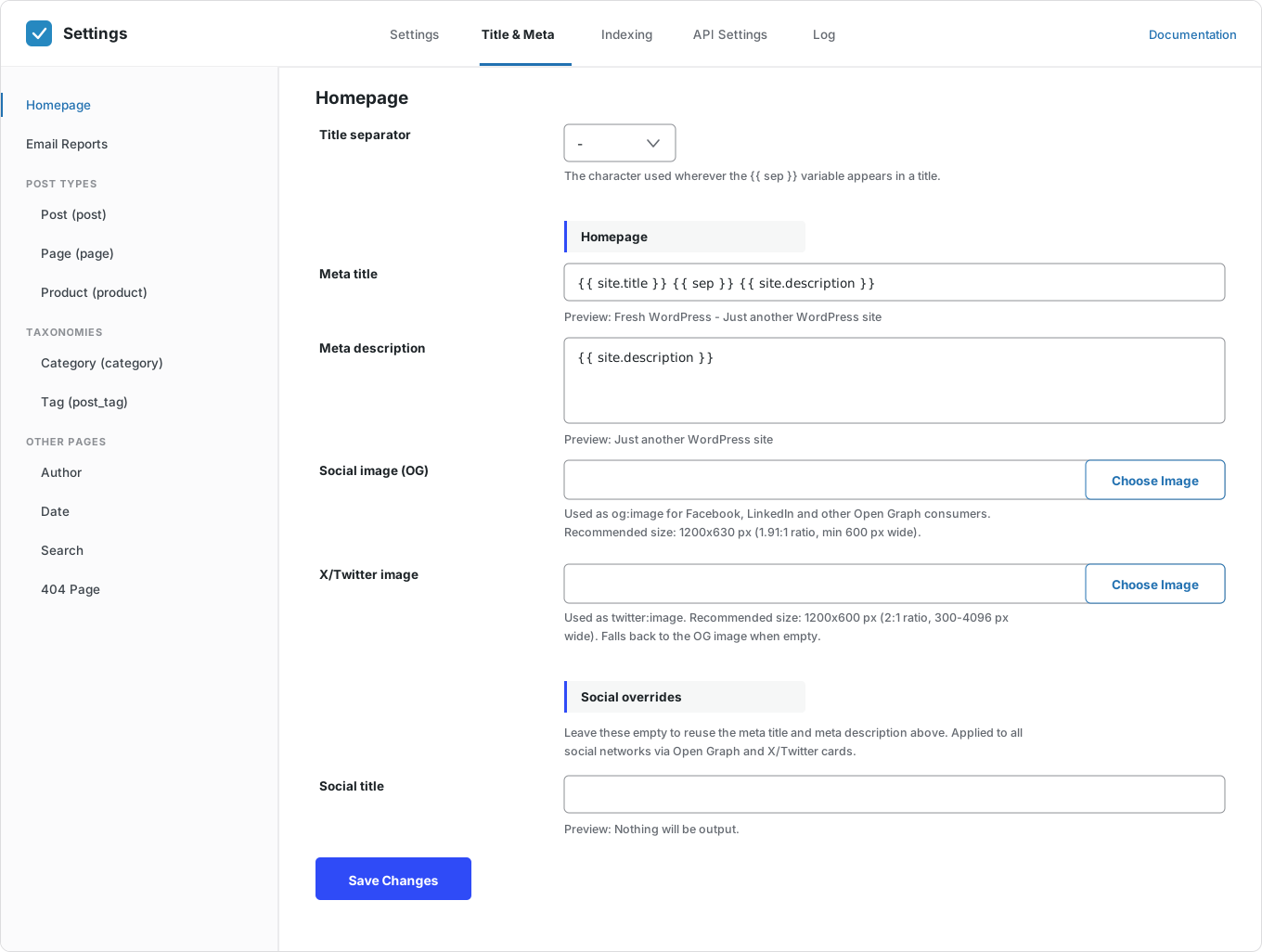
Use a 2:1 image for X. Leave it empty and CrawlWP uses your Open Graph image.
Default social images
Set default social images in Title & Meta, so pages look right without extra work.
Fallback image
One image for any page that has none of its own, so no link is shared without a picture.
Shorter social titles
Remove your site name from social titles to keep them short.
Facebook author
Link articles to a Facebook profile. Authors can add their own on their profile page.
Facebook App ID
Add your Facebook App ID if you use one.
Turn each on or off
Switch off Open Graph or X card tags if your theme or another plugin already adds them.
Why it matters
Why Open Graph tags matter
Without these tags, social sites have to guess. They may pick the wrong image, cut your title short, or show no picture at all.
A shared link is often the first thing people see from you. A clear title and a good image give them a reason to click.
How it works
Set up social sharing cards in three steps
Set your defaults once. After that, every new post gets its own cards.
Step 1
Switch on the tags
On the Social Networks screen, turn on Open Graph and X card tags, and choose a fallback image.
Step 2
Set your defaults
In Title & Meta, choose your default social images. Leave the social title and description empty to reuse your SEO ones.
Step 3
Adjust the posts that matter
Open the Social tab in the SEO metabox to set a custom title, description, and image, then check the preview.
Image sizes
The right social image size for each network
Social sites crop images that are the wrong shape. Use these sizes and your image shows in full.
Which image does CrawlWP use?
If you set a social image for a post, CrawlWP uses it. If not, it uses an image from the page. If the page has none, it uses your fallback image. For X, it uses the X image if you set one, or the Open Graph image if you didn’t.
Questions
Open Graph and social card questions
Answers to the questions people ask most about social sharing cards in WordPress.
What is Open Graph?
It is a set of meta tags, created by Facebook, that tells social sites which title, description, and image to show when your page is shared. Most social sites and messaging apps read it.
What are X cards?
They are X’s own tags for the same job. CrawlWP adds them for you and uses your Open Graph image for X when you haven’t set an X image.
What size should my social image be?
1200 × 630 pixels works well for Facebook, LinkedIn, and most other sites. For X, use 1200 × 600 pixels.
Can I use a different title on social media?
Yes. Add a social title and description in the Social tab of the SEO metabox. Leave them empty to reuse your SEO title and meta description.
Does LinkedIn use Open Graph?
Yes. LinkedIn reads the Open Graph title, description, and image, so the same card works there.
I changed the image, but Facebook still shows the old one. Why?
Social sites save a copy of your card. After a change, ask them to fetch it again, for example, with Facebook’s Sharing Debugger.
My theme already adds Open Graph tags. What should I do?
Keep only one set, or your pages will carry two. You can turn off CrawlWP’s Open Graph or X card tags on the Social Networks screen, or turn off your theme’s.
Are social sharing cards free?
Yes. Open Graph and X card tags are part of CrawlWP Lite, the free version.
Pricing
Straightforward pricing, every feature included
Standard
For 1 Site
$59
/ year
Pro
For 5 Sites
$159
/ year
Agency
For Unlimited Sites
$259
/ year
Standard
For 1 Site
$359
once
Pro
For 5 Sites
$559
once
Agency
For Unlimited Sites
$759
once
Make every shared link look right
Join thousands of website owners using CrawlWP for their WordPress SEO. Social sharing cards are free, and work as soon as you switch them on.
yoursite.com
https://yoursite.com › guides › wordpress-seo
A Practical Guide to WordPress SEO in 2026
Learn how to structure, optimize, and index a WordPress site so search engines find your content within hours rather than weeks.
Google · indexed
Bing · indexed
Yandex · indexed
