
Every feature in the CrawlWP WordPress SEO Plugin
Here is everything CrawlWP does, screen by screen. Review each setting before you install anything, and decide whether it is the complete WordPress SEO plugin you need.
Paid plans include every feature. There are no add-ons to buy.
In the editor
Title & Meta
In the post editor
The SEO metabox
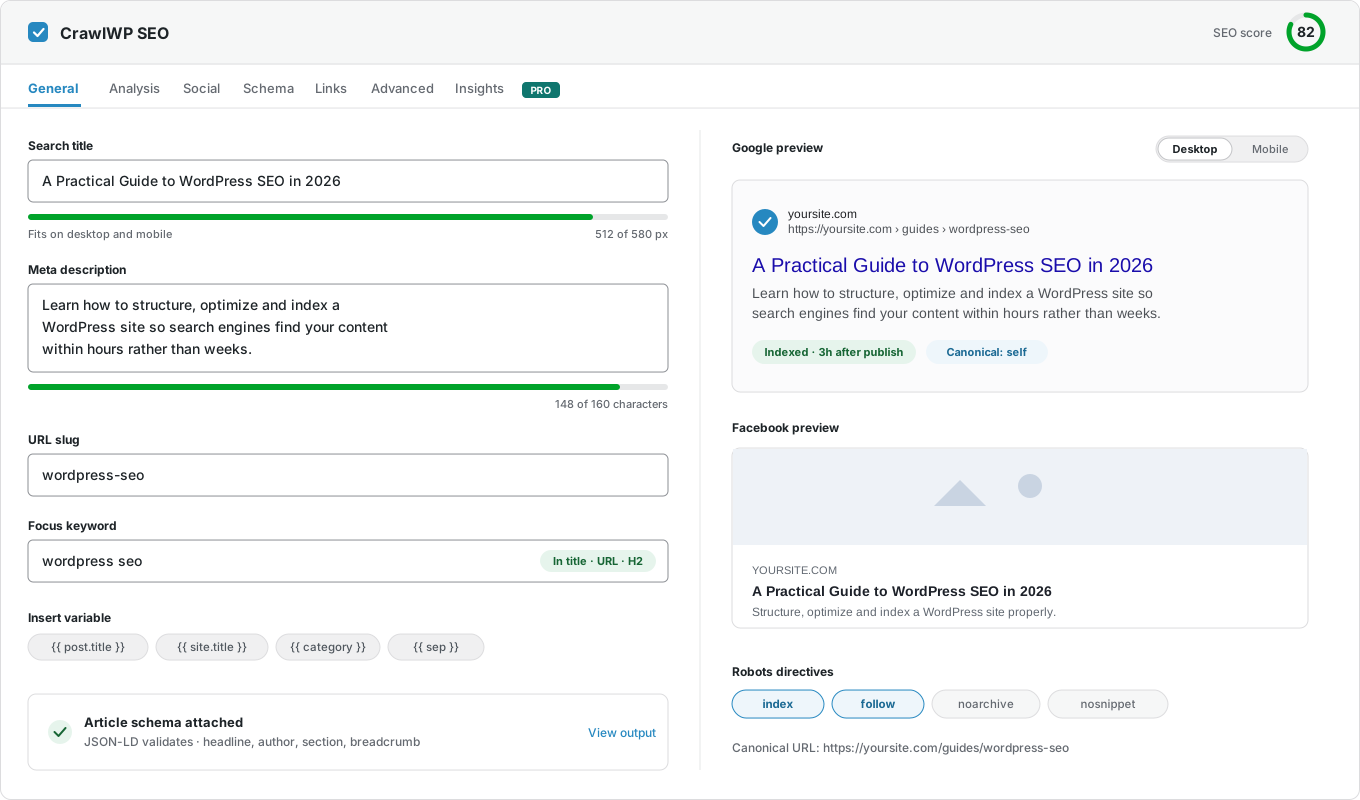
This is where you do most of the work. It sits under every post, page, and custom post type you write.
General: how your page looks in search
Control how this page appears in Google, Bing, Yandex, and other search engines. A live preview updates as you type.
- Search title: Write a title for this page, or leave it empty to use your template.
- Meta description: Write one for important pages. Other pages use your template.
- Pixel meters: Google cuts titles by width, not by letter count. The meter shows exactly where yours will be cut.
- Google preview: See your search result as you type.
- Facebook and X preview: See how the page looks when someone shares it.
- Robots settings: Choose if search engines should index this page, follow its links, or show a snippet.
- AI writing help: Let AI suggest SEO titles and meta descriptions, using the AI connectors in WordPress.

Links: internal linking for each post
Three counts at the top — links out, links in, and external links — and the details below them.
- Suggested links: Related posts on your site that this post could link to. Copy any link with one click.
- Outbound links: Every link already in the post, marked internal or external.
- Links to this post: The posts that already link here. If there are none, it tells you.
- Orphan posts: A post with no links pointing to it is hard for search engines to find. You will see this straight away.
Analysis: check your post before you publish
Keyword checks that tell you where your keyword is missing. They do not ask you to repeat it again and again.
- Focus keyword: Pick one keyword per post. Every check below uses it.
- Where it appears: The title, URL, meta description, first paragraph, subheadings, and image alt text.
- Content details: Word count, reading time, keyword density, and heading structure.
- Images without alt text: Flagged here. Fix them all at once with Image SEO.
- Links in and out: Counted, so you can see when a post has no internal links.
Social, Schema, Advanced and Insights
The other tabs control how the page looks when shared, its structured data, its robots rules, and how it performs in search.
- Social: The title, description, and image used when this post is shared on Facebook and X.
- Schema: The structured data for this page. You can read it, so you know exactly what search engines get.
- Advanced: Robots rules and the canonical URL for this post.
- Insights: Clicks, impressions, and average position for this page.
Settings
Titles and meta descriptions
Templates write a title and description for every post and page in WordPress, so most of them need no work from you.
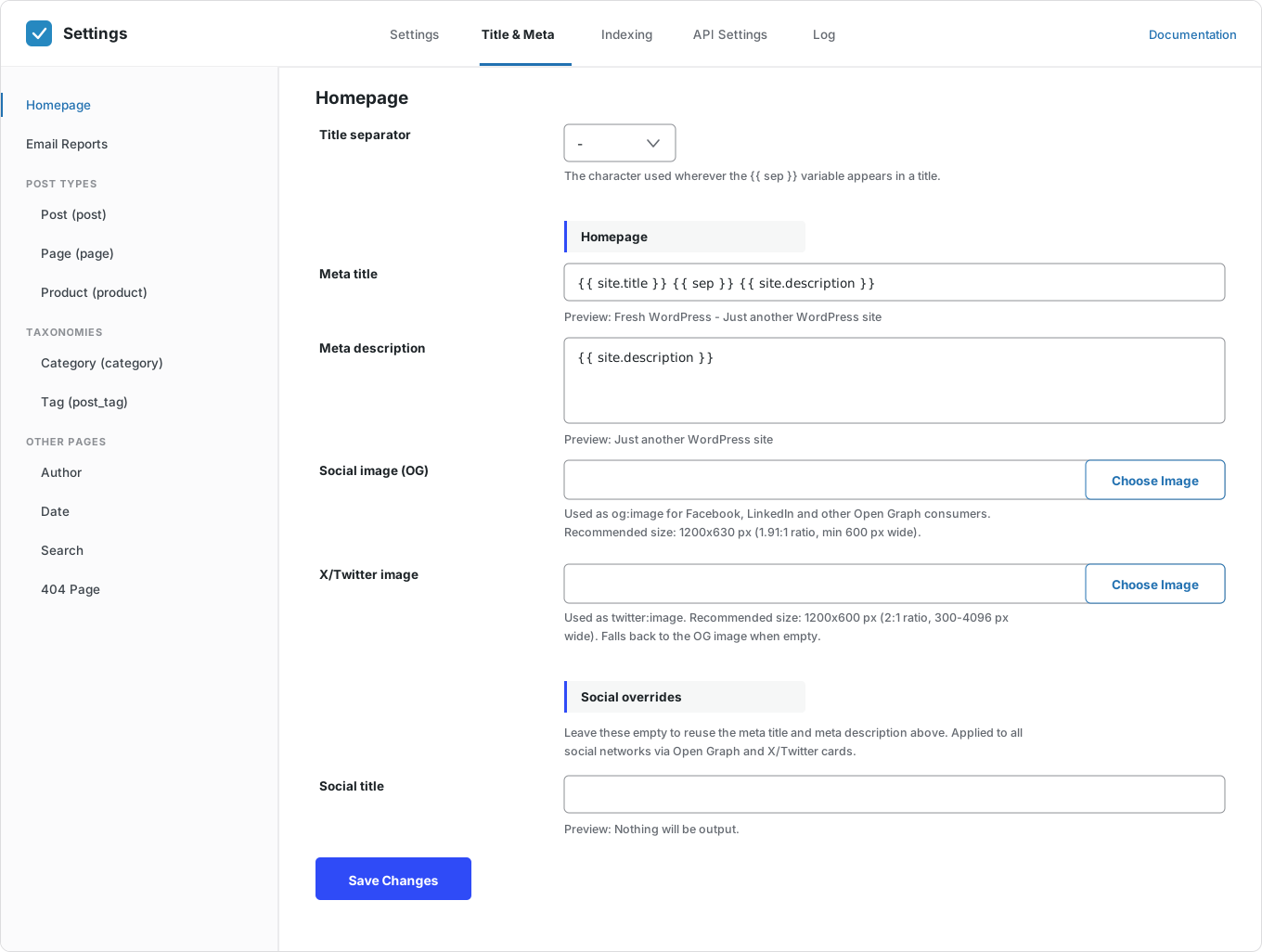
Homepage
The most important page on your site, and the one most sites get wrong. Set it once.
- Search title: Build it from variables. A preview shows the result as you type.
- Meta description: The same, with a meter that shows where Google will cut it.
- Separator: Choose the character that {{ sep }} becomes, for the whole site.
- Site title and tagline: {{ site.title }} and {{ site.description }} come from WordPress. Change them there and every template updates.
Post types
Posts, pages, and every custom post type on your site. Each one gets its own template.
- Title template: Use variables like the post title, category, author, date, and site title.
- Description template: A default for every post that does not have its own.
- Hide a post type: Keep a whole post type out of search results with one switch.
- Custom post types: Products, downloads, docs — any public post type shows up here.
Categories, tags and archives
WordPress creates these pages for you. They are the most common cause of duplicate content.
- Categories and tags: Templates that use the category or tag name and description.
- Custom taxonomies: Handled the same way, automatically.
- Author archives: Give them a template, or hide them if your site has only one author.
- Search results: These pages have little value in search, so they are usually hidden.
- 404 page: Give it a title that makes sense in the browser tab.

Bulk editor
Templates handle most posts. The bulk editor handles the rest, without opening each post one by one.
- One table: Every post, with its SEO title and meta description ready to edit.
- Live counters: Letter counts that turn red when text is too long.
- Filter by post type: Show only posts, pages, or one custom post type.
- Search: Find the posts you want quickly.
- Empty uses the template: Leave a field empty and the post uses your template.
Email reports
Your SEO numbers, sent by email — for people who never log in to WordPress.
- How often: Daily, weekly, monthly, or any mix of the three.
- Who gets it: Add as many email addresses as you like. They do not need a WordPress account.
- Search performance: Impressions, clicks, click-through rate, and average position from Google, Bing, and Yandex.
- Indexing: How many of your pages Google, Bing, and Yandex have indexed.
- Keywords and pages: The searches that bring visitors, and the pages that get the clicks.
- Recent changes: Pages that were newly indexed, and pages that dropped out.
- Your brand color: The report uses the color you choose.

Settings
Site information
Tell search engines what your WordPress site is, who runs it, and that it’s yours.

What your site is
Say if your site belongs to a business or a person. Search engines use this in your structured data.
- Business or person: Businesses and brands, or personal sites and blogs.
- Name: Uses your WordPress site title unless you change it.
- Description: A short line about your site.
- Logo: A square image, at least 112 × 112 pixels.
- Sitelinks search box: Lets Google show a search box for your site right in the search results.
Local SEO
For businesses with an address. It is off by default, so blogs and online-only sites are not affected.
- Business type: Choose the type that matches your business.
- Address: Street, city, region, and postal code.
- Country code: Two letters, like US, NG, or GB.
- Phone: Your business phone number.
- Opening hours: One line per range, like Mo-Fr 09:00-17:00.
Social profiles
Link your site to your social accounts, so search engines know they belong together.
- Facebook page: Your business page, not a personal profile.
- X profile: The full link to your X profile.
- Other profiles: One per line — LinkedIn, YouTube, Instagram, or anything else.
Site verification
Prove to search engines you own your site. Paste each verification code once. It stays safe when you change or update your theme.
- Google: For Google Search Console.
- Bing: For Bing Webmaster Tools.
- Yandex: For Yandex Webmaster.
- Baidu: Useful if some of your visitors are in China.
- Pinterest: Claim your site on Pinterest and get Pinterest analytics.


Social sharing
Control how your pages look on social media when someone shares a link.
- Open Graph: The title, description, and image, with a preview in the editor.
- X cards: Small or large image cards. If empty, they use the Open Graph details.
- Default image: One image for every page without a featured image.
- Page overrides: Change the share details for any page from the Social tab.
- Facebook details: Add your Facebook app and page IDs if you need them.
Settings
Crawling, redirects and files
The technical side: what search engines can reach, where old links go, and which files your site serves.
Redirects
A full redirect manager. Other plugins often charge extra for this, or send you to another plugin.
- Match types: Match the exact URL, the start or end of it, or a regular expression.
- Redirect types: 301 for pages that moved for good, 302 for short-term moves, and 410 for pages you removed on purpose.
- Automatic redirects: Change a post’s URL and CrawlWP adds the redirect for you.
- Hit counts: See which redirects people actually use.
- Turn off any rule: Switch a redirect off without deleting it.
- Bulk actions and search: Manage hundreds of redirects easily.


404 monitor
Most sites have broken links they do not know about. Visitors who land on a 404 page rarely tell you. They just leave.
- Every 404 logged: The URL, how often it was hit, when, and where the visitor came from.
- Where it came from: See if the broken link is on your site, another site, or just a bot guessing.
- One-click redirect: Turn any 404 into a redirect from the same screen.
- Clear the log: Remove the noise once you have fixed the real problems.
robots.txt
The editor opens with the file your site really serves, including anything other plugins add. So you edit what is actually there, not a blank box.
- Read-only at first: Look before you change anything.
- The whole file: What you save is the complete file. Nothing is added behind your back.
- Undo: Empty the box to go back to the WordPress default.
- No FTP needed: WordPress handles the file, so there is nothing to upload.

Sitemaps
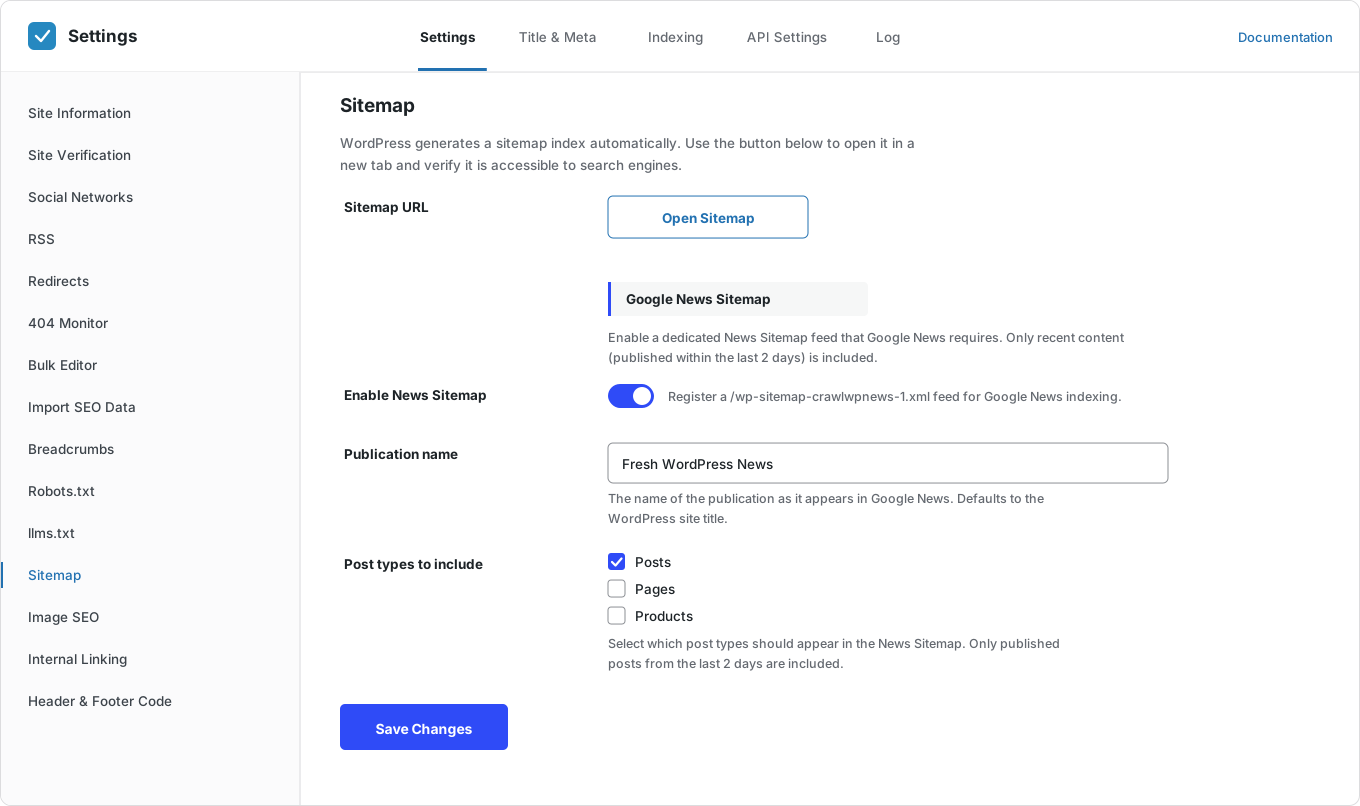
WordPress already makes an XML sitemap. CrawlWP keeps it and adds four more.
- Google News sitemap: A news sitemap with your publication name. It lists your last two days of articles, as Google News requires.
- Video sitemap: Helps Google find the videos in your posts and show them in video results.
- HTML sitemap: A page that lists your content for visitors and search engines.
- Multilingual sitemaps: Every language version of your site, found and listed. Works with WPML, Polylang, and TranslatePress.
llms.txt
AI tools now read websites as often as search engines do. An llms.txt file tells them what your site is about.
- Served at /llms.txt: WordPress serves it. There is nothing to upload.
- Made for you: Built from your website title, tagline, and sitemap.
- Or write your own: Describe the parts of your site that matter most.
- One switch: Turn it off and the file goes away.


Breadcrumbs and RSS
Two small features that many plugins skip or get wrong.
- Shortcode embed: Add breadcrumbs with a shortcode in your theme, a block, or a page builder.
- Home label and separator: Use your own words and your own symbol.
- Main category: Choose which taxonomy builds the breadcrumbs trail.
- Breadcrumbs schema: Added to your structured data, even if you do not show the breadcrumbs.
- RSS credit: Add a line to every feed item so sites that copy your posts link back to you.
Image SEO, internal linking and scripts
Small automatic fixes that save you hours of manual edits.
- Alt text filled in: Missing alt text comes from the image title or file name.
- Your alt text stays: Alt text you wrote yourself is never replaced.
- Keyword rules: Write keyword|URL, one per line, and CrawlWP adds the links to your content.
- Sensible limits: Only the first match is linked, existing links are skipped, and each keyword is linked at most three times.
- Google Analytics: Paste your GA4 ID, and we add the tracking code for you.
- Google Tag Manager: Paste your container ID. The code is handled for you.
- Header, body, and footer scripts: Add any other code in three places. It stays when you change your theme.


Import your SEO data
Switching takes about ten minutes, not a whole weekend.
- Six plugins supported: Yoast SEO, Rank Math, All in One SEO, SEOPress, The SEO Framework, and Slim SEO.
- See the numbers first: Check how many posts, terms, and redirects each plugin has before you import.
- What moves across: Titles, descriptions, robots rules, canonical URLs, social images, and redirects.
- Nothing is deleted: Your old plugin’s data stays so that you can switch back.
Indexing
Indexing
The part most WordPress SEO plugins leave to chance.
Instant indexing
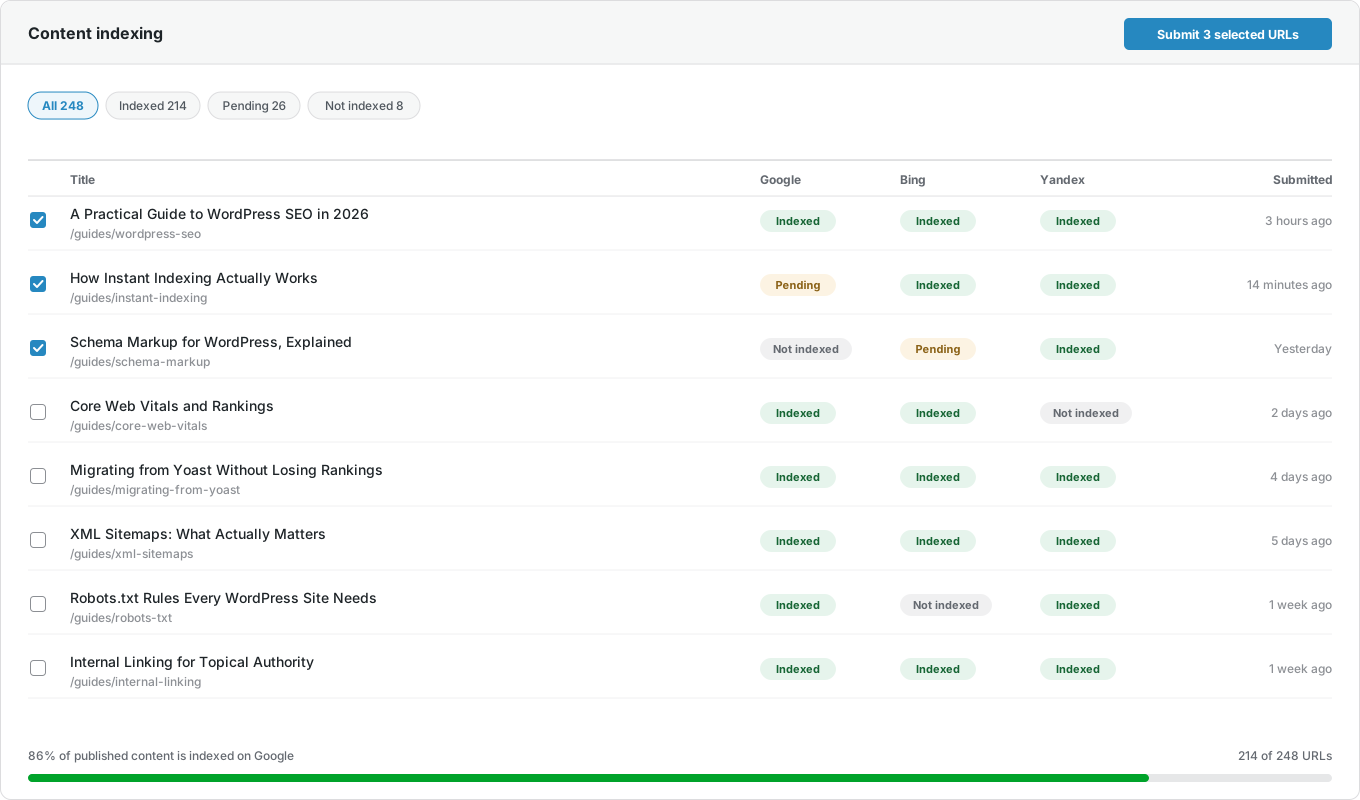
A sitemap tells search engines a page exists, then waits for them to visit. CrawlWP sends the page to them directly for indexing.
- Google: Sent through the Google Indexing API.
- Microsoft Bing: Sent through the Bing API and IndexNow.
- Yandex: Sent through the Yandex API and IndexNow.
- Naver, Yep and Seznam.cz: Sent through IndexNow. No account needed.
- When you publish or update: Posts, pages, and every custom post type.
- When you delete: Search engines are told the page is gone.
Index status and history
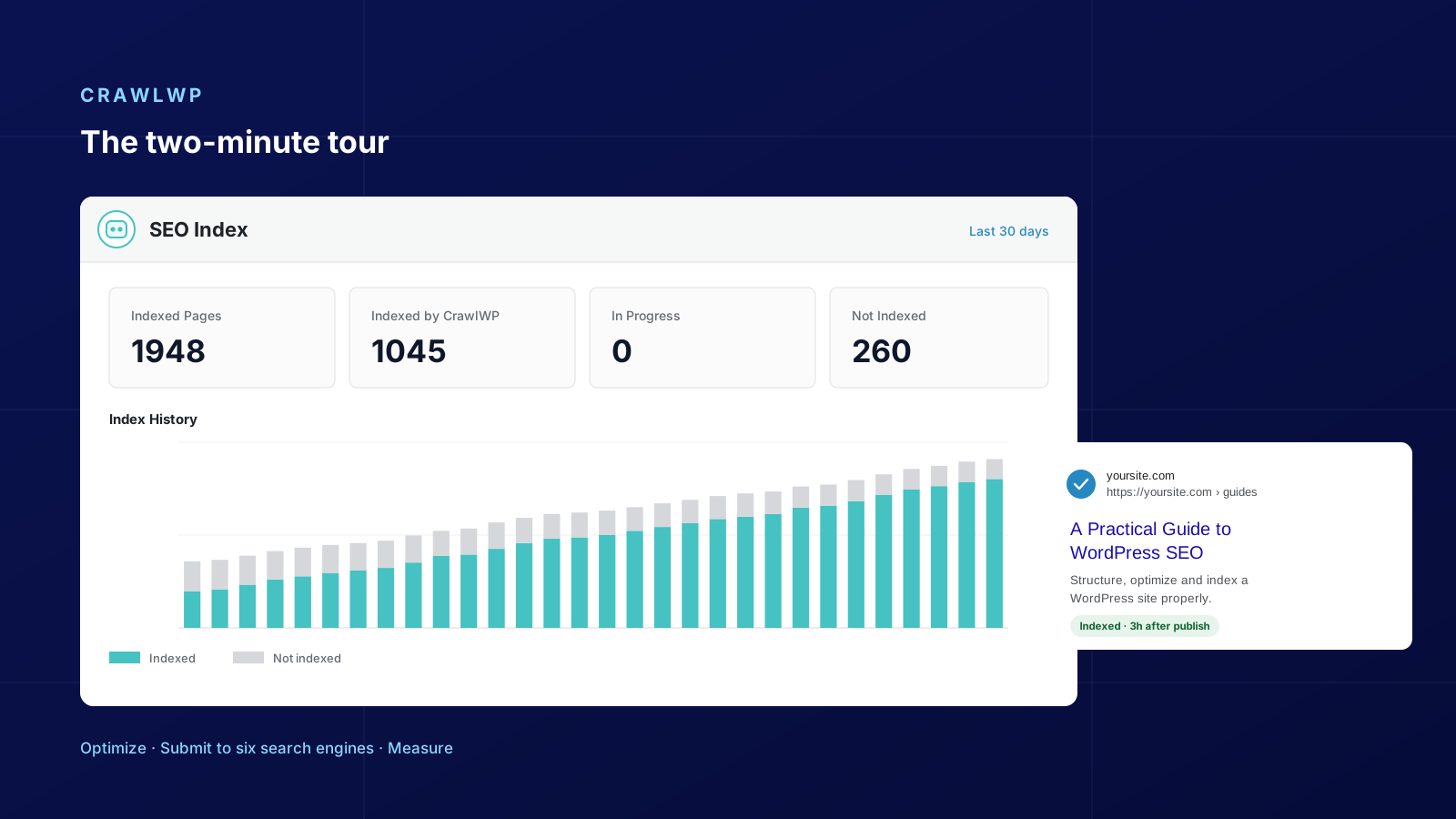
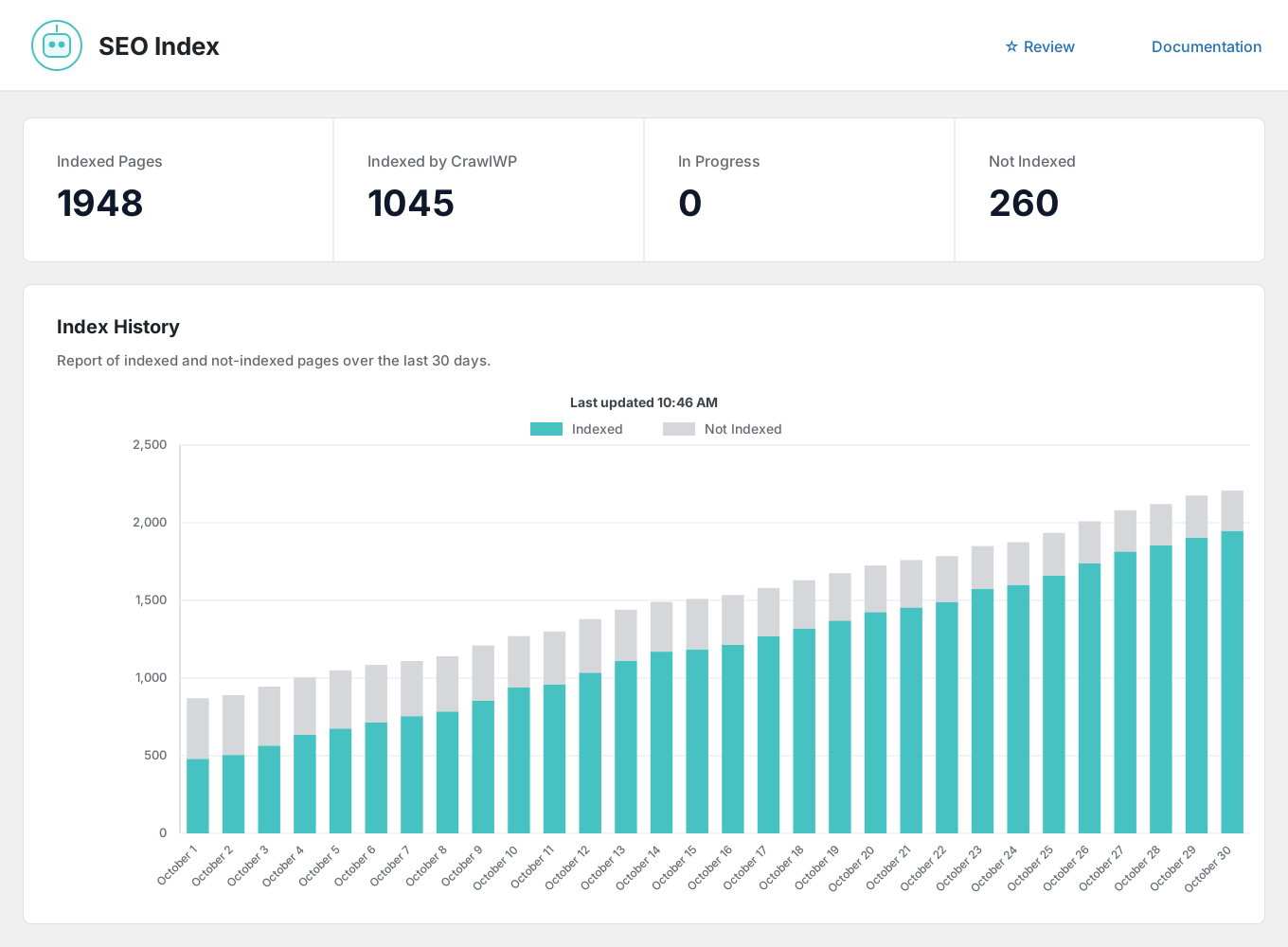
Answer a question most sites cannot: how many of my pages are actually indexed?
- Indexed pages: Checked with the search engines, not guessed from your sitemap.
- Indexed by CrawlWP: The pages that got indexed because CrawlWP sent them.
- In progress: Sent and waiting for an answer.
- Not indexed: Missing pages, ready to select and resend.
- 30-day history: A chart of indexed and not-indexed pages so that you can see the trend.
Automatic and bulk indexing
For older posts that nobody has checked since publication.
- Automatic check: Finds published pages that are not indexed and sends them.
- In batches: Sends pages in small groups, which is what large sites need.
- Bulk sending: Select pages in your content list and send them all for search engine indexing.
- URL inspection: Open Google’s inspection tool for any page in one click.
- Respects noindex: Pages you hid from search stay hidden.
Reporting
SEO stats
See how your pages perform in search, without leaving WordPress.
Three search engines, one screen
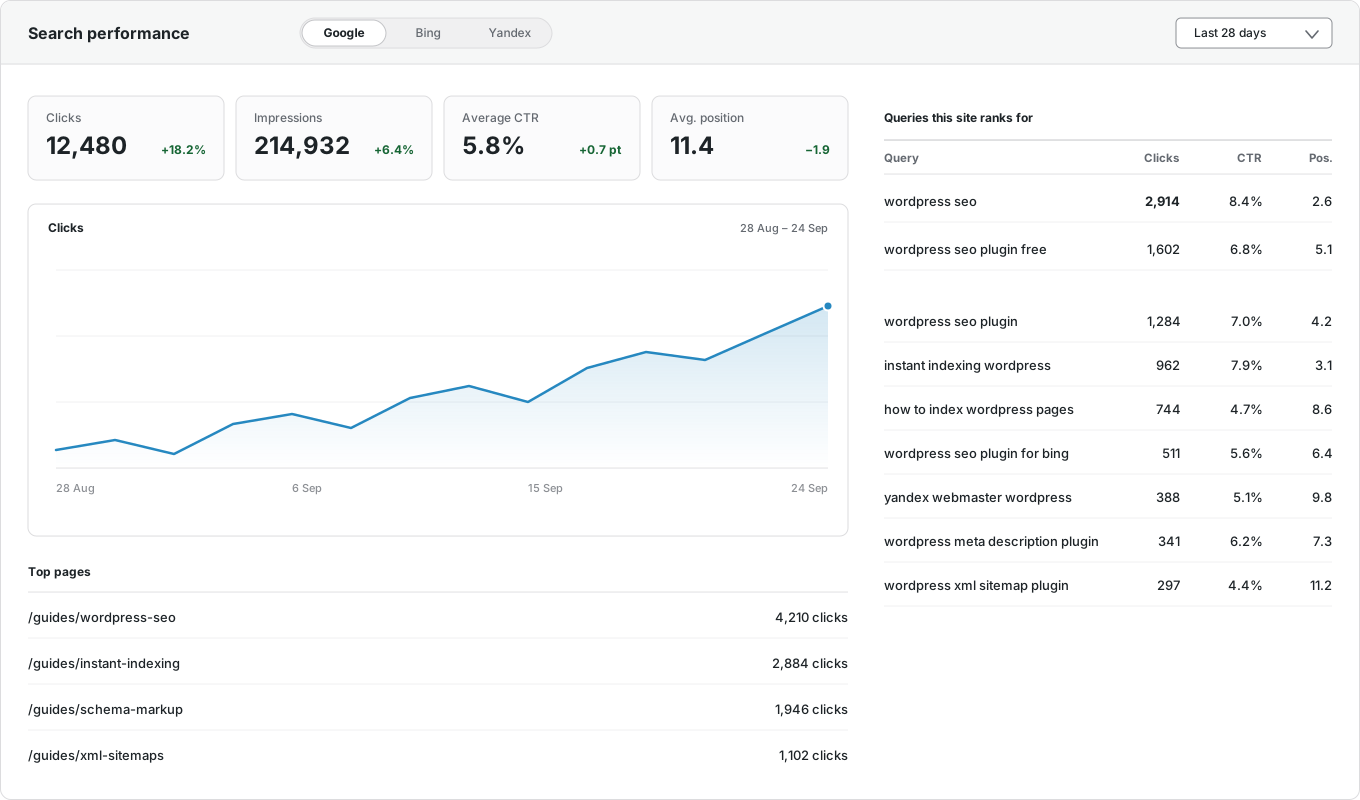
Google Search Console, Bing Webmaster Tools, and Yandex Webmaster usually live in three separate tabs. CrawlWP brings all three into WordPress.
- Google Search Console: Clicks, impressions, click-through rate, and average position.
- Bing Webmaster Tools: The same numbers from Bing. Almost no other plugin shows them.
- Yandex Webmaster: Clicks, impressions, keywords, and positions.
- All together: One screen instead of three browser tabs.
- Your data stays yours: Saved in your own WordPress database.

Where you see it in WordPress
A report you have to remember to open is a report nobody reads. So CrawlWP shows the numbers where you already work.
- Dashboard widget: Clicks, impressions, click-through rate, and position for the last 28 days, with your indexing numbers below.
- SEO score column: Several checks for every post: title, description, and keyword for the writing; indexing, link following, and social image.
- Sort by score: Find your weakest posts in one click.
- CrawlWP Details column: Index status for each search engine, plus clicks, impressions, and average position for each post.
That is everything
Install CrawlWP, import your data from your old WordPress SEO plugin, and connect your search engines. It takes a few minutes.
