Image

2026 Retrocomputing Challenge: Oldputer Gives Old Eyes Relief With E-ink Display

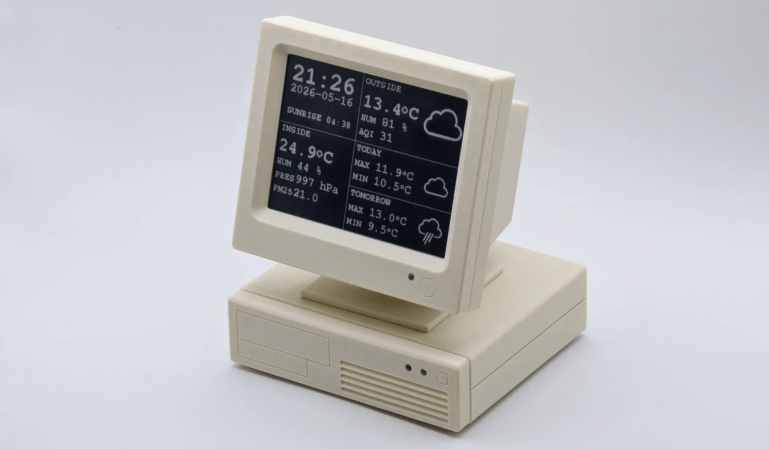
Modern computers are towers of glass and metal with very few large deviations from one to another. Monitor A will go against B, except you can’t tell them apart unless they’re on. At least, that is, compared to how different the old bulky monitors look compared to the new. [Andrzej Górski] seems to agree with this sentiment with his Oldputer, a blast from the past.

[Andrzej Górski]’s inspiration came from one component, and the main component of the project, an old e-ink display. When life gives you one of the slowest versions of a display, there really isn’t too much else to do other than pair it with slow old computers of the past. From that inspiration, there isn’t entirely a whole lot to do other than throw in an ESP32 and some LEDs for indicator lights. Put all this into a fun case, and you get one pretty desk ornament for whatever information you wanna display.

If you want to replicate the past again, you might want to look for the project GitHub here. If you’re looking for something even older, check out the replica of the MCM/70!

Image

2026 Retrocomputing Challenge: NEC 286 Laptop Rides Again

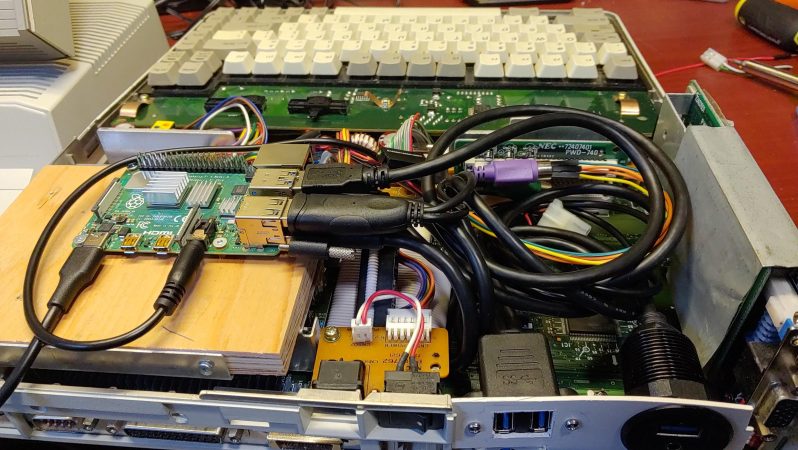
The sad reality is that all consumer electronics are going to be e-waste eventually. [Cory Whitesell] was determined his old NEC ProSpeed 286 Laptop wouldn’t meet that fate until absolutely necessary, so when his attempts at repairs failed, his efforts pivoted to create a retro battlestation from the stylish old machine.

Image
That screen looks too good to be stock, but otherwise you can’t tell from this angle.

Externally, it looks pretty well stock, and [Cory] has retained as much of the internals as possible. The original power supply remains intact, with power taken off the original HDD’s molex connector. Said power drives a Raspberry Pi, which is small enough to fit inside without any gutting. The original keyboard connects easily enough via a PS/2 to USB adapter, while the passive-matrix LCD has been replaced with a modern screen of the same dimensions. You’d have to be a pretty hard-core purist to mourn that last change.

With emulation on the Pi, he can still have the DOS experience you’d expect from this machine, but its also powerful enough to be useful in the modern day. While we place no bets on whether or not this mod will stay relevant for another 38 years, a more powerful single-board computer or slightly-squished cell phone can be placed in the drive bay instead once the Pi’s ARM processor inevitably starts to look as anemic as the 286 does now.

Not everyone loves this kind of restomod, but we’ve featured more than a few and have a special category for it in our ongoing retrocomputing contest for those who will do everything to keep classics out of the e-waste bin, including remaking them.

Image

2026 Retrocomputing Challenge: Retro Terminal Bartop Arcade Topper

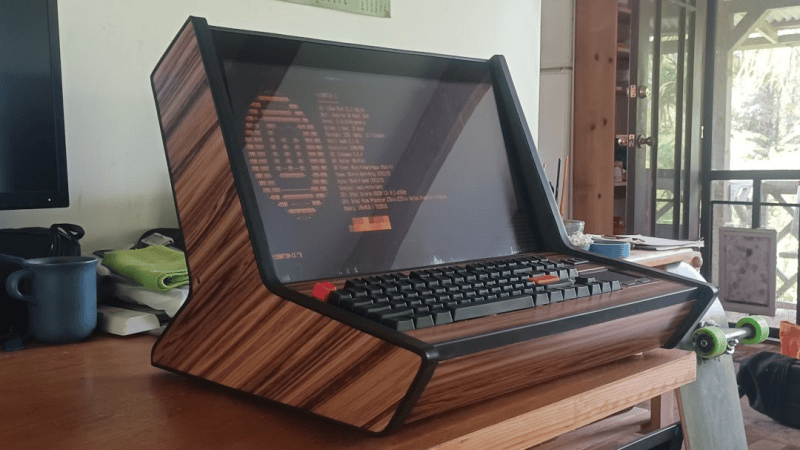
Retrocomputing is more than just hardware. It’s also a feel, a vibe, and [valkyrie0528]’s Retro Terminal Bartop Arcade Topper has it in spades.

Image
The same unit, in bartop arcade machine mode.

Here’s how it happened. The gorgeous device you see in the image above in fact started out as a bartop arcade cabinet build. The front section — with arcade buttons and joystick — is a removable panel. While building it, the panel was uninstalled and [valkyrie0528] placed a keyboard in the empty recess to do some configuration. Sitting at the machine like that felt like being right back in the 80s, perched at an 8-bit home computer. Cue a visit from the Good Ideas Fairy.

Now, in addition to being an arcade cabinet, one can swap the arcade controls panel for a one that has a keyboard (clicky and mechanical, of course), touchpad, and small USB breakout. The result looks amazing either way. As an arcade machine it’s beautiful, and in retro terminal mode it’s simply gorgeous.

The icing on the cake is [valkyrie0528]’s use of cool-retro-term as the terminal emulator, and there’s even a widescreen wallpaper accompanying it that puts an image of two 5.25″ floppy drives to the side. If you like that idea, you can download the wallpaper file from the project page for your own use.

Image
A widescreen wallpaper with two 5.25″ floppy drives is the perfect complement to a retro terminal emulator.

There’s still time to enter our 2026 Retrocomputing Challenge, so if you find yourself inspired and want to show off your own take of things, there’s no time to lose!

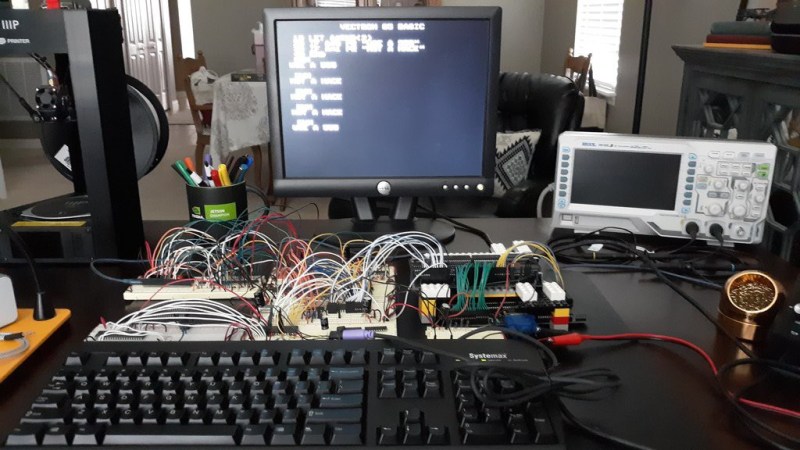
The prototype Vectron65 on breadboard with the VGA Plus v2 and VGA Text Mode cards

2026 Retrocomputer Challenge: Vectron65 Plus Puts The Emphasis On Plus

[Nick Bild] evidently has a soft spot for the 6502, given that his Vectron65 Plus home computer project uses at least one of them, depending on the add-ons. You see, he hasn’t just made a homebrew computer, he’s also produced multiple expansions. One of which, the VGA Plus Text Mode, has its own 6502 co-processor. He’s also produced two versions of a VGA graphics card capable of 640×480 output. We’re still not 100% sure how many entries we are going to count [Nick]’s work as for the contest, since the graphics cards can be used with just about anything, not just the Vectron65, but we do know they’re strong contenders every one.

Image
The video doesn’t really show the graphics, so here’s an example.

We covered the start of the Vectron65 project back in 2019, and it’s only gotten more practical as it has moved off breadboard onto PCB, and into a new version as the 65 Plus with more RAM and GPIO ports. Considering that the original let you game in VR using an add-on we covered, we might have to drop the “nearly” from “nearly practical” when talking about the Plus. Especially when you consider the graphics — we covered first version of 7400-series based VGA graphics card, while the newer V2 differs mostly in doubling the RAM and producing a more stable output. The V2 VGA card can work in tandem with the Text Mode card to write 40-column text to the screen without using up all the 6502 CPU’s cycles, offloading them to the second 6502 on the card with the help of a character ROM. Hey, if Commodore could put a second 6502 in a disk drive, why not? You can check out the whole suite in action in the demo video below. We admit to being particularly tickled by the Hackaday Comment Generator he’s running in BASIC.

If you’re worried about competing with [Nick], don’t worry — the 2026 Retrocomputing contest has multiple categories. You still have a few weeks to do something retro-modern, restomod an old machine, or just do some old-school programming.

Continue reading “2026 Retrocomputer Challenge: Vectron65 Plus Puts The Emphasis On Plus” →

Image

Announcing The 2026 Hackaday Retrocomputing Challenge

What is it about retrocomputing? For some people, it’s nostalgia. For others, it’s the appeal of simplicity. For still others, it’s the chance to save old machines from the graveyard. Whatever your motivation, there’s no denying that we’ve seen a metric ton of retrocomputer projects here at Hackaday. And we’d like to see more!

We’re happy to announce the 2026 Hackaday Retrocomputing Challenge!

Now’s the chance to put your retrocomputer project up for all to see. Open up a Hackaday.io project that features your retrocomputer project, and we’ll pick our three favorites for a $150 gift certificate courtesy of this contest’s sponsor, DigiKey. You have until Tuesday, October 27th. So get hacking!

Continue reading “Announcing The 2026 Hackaday Retrocomputing Challenge” →

Image

Congratulations To The Frikkin Laser Winners!

Apparently you all love lasers just as much as we do. We put out a challenge to use, build, or otherwise abuse our favorite coherent light sources, and you responded. Some of the projects had been in the works for quite a while and were ridiculously polished, some were whipped together on the fly just for the contest, and we truly enjoyed both.

We only have three $150 DigiKey gift certificates to give out, though, so without further ado, we present to you…

Continue reading “Congratulations To The Frikkin Laser Winners!” →

Image

2026 Frikkin Lasers Challenge: Super-Simple Laser Precision For Your Stargazing

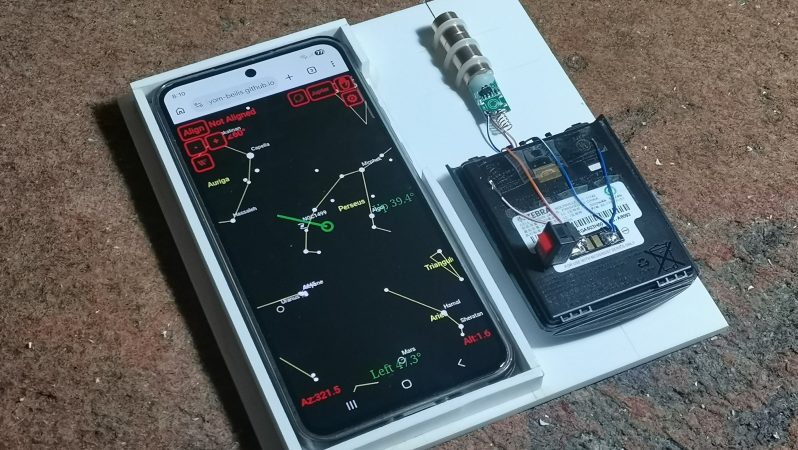
Perhaps the hardest thing for amateur astronomers just starting out is finding the things you want to look at. Prolific maker [mircemk] has submitted a quick-and-easy star-hopper device that will help guide your binoculars with laser-like precision using things you likely already have on hand: a smartphone, a mounting plate, and a green laser pointer.

The smartphone is running AstroHopper, an astronomy app that uses GPS and inertial navigation to know exactly where your phone is pointing, and offer an image of the sky on the screen. There are many others of this ilk, and there’s no reason [mircemk]’s trick won’t work with your favorite. The trick is decidedly simple: the smartphone is mounted to a flat plate, in line with a green laser pointer. Careful placement aligns the axis of the phone and the laser, and the mounting plate is set up to fit a tripod.

Using it is simple: with a labelled view of the sky displayed on the screen, one lines up the phone/laser combo with the desired object, and activates the laser pointer. [micremk] has wired in an on-off switch for this purpose and a large external battery, rather than relying on the stock pushbutton. Since the axis of the laser pointer and the phone are aligned, a green line launches out into the heavens for you to follow with your binoculars. Once you locate that green dot, you can turn off the laser. Yes, the computer has helped you find the object, but your muscles are doing the slewing and that will make it much more likely you start to learn the sky yourself rather than relying on electronic magic.

This is probably the simplest hack we’ve yet seen in the Frikkin’ Lasers Challenge, and yet also one of the most practical. If you enjoy playing with radiation that’s spontaneously emitted, there’s still time to get your entry together — the contest runs until July 23, 2026.

Continue reading “2026 Frikkin Lasers Challenge: Super-Simple Laser Precision For Your Stargazing” →