
WordPress mobile menu plugin
Replace your theme's mobile menu with one you design yourself.
Pick any WordPress menu and style it while a phone preview updates as you go. It works with any theme, and you never edit CSS.
See Pro plansFrom $49 a year · 14-day refund policy · Or try the free version first
4.5 from 573 WordPress.org reviews 70,000+ active sites Updated October 2026
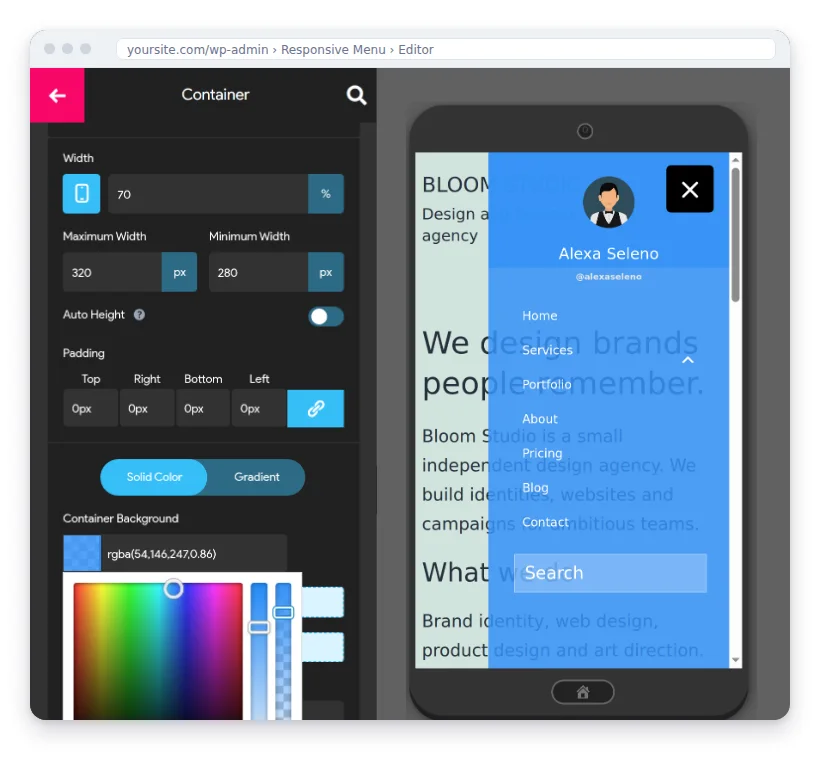
- Works with any WordPress theme
- Elementor integration
- WPML and Polylang ready (Pro)
- Keyboard and screen-reader support
- Copy your menu to other sites
Menu styles
Six menu styles in one plugin
- Slide-out menuSmooth off-canvas mobile navigation
- PROHeader barLogo, title, search & content on top
- PRODesktop & mega menuOne plugin for every screen size
- Search & iconsSearch box, font icons, social links
- Pre-built themesStart from a ready-made design
- Menus by user & roleDifferent items for members & guests
Why not use your theme's menu?
Your theme decides how its mobile menu looks. Changing it means CSS, a child theme or a developer.
Typical theme menu
- Changing the look means editing CSS or a child theme
- A plain list of links, usually without search, a logo or contact icons
- The same items for every visitor
- A new theme means a new menu
Responsive Menu
- Set colours, fonts, animations and layout in a live editor
- Search, logo, title, social and call icons inside the menu
- Show items only to logged-in users, guests or chosen roles
- Keeps its design when you change theme, and copies to your other sites
How it works
Set it up in three steps
The setup wizard walks you through it, and the phone preview shows each change as you make it.
- 1
Choose your menu
Pick the WordPress menu to show, or create one.
- 2
Pick a starting design
Start from a ready-made theme or a blank menu.
- 3
Hide the old menu and publish
Tell it which theme menu to hide, then go live. You can fine-tune every detail in the editor later.
Features
What the free plugin does, and what Pro adds
The free plugin builds your mobile menu. Pro adds a desktop and mega menu, a header bar and page-by-page rules.
- FREE
Live visual editor
Design with a real-time phone, tablet and desktop preview.
- FREE
Pre-built themes
Start from a ready design and make it yours in one click.
- FREE
Colours with opacity
Every colour option supports transparency for a modern look.
- PRO
Desktop & mega menu
One plugin for mobile and desktop navigation, including mega menus.
- PRO
Header bar
Add your logo, title, search and custom content above the page.
- PRO
26 button animations
Animated menu buttons, from Spin to Vortex.
- PRO
Font icons
Add icons to any menu item for faster scanning.
- PRO
Show on specific pages
Exclude or include the menu page-by-page, and by device.
- PRO
Scroll lock
Stop the page scrolling behind an open menu.
Try it here
Try the editor right here
This is a small copy of the real editor. Pick a colour, set the transparency, and choose a side and a button shape.
Menu settings
Build yours with the free pluginFree vs Pro
Start free. Go Pro when you need more.
| Feature | Free | Pro |
|---|---|---|
| Live editor with phone / tablet / desktop preview | ✓ | ✓ |
| Pre-built themes | ✓ | ✓ |
| Colours with opacity, fonts, sub-menus, search, logo & title | ✓ | ✓ |
| Hide the theme's original menu | ✓ | ✓ |
| Desktop & mega menu | — | ✓ |
| Header bar (logo, title, search, custom content) | — | ✓ |
| 26 button animations & font icons | — | ✓ |
| Show / exclude on specific pages & devices | — | ✓ |
| Disable background scrolling, page overlay, smooth scrolling | — | ✓ |
| Multilingual (WPML and Polylang) | — | ✓ |
| Priority support & updates | Community | ✓ |
Pricing
Every plan has every Pro feature
Plans differ only by the number of sites.
Essential
For one website
$49/year
Billed yearly
Buy Essential- 1 site
- Every Pro feature
- 1 year of updates
- Priority support
- Recommended
Advanced
For freelancers with up to 5 client sites
$79/year
About $16 per site
Buy Advanced- Up to 5 sites
- Every Pro feature
- 1 year of updates
- Priority support
Expert
For agencies with up to 100 sites
$95/year
Under $1 per site
Buy Expert- Up to 100 sites
- Every Pro feature
- 1 year of updates
- Priority support
- 14-day refund policy. If it doesn't work and we can't fix it, you get your money back.
- Keeps working without renewal. Your menu stays on your site if you stop paying.
- Secure checkout with Stripe.
Reviews
“Hands down the best, easiest to customize and works the most reliably.”
- ★★★★★
“Responsive Menu is very user friendly. The customer service is really helpful, too.”
— hande9797 · WordPress.org, Nov 2025
- ★★★★★
“This plugin helped me add a responsive mobile menu when Elementor stopped working on my client's website. 100% recommend.”
— finch357 · WordPress.org, Mar 2026
- ★★★★★
“What I appreciate most is the impressive number of settings and design options, even in the free version.”
— tidros · WordPress.org, Jun 2026
- ★★★★★
“I have been looking for a reliable and easy to use responsive menu for some time and this is the one.”
— Puntoman · WordPress.org, Nov 2025
- ★★★★★
“It is easy to install and has so many options including a way to add your own customization without jumping through hoops.”
— gravesch2 · WordPress.org, Nov 2025
- ★★★★★
“It included all the options I needed and was easy to implement. The option to export it from my staging site and import it into production was great too.”
— Arno Kools · WordPress.org, Sep 2025
What's new
New features every few months
Latest release: 4.7.4, October 2026. From the official changelog.
- v4.7.4 · Oct 2026
Menu items by user role
Show menu items only to the user roles you choose, plus improved keyboard and screen-reader accessibility.
- v4.7.0 · Feb 2026
Action & social icons
Put call, email and social links right inside the menu container.
- v4.6.0 · Jul 2025
Logged-in vs guest menus
Hide menu items for logged-in or logged-out visitors. Useful for membership and shop sites.
FAQ
Questions before you buy
What happens if I don't renew after a year?
Your menu keeps working exactly as it is. A valid licence is only needed for updates and priority support.
Can I try it before buying?
Yes. The free version on WordPress.org has the live editor and the core menu features. Pro also has a 14-day refund policy: if it doesn't work as expected and we can't fix the problem, you get a full refund.
Will it work with my theme or page builder?
It works with any theme that uses WordPress menus, and it has an Elementor integration. In the setup wizard you tell it which theme menu to hide, so visitors only see the new one.
Can I show different menu items to members and guests?
Yes. You can hide menu items for logged-in or logged-out visitors, and show items only to selected user roles.
Is it multilingual?
Yes, in Pro. It works with WPML and Polylang, so the menu switches with the visitor's language.
Is it still maintained?
Yes. Version 4.7.4 came out in October 2026 and is tested with WordPress 7.1.
Can I upgrade from 1 site to more later?
Yes. Contact support and we'll move you to a bigger plan.
Which payment methods do you accept?
All major credit and debit cards through Stripe. No card? Contact support and we'll find an alternative.
