• Resolved Imagezeroxomega

    (@zeroxomega)


    Hi there,

    I recently installed your plugin and set it up with my Digital Ocean Space bucket. However, I noticed there’s no option to specify the bucket path for uploaded media files. Ideally, I’d like the files to be stored in an existing folder structure, like:

    https://example.sgp1.digitaloceanspaces.com/wp-content/uploads/2024/09/example.jpg

    Instead, the current system automatically uploads files by creating a new folder, resulting in a path like:

    https://example.sgp1.digitaloceanspaces.com/2024/09/example.jpg

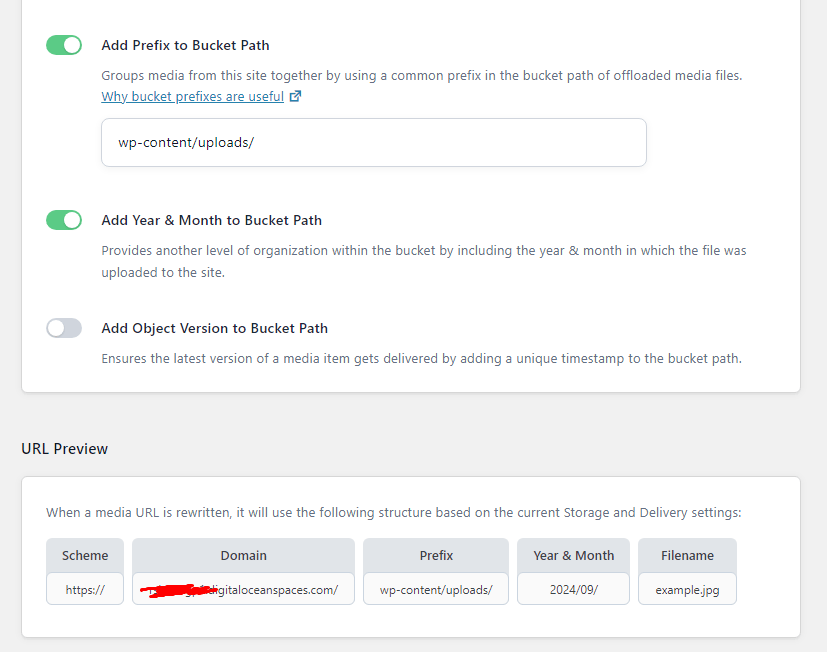
    It would be incredibly helpful if you could add an option to set a prefix for the bucket path, as well as an option to add the year and month to the path. This would allow us to maintain consistency and continue using our existing folder structure.
    Image

    Additionally, I’d love to see a feature that can rewrite URLs to replace local links with the S3 bucket links.

    Your plugin has great potential and, with these features, it could easily compete with other offload plugins out there. You’ve done a fantastic job so far!

    Thanks again.

Viewing 9 replies - 1 through 9 (of 9 total)
  • Thread Starter Imagezeroxomega

    (@zeroxomega)

    I noticed your latest update still has the same issue—it’s skipping the wp-content/uploads folder and just adding a unique timestamp (like this: https://example.sgp1.digitaloceanspaces.com/2024/09/28140434/demo.webp). Hope you can take a look at this and adjust accordingly.

    Plugin Author ImageMasoud Golchin

    (@masoudin)

    Hello,

    Thank you for the suggestion. We released a new version a few minutes ago and have added your requested feature (Bucket Path Prefix) to our plugin.

    Regarding URL rewriting, our plugin supports it! First, you need to add a domain to your DigitalOcean Spaces storage. Then, use the following constant in your wp-config.php to enable the plugin to handle URL rewriting for you.

    define('ADVMO_DOS_DOMAIN', 'your-domain-url');


    How to Customize the Spaces CDN Endpoint with a Subdomain:
    https://docs.digitalocean.com/products/spaces/how-to/customize-cdn-endpoint/

    Please feel free to test it out and let us know if you need any assistance from our side.

    Thread Starter Imagezeroxomega

    (@zeroxomega)

    I’m running into a couple of issues after updating the plugin:

    1. I can’t upload images directly into posts or pages. Uploading media from the media library still works, but uploading within the post/page editor fails.
    2. I’ve uploaded images using the WP Offload Media Lite plugin to my S3 bucket. I used the “upload all to cloud and remove from local” option in the plugin, but now those images aren’t displaying correctly after enabling your plugin. Instead of showing the S3 URLs, it’s trying to pull the images from local links, which obviously aren’t there anymore.
    Plugin Author ImageMasoud Golchin

    (@masoudin)

    @zeroxomega

    I have added tasks to our backlog to address the issues you are facing:

    1. The upload speed in the post editor appears to be too slow. We are working to resolve this issue. 2. We need to ensure compatibility with “WP Offload Media.” We will investigate this and work to resolve it.

    Thread Starter Imagezeroxomega

    (@zeroxomega)

    Thanks a lot!

    May I ask if this is already implemented or not for WordPress and Cloudflare R2 bucket to keep the path as uploads/year/month/ ? Thank you

    Plugin Author ImageMasoud Golchin

    (@masoudin)

    Hi @fritex,

    This issue has been resolved. You can set a prefix for the bucket path in the plugin settings page. (Screenshot below)

    Image

    I have some issues on URL rewriting, I have already configured that “Use Custom Path Prefix” with wp-content/uploads, and the file upload is ok,
    but then I have some problems with the srcset param on my images, is not printing that “wp-content/uploads” string.

    by example: “http://myweb.com/2024/11/image.jpg”
    and therefore is breaking all my images

    Plugin Author ImageMasoud Golchin

    (@masoudin)

    Hi @basarium

    Please create separate tickets for each new issue. This will help us efficiently track and address all open tickets more quickly.

    Additionally, could you let me know if this issue is occurring with newly uploaded images or with existing images that have been offloaded in bulk?

Viewing 9 replies - 1 through 9 (of 9 total)

The topic ‘Add Prefix to Bucket Path’ is closed to new replies.
