Professional and cost-free PDF editor
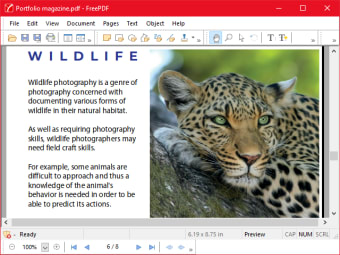
FreePDF is a completely free productivity companion that allows you to create, edit, view, print, and annotate PDF files. Developed by SoftMaker, it is suitable for both personal and business use. With the comprehensive features it provides, it attends to all the needs that your PDF will potentially demand.
Top Recommended Alternative

The program offers a pretty straightforward and intuitive user interface so even when you are a beginner or less tech-savvy user, you can get the hang of it in no time. FreePDF is a much more affordable alternative to Foxit PDF Editor and Nitro Pro.
Powerful PDF utility
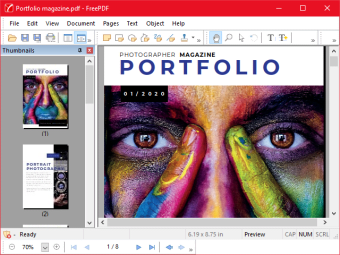
FreePDF is a robust PDF tool that can do all sorts of important things relevant to managing and enhancing PDFs. For instance, you can rearrange the order of the document’s pages. You are free to add pages from other PDF files or even remove one. Moreover, if you feel like your PDF lacks visuals then you can insert pictures and drawings as needed to make it detailed or more attractive.
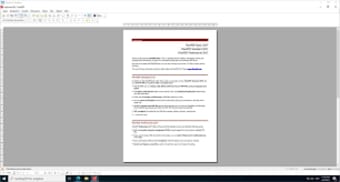
Not only that, you can freely customize its layout as well by reorganizing, moving, and deleting texts and pictures to tailor it to a specific standard or your own liking. Aside from editing, it acts as a simple viewing suite that enables you to have a quick overview of the document. It offers a built-in PDF printer drive empowering you to create PDF files from any PC application available.
To safeguard your PDF from potential attack, it grants you authority to securely encrypt the document for further protection. Changing the page order of your PDF can conveniently be done by moving the sidebar thumbnails through a drag and drop function. Inserting pictures, on the other hand, can also be performed with ease by dragging the images displayed from your desktop to the opened PDF file.
Attend to PDF needs sufficiently
FreePDF is undoubtedly a cheaper but, effective alternative to expensive PDF editor solutions that somehow provides almost the same function to its users. View, rearrange, insert objects, customize, encrypt or create a fresh PDF as much as you like. This office suite software is packed with convenient features and an efficient interface that make PDF editing a smooth and comfortable task to adhere to.







.png)