Image

Gephi 0.11: Major Performance Upgrade and New Features

This new Gephi release delivers a massive upgrade in performance, and our most reliable version to date. The Gephi team has long dreamt to rebuilt Gephi’s OpenGL visualization engine from scratch. The day where this hard work finally hits our dear users has come, alongside many new exciting features and more than 50 bug fixes.

Checkout the official release notes for expanded details on what’s new, and download Gephi 0.11 on our website!

Image

New Features

New Visualization Engine

Gephi accelerates graph visualization via its OpenGL engine. The legacy engine was originally built in 2008 and wasn’t taking advantage of all the rendering improvements graphics card and OpenGL have made over the years. We’ve rewrote Gephi’s engine from scratch, harnessing massive performance gains along the way, while maintaining compatibility with older hardware.

Gephi can now easily visualize up to 10M elements on modern hardware. This is a 30x improvement compared to previous versions.

Image
Benchmark made on a Mac M4 Pro, showing the FPS each version can achieve. Maximum FPS is clamped at 60.

In this 0.11 release, our goal was to have feature parity with the legacy engine. Therefore, the way networks look on Overview hasn’t changed and we haven’t introduced many new features. We’ve built new foundations that will allow us to extend features in future versions.

We’ve however remodeled the settings panel with enriched and clearer options, to customize the way the graph looks.

New Settings Panel
New Visualization Toolbar and Settings Panel

Seamlessly switch between Overview and Preview

To improve usability, we’ve made the transition between the Overview and Preview perspective more seamless. We’ve notably focused on edge thickness and labels. For instance, now by default Preview uses the same font size and scale as Overview. It’s still possible to customize the font in Preview thought.

Explore the graph with your mouse

We’ve filled another usability gap with a new “Attributes” panel that shows the attribute values of the currently selected node. This new experience is well integrated into our new visualization engine, responding to mouse movement.

The existing “Edit” feature that was accessible from the toolbar has been merged with the new experience.

New option to avoid label overlap

A new toggle button was added to the Visualization settings. When turned on, labels no longer overlap and the largest ones are chosen first.

Image
New option to avoid label overlapping

The same feature is also available in Preview, and can be customized. Note that it remains possible to finely control which label should be visible, via the Filters panel.

Image

Transform in one click

Common transformations like Expand or Rotate previously required multiple clicks to be performed. We’ve made them more accessible in the Layout panel, in one-click. In addition, we added a Mirror transformation, which was previously missing.

We kept the legacy Contraction, Expansion and Rotate Layouts for now but will remove them in the next release.

Image

New icons

We’ve refreshed all icons to make them more intuitive and consistent. Both light and dark modes are supported.

Image
Gephi new icons pack

Support for Greek, Hungarian, Swedish and Ukrainian added

New languages have reached the minimum threshold of translation completion to be included as a new supported language: Greek, Hungarian, Korean, Swedish and Ukrainian language. If you want to contribute to localization, head to our Weblate project and get started.

Image
Language Selection menu

New default settings and presets

Default values that persist across Gephi executions are set in Settings. We’ve added a lot more of those “Default settings” across Visualization, Layout, Appearance, Preview and Attributes to increase usability and customization capabilities. For instance, one can create a Preview preset and set it as the default.

Image
New Default Settings

Layout Presets were also improved, so that one can choose a Default Preset applied to a Layout.

Image
Layout Presets improvements

We’re excited for you to try the new version! We want to thank everyone who contributed to the release and especially the beta testers who give us valuable feedback.

Compatible plugins have already been published. We’ll review the missing ones shortly.

Feel free to join our Community channel where you can chat about Gephi. You’re welcome to join!

Image

Gephi 0.11 is coming soon: Beta testers needed!

As you may have seen on a previous article, the Gephi team has been hard at work over the past few months and is currently preparing to release version 0.11 of your favorite network analysis application. All development work has been completed but before releasing it we want to strengthen it, via testing it on different configurations.

We need your help! This post explains how to test Gephi 0.11 and send us your feedback. It also briefly outlines the new features of this version. 

Image
Gephi 0.11 is coming

Test the development version…

Go to Development Builds and download Gephi 0.11-SNAPSHOT or click on the appropriate link below:

Install it on your computer like you would install Gephi. It can be installed alongside an existing Gephi version.

Note that Plugins aren’t available. They can be installed manually via their NBM file though.

… and share your feedback with us!

To share your feedback with us, please join the Gephi Desktop Beta Test on Element. It’s easier for us to engage with you, discuss your experiences, and clarify your configuration than to receive issues on GitHub. You can also use this channel if you have any questions or if you’re having trouble getting this beta to work.

If you find an issue, please provide enough context so that we can reproduce them. Please provide on which OS you’re testing, and if the issue is related to the visualization engine which graphic card you have. No need to report anything related to Java versions as Gephi embeds the appropriate Java version. Element supports uploading images and videos.

The Gephi space on Element also contains a Community channel where you can chat about Gephi. You’re welcome to join!

New Features

New Visualization Engine

Gephi has a brand new visualization engine, powering “Overview”. This new engine is the result of multiple years of work. In this 0.11 release, our goal was to have feature parity with the previous engine. Therefore, the way networks look on Overview hasn’t changed and we haven’t introduced many new features. However, we’ve focused on performance improvements for large graphs and paved the way for future extensions.

Because it’s been rewritten from scratch and OpenGL compatibility is very dependent on the computer you’re running Gephi on, there might be bugs or compatibility issues that we haven’t seen. That’s why we’re very interested in you giving it a spin.

New Settings Panel
New Visualization Toolbar and Settings Panel

Better alignment between Overview and Preview

A common complaint in Gephi is configuring something the visualization in Overview (font sizes, edge weight etc.) and having to start over in Preview.

We’ve addressed that and closed the gap so that the transition should be much easier. We’ve particularly focused on edge thickness and labels. For instance, now by default Preview uses the same font size and scale as Overview. It’s still possible to customize the font in Preview thought.

More details here if you’re interested.

Attributes Panel

We added an “Attributes” panel that shows the attribute values of the currently selected node.

We actually combined this new panel with the pre-existing “Edit” feature. The panel can either be in selection mode or in edit mode. Edit remains a Tool available in the toolbar, and a contextual action in the Data Laboratory.

Label overlap avoidance algorithm

A new toggle button was added to the Visualization settings. When turned on, labels no longer overlap and the largest ones are chosen first. Also available in Preview.

Image

Transform in one-click

Common transformations like Expand or Rotate were previously mixed with force directed layouts. We added simple buttons in Layout to support these common operations, in one-click. In addition, we added a Mirror transformation, which was previously missing.

We kept the legacy Layouts for now but will remove them in the next release.

Image

New icons

All of the legacy Gephi icons have been replaced by refreshed icons. In addition, icons are now SVG-based, so they look better and are easier to maintain. Both light and dark modes are supported.

We did our best to design the icons so that they represent the feature / settings they control. However, sometimes it might not be clear enough. If you have suggestions, please let us know.

New languages

New languages have reached the minimum threshold of translation completion to be included as a new supported language: Greek, Hungarian, Korean, Swedish and Ukrainian language

When you see gaps in your language, there is still time to contribute to the localization via Weblate. We’ll include any new translations that you provide until the release date.

Image
Language Selection menu

Default settings and presets

We’ve added more “Default settings” across Visualization, Layout, Appearance and Preview to set default values that persist across Gephi executions.

Image
New Default Settings

We’ve also improved Layout Presets, so that one can choose a Default Preset applied to a Layout.

Image
Layout Presets improvements

Thanks in advance for your valuable feedback, we look forward to hear what you think about the new features. Stay tuned for the official release coming up soon.

Gephi 0.10 released

Gephi 0.10.0 is here! Download it from http://gephi.org (only patch versions auto-update, it’s intentional). This time around we focused on a few long-awaited features, while keeping our pace on code and sustainability improvements. This release improves the usability and reliability. Here are 5 highlights:

1. Quick search

Searching the graph was previously only possible within the Data Laboratory. There is now a global quick search feature that allows to find nodes and edges in the graph and highlight them. Each result can be acted upon with the same right-click operations found in the Data Laboratory. Quick search is brand new and we’re interested in your feedback as we plan to extend it in future releases.

2. Dark mode

We’ve introduced a new dark look-and-feel in a previous version but a number of components weren’t adjusted accordingly. We have fixed all of these issues and the dark mode is now fully usable.

Image
New dark mode in Gephi

3. Support for Apple Silicon

Gephi now supports the Apple Silicon architecture. As a result, both x64 and aarch64 bundles now exist for Mac OS. The performance improvements for M1/M2 processors is substantial as Gephi can now run natively on this architecture. It loads much faster and complex operations such as layouts run smoother.

Image

4. Preview Improvements

We shipped two major improvements to the Preview module: arrows on curved edges and node border matching the Overview style.

Directed curved edges now have arrows as well. Previously only straight edges had arrows.

Node borders style now match the one seen on Overview: darker node color and size proportional to the node’s size. The border color and size remains entirely configurable.

5. Project and Workspace Management

We reorganised how projects work in Gephi to make it easier to use and pave the way for future features.

Gephi now keeps track of all the projects you’ve worked on in a project list. It’s also now easier to give projects and workspaces names so you can organise your work better. Finally, it’s now possible to duplicate any workspace with all of its settings.

Image
New workspace management

List of improvements

You can check our changelog in the release page:
https://github.com/gephi/gephi/releases/tag/v0.10.0

More about this release

This release is a follow-up to the code sustainability retreat 2022. You can read our report in our last blog post. Not all the features we discussed and worked on are included in this release but it certainly served as an accelerator. We also welcomed contributions from new developers with this release, which is great to see.

Check our road map as of Summer 2021 to have a better idea of where we are going. With this release, we continued to focus on core improvements that pave the way for future big features such as the undo/redo. Specifically, the core improvements to Project Management bring us much closer to it.

Mac OS Users

Note that some users have been experiencing hangs with previous versions, at startup or when switching perspectives. We are aware of the issue and unfortunately there isn’t a complete fix or workaround available at this point. We’re still working on it and you can follow updates on this thread. With this release we hope to have mitigated the issue, while we work on a complete resolution.

As usual, please share your experience/feedback on our Facebook group or on Twitter.

Gephi 0.9.3

Gephi 0.9.3 is here! Download it from http://gephi.org. No crazy new features, but many improvements and bug fixes. Here are 5 highlights:

1. No more Java installation required.

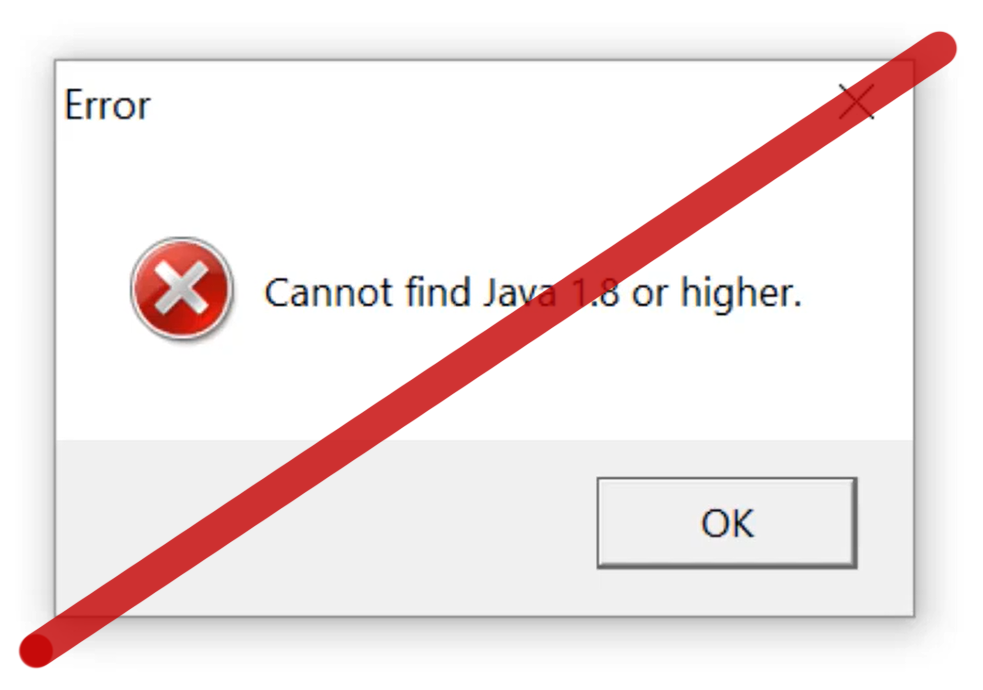
Gephi is installed on top of Java, so you had to install it before Gephi. On some computers, a bug related to theJava path caused the infamous “Cannot find Java 1.8” issue. This does not happen anymore, as you do not have to install Java anymore! It is packaged with Gephi.

Image

2. New look and feel

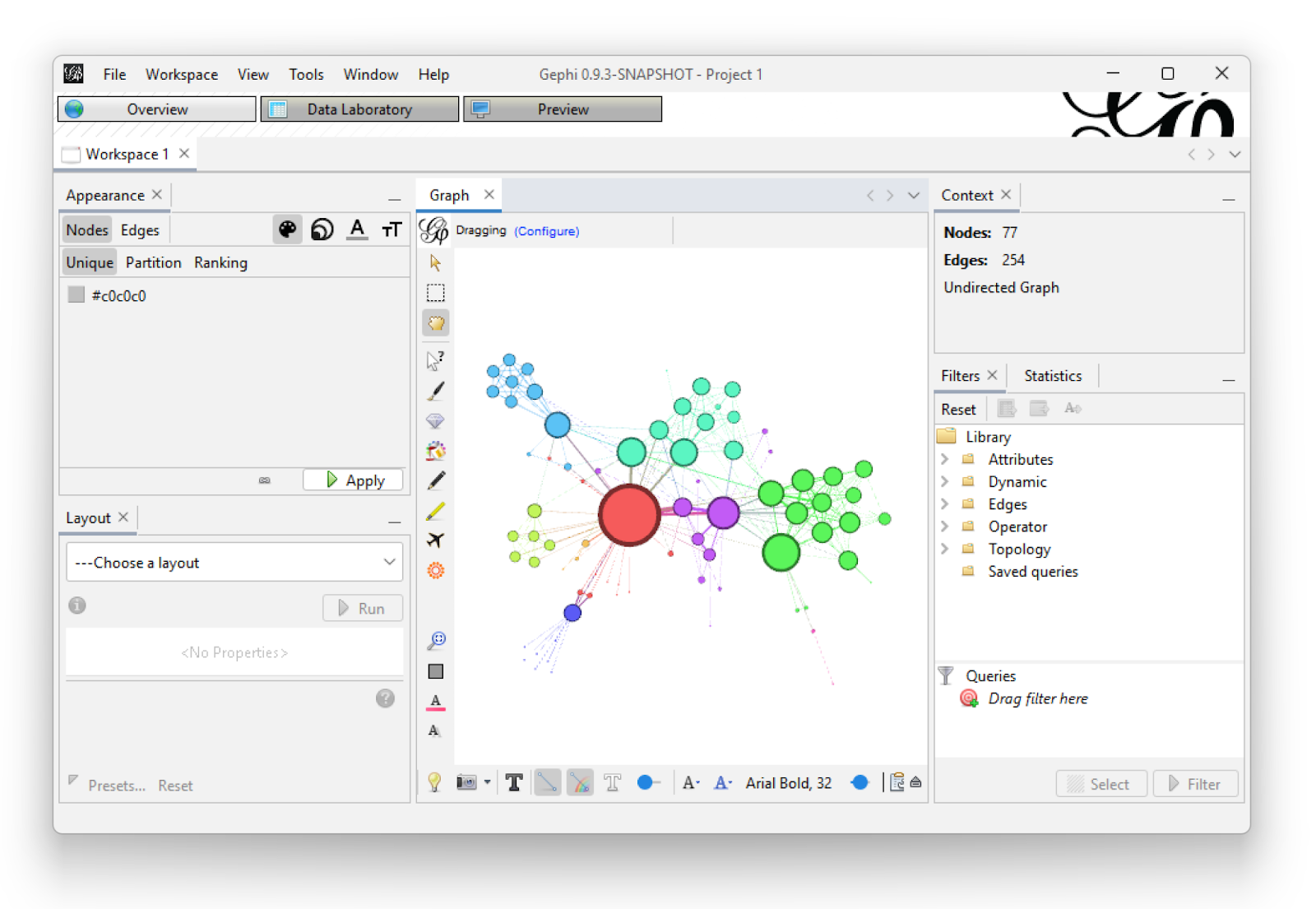
Gephi now has a flat look and feel. This is much better for Linux users, as well as some Mac users who had issues with the appearance (one did not see which tab was selected etc.).

Image

3. New community detection algorithm via statistical inference

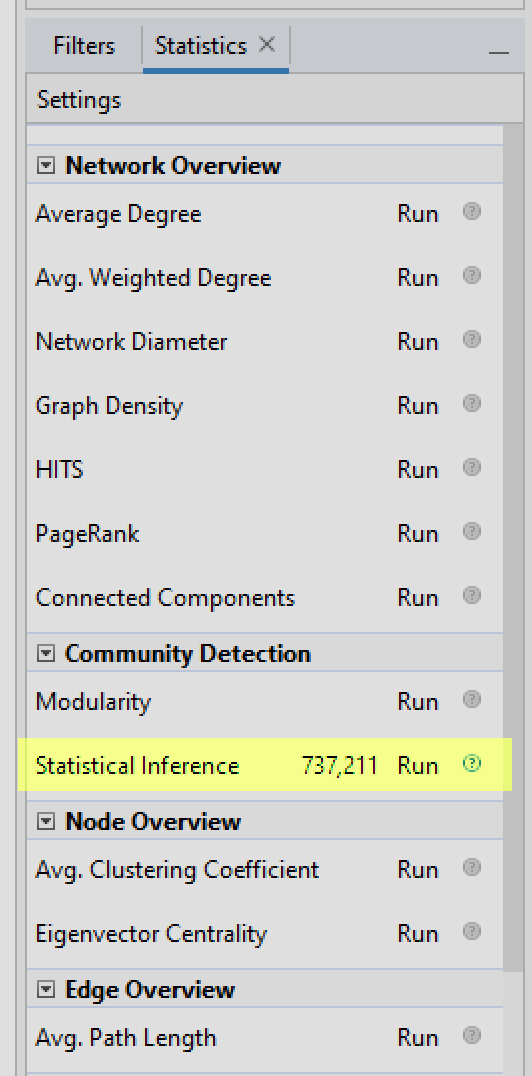
Tiago Peixoto attended the code sustainability retreat 2021 and we implemented a version of his approach to community detection. It uses the same convergence heuristic as the Louvain algorithm (“modularity” in Gephi), also looks for assortative structures, but optimizes a different criterion, based on Bayesian inference.

Image

You can look at Tiago’s blog for more information about it, or the two papers it is based on:

4. GEXF 1.3

The file format often used with Gephi, GEXF, has been updated to 1.3. This version is more mature and reliable than the previous one, and is implemented in Gephi. Check the announcement for the final specification there:
http://gexf.net/history.html

5. High DPI screens

High resolution screens are mainstream. We corrected a number of issues to fully support them.

List of improvements

You can check our changelog in the release page:
https://github.com/gephi/gephi/releases/tag/v0.9.3

For plugin maintainers

Check a specific announcement about your plugin right there:
https://github.com/gephi/gephi-plugins/discussions/245

More about this update

This update is a follow-up to the code sustainability retreat 2021. You can read our report in our last blog post. Not all the features we discussed and worked on are included in this update. We are working on it, but it’s just better to release updates as soon as usable improvements are ready.

Check our road map as of Summer 2021 to have a better idea of where we are and where we go. We are still working on big features such as a new graphic engine and the infamous undo feature.

We will also have a code sustainability retreat in 2022 with funded travel and accommodation, if you are interested in contributing to Gephi. We will almost certainly hold it the week of the 29th of August. A call for participation will come soon.

As usual, please share your experience/feedback on our Facebook group or on Twitter.

Gephi 0.9.2 : a new CSV importer

A new version of Gephi has been released! Thanks to Eduardo’s relentless issue fixing, Gephi’s overall stability has been improved. Eduardo is the author of the Data Laboratory, and at this occasion he revamped its CSV importer for a more flexible and straightforward user experience.

The new CSV/spreadsheet importer

Did you know that Gephi can export and import just the table of nodes or the table of edges? This feature is useful in many situations, for instance to produce charts in Excel or to clean data in Open Refine. Below we will showcase the new features and more generally explain how to import a spreadsheet as a list of nodes.

To import a spreadsheet you have to reach the Data Laboratory and click on Import Spreadsheet. In the example below a network is already loaded: we will decide later whether the imported nodes will be merged into the existing ones or not.

Tuto01

Gephi is now able to recognize the type of file you upload, and the support of Excel files has been added. Choosing the right separator is crucial since improperly separated columns would compromise the data. In the example below Gephi recognized that the separator is the Comma (as in a properly formatted CSV file).

Tuto02

The encoding of the file is a common issue, notably with languages using accents and special characters. Gephi can guess the encoding and you can manually edit it if necessary. In the example below Gephi correctly guessed the UTF-8 encoding.

Tuto04

Selecting a different encoding would produce errors. Fortunately the Preview table allows you to see them and fix the encoding. In the screenshot below, see how the wrong encoding produces exotic characters in the data.

Tuto03

When you validate these settings, Gephi now opens the exact same panel as when you open a new network. I personally love this addition since it brings more consistency to the user experience. It allows Gephi to provide a number of useful informations like the number of nodes detected or the issues found during the import process.

Tuto05bis

Do not miss an important feature here: in this panel you decide either to create a new workspace with the imported data or to merge the new nodes with the old ones. This very useful feature was already present at the opening of a new network, but many users still ignore it exists. Mind to select the Append option if you intend to merge the nodes. In that case when an imported node has the same Id than an already present one, the new node data will override the old one.

Tuto06

More info

Take a look at the full list of improvements there:
https://github.com/gephi/gephi/releases/tag/v0.9.2

How do I get this release?

  • If you have a recent Gephi, the update will be automatically proposed to you
  • If you have an older version (0.8 or before) you have to download and install manually
  • This update can be downloaded from http://gephi.org

Gephi updates with 0.9.1 version

splash091A new Gephi version has been released and can be downloaded from gephi.org. This version is an update from the 0.9.0 version released last December and mostly addresses issues discovered since.

One notable improvement is a new localization: German! Gephi is now localized in nine languages (English, French, Spanish, Japanese, Brazilian Portuguese, Russian, Chinese, Czech and German) and we hope to continue the momentum on this effort in the future.

new_german_l10n

Other notable improvements include a better support for parallel edges, appending to existing workspaces and how filters are saved in .gephi files. More than 60 bugs were fixed with a majority of them reported by the community. Thanks to all users who took the time to help! The complete list of bugfixes and improvements can be found in the changelog on GitHub.

In the next few weeks we would like to focus on documentation as there’s still many features brought in the 0.9.0 version without up-to-date documentation. This is especially important for more complex features such as dynamic graphs, which got a major upgrade.

As usual, please share your experience/feedback on our Facebook group or on Twitter.

Gephi 0.9 released: Play with network data again

splash

We’re proud to announce the release of the next major version of Gephi! This 0.9.0 version has been more than three years in the making but today brings an exciting new life to this project, and the graph/network analytics community at large. You can download it here for Windows, Mac OS X and Linux.

Gephi is the leading graph visualization software – known as the “Photoshop for networks” and is open-source and free. It has been downloaded more than a million times and is used by many scholars and data scientists around the world. This new release brings new features in the area of dynamic networks (i.e. network over time) and major compatibility and performance improvements.

Since the last release in 2013, users were facing compatibility issues with Java, which have been resolved with this release. Development had slow down three years ago but had never stopped. In fact, in March 2013 the time had come to think about what Gephi 1.0 would look like and realize it needed a new core. This was by far the most complex project the team had to overcome but developers had a long-term vision and know that future developments will now rely on a robust and extensible core, with world-class performances.

The world is increasingly complex and interconnected. Gephi’s purpose is to unfold this complex relational data in a way anyone can understand them. It allows you to visualize graph data as a map and create the visualizations to support your narratives. State-of-the-art algorithms make readable layouts, highlighting communities or influential nodes. Visual tools tweak colors and shapes to reveal hidden patterns in the data, helping solving complex problems. More and more network-maps are pictured in online, offline press and other communication media. They spread from science to business, art and activism. People are increasingly exposed to them and learn how to read them. Gephi aims to accelerate this commoditization process by providing free and easy-to-use tools.

What’s new in Gephi 0.9?

The list is too long! The complete changelog for this version can be found on GitHub’s release page.

Next steps

There are a few immediate next steps coming up right after this release. Following-up on the recent plugin development announcement we’ll get in touch with plugin developers and start migrating plugins to this version. There’s more than 80 plugins to update!

Then, we’ll identify and resolve new issues that appeared with this version. A future Gephi 0.9.1 release will come next year to address those.

A Gephi Toolkit release will also be made very soon so developers can update their application built on top of Gephi’s modules. In the meantime, we’re interested in users’ feedback and want to hear from you on Twitter or Facebook. Issues can directly be reported on GitHub as well, where the developers are.

Finally, thanks to all contributors and the community for supporting this project!

Announcing Gephi 0.9 release date

Gephi 0.9

Gephi has an amazing community of passionate users and developers. In the past few years, they have been very dedicated creating tutorials, developing new plugins or helping out on GitHub. They also have been patiently waiting for a new Gephi release! Today we’re happy to share with you that the wait will come to an end December 20th with the release of Gephi 0.9 for Windows, MacOS X and Linux.

We’re very excited about this upcoming release and developers are hard at work to deliver its roadmap before the end of 2015. This release will resolve a serie of compatibility issues as well as improve features and performance.

Our vision for Gephi remains focused on a few fundamentals, which were already outlined in our Manifesto back in 2009. Gephi should be a software for everyone, powerful yet easy to learn. In many ways, we still have the impression that we’ve only scratched the surface and want to continue to focus on making each module of Gephi better. As part of this release, we’ve undertaken one of the most difficult project we’ve worked on and completely rewrote the core of Gephi. Although not very visible for the end-user, this brings new capabilities, better performance and a level of code quality we can be proud of. This ensure a very solid foundation for the future of this software and paves the way for a future 1.0 version.

Below is an overview of the new features and improvements the 0.9 version will bring.

Java and MacOS compatibility

This release will restore Gephi’s compatibility with the latest Java versions on all platforms. This will resolve issues our users encounter with Java 7 and 8. Compatibility issues with Mac OS will also be resolved and full support for Retina display screens added.

New redeveloped core

This release will improve performance and reliability by a large margin. The graph structure at Gephi’s core has been redeveloped from scratch and will bring multiple new features, better performance and lower memory consumption. On benchmarks, simple operations such as reading nodes or setting attributes see performance improvements ranging from 2X to 100X. This new core will make many operations in Gephi faster and push the envelope even further in large graphs exploration. Reducing memory usage has also been an area of focus and we have measured a 2X reduction compared to Gephi 0.8.2 on a medium-size graph.

New Appearance module

We’re introducing a new user module named Appearance designed to combine and replace Ranking and Partition modules. Appearance will group in one place all controls acting on the node or edge appearance. The partition capabilities will also greatly improve as part of this new module and a new palette selector is being added. In addition of the default palettes, we’re also adding a cool palette generator designed to find the optimal colors (i.e. partitions can be differentiated from each other). Moreover, it will be possible to “Auto-apply” partitions as well, which is a feature that was only available for Ranking so far.

Appearance Partition Palette selector Palette Generator

Timestamp support

This 0.9 release adds a new way to represent networks over time: timestamps. So far, users could only represent time using intervals and that was cumbersome when the underlying network data was collected at fixed time intervals (e.g. one network per day). Starting with this release, Gephi will support both intervals and timestamps to represent evolving network topology and/or evolving attribute values.

GEXF 1.3 support

The GEXF format is also evolving to its 1.3 version. This version improves the support for graphs over time and introduces the ability to represent time using timestamps rather than intervals. In addition, it’s now possible to set a timestamp or an interval for the entire graph, allowing building collections of GEXF files where each represents a “slice”. This is a common request from the community and we hope this will greatly facilitate the exploration of longitudinal networks.

Multiple files import

With the 0.9 version users will be able to import multiple files in Gephi at the same time. Once the files have been read, two choices are offered, either to import each file into a separate workspace or merge them into the same workspace. The latter is a powerful option when used with dynamic graphs. Indeed, a collection of GEXF files representing the same network over time will be imported in Gephi in a single step.

Import Report Multiple Graphs

Multi-graph support

Multi-graph exampleThis release will bring support for multi-graphs, where multiple edges can exist between two nodes each with a different relationship. Users will be able to import, filter and run algorithms on these graphs but the support for visualizing these graphs will come in a further release.

New workspace selection UI

We’ve heard users’ feedback and the workspace selection user interface will be improved. The new interface will be a “tab-style” interface where each workspace is a tab and switching from one workspace to another only requires a single click. Tabs will be located at the top just under the perspective selection. The previous interface is located at the bottom right corner and will be entirely removed.Workspace Tabs

Gephi Toolkit release

A new release of the Gephi Toolkit, based on the 0.9 version will be made soon after December 20th.

Bug fixes

We’ve done a serious bug squash and already addressed many difficult issues, more to come until the release date.

separator

Follow us on Twitter or join the Facebook group to get the latest news. If you want to know more about this upcoming release, or want to help out please send us a note.

0.8.2 beta released

The latest version of Gephi has been released, download it for Windows, Mac OS and Linux platforms. This release captitalizes the bugfixes and stability improvements we have done over the last few months. It also greatly improves the Mac OS X compatibility with the Gatekeeper and Retina Display support. Gephi should now starts right away when double-clicking on the App with a Gatekeeper-enabled computer. However if you have an older version of Gephi on your computer, you should uninstall it and remove the user directory, see the installation instructions.

Image

This release is the first one based on our new Continuous Integration environment. This new system makes it easy for developers to create a new release and for beta-testers to test an early version. Users eventually get a software which has been tested much more heavily and by a larger population compared to previous releases.

Plugins need to be checked for compatibility. They will reappear on the Plugin Center in the coming days, as they are verified. Thanks for your patience.

ImageConsult the release notes and the new Javadoc for more information.

New and Noteworthy

* Data Laboratory’s time interval merge strategy now supports custom date format
* Improved parser for dynamic types. Literal strings are now supported.
* Add Retina Display support to the Mac OS X version

Bug fixes

* Filters ‘Duplicate’ does not work (Issue 176)
* Exporting SVG File throws DomException due to invalid stroke-widths (Issue 697)
* File name entered is lost when changing folder (Issue 463)
* Datalab: can’t export all columns (Issue 628)
* NullPointerException when importing from database (Issue 691)
* Filter on column created with regex causes crash (Issue 663)
* “Long cannot be cast to a String” when either exporting a graph or saving a gephi file (Issue 679)
* Mapping of Escape Keyboard Shortcut for “Save changes before closing?” dialog box (Issue 686)
* DataLab: filling edge weight column doesn’t work when dynamic (Issue 619)
* Spreadsheet import of dynamic data: support of “infinity” (Issue 631)
* Missing license headers (Issue 664)
* Spreadsheet import and self-loops (Issue 683)
* Timelime interval set in infinite loop (Issue 712)
* OutDegreeRange broken (Issue 651)
* Shortest path on filtered graphs fails (Issue 650)
* Weighted degree computation fails (all values 0) when a filter is applied (Issue 636)
* Dot parser fixes (Issue 621)
* Filtering leads to Null Pointer exception when saving (Issue 617)
* Partition percentages incorrectly composed across filters (Issue 637)
* Start/end attributes are always imported using DATETIME format (Issue 649)
* HeatMap / Shortest Path on undirected Graph wrongly paints / calculates (Issue 630)
* Typo fix connetion to connection (Issue 642)
* Timeline sparkline bug (Issue 615)
* Fixes calculation of clustering coefficient on graph (Issue 625)
* Unix timestamp support (Issue 612)
* GML loading cannot accept scientific notation for float-type edge property (Issue 300)
* GML export does not respect specs (Issue 604)
* GEXF export outputs incorrect files (Issue 570)
* Problems with export of PNG files (Issue 601)
* Edge pencil: unable to set edge directedness (Issue 549)
* Presets of “Preview settings” are incorrectly / not saved (Issue 575)
* Option “Time intervals as dates” in Timeline (Issue 613)
* 8.1 and 8.0 both freeze at start-up when on network (Issue 592)
* Data laboratory max columns unintuitive (Issue 590)
* Modularity with Edge Weight Causes Array Out-of-Bounds (Issue 577)

Do Gephi technologies matter for your research or business? You can support us by donating to the Gephi Consortium, or becoming a member to have an impact on our roadmap.

The next version will be a new serie (0.9) and will bring a strengthen core and new features. Stay tuned for that.

Feel free to reach to us if you are willing to organize events (meetups, workshops, hackathon, etc.), we will support them.

Beta Tester program starts

ImageHi all, today we are announcing a new program and it’s all about testing the latest versions of Gephi. Anyone can join the program and test the development version, send feedback and discuss features. We want to build a team of beta-testers who the developers can work with to detect issues before the software reaches the standard users.

So far, testing has been done by a small group of developers and users but we would like to extend it to a larger audience. There are many different versions of Windows, Mac OS X and Linux Gephi supports. Testers will help to detect compatibility issues specific on a single platform and overall participate in testing new features.

To make this effort successful, we’re making it super easy to test the latest development version without requiring to know about programming or how Gephi is built. We’re introducing a nightly build package which gets updated automatically every night with the latest version of the code. Once downloaded and installed, this version of Gephi will ask you to update itself every time a new version is available so you don’t have to download and install Gephi over and over again. If you’re already familiar with Gephi’s auto update capability, this is using the same system.

Image

How to get started?

    1. Join the gephi-tests@lists.gephi.org mailing list

Developers and testers will discuss on this list.

    1. Fill this questionnaire online.

Cuple of questions on your hardware and software configurations.

Questions? Feel free to stop by on this forum thread.