
Process-level traffic control and monitoring for Windows
NetBalancer by SeriousBit is a Windows application for local network traffic control and monitoring. It helps users manage bandwidth by setting download and upload priorities or limits for individual processes, making it useful when download managers, torrent clients, games, browsers, or work applications compete for the same connection.
Top Recommended Alternative

Bandwidth priorities, rules, and filters
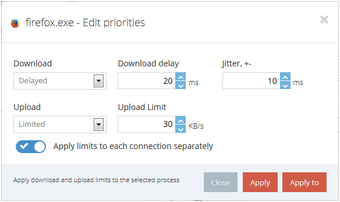
NetBalancer lets users set upload and download priorities or limits for any process. Important applications can be given higher priority, while background apps that consume large amounts of bandwidth can be limited.
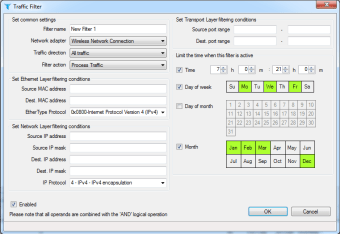
For more advanced control, users can create detailed rules and filters, including time-based rules. The app also supports Deep Packet Inspection (DPI), native IPv6 rules and filters, and geo priorities based on the location of connected sites and servers. These options give technical users strong control, but they may be more than casual users need for basic bandwidth limiting.
Monitoring, statistics, and automation
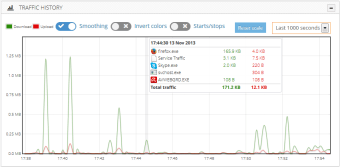
The app shows system processes with their download and upload speeds down to the connection level. It also provides real-time traffic data, charts, statistics, and detailed upload and download history for each process since NetBalancer was first installed.
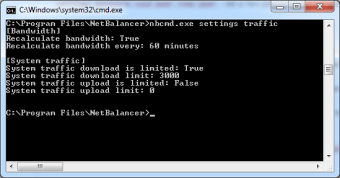
For easier monitoring, NetBalancer can display network traffic and other information through a system tray icon or taskbar toolbar. It also supports command-line commands and Web APIs for automation, along with tags and bulk commands for managing multiple computers.
Privacy, security, and VPN features
NetBalancer includes a VPN service for hiding the user’s IP address, improving online privacy, unblocking internet access, and bypassing restrictions. It also uses encryption for website traffic, sync traffic, internal traffic, passwords, and communications. These privacy and VPN features are separate from the app’s core traffic-control tools, so users should evaluate them based on their specific privacy needs.
Detailed traffic monitoring tool
NetBalancer is a strong option for Windows users who need predictable bandwidth control and detailed traffic visibility. While casual users may find it more advanced than necessary, technical users can benefit from its process-level priorities, rules, filters, monitoring tools, and automation options.


















.png)