Icon of program: ThreatFire

ThreatFire for Windows

  • Free
  • 4
    312
  • 56.4K
  • V4.5.0
Free Download for Windows

View an ad to download for free

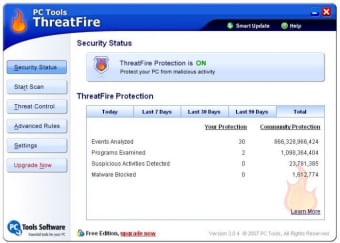
Monitor your PC for suspicious activity

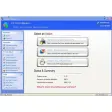
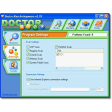
ThreatFire, previously know as CyberHawk, is a pre-emptive anti-spyware monitoring tool that aims to protects you from malware before it gets anywhere near your system.

Top Recommended Alternative

It does this by monitoring the behaviour of your PC in real time to check for strange or irregular behaviour.

This method supposedly offers faster protection as you don't need to wait for an anti-virus signature file to be updated as with conventional antivirus programs.

However, ThreatFire can interpret any kind of new behaviour on your PC as a threat and it can be rather annoying to get warnings and prompts every time you install a new piece of software.

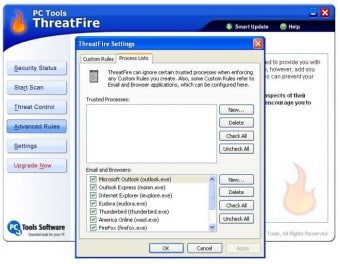
However, you can configure it to "trust" certain activity so you can minimise annoying messages in this way.

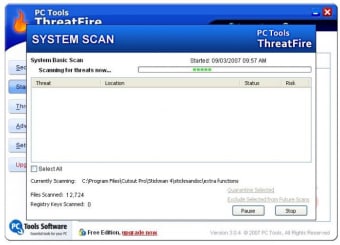
Obviously, ThreatFire monitors your PC in real time, but you can also configure it to run on demand although it seems there's no way of knowing the progress of these scans.

Note that because this program is designed to protect your PC, it can be hard to fully close it down. Even when you've closed the window, it will run in your taskbar and even closing it from there is not clear.

  • Pros

    • Protects your PC before Spyware reaches it
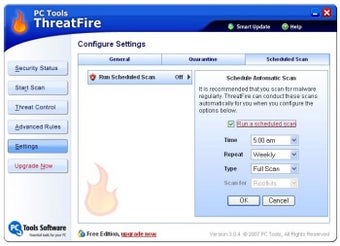
    • Enables you to schedule scans
  • Cons

    • No progress bar during scanning
    • Can interpret normal use as "threatening"
Image
 0/4

App specs

  • License

    Free

  • Version

    4.5.0

  • Latest update

  • Platform

    Windows

  • OS

    Windows 2003

  • Language

    English

  • Downloads

    56.4K

    Last month's downloads

    • 11
  • Size

    7.80 MB

  • Developer

Program available in other languages


Icon of program: ThreatFire

ThreatFire for PC

  • Free
  • 4
    312
  • 56.4K
  • V4.5.0
Free Download for PC

View an ad to download for free


User reviews about ThreatFire

4

2 reviews

Add review

Main reviews for you

  • Image

    Anonymous user

    Great Software to add to your computer. As you are all well aware you should have at least 2 security software and this one is a great addition. I had Internet Security and Spyware Terminator but ST was just pretty horrible. It was really annoying because of frequent pop-ups and i uninstalled it and got this. This software protects against the stuff that most other security software don't pick up. So i recommend it as an additional software.

  • Image

    Anonymous user

    Excellent additional protection. This is a very good security app have. I do not recommend it being yur only app though. It is a good addition to a real antivirus and antispyware app for it uses behavior-based detection as apposed to using only a database. This will definetly protect you from most zero day attacks. I have tested it with fake trojans and it has popped up with warning about the files and give options to quarantine or delete. It has 5 different levels of protection to choose from. It starts off at level 3 which is the recommended level for most users. I normally forget I have it running most of the time. Every once in a while it will popup with a moderate warning about a file that is running. Normally this happens when I install a program and it tries to gain internet access. This doesn't happen often as those kind of detections are referred to as PUAs or Potentially Unwanted Applications. Overall, a great addition to a security setup. Pros: -behavior-based detection-normally not intrusive at recommended protection level-an excellent addition-starts up relatively quickly Cons: -no scan bars of any sort when performing a scan

More

You may also like

Alternatives to ThreatFire

Explore Apps

Related Articles

Latest articles

Laws concerning the use of this software vary from country to country. We do not encourage or condone the use of this program if it is in violation of these laws.
Softonic

Is ThreatFire safe?

Score result: Clean

This file passed a comprehensive security scan using VirusTotal technology. It is safe to download.

  • Virus free
  • Spyware free
  • Malware free
  • Verified by Security Partners

    VirusTotal logo

Scan Info

Last scan
Wednesday, December 2, 2020
Scan provider
VirusTotal

Softonic security commitment

ThreatFire has been thoroughly scanned by our advanced security systems and verified by industry-leading partners. This file comes from the official developer and has passed all our security checks, showing no signs of viruses, malware, or spyware. For more information, visit our Security and Trust Center