
Git-friendly JSON, not opaque database dumps
Choose storage in your child theme, uploads folder, or a custom path. WPChangeSync writes structured files for supported integrations so your site configuration can travel with your codebase.
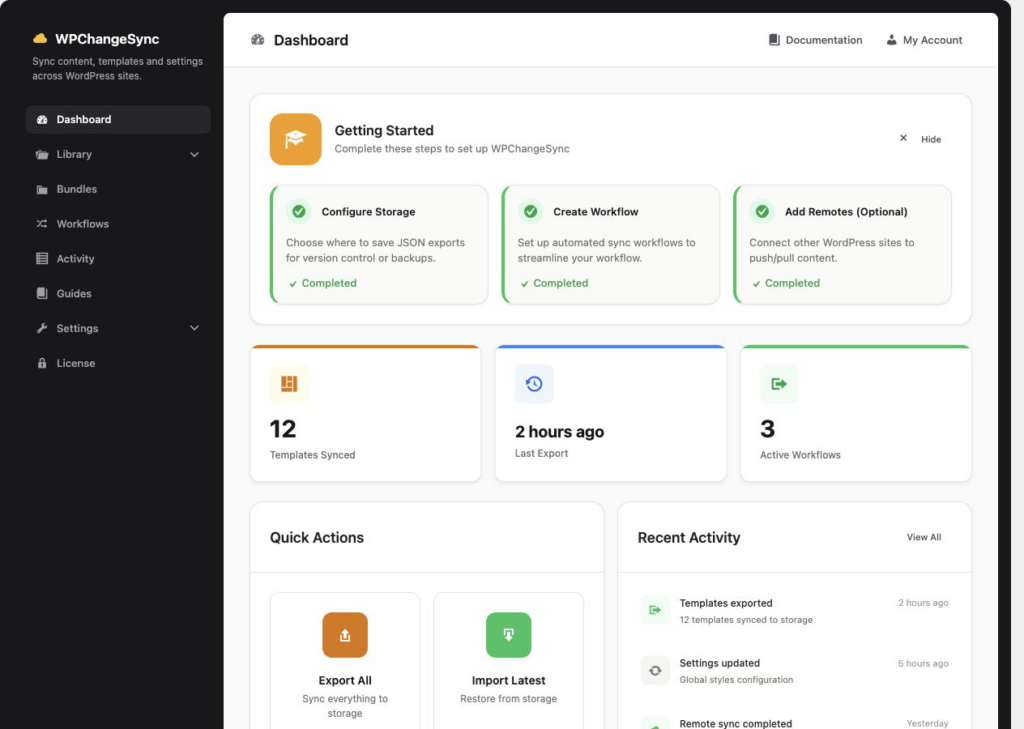
Loading the trailer…
Push selected templates, pages, media, menus, and configuration between environments without manual exports.
Explore use cases →WPChangeSync carries BricksSync forward with stronger template, component, global style, and variable coverage.
Bricks docs →Use workflows, dry runs, approvals, notifications, and activity logs to make releases predictable.
Release guide →Remote groups and batch jobs help you coordinate changes across multisite and distributed WordPress installs.
Multisite guide →Choose storage in your child theme, uploads folder, or a custom path. WPChangeSync writes structured files for supported integrations so your site configuration can travel with your codebase.
Pages, posts, media, menus, widgets, categories, tags, and other supported core entities.
Field groups, custom post type definitions, taxonomies, and plugin-owned configuration.
Templates, components, global styles, variables, colors, custom fonts, and reusable block patterns.
Bricks templates, components, global classes, CSS variables, theme styles, colors, typography, custom fonts, icon fonts, breakpoints, element defaults, sidebars, and custom code can all become part of a controlled workflow.
Export, import, push, pull, version, and roll back Bricks template changes.
Move components by slug/name and preserve references across environments.
Carry colors, classes, typography, CSS variables, custom CSS, and related settings with your build.
Conflict strategies include skip, overwrite, duplicate, newer wins, backup then overwrite, merge, and prompt. Audit logs and backups make high-impact changes traceable and recoverable.
Check scope, targets, and likely outcomes before executing a workflow.
Resolve differences with clear strategies instead of blindly overwriting live data.
Record sync actions, actors, timestamps, targets, results, and export logs when needed.
Combine export, import, push, pull, webhook, shell, approval, notification, and maintenance-mode steps. Run everything, selected items, or a dry run before the real sync.
Require manual approval before production pushes or destructive imports.
Notify when workflows need approval, complete successfully, or fail.
Use WP-CLI commands for templates, components, settings, config, workflows, integrations, and demos.
No native integration yet? Build your own data source in minutes — no code.
Headers, footers, sections, and content templates
Reusable Bricks components
Global settings, palettes, and theme styles
Global CSS classes for consistent styling
Reusable global element presets
Reusable query-loop definitions
Theme style presets
Brand color palette
Typography settings
Variables from the Variable Manager
Global custom CSS
Header and footer scripts
Custom fonts with font-file attachments
Adobe Fonts (Typekit) selections
Icon font libraries
Custom icon sets (Bricks 2.0+)
Responsive breakpoints
Default element settings
Enabled/disabled builder elements
Custom interactive-state classes
Style Manager config (Bricks 2.2+)
Custom widget sidebar definitions
Blog posts with categories, tags, and metadata
Pages with content and metadata
Media library items
Navigation menus and their locations
Post categories with term meta
Post tags with term meta
Sidebar widgets and their configuration
ACF field groups and configuration
CPTs defined via the ACF UI
Taxonomies defined via the ACF UI
Meta Box field groups and settings pages
Advanced Custom Post Types definitions, taxonomies, and meta
ACSS settings, variables, and configs
CoreFramework design tokens
Theme styles, colors, and typography
Panel settings, global classes, and animations
Reusable blocks and patterns
Choose child theme, uploads, or custom storage for generated JSON files.
Authenticate staging, production, or network sites with application passwords and remote groups.
Sync all items or only selected templates, pages, media, field groups, settings, or bundles.
Preview changes, conflicts, missing dependencies, and workflow steps before anything is applied.
Run the workflow, pause for approval when needed, then audit the result.
WPChangeSync helps agencies and technical site owners reduce manual copy work, avoid broad database overwrites, keep client changes reviewable, and reuse the same workflow across local, staging, production, and multisite environments.
Dry-runs, approvals, audit records, and rollback plans make production releases easier to explain to clients and stakeholders.
Once a workflow exists, teams can reuse it for weekly staging pushes, template releases, content moves, and multisite rollouts.
Use selected JSON payloads instead of replacing entire databases when production content has moved on.
Application-password authentication, rate limiting, sanitized input, and safe unserialize for imported data.
Backup-then-overwrite strategies, template version history, and restore paths for high-risk imports.
Remote groups, network settings, locks, retries, failure thresholds, and progress tracking for larger operations.
Checkout, login and account management are handled on my.alterview.net, our secure billing hub.
Contact us for licensing, purchase, or BricksSync migration questions.
Activate your license, configure storage, create your first workflow, dry run, then execute.
Read docs →Push templates, components, settings, and related data to production with a dry run first.
Open guide →Builder-agnostic support, conflict resolution, audit trail, deep export, onboarding, and modern UI.
View changelog →See the WPChangeSync workflow from setup to selected sync, dry-run, remote push, audit, and rollback.
Start tour →Check WordPress/PHP requirements, optional Bricks behavior, supported integrations, and remote prerequisites.
Check stack →