
Download EureScribe – Fast Transcription & Subtitle Tool for Audio & Video
Overview
EureScribe is a purpose‑built transcription software that turns the often‑tedious process of converting audio or video into text into a streamlined, keyboard‑driven workflow. Whether you are a solo journalist, a language‑learning enthusiast, or a post‑production house tasked with creating subtitles for a feature film, EureScribe offers a fast, reliable, and secure way to break down media files into bite‑size chunks that are easy to memorize and type. The core idea behind the application is to eliminate the constant back‑and‑forth between mouse and keyboard, which traditionally slows down transcription speed. By leveraging a rich set of keyboard shortcuts, users can pause, rewind, play, and insert timestamps without ever leaving the main typing window. Once the transcription is complete, the final document can be exported directly to Microsoft Word (RTF) or saved as a subtitle file compatible with most video players. EureScribe supports an extensive array of media formats—including WAV, MP3, WMA, AVI, MPEG, and even full‑disc DVD video—making it a versatile solution for almost any project. The software is available in two editions: Personal, aimed at independent users handling one‑off projects, and Workgroup, designed for collaborative teams that need shared access, version control, and multi‑user licensing. In short, if you need a secure, efficient, and flexible tool to transcribe speech or generate subtitles, EureScribe delivers a professional‑grade experience without the overhead of complex video‑editing suites.
Key Features that Set EureScribe Apart
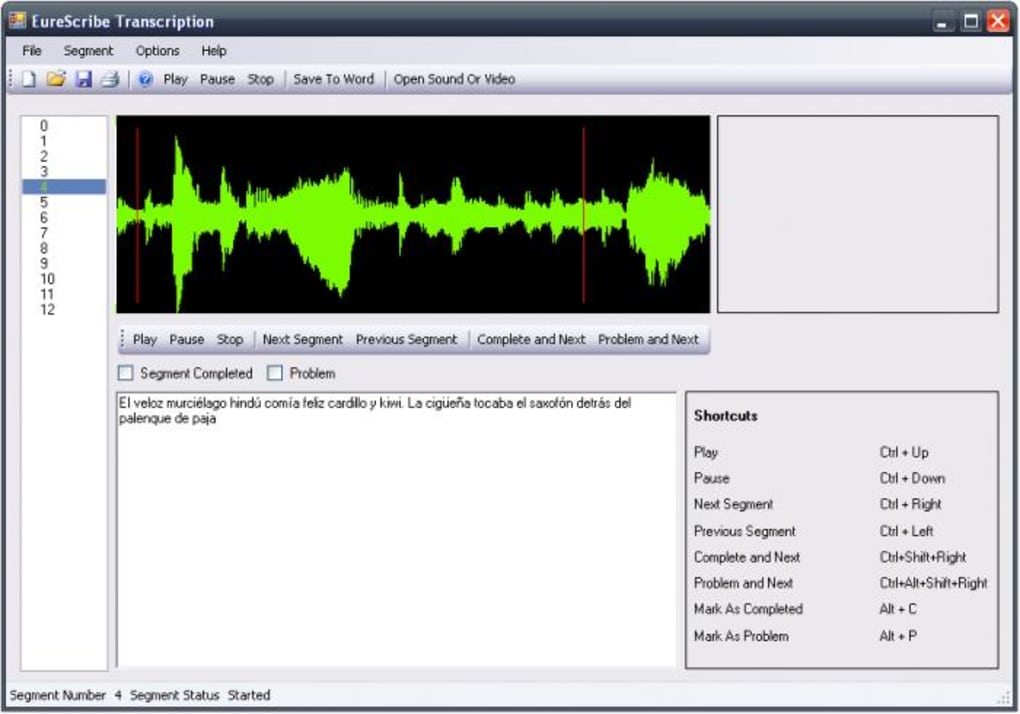
- Keyboard‑Centric Workflow: Over 30 customizable shortcuts let you control playback, insert timestamps, and navigate between chunks without touching the mouse.
- Chunk‑Based Playback: Media files are automatically divided into 5‑second segments (adjustable), enabling you to focus on short, manageable excerpts and improve recall.
- Multi‑Format Compatibility: Native support for WAV, MP3, WMA, AVI, MPEG, and DVD video eliminates the need for external converters.
- Dual Export Options: Save transcripts as Rich Text Format (RTF) for seamless Word editing or export as SubRip (.srt) subtitle files ready for video integration.
- Personal & Workgroup Editions: Choose the edition that matches your workflow—single‑user licensing for freelancers or team‑based licensing with shared project folders for studios.
- Integrated Spell‑Check & Auto‑Correction: Real‑time language tools help maintain accuracy while you type, reducing post‑editing time.
- Secure Project Storage: All files are saved locally with optional encryption, ensuring that sensitive scripts or interviews remain private.
- Automatic Back‑up & Versioning (Workgroup only): Cloud‑synchronised backups keep your team on the same page and protect against data loss.
- Customizable Interface: Adjustable font sizes, colour themes, and layout panes let you tailor the UI to your comfort level.
- Regular Free Updates: The development team releases monthly patches that improve stability, add new formats, and refine shortcut mappings.
Installation & Usage Instructions
Step‑by‑Step Installation
1. Download the Installer: Visit the official EureScribe website and click the Download button for your operating system (Windows 10/11 or macOS 10.15+). The file is signed with a digital certificate, guaranteeing a secure and malware‑free download.
2. Run the Setup: Double‑click the downloaded .exe (Windows) or .dmg (macOS). Follow the on‑screen wizard, accepting the license agreement and selecting the destination folder (default is C:\Program Files\EureScribe on Windows).
3. Choose Your Edition: During installation you’ll be prompted to select Personal or Workgroup. The Personal edition activates automatically after the first launch; the Workgroup edition requires entering a license key provided via email.
4. Complete Installation: Click “Install” and wait for the progress bar to finish. Once done, you can launch EureScribe directly from the desktop shortcut or the start menu.
5. Initial Configuration: On first run, the software asks you to configure default audio chunk length, preferred export format, and shortcut preferences. Save these settings to a profile so you can switch between personal and team configurations instantly.
Basic Workflow for Transcribing
After installation, open EureScribe and load a media file using the File → Open menu or the Ctrl+O shortcut. The program will scan the file and split it into segments based on the chunk length you set (default 5 seconds). Press Space to start playback; the audio will pause automatically at the end of each chunk, giving you a moment to type what you heard. Use Enter to confirm the transcription for the current chunk and automatically advance to the next segment. If you need to replay a segment, hit ← (rewind) or → (forward) to move between chunks without losing your typed text. For timestamps, press Ctrl+T to insert a timecode at the cursor position—ideal for subtitle creation. Once you have completed the entire file, choose File → Export and select either “Word (RTF)” or “Subtitle (SRT)”. The export process preserves all timestamps and formatting, delivering a ready‑to‑publish document or subtitle track. The Workgroup edition adds a “Share Project” button, allowing you to push the file to a shared server where teammates can lock sections, add comments, and merge changes in real time.
Compatibility, System Requirements & Technical Details
EureScribe is built with cross‑platform compatibility in mind. The current stable release runs natively on the following operating systems:
- Windows: Windows 10 (64‑bit) and Windows 11 (64‑bit). Requires .NET Framework 4.8 or later.
- macOS: macOS 10.15 Catalina or newer. Requires the latest version of Apple’s Core Audio and AVFoundation frameworks.
- Linux (Beta): A community‑maintained package is available for Ubuntu 20.04+; however, full feature parity is only guaranteed on Windows and macOS.
Hardware Recommendations: A modern dual‑core CPU (Intel i5 or AMD Ryzen 5) with at least 8 GB RAM ensures smooth chunk processing and rapid file indexing. For video subtitles, a dedicated graphics card is not required, but a fast SSD improves load times for large MPEG or AVI files. The software supports both 32‑bit and 64‑bit audio drivers, making it compatible with most professional sound cards and USB microphones.
Language Support: The UI is available in English, Spanish, French, German, and Mandarin. Transcription itself is language‑agnostic; however, built‑in spell‑check works best with the language selected in the preferences panel.
Pros & Cons, Frequently Asked Questions, and Final Verdict
Pros
- Keyboard‑only workflow dramatically speeds up transcription.
- Supports virtually every major audio and video format.
- Export directly to Word or SubRip subtitle files.
- Two editions cater to freelancers and collaborative teams.
- Secure local storage with optional encryption.
- Regular free updates keep the software current.
- Customizable UI and shortcut set.
Cons
- No native Linux GUI (beta CLI only).
- Workgroup edition price may be high for small studios.
- Learning curve for mastering all shortcuts.
- Requires a modern CPU for handling large HD video files.
FAQ – Your Questions Answered
Can I use EureScribe to transcribe live recordings?
Yes. While the primary design targets pre‑recorded files, you can connect a microphone and capture live audio directly within the app. The chunk‑based playback still applies, allowing you to pause and type in real time.
Is there a trial version available?
A 14‑day fully functional trial is offered for both Personal and Workgroup editions. No credit‑card information is required; simply register with an email address.
How does EureScribe handle encrypted video files?
The software can open DRM‑protected MP4 files if the appropriate codec is installed on the system. However, it does not bypass copy‑protection; you must have legal access to the source file.
Can multiple users edit the same subtitle file simultaneously?
In the Workgroup edition, yes. The built‑in collaboration server locks individual chunks for each user, preventing overlap while allowing real‑time updates and comments.
What export formats are supported beyond RTF and SRT?
Besides RTF and SubRip (.srt), the Pro version also exports to plain text (.txt), CSV for timing analysis, and WebVTT (.vtt) for HTML5 video integration.
Conclusion & Call to Action
If you are serious about turning audio or video into accurate, searchable text, EureScribe provides a focused, keyboard‑centric environment that trims down the time spent on manual transcription. Its flexible export options, robust format support, and the choice between a lightweight Personal edition or a collaborative Workgroup suite make it a compelling choice for freelancers, educators, and post‑production teams alike. The few drawbacks—such as the lack of a full Linux GUI and the learning curve for shortcuts—are outweighed by the productivity gains and the secure handling of sensitive content. Ready to boost your transcription speed and streamline subtitle creation? Download EureScribe today and start a free 14‑day trial—no credit card required.








