

Go to Windows platform Display platforms icon
Go to Windows platform Go to Mac platform Go to Android platform Go to iOS platform
FileZilla icon

FileZilla

3.70.5
Image 4.1 7 reviews
1.3 M downloads
security security

The most used client for uploading files via FTP

Advertisement
Remove ads and more with Turbo
Advertisement
Remove ads and more with Turbo
Alberto García icon
Reviewed by
Alberto García
Developer’s Operations and Support
Alberto García is part of Uptodown's in-house Editorial Team. Translated by Uptodown Localization Team

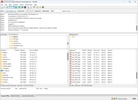
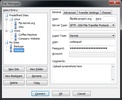
FileZilla is the most commonly used program for uploading files to an FTP server. This tool is open source and completely free, so anyone can use it. It supports protocols such as FTP, FTP over TLS (FTPS) and SFTP. The latter encrypt all content sent to the server, ensuring that no one can intercept the files on their way to the server.

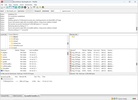
FileZilla lets you configure profiles to upload content to a specific address. You can add parameters such as an IP address, port, username and password. Thanks to this, all you have to do is select that profile and you will be able to manage the files on the FTP server, whether that's a local or external server.

Advertisement
Remove ads and more with Turbo

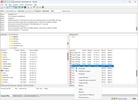
With FileZilla, you can interrupt the download or upload of a file, and resume it later from the exact point you left it. However, the server you are downloading it from must support this function.

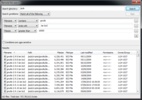
FileZilla is particularly useful for uploading a large number of files or large files, especially those larger than 4 GB, to a server. With this tool, you can take advantage of your connection's maximum speed, as well as set speed limits or IP filters.

If you are looking to upload files to an FTP, SFTP or FTPS server, then try downloading FileZilla.

Information about FileZilla 3.70.5

Basic information

Image Developer Tim Kosse
Image License Free
Image Category FTP
Image Rating Not specified
Image Languages English
5 more

Security and privacy

Image Required permissions Not applicable
Image Advertising Not specified
Image
See security and antivirus report
Image Why is this app published on Uptodown? (More information)

Download info

Image Downloads 1,322,908
Image Date May 11, 2026
Image File type EXE
Image Size 12.12 MB
Image SHA256 8a0c4e23f4c2f130d9651afbc7c265e5a1ce6e106ac60f4d876763971a84b7f6
Advertisement
Remove ads and more with Turbo

Older versions

See more
exe 3.70.4 Apr 22, 2026
exe 3.70.2 Apr 14, 2026
exe 3.70.0 Apr 13, 2026
exe 3.69.6 Feb 13, 2026
exe 3.69.5 Nov 12, 2025
exe 3.69.3 Aug 4, 2025
Available for other platforms

Rate this App

Review the app
FileZilla icon
Image Image Image Image Image

Rating

4.1
5
4
3
2
1
Image 7 reviews

Comments

See more
dangerouswhitedonkey13967 icon
dangerouswhitedonkey13967
Image Image Image Image Image
in 2019

Excellent functionality, as it also provides the option to save data and access it very quickly. Additionally, it is constantly updated.

Image 7
Image Reply
blaieu icon
blaieu
Image Image Image Image Image
in 2014

Hello, I would like to know how to update FileZilla. The thing is that I have version 3.7.3, and in the Edit Menu, I don't have the Settings option. Therefore, I don't know if I need to uninstall this...See more

Image 12
Image Reply
minime icon
minime
Image Image Image Image Image
in 2012

It is reliable, free, and has a very practical site and connection manager. Otherwise, it provides the service you can expect from a complete FTP client, so it's hard to improve.

Image 7
Image Reply
Atacar icon
Atacar
Image Image Image Image Image
in 2010

I use it regularly, and it's very good. Such practical and user-friendly programs are a testimony to the general public of the functionalities of GNU/Linux programs that are paving their way into othe...See more

Image 6
Image Reply
daniel icon
daniel
Image Image Image Image Image
in 2009

It's not the prettiest, nor the fastest, but if I had to count the times it has gotten me out of a jam, I would run out of time. It fulfills its purpose perfectly.

Image 28
Image Reply
svcsec icon
svcsec
Image Image Image Image Image
in 2007

Filezilla Client 3.0 does not have the help file of its predecessor Filezilla version 2.2.32, which, although in English, was an appropriate reference source.

Image 78
Image Reply
See more
Advertisement
Remove ads and more with Turbo
Cyberduck icon
FTP, SFTP client and cloud storage in one
Google Drive icon
Store all your content on the cloud
Fiddler Classic icon
Analysis and optimization of HTTP traffic.
S3 Browser icon
A useful client for Amazon S3
RaiDrive icon
Access your Google Drive files directly from your PC
WinSCP icon
Very safe FTP client
FileZilla Server icon
Transfer your files and don’t worry about privacy
WinSCP Portable icon
Portable version of one of the most secure FTP clients
FormatFactory icon
Conversion between video, sound and image formats
Psiphon icon
Much more than just a VPN
Opencode icon
Open-source AI programming agent
VLC Media Player icon
A powerful media player and streaming server
QOwnNotes icon
Take plain text notes and integrate them into Nextcloud
Open Design icon
Open source design in the style of Claude Design
Pixelle Video icon
Produce videos with the help of AI
SISR icon
Use your Steam Controller however you want
Google Chrome icon
Fast, clean and easy web browsing courtesy of Google
SSuite NetSurfer Prometheus icon
The ultimate browser for modernized web surfing excellence!
WhatsApp Desktop icon
The official WhatsApp app for Windows
Google Chrome Canary icon
Google Chrome version for developers
Uptodown App Store icon
Native Uptodown client for Windows 11
Snap Camera icon
Add fun Snapchat filters to your PC camera
Opera icon
Robust, versatile and customizable browser
Proton VPN icon
Powerful, free, secure and unlimited VPN