

House

Vehicles

Jobs

Skills

Messages

Events

Recipes

Settings

RoTunes

Calendar

Map

Wallpaper

Wordy

Mines


The Settings app contains game options. It is located on the phone's home page.
Options[]

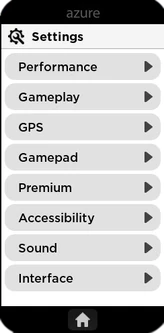
Main Menu
Performance
- Enable custom world textures: Sets whether the world uses custom imported textures
- Enable prop shadows: Sets whether props cast shadows
- Enable world particles: Sets whether particle effects are rendered (occluding weather particles)
- Show framerate: Display average frames per second (FPS)
- Show server framerate: TDisplay average frames per second (FPS) of the server
- Enable Furniture Shadows: Sets whether furniture items in houses cast shadows
Gameplay
- Allow trade requests: Sets whether other players may send you trade requests
- Allow friends to force emotes: Sets whether friends may force you into their emotes
GPS
- Hide minimap: Sets whether the minimap is visible on the screen
- Hide player marker from others: Sets whether other players see you on their GPS
Gamepad
- Enable Haptic Feedback: Sets whether or not haptic feedback will be played via the gamepad
Premium
- Coloured nameplate: Sets whether your nametag is specially colored
Accessibility
- Show Flashing Lights: Sets whether bright lights (potentially epileptic) will be shown. Ex: Police lights.
Sound
- Mute disruptive sounds: Sets whether you can hear disruptive sounds like sirens, doorbells, car radios, and boomboxes
- Mute copyrighted sounds: Sets whether you can hear player-selected music on stereos or other potentially copyrighted audio.
- Mute game music: Sets whether game music is muted
Interface
- Show nameplates: Sets whether character nameplates are visible
- Show player nameplate: Sets whether your own nameplate is visible
- Show character name: Sets whether your character/roleplay name is publicly visible
- Hide hotkeys: Sets whether hotkeys are hidden on UI
- Hide event invites: Sets whether you will receive popups inviting you to events
- Friend invites only: Only receive popup invites to player events hosted by friends
- Show interaction indicators: Sets whether interaction indicators are visible
- Show player menu interaction: Sets whether an interaction is shown for the default player interaction menu (trade & mimic interactions). Other interactions will still be shown
- Always show money: Sets whether your cash amount will always be displayed on the HUD. Otherwise it will only show in shops & during transcations.

