
Скриншоты
Сведения о приложении
- Обновлено
- August 16, 2025
- Требуется
- Chrome
- Лицензия
- Subscription
- Разработчик
- ScreenHelp
- Категория
- Web Apps
О ScreenHelp
Скачать ScreenHelp – Мгновенная AI‑помощь при проблемах с экраном
Обзор
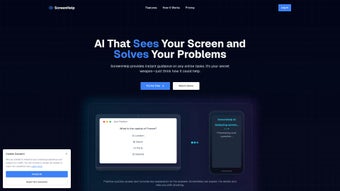
ScreenHelp — это передовое веб‑приложение с поддержкой ИИ, которое предоставляет мгновенную помощь при любой проблеме, связанной с экраном. Будь то застрявший вопрос в тесте с множественным выбором, быстрый подсказка для задачи по программированию или простое уточнение запутанной схемы, ScreenHelp может проанализировать предоставленный вами скриншот и за секунды сгенерировать полезный ответ. Сервис создан специально для образовательных сред, но его гибкость делает его ценным помощником для профессионалов, геймеров и всех, кто регулярно работает с визуальной информацией на компьютере или мобильном устройстве. Одним из самых убедительных аспектов ScreenHelp является его браузер‑ориентированный дизайн: нет необходимости скачивать громоздкие установщики или управлять обновлениями — инструмент работает полностью в облаке, обеспечивая лёгкий и безопасный опыт. Пользователи вызывают помощь, нажимая на настраиваемую комбинацию клавиш, которая захватывает текущий экран, после чего ИИ оценивает изображение, извлекает текст, распознаёт элементы интерфейса и возвращает персонализированный ответ. Для тех, кто предпочитает более постоянное присутствие, лёгкое расширение для браузера размещает плавающую иконку на каждой странице, позволяя вызвать помощь, не покидая рабочий процесс. ScreenHelp предлагает как бесплатный тариф — идеальный для редких запросов, так и подписочный тариф, который открывает более высокие лимиты запросов, приоритетную обработку и расширенные настройки конфиденциальности. Приоритет шифрования данных и анонимизации гарантирует пользователям, что их скриншоты никогда не хранятся постоянно и не передаются третьим сторонам. Короче говоря, ScreenHelp превращает простой скриншот в мощного партнёра по решению проблем, повышая продуктивность, снижая фрустрацию и поддерживая учебный импульс. Кроме того, сервис постоянно получает обновления модели, которые улучшают точность и расширяют поддержку языков, так что вы всегда получаете выгоду от новейших достижений ИИ без какого‑либо ручного вмешательства.
Ключевые функции и что отличает ScreenHelp
Сила ScreenHelp заключается в сочетании передовых технологий компьютерного зрения, бесшовной облачной интеграции и пользователь‑центричного интерфейса. Платформа была разработана для обработки широкого спектра визуальных вводов — от скриншотов учебников и редакторов кода до сложных макетов UI — при этом предоставляя лаконичные, контекстно‑осознанные ответы. Будь то студент, решающий задачу по физике, или разработчик, отлаживающий фрагмент кода, способность инструмента разбирать и понимать визуальные данные в реальном времени выделяет его среди обычных текстовых помощников. Ниже представлен подробный обзор основных возможностей, которые формируют этот опыт.
- AI‑Driven Image Analysis: Uses state‑of‑the‑art computer vision to extract text, code snippets, and UI elements from any screenshot.
- Instant Answers: Generates responses within seconds, cutting down the time spent searching for solutions.
- Keyboard Shortcut Capture: One‑click shortcut (customisable) captures the active screen without leaving your current application.
- Browser Extension: A lightweight add‑on places a persistent help icon on every tab for quick access.
- Cross‑Device Support: Works on a secondary monitor, tablet, or smartphone, letting you view answers on a separate screen.
- Custom Prompts: Users can add context or specific instructions to guide the AI’s response.
- Free & Paid Plans: Free tier offers 10 queries per day; Pro tier provides unlimited queries, faster processing, and priority support.
- Privacy‑First Architecture: Screenshots are encrypted in transit and deleted after processing; no personal data is retained.
- Multi‑Language Support: Recognises and responds in over 20 languages, making it suitable for international students.
- Continuous Updates: As a web‑based service, new features roll out automatically without user intervention.
Плюсы
- Zero‑installation – runs directly in the browser.
- Lightning‑fast response time thanks to cloud AI.
- Highly accurate text extraction, even from low‑resolution screenshots.
- Flexible usage across Windows, macOS, Linux, Android, and iOS browsers.
- Robust privacy safeguards protect sensitive educational content.
- Free tier sufficient for casual learners.
Минусы
- Requires an active internet connection; offline use is not supported.
- Free tier limits daily queries, which may be restrictive for power users.
- Complex coding problems sometimes need manual clarification beyond AI’s scope.
- Performance may vary on heavily congested networks.
ScreenHelp delivers a remarkably smooth experience for anyone who frequently needs on‑the‑fly help with visual content. Its AI is surprisingly adept at parsing code and academic diagrams, and the browser‑first approach eliminates the hassle of constant updates. While the free tier’s query cap may feel limiting for heavy users, the Pro subscription is reasonably priced and unlocks a truly unlimited workflow. Overall, it’s a valuable addition to any student’s or professional’s toolkit.
Начало работы: установка, использование и совместимость
Because ScreenHelp is a web‑based solution, there is technically no “installation” in the traditional sense. The first step is to navigate to https://screenhelp.io using a modern browser such as Chrome, Firefox, Edge, or Safari. Once on the homepage, click the “Get Started” button to create a free account or sign in with an existing Google or Microsoft ID. After authentication, the dashboard appears with a brief tutorial that explains how to configure the keyboard shortcut that will capture your screen. By default, the shortcut is set to Ctrl + Shift + S (or Cmd + Shift + S on macOS), but you can modify it in the settings panel to avoid conflicts with other applications.
To capture a screenshot, simply press the configured shortcut while your focus is on the content you need help with. A semi‑transparent overlay appears, indicating that the image is being processed. Within a few seconds, the AI‑generated answer is displayed in a side panel that can be docked on the left or right side of the browser window. If you prefer a more discreet workflow, click the “Hide Panel” icon; the answer will then be sent to your secondary device via the companion mobile app or a linked tablet, allowing you to keep your primary screen uncluttered.
For power users who want instant access without leaving the current tab, install the optional browser extension. The extension is available in the Chrome Web Store and Firefox Add‑ons marketplace. After adding the extension, a small “Help” icon appears next to the address bar. Clicking the icon opens the same capture dialog, and the extension also remembers your preferred language and prompt settings, streamlining repeated queries.
Compatibility: ScreenHelp runs flawlessly on any device that supports a modern HTML5‑compatible browser. This includes Windows 10/11, macOS Ventura and later, most Linux distributions (Ubuntu, Fedora, etc.), as well as mobile browsers on Android 8.0+ and iOS 13+. Because the service is cloud‑hosted, hardware requirements are minimal—any device capable of running a browser with JavaScript enabled will work. The only prerequisite is a stable internet connection; the platform automatically selects the nearest data centre to minimise latency.
After your first few queries, you may want to explore advanced settings such as “Custom Prompt Templates,” which let you prepend a specific instruction (e.g., “Explain this concept as if I were a beginner”) to every request. These templates are stored in your user profile and synced across devices, ensuring a consistent experience whether you are on a laptop, tablet, or phone. Finally, if you decide to upgrade to the Pro tier, the upgrade process is handled entirely within the web dashboard—just select “Upgrade,” choose a payment method, and enjoy unlimited queries and priority processing instantly.
Часто задаваемые вопросы
Below you will find answers to the most common queries from new and seasoned users alike. If you have a question that isn’t covered here, the support team is reachable directly from the dashboard, and the community forum often contains helpful tips from fellow users.
Is ScreenHelp really free to use?
Yes, ScreenHelp offers a free tier that includes up to 10 AI‑generated answers per day. This is sufficient for occasional students or casual users. For heavy users, a paid subscription removes the daily limit and adds premium features such as faster processing, unlimited queries, and priority support.
How does ScreenHelp protect my privacy?
All screenshots are transmitted over TLS‑encrypted connections and are automatically deleted from our servers within minutes of processing. No personal data is stored, and we never share images with third parties. The platform also offers an optional “no‑log” mode for added peace of mind.
Can I use ScreenHelp offline?
Because the AI engine runs in the cloud, an active internet connection is required for every query. Offline use is not currently supported, but the developers are exploring a lightweight on‑device model for future releases.
Which browsers are supported?
ScreenHelp works with the latest versions of Chrome, Firefox, Edge, and Safari on both desktop and mobile platforms. Older browsers may experience reduced performance or lack support for certain UI features such as the capture overlay.
How do I upgrade to the Pro plan?
Log into your ScreenHelp dashboard, click the “Upgrade” button, choose a subscription term (monthly or annual), and complete the payment using a credit card or PayPal. Your account is upgraded instantly, and you’ll notice the higher query limits and priority processing right away.
Заключение и призыв к действию
In a world where knowledge is just a screenshot away, ScreenHelp stands out as a reliable, secure, and remarkably fast AI companion. Its browser‑first architecture eliminates the friction of downloads, while the powerful image‑recognition engine delivers accurate answers for quizzes, coding tasks, and visual problems. Whether you are a high‑school student juggling multiple assignments, a university researcher needing quick clarification, or a developer looking for instant code snippets, ScreenHelp adapts to your workflow and keeps you moving forward. The free tier provides ample opportunity to test the service, and the reasonably priced Pro plan removes limits for power users who demand uninterrupted assistance. By prioritising privacy, cross‑platform compatibility, and an intuitive user experience, ScreenHelp earns its place as a must‑have tool in any digital learning or productivity arsenal.
Ready to experience instant AI help without the hassle of installations? Visit ScreenHelp now, create your free account, and start solving problems with a single keystroke. Boost your productivity, reduce study stress, and keep the momentum going—download ScreenHelp today and join the growing community of users who rely on smart visual assistance to achieve their goals.
Руководства и уроки
Как установить ScreenHelp
- Нажмите кнопку Скачать выше.
- После перенаправления примите условия и нажмите Установить.
- Дождитесь завершения загрузки ScreenHelp на ваше устройство.
Как использовать ScreenHelp
Это ПО в основном используется для основных функций, описанных выше. Откройте приложение после установки, чтобы изучить его возможности.
Отзывы пользователей
Отзывов пока нет. Поделитесь своим опытом первым.
Вам также может понравиться
еще
3D AI Studio
3D AI Studio Overview 3D AI Studio is a web-based AI-powered tool developed by S...

3D textures by Polycam
Generate Realistic 3D Textures Effortlessly 3D Textures by Polycam is an innovat...

3DAiLY
Customizable 3D Modeling Tool: 3DAiLY 3DAiLY is an online platform that harnesse...

3DFY
Revolutionizing 3D Model Creation: 3DFY Review 3DFY is an AI-powered service, de...

AI Dungeon
AI Dungeon: Deep Learning Text Adventure AI Dungeon is an artificial intelligenc...

Alpha3D
A subscription-based program for Web apps, by alpha3d. Alpha3D is a subscription...
