

Download Transmit – Premium FTP client for Mac, secure file transfer, cloud sync
Transmit is Panic’s flagship FTP client built from the ground up for macOS. It blends a native‑look Mac interface with powerful protocols such as FTP, SFTP, WebDAV, Amazon S3, Backblaze B2, Dropbox, Google Drive, Box and many more. After a generous seven‑day free trial, users can purchase a single‑payment license that unlocks all current and future features. Whether you’re a web developer pushing code to a remote server, a designer syncing large media libraries, or an IT admin managing backups across multiple cloud providers, Transmit delivers fast, reliable, and secure transfers. The dual‑pane layout, drag‑and‑drop support, and built‑in Panic Sync make everyday file management feel as intuitive as using Finder, while the new batch‑rename, remote‑to‑remote sync, and detailed “Get Info” sidebar give power‑users the control they need.
Key Features that Set Transmit Apart
- Broad protocol support: FTP, FTPS, SFTP, WebDAV, Amazon S3, Backblaze B2, Dropbox, Google Drive, Box, DreamObjects, and iDisk.
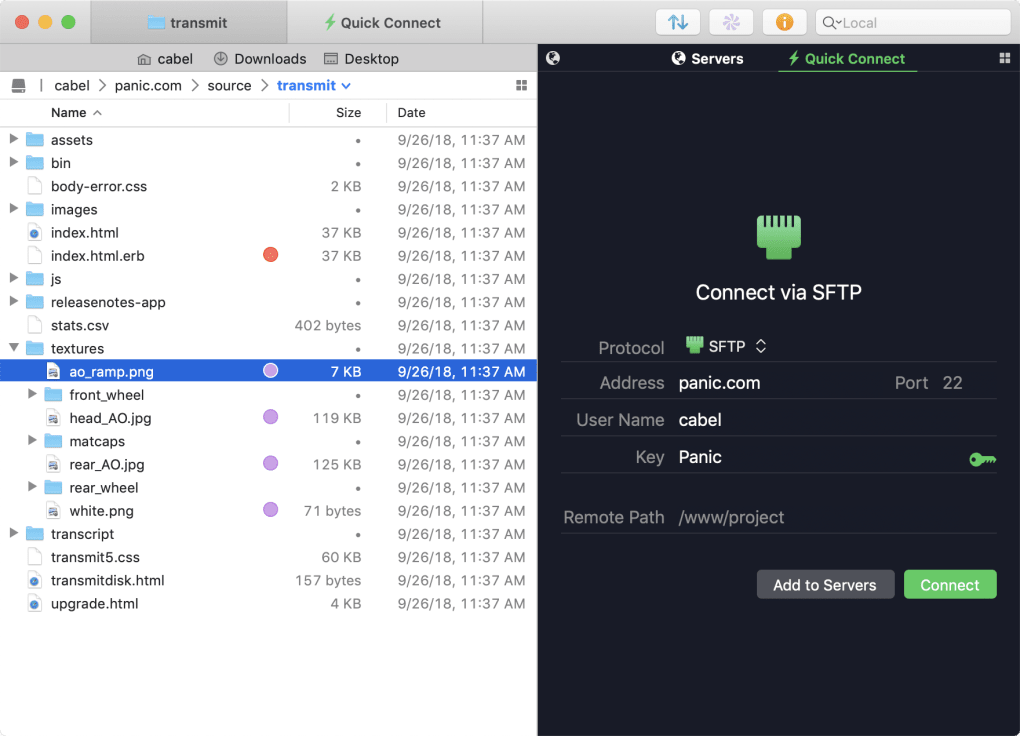
- Dual‑pane, Mac‑native UI: Folders on the left, transfer queue on the right, with native macOS look‑and‑feel.
- Panic Sync: Instant, end‑to‑end encrypted sync between your local machine and remote sites.
- Finder integration: Mount any FTP/SFTP location as a virtual drive directly in Finder.
- Batch rename tool: Rename dozens of files with pattern‑based rules in seconds.
- Remote‑to‑remote sync: Transfer files directly between two remote servers without routing through your Mac.
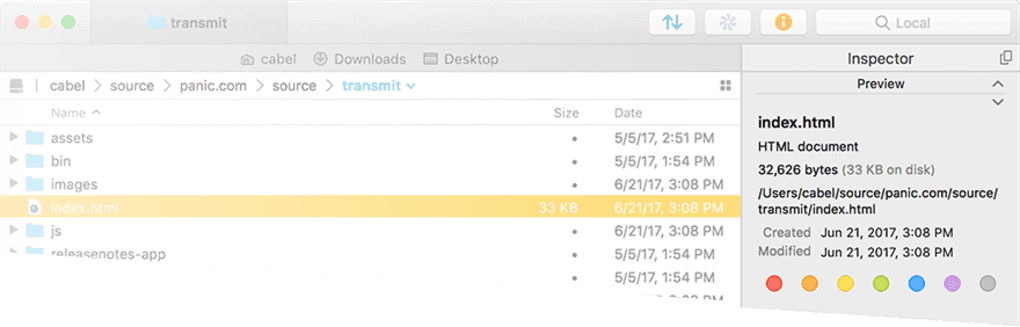
- Get Info sidebar: Detailed file metadata, permissions, and quick‑action buttons appear with a single click.
- Secure key management: Generate, import, and store SSH keys without leaving the app.
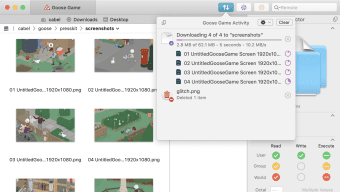
- Notification Center support: Real‑time transfer progress and alerts appear in macOS Notification Center.
- Retina‑ready graphics: Crisp icons and UI elements on all modern Mac displays.
Installation, First‑Run Setup & Compatibility
Installing Transmit on macOS is straightforward. Download the .dmg file from Panic’s official website, drag the Transmit icon into the Applications folder, and launch the app. On first launch, macOS will prompt you to confirm that the app is from an identified developer – simply click “Open.” The built‑in trial timer starts automatically, giving you a full seven days of unrestricted access.
Step‑by‑step usage guide:
- Create a new connection: Click the “+” button in the upper‑left pane, select the desired protocol (e.g., SFTP), and fill in the host, username, password, and optional SSH key.
- Save as a favorite: After a successful connection, click the star icon to add the site to your Favorites bar for one‑click access.
- Transfer files: Drag files from your local pane to the remote pane (or vice‑versa). Use the “⌘+I” shortcut to open the Get Info sidebar for quick permission edits.
- Batch rename: Select multiple items, right‑click and choose “Batch Rename.” Define a pattern, preview changes, and apply.
- Remote‑to‑remote sync: Open two connections in separate tabs, select source files, then choose “Sync to Remote” from the context menu.
- Sync with Panic Sync: Enable Panic Sync in Preferences → Sync, choose the remote site, and let the background daemon keep your files mirrored.
System requirements: macOS 10.13 (High Sierra) or later, Intel or Apple Silicon (native universal binary), at least 200 MB of free disk space, and an internet connection for remote transfers. The app runs flawlessly on Retina displays and fully supports macOS features such as Dark Mode, Touch Bar, and Notification Center.
Pros and Cons – A Balanced Review
Pros
- Extremely polished macOS‑centric UI that feels native.
- Wide range of supported cloud services and protocols.
- Powerful batch rename and remote‑to‑remote sync capabilities.
- Built‑in Panic Sync provides secure, instant synchronization.
- Finder integration lets you treat remote locations like local drives.
- Regular updates improve stability and add modern features.
Cons
- One‑time license cost may be a barrier for casual users.
- Preferences window occasionally freezes on older macOS versions.
- No native Windows or Linux client – macOS‑only focus.
- Advanced features (e.g., remote‑to‑remote) require a learning curve.
- Limited free tier – after the 7‑day trial, functionality is locked.
Frequently Asked Questions
Is Transmit compatible with Apple Silicon Macs?
Yes. Transmit ships as a universal binary, so it runs natively on both Intel‑based and Apple Silicon Macs without any performance penalty.
Can I use Transmit to transfer files between two remote servers?
Absolutely. The remote‑to‑remote sync feature lets you open two connections in separate tabs and copy or sync files directly between them, bypassing your local machine.
What happens after the 7‑day free trial ends?
After the trial, Transmit enters a limited mode where you can still view connections but cannot initiate transfers. Purchasing the one‑time license restores full functionality.
Does Transmit support encrypted transfers?
Yes. It supports FTPS, SFTP, and WebDAV over HTTPS, as well as encrypted cloud protocols like S3 with SSL/TLS. All credentials and keys are stored securely in the macOS Keychain.
Can I mount an FTP site as a drive in Finder?
Yes. Using the “Mount as Disk” option, Transmit creates a virtual volume that appears in Finder, allowing drag‑and‑drop file operations just like any external drive.
Conclusion – Should You Download Transmit?
Transmit continues to be the benchmark for macOS‑only FTP clients. Its combination of a beautiful native interface, robust protocol coverage, and advanced tools such as batch rename, remote‑to‑remote sync, and Panic Sync make it a powerful ally for anyone who works with remote files on a daily basis. While the one‑time purchase price may give some pause, the longevity of the app—regular updates, Retina‑ready graphics, and deep macOS integration—delivers excellent value over time. If you need a secure, fast, and feature‑rich file‑transfer solution that feels right at home on your Mac, download Transmit today, take advantage of the 7‑day trial, and experience why developers and designers have trusted Panic for more than a decade.








