ID
ID  EN
EN  ES
ES  DE
DE  PT
PT  IT
IT  JA
JA 6 Best Ninja Forms Alternatives in 2026 (Free & Pro Compared)
Ninja Forms plugin is useful until you need features like conditional logic and file uploads. The moment you need those, you need add-ons. And if you want to accept Stripe payments, you also need another add-on.
That add-on model and pricing pattern is the reason most users look for Ninja Forms alternatives. The free version covers unlimited submissions, 28+ field types, and spam protection. Everything past that, from file uploads, multi-step forms, to sending leads to HubSpot or Salesforce, sits behind a higher plan.
That’s why the cost adds up very fast as the requirements grow. Also, the first-year discount only applies once, so you pay full price at renewal. On top of that, you don’t get any lifetime deal.
None of this makes Ninja Forms a bad plugin. It just means “free” only covers the basics, so it’s worth checking what you’d actually pay for the features you need. So here are the 6 best alternatives to Ninja Forms, with what they do better, their drawbacks, and more. Let’s hop in.
Ninja Forms Alternatives Compared at a Glance
This table highlights the main differences between the six alternatives. Use it to narrow down your options, then check the official pricing page for the features you need.
| Tool | Main strength | Free starting option | Check before choosing |
| Bit Form | Advanced WordPress forms and flexible pricing | Ya | Advanced features and payment integrations require a paid plan. |
| Fluent Forms | Broad form features and integrations | Ya | Check Pro requirements for specific integrations and advanced workflows. |
| Formidable Forms | Calculators and data-driven applications | Ya | Check which plan includes the advanced features you need. |
| MetForm | Visual form building with Elementor | Ya | Elementor is required, and some features need a paid plan. |
| Formulir Everest | Everyday forms and beginner-friendly setup | Ya | Confirm whether conditional logic and other advanced features require an upgrade. |
| FormulirPembayaran.io | Hosted payment forms | Ya | Check gateway support and whether you need a general-purpose form builder. |
Why Are People Looking for Alternatives to Ninja Forms?
Ninja Forms gives you a solid starting point, but the free version may not cover everything you need. Conditional logic, file uploads, multi-step forms, and Stripe payments require paid add-ons or plans. If your forms need several of these features, the setup can become more expensive than you first expected.
Now, let’s learn some of the key reasons why people look for alternatives to Ninja Forms.
- Features are split across tiers. If you need to create conditional logic forms, formulir bertahap, collect files, accept payment, style your forms, or route submissions to a CRM, first you’ll need to check how many add-ons or which plan covers them. Ultimately, the cost spikes up too quickly.
- The free version is limited. It includes useful basic form features, such as form fields, unlimited submissions, entry management, notifications, and spam protection. But if you need conditional logic, file uploads, or payment integrations, you’ll need to upgrade. That can be a limitation for small businesses that want more advanced forms without committing to a paid plan.
- The first-year discount fades. The discount is only for the first year; users need to renew at the full price.
- There’s no lifetime option. The pricing page lists yearly subscriptions only.
So is Ninja Forms too expensive? Not for a simple site. It gets expensive when your forms need several paid features at once. The next section puts a number on that.
How Much Does the Same Form Cost on Ninja Forms and Its Alternatives?
Comparing plugin prices is messy. One plugin lists features by plan, another by add-on, and a third by number of sites. So to keep things fair, we priced one form on every tool in this list.
The benchmark form: a quote request form for a single website. It shows extra fields depending on the service a visitor picks (conditional logic), lets them upload a file, and collects a deposit through Belang. It’s an everyday form for freelancers, small businesses, and agencies, and it uses the exact features Ninja Forms charges extra for.
On Ninja Forms, that form needs the Pro plan, which is $119.40 (for the first year). Plus covers the logic and the file upload, but Stripe isn’t included until Pro.
What Does Ninja Forms Give You for Free, and Where Do the Paywalls Start?
The free core handles the basics. Here’s where each paid plan picks up.
| Rencana | Sites | Year 1 | Regular price | What it adds |
| Core (free) | Any | $0 | $0 | Unlimited submissions, 28+ fields, calculations, spam protection, and more. |
| Plus | 3 | $59.40 | $99 | Everything in Core, and Conditional logic, file uploads, multi-step forms, layout and styles, conversational forms, PayPal, and email marketing tools |
| Pro | 20 | $119.40 | $199 | Everything in Plus, and Stripe, Authorize.net, Elavon, HubSpot, Salesforce, Zoho CRM, Zapier, Save Progress, and more. |
| Elite | Unlimited | $299.40 | $499 | Every add-on, feature, and integration |
A few details are easy to miss.
Stripe lives in Pro, not Plus. A lot of people buy Plus for conditional logic, then find out they need to move up again just to take a payment.
The discount is a first-year offer. The discount applies once; the license auto-renews each year, and the renewal is at full price. If you cancel, your add-ons keep working, but updates and support stop.
You can buy single add-ons, too. You don’t have to take a plan. For example, File Uploads is sold separately for $49 a year for one site. If that’s the only thing you need, price it on its own before you upgrade.
When staying makes sense. If the free core already covers your forms, there’s no reason to switch. The same goes if you only need one add-on. A single Pro license also covers 20 sites, which is a real advantage if you run several client sites. And if you depend on Elavon or a native Salesforce connection, check that the plugin you’re moving to supports them before you leave.
Six Alternatives, One Benchmark Form: What Does It Cost on Each?
Three things to keep in mind when you read this table.
First, intro price versus regular price. Formidable Forms says renewals are at full price, and Ninja Forms and Everest Forms state their renewal rates on their pricing pages. Bit Form renews at the same purchase price. So confirm renewal terms at checkout.
Second, site count. Ninja Forms Pro covers 20 sites. If you manage a lot of client sites, divide each price by the number of sites before you decide. Or, you can opt for plugins that offer an unlimited sites option.
Third, payment fees. Formidable’s Basic plan adds a 3% fee on payments, and Fluent Forms’ free Stripe takes 1.9%, which is removed on upgrading.
Which Ninja Forms Alternatives Include Every Feature in Every Plan?
Three of them: Bit Form, Fluent Forms, and Everest Forms. You pay for a starting plan, and every feature comes with it, so there’s no buying add-ons one by one. The real difference is where the free version stops, so that’s worth comparing first.
1. Bit Form

Bit Form is a simple drag-and-drop WordPress form plugin that can handle everything from simple contact forms to complex forms like multi-step, calculator, and payment forms. It comes with 50+ field types, unlimited forms and submissions, built-in spam protection and email notifications, so you don’t need extra plugins for the basics. There’s a generous free version which includes unlimited forms, 50+ integrations, conditional logic and more, and a Pro version for advanced features like payments and PDF generation. The pricing plan is affordable, which makes it suitable for growing businesses.
What Bit Form does better than Ninja Forms:
- More useful features in the free version, like multi-step forms, logika kondisional, dan file uploads, are all included. Unlike Ninja Forms, where all three are in the Plus plan.
- Free integrations. The free version connects to 50+ apps, including Google Sheets, Mailchimp, HubSpot, and Zoho tools. On Ninja Forms, HubSpot starts at Pro.
- One paid plan, every feature. There are no add-ons and no tiers to decode. Every premium plan includes payments, PDF generation, form abandonment, front-end entry editing, and email OTP verification- every feature. You can see the full split on the free vs pro page.
- Affordable starting price and Lifetime deals. The paid plans start at $25/year for one site. In contrast, Ninja Forms’ pricing page lists annual plans only.
Worth knowing: The template library is not so big; it is growing. And payment integrations are available on Pro plans, so the free version won’t fix a Stripe problem. Gateways Bit Forms supports are PayPal, Stripe, Mollie, and Razorpay.
Harga
| Rencana | Tahunan | Seumur hidup | No of sites |
| Starter | $25 | $99 | 1 |
| Agen | $79 | $169 | unlimited |
2. Fluent Forms

Fluent Forms is another Ninja Forms alternative with a visual builder from WPManageNinja. Since it also has a drag-and-drop interface, for creating web forms you don’t have to write code. It is known for its fast performance, surveys, quiz builder, and conversational forms. It features a built-in data reporting dashboard to analyze submissions and seamlessly connects with over 60 marketing platforms, CRMs, and automation tools like Mailchimp, HubSpot, and Zapier.
What Fluent Forms does better than Ninja Forms:
- More generous free version than Ninja Forms. Fluent Forms includes conditional logic, visual styling, conversational forms, and Stripe integration in Free. Ninja Forms requires paid add-ons for comparable features, with Stripe included in Pro rather than Plus.
- Every paid license has the same features, similar to Bit Form. Plans differ by the number of sites, not by what’s unlocked.
- Supports more payment gateways than Ninja Forms
Worth knowing: Multi-step forms, file uploads, save and resume, and the HubSpot and Salesforce integrations sit in Pro. Fluent Forms also says it ships a Ninja Forms migrator inside the plugin, so it’s worth testing on a staging site if you have a lot of existing forms. Although Stripe integration is free, it charges a 1.9% transaction fee for payments.
Harga
| Rencana | Tahunan | Seumur hidup | No of sites |
| Single site license | $63 | $279 | 1 |
| Agency license | $127 | $479 | 5 |
| Unlimited license | $239 | $719 | unlimited |
3. Everest Forms
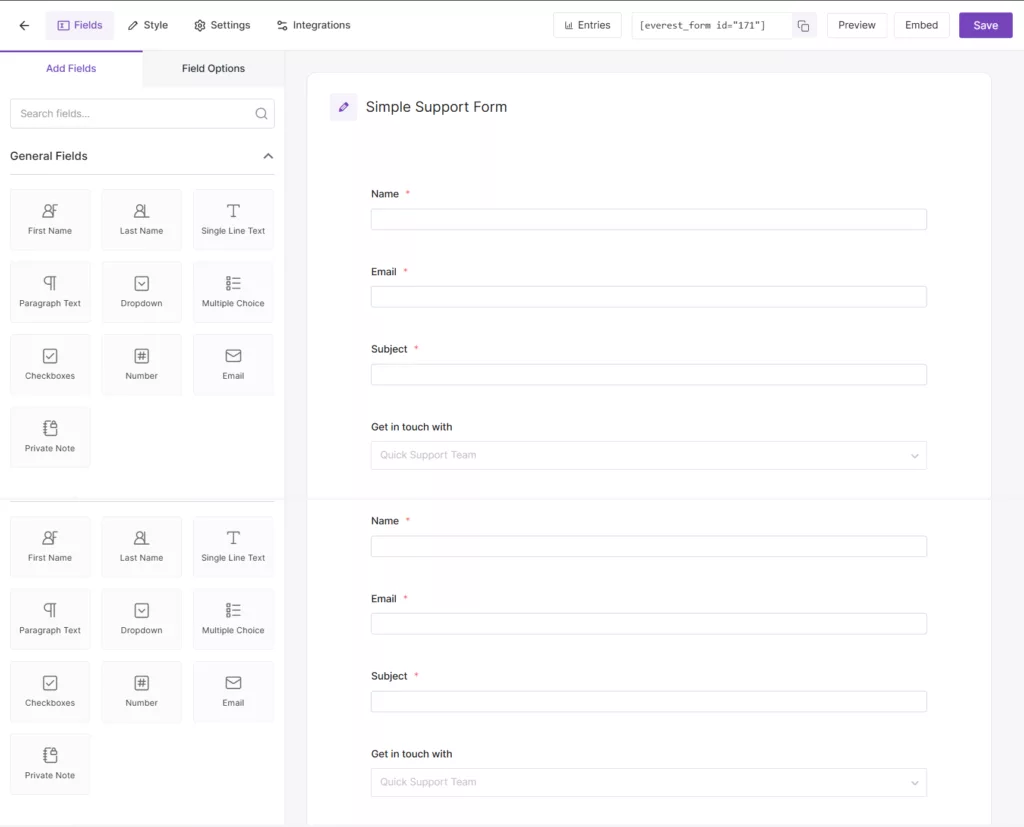
If you want an AI-powered alternative to Ninja Forms, then try Everest Forms. It simplifies the entire form-building ecosystem by handling everything from basic lead capture to complex backend workflows directly inside the WordPress dashboard. Its free plugin includes an AI form builder that creates a form from a plain-English description. Paid plans carry the same features and differ only by the number of sites. Moreover, it comes with 35+ custom form fields, conditional logic, multi-step layouts, and entry management and analytics right inside your CMS.
What Everest Forms does better than Ninja Forms:
- One feature set at every price. Conditional logic, multi-step forms, payments, surveys, and CRM connections come with every paid plan. There’s no plan-by-plan feature list to decode.
- Free file uploads. File uploads are in the free plugin, but Ninja Forms needs Plus.
- More gateways and CRMs from the first paid plan. It lists Stripe, PayPal, Square, Razorpay, Mollie, and Authorize.Net, plus HubSpot and Salesforce. On Ninja Forms, Stripe, Authorize.net, HubSpot, and Salesforce start at Pro (second paid plan).
- A built-in free AI form builder. You describe the form in plain English and it builds one, even in the free plugin.
Worth knowing:
- Logic and payments aren’t free. Conditional logic and payments are Pro features.
- Renewals cost more. Personal plan is $49 the first year and $69 after that, so the benchmark form costs $49 in year one.
- Smaller user base. 90,000+ active installs on its own page, against 500K+ for Ninja Forms.
Harga
| Rencana | Tahunan | Seumur hidup | Sites |
| Pribadi | $49 / year | $199 one-time | 1 Situs |
| Plus | $99 / year | $399 one-time | 5 Situs |
| Agen | $199 / year | $799 one-time | Situs Tanpa Batas |
Which Ninja Forms Alternatives Keep Tiered Plans but Offer More in the Cheapest One?
Not every builder puts everything in one license. Formidable Forms dan MetForm keep tiered plans, as Ninja Forms does, but their cheapest paid plans already include features Ninja Forms sells in Plus. The catch is that each tier still holds back something, so check which one your form needs before you compare prices.
4. Formidable Forms

If you want to build calculators and data-driven forms, go for Formidable Forms. This alternative works a bit differently from other form builders; others focus mainly on collecting info. Formidable Forms uses the submitted data to build calculators, directories, data displays, and other interactive features on your WordPress site. For example, you can create a quote calculator that estimates project costs from a visitor’s answers or use submitted data to populate a searchable directory.
Where it stands out: Formidable Forms is worth considering if your forms need to calculate values or turn submissions into something visitors can use. Its Views feature is particularly useful for displaying submitted data on the front end without writing custom code.
What to consider: Some of its most distinctive features, including advanced Views and calculators, require higher-tier plans. If you only need contact forms and lead capture, you may not need that extra functionality.
Best for: Businesses and developers building calculators, quote forms, directories, and data-driven WordPress applications.
What Formidable Forms does better than Ninja Forms:
- With Formidable Views, you can display form entries directly on your website as searchable directories, calendars, listings, or user dashboards, something Ninja Forms cannot do natively.
- Both plugins support calculations, but Formidable Forms offers more tools for data-driven applications, including advanced calculator templates and front-end Views for displaying results and submissions in directories, dashboards, and other interactive applications.
- Accept Stripe payments di versi gratis. On Ninja Forms, PayPal starts at Plus and Stripe at Pro.
Worth knowing:
- File uploads are free; conditional logic requires a paid plan. Formidable Forms Lite includes file uploads, while Basic adds conditional logic. Higher plans unlock Views, specialized calculators, and more advanced workflows.
- Intro pricing and fees. The 50% first-year discount renews at full price. Basic and Plus take a 3% fee on payments.
- Tiers still apply. You get surveys, quizzes, calculator forms, PDFs, form abandonment, and Zapier starting at the Business plan. HubSpot and Salesforce are Elite-only.
Harga
| Rencana | Tahunan | Seumur hidup | Sites |
| Dasar | $39.50 / year | Not Available | 1 Situs |
| Plus | $99.50 / year | Not Available | 3 Situs |
| Bisnis | $199.50 / year | Not Available | 7 Sites |
| Elite | $299.50 / year | Not Available | Situs Tanpa Batas |
Which Alternatives to Ninja Forms Work Best With Elementor?
5. MetForm
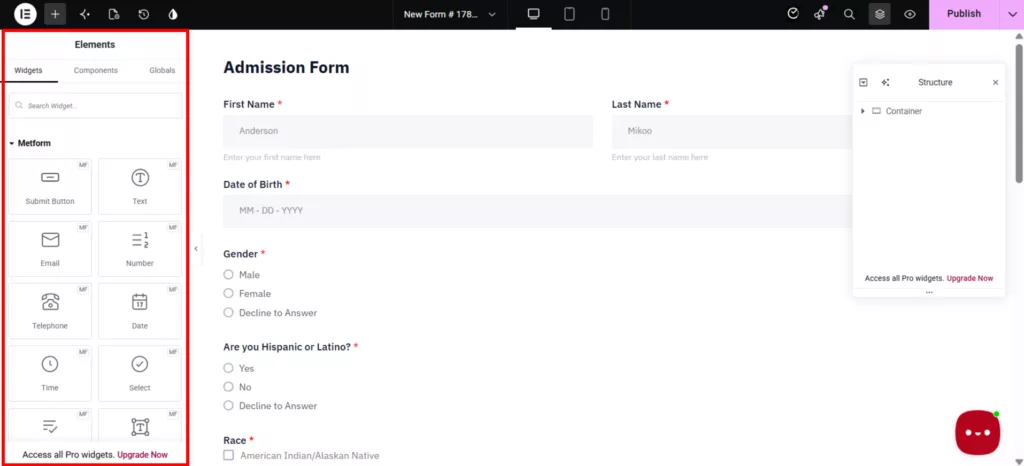
Now, if you want an Elementor-based alternative, then this option is for you. MetForm is a form builder add-on for Elementor, made by Wpmet. Basically, you build forms as Elementor widgets with a live preview, so there’s no separate form builder screen. You can create contact forms, lead generation forms, surveys, quizzes, and multi-step forms. Its broader feature set also includes conditional logic, calculations, file uploads, payment integrations, and connections to tools such as HubSpot and Google Sheets.
Where it stands out: The main advantage is its close integration with Elementor. You can control the form’s layout and appearance alongside the rest of your page, which is useful when you want the form design to match a custom landing page.
What to consider: MetForm requires Elementor, so it may not be the right choice if you use the WordPress block editor or another page builder. Also, check the plan requirements for conditional logic, calculations, and payments before switching.
Best for: Elementor users who want visual control over their forms and page layouts.
What MetForm does better than Ninja Forms:
- It lives inside Elementor. You can control the form’s layout and appearance alongside the rest of your page, without a separate form builder interface that Ninja Forms need.
- Free file uploads and HubSpot. File uploads and the HubSpot integration are both in the free version. On Ninja Forms, uploads start at Plus and HubSpot at Pro.
- MetForm lets you manage submissions directly from WordPress. Ninja Forms also includes built-in entry management, searching, filtering, editing, and CSV exports. MetForm’s main advantage is its Elementor-based form-building experience rather than submission management.
- A lifetime license is available.
Worth knowing:
- Elementor is required. If you don’t use it, MetForm isn’t an option.
- If you want Stripe and PayPal integration, you need to purchase the Professional tier.
- Calculations are paid. Ninja Forms includes calculations in the free core. On MetForm, they start at Professional.
- If you don’t renew, you keep using the plugin, but you stop getting updates and support.
Pricing Tiers
| Rencana | Tahunan | Seumur hidup | Sites |
| Pribadi | $41 / year | $124 one-time | 1 Situs |
| Profesional | $89/ year | $249 one-time | 5 Situs |
| Agen | $174/ year | $337 one-time | Situs Tanpa Batas |
Is There a Ninja Forms Alternative If You Only Need to Collect Payments?
Sometimes it’s all about collecting payment. If you need a donation page, a ticket checkout, or a simple order form, a full form builder may be more than you need. That’s where a dedicated payment form tool fits better.
6. PaymentForm.io

If you don’t have a WordPress site and yet you want to collect payments through your forms, FormulirPembayaran.io is for you. It is a hosted checkout tool that helps you to create payment forms without hosting or domain hassles. Since it is a module-based tool, you simply select the module, add necessary fields, design it, connect your preferred payment gateway, and then share it as a link, embed it on any site, or print a QR code. And it charges a 0% platform transaction fee; you just have to pay the gateway charges.
What PaymentForm.io does better than Ninja Forms:
- Allows you to create payment forms on a free plan. You can connect Stripe, PayPal, Square, Mollie, Razorpay, and more, with unlimited transactions and no platform fee. On Ninja Forms, payment integration is on paid plans.
- No website needed. You can sell or collect money without a site. Ninja Forms needs WordPress.
- Ready-made payment modules. Donations, fundraising campaigns with progress bars, event tickets with QR check-in, contracts with signatures, memberships, and digital products are all built in. You set them up instead of building them field by field.
Worth knowing:
- It isn’t a general form builder. Conditional logic isn’t among its listed features, so it won’t replace Ninja Forms for forms like our benchmark quote form.
- It’s a new tool. Expect a smaller community and fewer tutorials than Ninja Forms.
Pricing Tiers
| Rencana | Harga | Sites |
| Free Forever | $0 | Unlimited Domains |
| Pro | $9/month | Unlimited Domains |
Which Alternative to Ninja Forms Fits Your Type of Form?
People switching from Ninja Forms have an issue with budget; due to add-ons, the price increases very quickly. So while choosing, rather than considering, the plugin that has a longer feature list, check the workflow you want to build and your budget, and then decide which of them fits well.
- For contact forms and lead generation, consider Bit Form, Fluent Forms, or Everest Forms. Compare their free features, entry management, and integrations with your CRM or email marketing tool.
- For Elementor websites, MetForm is worth considering because it fits into the Elementor design workflow.
- For complex forms and data-driven applications, Formidable Forms is a strong candidate, especially when you need to display or work with submitted data.
- For payment collection, choose Bit Form if you want payment forms within WordPress, or PaymentForm.io if you prefer a hosted solution that can work without a website.
Putusan Akhir
Ninja Forms may still be enough for your website, but the cost can add up when you need several paid features. Before you leave Ninja Forms, compare what you pay each year with the features you actually use with what other form builders offer. Also, consider the time it would take to rebuild and test your existing forms.
The goal isn’t to find a plugin with the most features. It’s to get the features you need without paying for extras you don’t. If you’re exploring Ninja Forms alternatives, review your current setup, compare the available options, and switch only if the change makes sense for your budget and workflow.
Tanya Jawab
What is the best free Ninja Forms alternative?
It depends on which feature you need for free. Bit Form’s free version includes multi-step forms, conditional logic, file uploads, form styling, and more, which are in the paid version of Ninja Forms. Fluent Forms’ free version includes conditional logic, layout and styling, and conversational forms. Then Everest Forms and Formidable Forms offer spam protection and basic form fields for free. PaymentForm.io also offers a free plan with unlimited forms, submissions, transactions, and access to its payment modules. However, advanced features such as webhooks, exports, custom domains, analytics, and branding removal require Pro.
What do you have to pay for in Ninja Forms?
The free core covers unlimited submissions, 28+ fields, calculations, and spam protection. Plus adds conditional logic, file uploads, multi-step forms, and PayPal. Pro adds Stripe, Authorize.net, Elavon, HubSpot, Salesforce, and Zapier. Single add-ons are sold separately. File Uploads is $29 a year for one site.
Which Ninja Forms alternative takes Stripe payments for free?
Is there a Ninja Forms alternative with a lifetime license?
Ya, Bit Form, Fluent Forms, and MetForm offer lifetime licenses.
Which Ninja Forms alternative works best with Elementor?
MetForm is a natural option for Elementor users because it integrates form building into the Elementor workflow. If you prefer another builder, check how its forms can be embedded and styled within your existing pages.
Which alternative is best for advanced WordPress forms?
Bit Form and Formidable Forms are worth comparing. Bit Form supports conditional logic, multi-step forms, file uploads, and integrations, while Formidable Forms is particularly useful for calculators and displaying submitted data. Your best choice depends on the specific features and plan you need.
What Should You Check Before Leaving Ninja Forms?
Before switching to another form builder, check these points to avoid losing data or breaking existing forms.
1. Feature requirements. Make sure the alternative supports your required fields, conditional logic, file uploads, payments, and integrations.
2. Total cost. Compare annual renewal prices and the cost of any paid features you need.
3. Existing submissions. Export and back up your form entries before switching.
4. Form migration. Check whether your new plugin can import Ninja Forms forms directly or whether you need to rebuild them.
5. Integrations and notifications. Test CRM connections, email notifications, redirects, and automation workflows.
6. Final testing. Test each replacement form on desktop and mobile before removing Ninja Forms.


Blog Terkait

7 Best Everest Forms Alternatives: Compare Features and Pricing

7 Powerful Elementor Form Alternatives Worth Trying in 2026