
The serialVersionUID is a private static final long field that holds the version number of a Serializable class, and Java compares it during deserialization to check that the class that wrote the bytes and the class that reads them are compatible. If the two numbers differ, readObject() throws an InvalidClassException instead of creating the object.
Java serialization converts an object into a stream of bytes, so we can store it on disk, keep it in a cache or send it over the network, and deserialization converts the bytes back. Between writing and reading, the class often changes, for example when a new release adds a field. The serialVersionUID decides whether those old bytes can still be read.
The following example declares the field in an Invoice class, the running example of this article.
class Invoice implements Serializable {

    @Serial
    private static final long serialVersionUID = 1L;   // version 1 of the serialized form

    private final String customer;
    private final int amount;

    Invoice(String customer, int amount) {
        this.customer = customer;
        this.amount = amount;
    }

    @Override
    public String toString() {
        return "Invoice[customer=" + customer + ", amount=" + amount + "]";
    }
}
Notice the three modifiers and the L suffix of the long literal. We cover the declaration rules, show a successful read, a version mismatch and a compatible change, look at how Java computes the value when we leave it out, and decide when to change it.
1. Java SerialVersionUID Syntax
A Serializable class declares its own serialVersionUID with a field that must be named serialVersionUID and be static, final and of type long. The Serializable Javadoc also advises the private modifier, because the field applies only to the class that declares it and is not useful to subclasses.
class Receipt implements Serializable {
    @Serial
    private static final long serialVersionUID = 1L;
}
A field with a different name, such as SerialVersionUID with a capital S, or with type int, is not the version field, and Java computes a default value instead. The @Serial annotation from Java 14 documents the intent, and javac -Xlint:serial warns with serializable class Receipt has no definition of serialVersionUID when the field is missing.
The value itself has no meaning beyond being equal or not equal. Many teams use 1L for the first version, and others paste the value generated by a tool, which we look at in section 3.
2. Java Serialization and Deserialization Examples
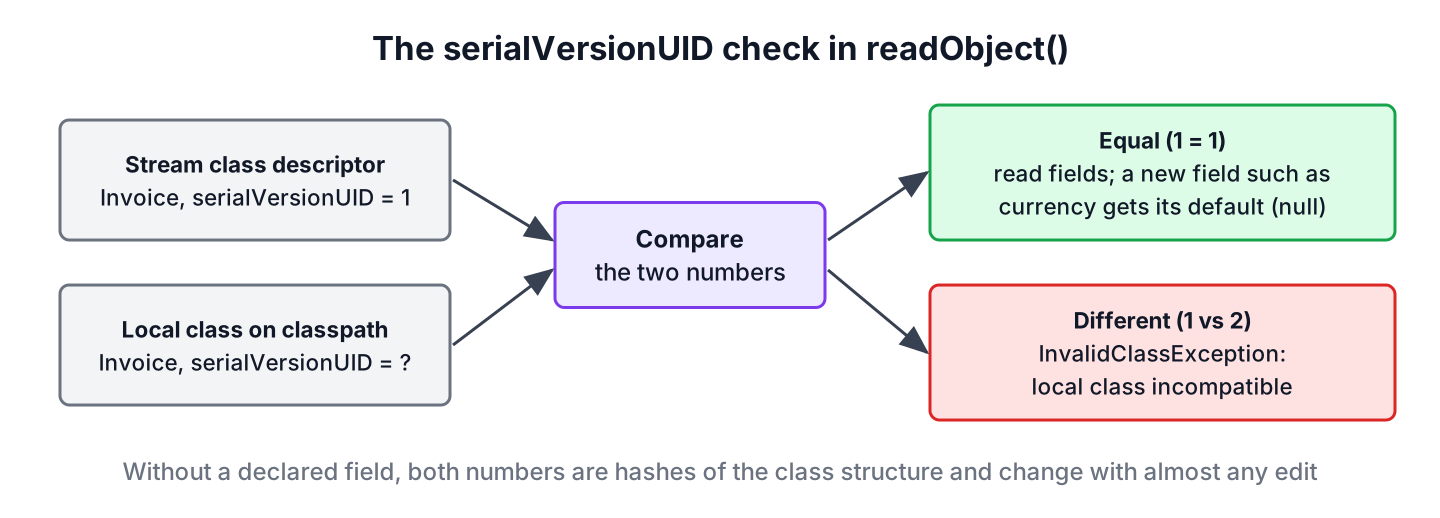
Each serialized object carries the class name and the serialVersionUID of its class in a class descriptor at the start of its data. When ObjectInputStream reads the object, it loads the local class with that name and compares the two numbers before it reads any field.
2.1. Same Version on Both Sides
The following example writes an Invoice to a file and reads it back with the same class. We also read the version number of the class with ObjectStreamClass.lookup(), which returns the declared value or the computed default.
Path file = Files.createTempFile("invoice", ".ser");
try (ObjectOutputStream out = new ObjectOutputStream(Files.newOutputStream(file))) {
    out.writeObject(new Invoice("Lokesh", 250));
}
Object restored;
try (ObjectInputStream in = new ObjectInputStream(Files.newInputStream(file))) {
    restored = in.readObject();
}
String text = restored.toString();                                        // "Invoice[customer=Lokesh, amount=250]"
long version = ObjectStreamClass.lookup(Invoice.class).getSerialVersionUID(); // 1
The read works because the stream and the local class both say version 1. During serialization, we handle IOException, and during deserialization also ClassNotFoundException, because the class must be on the classpath of the reading JVM.
2.2. Different Versions Throw InvalidClassException
To see a mismatch, we write the file with the class above and read it with a second build in which the line reads serialVersionUID = 2L. The second program fails on the first readObject() call.
java.io.InvalidClassException: com.howtodoinjava.core.serialization.Invoice; local class incompatible: stream classdesc serialVersionUID = 1, local class serialVersionUID = 2The message names the class and both numbers, so the cause is clear from the log. A team uses the same mechanism on purpose, because changing the number is the way to make old data unreadable after an incompatible change.
2.3. A Compatible Change Keeps the Same Version
In the next build, we keep serialVersionUID = 1L and add a field String currency to Invoice. Adding a field is a compatible change, so the new class reads the old file, and the new field gets its default value because the stream has no data for it.
Invoice[customer=Lokesh, amount=250, currency=null]Keep the serialVersionUID unchanged for compatible changes, and change it only when old data must be rejected. The full list of compatible and incompatible changes is in section 5.
3. How to Generate SerialVersionUID
If a serializable class does not declare a serialVersionUID, the serialization runtime computes one. It follows section 4.6 of the serialization specification, which builds a SHA-1 hash from these parts of the class and uses the first 8 bytes.
- The class name, the class modifiers and the names of the implemented interfaces.
- Every field except private static and private transient fields, with name, modifiers and type.
- Whether a static initializer exists.
- Every non-private constructor and method, with name, modifiers and parameter types.
So adding a public getter, renaming a method or adding an interface changes the computed value, even when the stored fields stay the same. The value can also differ between compilers, because compilers add synthetic members, for example for inner classes and assert statements. The specification therefore strongly recommends declaring the value in every serializable class.
We have four practical ways to get a value.
- Write 1L for a new class and increase it only for incompatible changes.
- Run the JDK tool serialver on the compiled class, which prints the computed value as a ready-to-paste declaration.
- Use the IDE quick fix, such as the IntelliJ IDEA inspection for a serializable class without serialVersionUID or the Eclipse warning, both of which can insert a generated value.
- Call ObjectStreamClass.lookup(type).getSerialVersionUID() in code, as in section 2.
$ serialver -classpath target/classes com.howtodoinjava.core.serialization.Invoice
com.howtodoinjava.core.serialization.Invoice:    private static final long serialVersionUID = 1L;
For a class with a declared field, serialver prints the declared value. For a class without one, it prints the computed hash, which is the number we need in the next section.
4. Java Classes without SerialVersionUID
A class without the field is not a situation we want to face, but it happens with older code. Say an app stores user sessions with Java serialization, and the session class has no serialVersionUID. A developer adds a small public helper method label() to the class, and after the next deployment, every stored session fails to load, although no field changed.
class Legacy implements Serializable {
    String code;
}
long computed = ObjectStreamClass.lookup(Legacy.class).getSerialVersionUID(); // a hash of the class structureReading a Legacy object written before the change gives this error, with the computed value of each version.
java.io.InvalidClassException: com.howtodoinjava.core.serialization.Legacy; local class incompatible: stream classdesc serialVersionUID = -6572036464690860334, local class serialVersionUID = 4888584158299352410The fix is to run serialver on the old class, which is the build that wrote the data, and declare that value in the new class. The value from the stream is also printed in the exception message, as stream classdesc serialVersionUID, so we can take it from there when the old build is gone.
$ serialver -classpath old-build/classes com.howtodoinjava.core.serialization.Legacy
com.howtodoinjava.core.serialization.Legacy:    private static final long serialVersionUID = -6572036464690860334L;
With private static final long serialVersionUID = -6572036464690860334L; added to the new class, the old sessions load again, and the added method no longer matters. The default readObject() handles the compatible changes, so no custom code is needed. When a change is incompatible, such as a changed field type, we add a custom readObject() method that reads the old fields with readFields() and converts them.
5. When to Change the serialVersionUID
The versioning chapter of the specification lists which changes old streams survive. As long as the serialVersionUID stays the same, Java reads old data for every compatible change. For an incompatible change, the read either fails or produces wrong data, so we increase the number to make the failure explicit.
| Compatible changes (keep the number) | Incompatible changes (change the number or handle them) |
|---|---|
| Adding fields | Deleting fields |
| Adding or removing writeObject() and readObject() | Changing the type of a primitive field |
| Changing the access modifier of a field | Changing a field to static or transient |
| Changing a field from static or transient to a normal field | Moving the class up or down the class hierarchy |
| Adding Serializable to a class | Switching between Serializable and Externalizable |
| Adding or removing a record component | Changing a class to an enum or back |
Deleting a field is listed as incompatible because the older class version would get a default value. In practice, a newer class skips stream data that has no matching field, so a deletion with the same number only gives default values to older readers of newer data. For data that has to survive many releases, the Java serialization guide compares this approach with Externalizable and JSON.
6. Records, Enums and Arrays
Three kinds of types follow special rules, all defined in the serialization specification.
- A record has a default serialVersionUID of 0L, and the matching check is waived for records, because the runtime rebuilds a record from its components through the canonical constructor.
- An enum always has 0L, and a declared value is ignored, because only the constant name is serialized.
- An array class cannot declare the field, and the matching check is waived for arrays.
record Point(int x, int y) implements Serializable {}
enum Status { OPEN, PAID }
long recordUid = ObjectStreamClass.lookup(Point.class).getSerialVersionUID(); // 0
long enumUid = ObjectStreamClass.lookup(Status.class).getSerialVersionUID(); // 0So records are a good choice for serializable data classes, because adding or removing a component does not break old streams and needs no serialVersionUID management.
7. serialVersionUID FAQs
A missing field and a field copied from another class are behind most of the questions about serialVersionUID.
7.1. What happens if we do not declare a serialVersionUID?
Java computes one from the class structure at runtime. Serialization works, but any change to the class signature, such as a new public method, changes the number, and old data fails with InvalidClassException. The compiler warns about the missing field only with -Xlint:serial, and IDEs show the same warning.
7.2. Is serialVersionUID inherited by subclasses?
No. Each serializable class in a hierarchy has its own version number, and the runtime checks the number of every class in the stream. A subclass without its own field gets a computed value, even when its superclass declares one, which is why the field is private.
7.3. Does every class need a unique serialVersionUID?
No. The number is compared only with other versions of the same class, so thousands of classes can all use 1L. Uniqueness across classes has no effect.
7.4. Is the serialVersionUID field itself serialized?
Not as object data, because it is a static field. The runtime writes its value into the class descriptor of the stream, once per class, which is how the reading side gets the number to compare. Other static fields are not written at all, so after deserialization they keep whatever value the class has in the reading JVM.
7.5. Does Jackson or Gson use serialVersionUID?
No. JSON libraries do not read it, because they map JSON properties to fields or constructor parameters by name. The field matters only for ObjectOutputStream and ObjectInputStream, including frameworks built on them, such as session replication in servlet containers or Java RMI.
8. Conclusion
The serialVersionUID is the version number of the serialized form of a class. Java compares the number in the stream with the number of the local class and throws InvalidClassException when they differ, before it reads any field.
We declare it as private static final long with @Serial in every serializable class, because the computed default changes with harmless edits such as a new method. We keep the number for compatible changes like added fields, change it for incompatible ones, and use serialver to rescue classes that never declared it. Records and enums need no number at all.
9. References
- Java Object Serialization Specification, Stream Unique Identifiers
- Java Object Serialization Specification, Versioning of Serializable Objects
- Serializable Javadoc
- InvalidClassException Javadoc
- The serialver Command
Happy Learning !!


Hi Lokesh,
When i ran the problem i am getting below output.
DemoClass to be saved: DemoClass: final static fileName=DemoClassBytes.ser, final static logger=java.util.logging.LogManager$RootLogger@7d4991ad, non-final static staticVariable=this is a static variable, instance intVariable=1, transient instance transientVariable=this is a transient instance field, non-serializable instance field threadClass:=null
DemoClass deserialized: DemoClass: final static fileName=DemoClassBytes.ser, final static logger=java.util.logging.LogManager$RootLogger@7d4991ad, non-final static staticVariable=this is a static variable, instance intVariable=1, transient instance transientVariable=null, non-serializable instance field threadClass:=null
After running this problem I am getting non-final static fields will not be null.
Can you please elaborate.
Yes. static variables are the part of class so on deserialization, Static variable value will be loaded with current value defined in the class.
The result mentioned in the example is wrong and need to be corrected.
static field do not serialize then why we make SerialVersionUDI static?
I assume because the serialVersionUID is not serialized but the class is. Also its not required to serialize the serialVersionUID. Its just for the JVM to uniquely identify the class during deserialization.
Hi Lokesh,
What is the difference whether we use default serial version UID i.e private static final long serialVersionUID = 1L; or generated serial version UID (using IDE e.g eclipse or IntelliJ)
-Manoj
Serial version id is used while de-serialization. If they don’t match, de-serialization fails. If its generated, then changing class structure will change the serial version id as well. You can assume them as version number for classes.
My question was that if i decide to have the serialVersionUID field in the class not let the JVM generate it.
There are two ways.
1) private static final long serialVersionUID = 1L;
Give 1,2 ,3 etc numbers
2) Generate it through eclipse one time.
So what is the difference between these two aproaches? de-serialization will still pass in both the cases but is there any problem we have it 1L always?
Suppose other classes and for all classes I give 1L , will it make any difference?
if you have already serialized and saved with an older version of code, you will want to have it matching the serialized
Really good explanation !!
Hi Lokesh,
You stated that static fields can not be serialized. But i can get the static field data after deserialization.
public class Employee implements Serializable {
private static final long serialVersionUID = 1L;
String Name;
static int age = 11;
Employee(String n) {
this.Name = n;
}
}
public class SerializableTest {
public static void main(String[] args) throws IOException, ClassNotFoundException {
Employee e1 = new Employee(“Sunil”);
FileOutputStream fp = new FileOutputStream(“employee.ser”);
ObjectOutputStream op = new ObjectOutputStream(fp);
op.writeObject(e1);
System.out.println(“—————serialization done”);
FileInputStream fs = new FileInputStream(“employee.ser”);
ObjectInputStream os = new ObjectInputStream(fs);
Employee e2 = (Employee)os.readObject();
System.out.println(“———————-deserialization done \n”);
System.out.println(“data after deserialization is”+ e2.Name + “—-“+ e2.age);
}
}
Let me know if i am missing anything.
Thanks,
Sunil.
Hi Sunil,
You are assigning the value of age during instance creation (initialized with it). So, when de-serilization happens; it first creates a blank object (age is set at this stage only); and now serialized values are read and overwritten on field of Employee instance.
To further clear the concept, I have modified your program and divided the serialization/de-serialization process into two methods. Please run the code into two steps. In first step, comment out the method call “deserializeEmployee()” inside main method. And in second step, comment out the method “serializeEmployee()”, so that fresh object is built using serialized data.
I have removed the static initialization from Employee class, and writing to it when I am serializing the Employee class only. If it was serialized then I must get it back during deserialization, BUT i do not.
public class SerializableTest { public static void main(String[] args) throws IOException, ClassNotFoundException { //serializeEmployee(); deserializeEmployee(); } @SuppressWarnings("resource") private static void serializeEmployee() throws IOException, ClassNotFoundException { Employee e1 = new Employee("Sunil"); //Modified the static value before writing it to employee.ser e1.age = 31; FileOutputStream fp = new FileOutputStream("employee.ser"); ObjectOutputStream op = new ObjectOutputStream(fp); op.writeObject(e1); System.out.println("—————serialization done"); System.out.println("data after serialization is + —-" + e1.age); } @SuppressWarnings("resource") private static void deserializeEmployee() throws IOException, ClassNotFoundException { FileInputStream fs = new FileInputStream("employee.ser"); ObjectInputStream os = new ObjectInputStream(fs); Employee e2 = (Employee) os.readObject(); System.out.println("———————-deserialization done n"); System.out.println("data after deserialization is + —-" + e2.age); } } class Employee implements Serializable { private static final long serialVersionUID = 1L; String Name; static int age = 0; Employee(String n) { this.Name = n; } }Hi Lokesh,
“If I need to serialize a Serializable class Employee, but one of its super classes is not Serializable, can Employee class still be serialized and de-serialized? The answer is yes, provided that the non-serializable super-class has a no-arg constructor, which is invoked at de-serialization to initialize that super-class.”
In one of my business use case i need to implement the reverse of the above quoted line i.e. serializing the super class “Employee” using the subclass object “Manager”, but unfortunately i didn’t find any way for doing it, as by default the subclass object also get serialized.
So is there any way of serializing only the super class using your subclass ref without change the structure of the subclass.?
Mark all fields in Manager class “transient”. It will prevent the subclass fields to serialize and still you have the same structure.
Hi Lokesh,
thx for the replay, Can you please explain how the Externalization is different from Serialization, i mean from the doc readExternal() and writeExternal() allows more control over the field then the readObject() and writeObject() but the same flexibility can be achieve once you customized the Serialization and implement your logic inside read/writeObject(). so where is the key difference then ?
Basically, the difference between Serializable and Externalizable is on default capabilities. Classes which implement Serializable, the serialization of the object is taken care of automatically, while classes that implement Externalizable is responsible for serializing itself, without the help of default serialization procedures.
Only the identity of the class of an Externalizable instance is written in the serialization stream and it is the responsibility of the class to save and restore the contents of its instances. The writeExternal and readExternal methods of the Externalizable interface are implemented by a class to give the class complete control over the format and contents of the stream for an object and its supertypes.
Hi Lokesh,
i too have the similar thought on this, hope along with the javadoc in near future Oracle may release the doc with reason behind the design :)
detail information about serialization.
Very detailed explanation specially the Fast Facts.. Thanks for sharing and increasing the readers’ knowledge here..
really good. it contains all the thing in serilization. I want to know serlizable iterface is marker interface. so ,how jvm works with this marker interface, as of in marker interface no, method.
Using instanceof operator.
can you show me the code or api.
Regarding which concept?
U said, non-static fields are not serialized but in the output of the program, I can see “non-final static staticVariable=this is a static variable”? Am I missing something?
Pretty good observation. The reason that static value was (looked like deserialized) printed because I executed the program in one go (read and write). So the static value was all the time in memory. Though It was not read in de-serialization, though it was pre-set in class, so got printed.
Anyway, I put a comment in program so that next person do not confuse.
Thanks for pointing it out.
good info lokesh, its really helpful for all Java Lovers
Very good information keep it up !!!