
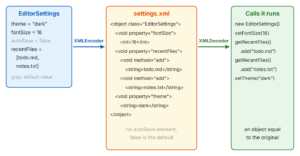
The class java.beans.XMLEncoder writes a JavaBean to an XML document, and java.beans.XMLDecoder reads that document back into an equal object. Both classes are part of the JDK, so we don’t need a library or annotations. The object must follow the JavaBean rules, so it needs a public no-argument constructor and a public getter and setter for each property.
We use XMLEncoder to save application state that a person may want to read or edit by hand, such as the preferences of a desktop app, a saved window layout or a test fixture that a later run loads again.
The following example saves the settings of a note editor to settings.xml and loads them back. The example uses Java 25, and the code also compiles for Java 21.
EditorSettings settings = new EditorSettings();
settings.setTheme("dark");
settings.setFontSize(16);
Path file = Path.of("settings.xml");

try (XMLEncoder encoder = new XMLEncoder(new BufferedOutputStream(Files.newOutputStream(file)))) {
    encoder.writeObject(settings);                       // settings.xml with theme and fontSize
}

try (XMLDecoder decoder = new XMLDecoder(new BufferedInputStream(Files.newInputStream(file)))) {
    EditorSettings loaded = (EditorSettings) decoder.readObject();
    String theme = loaded.getTheme();                    // "dark"
    int fontSize = loaded.getFontSize();                 // 16
    boolean autoSave = loaded.isAutoSave();              // false (default, not in the file)
}
Notice that both classes implement AutoCloseable, so try-with-resources closes them, and closing the encoder writes the end of the XML document. Also notice that autoSave still has its default value, so XMLEncoder did not write it to the file.
Next, we see what the XML contains and which rules the class must follow. After that, we handle the errors that XMLEncoder only prints by default, save records and immutable lists, and look at the one rule that matters most for XMLDecoder, which is to never decode XML from an untrusted source.
1. How XMLEncoder Works
Java’s binary serialization with ObjectOutputStream copies the fields of an object into bytes. XMLEncoder works differently. It writes the public method calls that rebuild the object, for example “create an EditorSettings with the no-argument constructor, call setFontSize(16), call setTheme(“dark”)“.
To find these calls, XMLEncoder reads every property through its getter and compares the value with the value of a new instance of the same class. It writes only the properties that differ, so default values never show up in the file. XMLDecoder reads the file and runs the same calls in the same order.
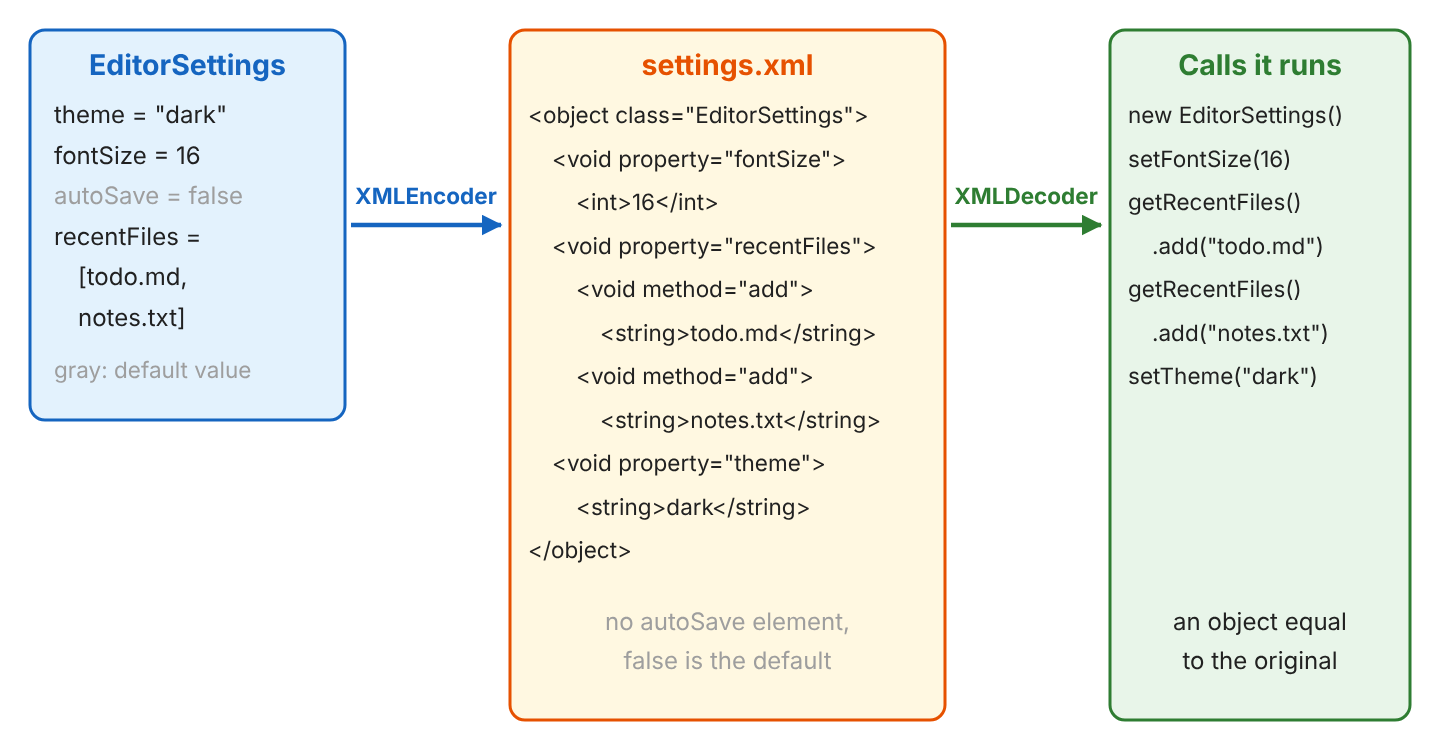
For example, a note editor saves its settings when the user closes it and loads them on the next start. Because the file lists only the changed properties, a user can open settings.xml and see at once which settings differ from the defaults.
The same design keeps old files loadable after class changes. When a later version of the app changes a default value, an old file still loads, and the properties that the file doesn’t mention get the new default.
2. Rules for Classes That XMLEncoder Can Write
The JavaBeans conventions decide what XMLEncoder can see. The class doesn’t need to implement Serializable, but the encoder can only call public methods.
| Rule | Why the encoder needs it | What happens otherwise |
|---|---|---|
| Public class with a public no-argument constructor | the decoder creates the object with new | InstantiationException, the object is skipped |
| Public getter and setter per property, e.g. getTheme() and setTheme() | the encoder reads the value and writes a setter call | the property is not written |
| isXxx() getter for boolean properties also works | standard JavaBean naming | none |
| Values are primitives, String, arrays, other beans or JDK classes with built-in support, such as ArrayList, HashMap and Date | each value is written as a nested element | InstantiationException for classes without a usable constructor |
Private fields without a getter and a setter are ignored. So XMLEncoder is a good fit for settings classes and a poor fit for domain objects with validation in the constructor.
Both classes are in the java.desktop module. On the classpath this needs no setup, but a modular app adds requires java.desktop; to its module-info.java.
3. XMLEncoder and XMLDecoder Example
The following example is the settings class of the note editor. EditorSettings has a theme, a font size, an auto-save flag, a list of recently opened files and a window size. The fields have defaults, so a new instance is a usable configuration.
public class EditorSettings {

    private String theme = "light";
    private int fontSize = 14;
    private boolean autoSave;
    private List<String> recentFiles = new ArrayList<>();
    private WindowSize windowSize;

    public EditorSettings() {
    }

    public String getTheme() { return theme; }
    public void setTheme(String theme) { this.theme = theme; }
    public int getFontSize() { return fontSize; }
    public void setFontSize(int fontSize) { this.fontSize = fontSize; }
    public boolean isAutoSave() { return autoSave; }
    public void setAutoSave(boolean autoSave) { this.autoSave = autoSave; }
    public List<String> getRecentFiles() { return recentFiles; }
    public void setRecentFiles(List<String> recentFiles) { this.recentFiles = recentFiles; }
    public WindowSize getWindowSize() { return windowSize; }
    public void setWindowSize(WindowSize windowSize) { this.windowSize = windowSize; }

    @Override
    public String toString() {
        return "EditorSettings[theme=" + theme + ", fontSize=" + fontSize + ", autoSave=" + autoSave
            + ", recentFiles=" + recentFiles + ", windowSize=" + windowSize + "]";
    }
}
public record WindowSize(int width, int height) { }WindowSize is a record. Records have no setters, so the encoder needs extra help with them, as section 5 explains. The static methods save() and load() of the SettingsStore class wrap the encoder and the decoder, and section 4 shows their code.
EditorSettings settings = new EditorSettings();
settings.setTheme("dark");
settings.setFontSize(16);
settings.setRecentFiles(new ArrayList<>(List.of("todo.md", "notes.txt")));
settings.setWindowSize(new WindowSize(1280, 800));

save(settings, Path.of("settings.xml"));
EditorSettings loaded = load(Path.of("settings.xml"), EditorSettings.class);
String text = loaded.toString();   // EditorSettings[theme=dark, fontSize=16, autoSave=false, recentFiles=[todo.md, notes.txt], windowSize=WindowSize[width=1280, height=800]]
The loaded settings print the same values as the saved ones. The generated settings.xml lists the four changed properties in alphabetical order.
<?xml version="1.0" encoding="UTF-8"?>
<java version="25.0.4.1" class="java.beans.XMLDecoder">
 <object class="com.howtodoinjava.core.serialization.xmlencoder.EditorSettings" id="EditorSettings0">
  <void property="fontSize">
   <int>16</int>
  </void>
  <void property="recentFiles">
   <void method="add">
    <string>todo.md</string>
   </void>
   <void method="add">
    <string>notes.txt</string>
   </void>
  </void>
  <void property="theme">
   <string>dark</string>
  </void>
  <void property="windowSize">
   <object class="com.howtodoinjava.core.serialization.xmlencoder.WindowSize">
    <int>1280</int>
    <int>800</int>
   </object>
  </void>
 </object>
</java>
3.1. Reading the Generated XML
Each XML element stands for one Java expression of the long-term persistence format. The elements in our file cover most settings classes.
| Element | Java code the decoder runs |
|---|---|
| <object class=”…EditorSettings”> | new EditorSettings() |
| <void property=”fontSize”><int>16</int></void> | settings.setFontSize(16) |
| <void property=”recentFiles”><void method=”add”>… | settings.getRecentFiles().add(“todo.md”) |
| <object class=”…WindowSize”><int>1280</int><int>800</int> | new WindowSize(1280, 800) |
| id=”EditorSettings0″ | a name for the object, so other elements can refer to it with idref |
Notice how the list is written. The encoder doesn’t call setRecentFiles() with a new list. It calls getRecentFiles() and adds each element, because the constructor already created an empty ArrayList.
4. Handling Errors With ExceptionListener
By default, XMLEncoder and XMLDecoder don’t throw an exception when they cannot handle a property. They print the exception to System.err, print Continuing …, and skip the failing part. For a settings file, a skipped part means lost data without any error in our code.
For example, a developer sets the recent files with List.of(“todo.md”). The immutable list has no public no-argument constructor, so the encoder fails on it. With the default listener, the encoder leaves the recentFiles property out of the file, and because no other property differs from the defaults here, the settings object is written empty.
java.lang.InstantiationException: java.util.ImmutableCollections$List12
Continuing ...
java.lang.RuntimeException: failed to evaluate: <unbound>=Class.new();
Continuing ...
<?xml version="1.0" encoding="UTF-8"?>
<java version="25.0.4.1" class="java.beans.XMLDecoder">
 <object class="com.howtodoinjava.core.serialization.xmlencoder.EditorSettings"/>
</java>
We always set an ExceptionListener that collects the errors, and we fail the save or the load when the list is not empty. The save() method writes the XML into memory first, so a failed save never overwrites a good settings file.
public static void save(Object settings, Path file) throws IOException {
    List<Exception> errors = new ArrayList<>();
    ByteArrayOutputStream xml = new ByteArrayOutputStream();
    try (XMLEncoder encoder = new XMLEncoder(xml)) {
        encoder.setExceptionListener(errors::add);
        encoder.setPersistenceDelegate(WindowSize.class, new RecordPersistenceDelegate());
        encoder.writeObject(settings);
    }
    if (!errors.isEmpty()) {
        IOException failure = new IOException("XMLEncoder could not write " + settings.getClass().getName());
        errors.forEach(failure::addSuppressed);
        throw failure;
    }
    Files.write(file, xml.toByteArray());
}
The load() method passes the listener to the XMLDecoder constructor and checks the type of the result with Class.cast(), so a file with a different object fails with a ClassCastException instead of a confusing error later.
public static <T> T load(Path file, Class<T> type) throws IOException {
    List<Exception> errors = new ArrayList<>();
    try (InputStream in = new BufferedInputStream(Files.newInputStream(file));
         XMLDecoder decoder = new XMLDecoder(in, null, errors::add)) {
        Object value = decoder.readObject();
        if (!errors.isEmpty()) {
            IOException failure = new IOException("XMLDecoder could not read " + file);
            errors.forEach(failure::addSuppressed);
            throw failure;
        }
        return type.cast(value);
    }
}
With these two methods, the List.of() mistake fails at once, and the file on disk keeps its last good content. The IOException carries both errors that the default listener printed as suppressed exceptions.
EditorSettings settings = new EditorSettings();
settings.setRecentFiles(List.of("todo.md"));
save(settings, Path.of("broken.xml"));   // IOException: XMLEncoder could not write ...EditorSettings
                                         //   Suppressed: InstantiationException: java.util.ImmutableCollections$List12
boolean written = Files.exists(Path.of("broken.xml"));   // false
5. Saving Records and Immutable Objects
A record such as WindowSize has no no-argument constructor and no setters, so the default encoder cannot write it. The encoder prints an InstantiationException and discards the whole statement. A DefaultPersistenceDelegate with the names width and height doesn’t help either, because it looks for JavaBean getters such as getWidth(), and a record has width().
A PersistenceDelegate tells the encoder how to create an object. Our delegate reads the record components and writes one call to the canonical constructor, such as new WindowSize(1280, 800).
public class RecordPersistenceDelegate extends PersistenceDelegate {

    @Override
    protected Expression instantiate(Object oldInstance, Encoder out) {
        RecordComponent[] components = oldInstance.getClass().getRecordComponents();
        Object[] args = new Object[components.length];
        try {
            for (int i = 0; i < components.length; i++) {
                args[i] = components[i].getAccessor().invoke(oldInstance);
            }
        } catch (ReflectiveOperationException e) {
            throw new IllegalStateException("Cannot read record " + oldInstance.getClass().getName(), e);
        }
        return new Expression(oldInstance, oldInstance.getClass(), "new", args);
    }

    @Override
    protected boolean mutatesTo(Object oldInstance, Object newInstance) {
        return oldInstance.equals(newInstance);
    }
}
We register the delegate for each record type with encoder.setPersistenceDelegate(WindowSize.class, new RecordPersistenceDelegate()), as save() does. The decoder needs no extra setup, because the XML holds a plain constructor call. The method mutatesTo() tells the encoder that two records with equal components are the same value, so the encoder doesn’t try to rebuild one from the other.
For immutable JDK lists, we don’t write a delegate. We copy the values into an ArrayList before calling the setter, as the example in section 3 does.
6. Loading Old Files After the Class Changes
Settings files outlive app versions. Say version 1 of the editor had a property colorScheme, and version 2 renamed it to theme. Users still have files from version 1, and the XMLDecoder can still read them, because it runs each statement on its own.
With the default listener, the decoder prints the failed statement and loads the rest. In an old file, the setter setColorScheme() no longer exists, so theme keeps its default light, and fontSize is still 16.
java.lang.NoSuchMethodException: <unbound>=EditorSettings.setColorScheme("dark");
Continuing ...
EditorSettings[theme=light, fontSize=16, autoSave=false, recentFiles=[], windowSize=null]
The lenient default is useful for old settings files, whereas the strict load() method from section 4 rejects the file. We choose per use case. A preferences file is better loaded partially than not at all, but a test fixture or a saved document should fail loudly.
7. Never Decode XML From an Untrusted Source
An XML file for XMLDecoder is a program, not data, so we decode only files that our own app wrote and that no one else can change. The decoder creates the classes and calls the methods that the XML names, and the XML can name any class on the classpath, not only our settings class.
So an XML file from a user upload, an HTTP request or a shared folder that other users can write to must never reach XMLDecoder. The Class.cast() check in load() does not protect us, because the methods run while readObject() builds the object, before the cast.
For data that comes from outside the app, we use a library that maps XML to fields of known classes, such as Jackson XML or JAXB. These libraries create only the classes we ask for.
8. XMLEncoder FAQs
Class requirements and the choice of format are where XMLEncoder differs most from other serialization options, so most questions are about them.
8.1. Does a Class Need to Implement Serializable for XMLEncoder?
No. XMLEncoder uses only the public constructor and the public getters and setters, so Serializable plays no role. Serializable matters only for Java binary serialization with ObjectOutputStream.
8.2. How Do I Convert an Object to an XML String Instead of a File?
We pass a ByteArrayOutputStream to the encoder and convert the bytes to a String after the encoder is closed. The encoder writes UTF-8 by default.
EditorSettings settings = new EditorSettings();
settings.setTheme("dark");
ByteArrayOutputStream bytes = new ByteArrayOutputStream();
try (XMLEncoder encoder = new XMLEncoder(bytes)) {
    encoder.writeObject(settings);
}
String xml = bytes.toString(StandardCharsets.UTF_8);
boolean hasTheme = xml.contains("<string>dark</string>");   // true
The object to String guide shows the same task with Java serialization, Jackson and Gson.
8.3. Is XMLEncoder Deprecated in Java 25?
No. XMLEncoder and XMLDecoder are part of the java.desktop module in Java 25 and carry no deprecation. A custom runtime image built with jlink includes them only when it adds the java.desktop module, which also brings AWT and Swing, so small server images often leave them out.
8.4. Should I Use XMLEncoder, Java Serialization or Jackson?
Each option fits a different job, and the main differences are the input we trust and the classes we can change.
| XMLEncoder | ObjectOutputStream | Jackson XML or JSON | |
|---|---|---|---|
| Format | XML of method calls | binary | XML or JSON of fields |
| Class requirements | JavaBean, no-arg constructor | Serializable | getters or annotations, records supported |
| Default values | omitted | always written | written, configurable |
| Records | custom delegate | supported | supported |
| Untrusted input | never | only with a deserialization filter | yes, for known target classes |
| Extra dependency | none (java.desktop) | none | Jackson library |
We pick XMLEncoder for small settings files of our own app when we don’t want a dependency. For data exchange with other systems or for any input from outside, Jackson or JAXB is the safer choice.
9. Conclusion
XMLEncoder writes a JavaBean as a list of constructor and setter calls, and XMLDecoder runs those calls to rebuild the object. Only properties that differ from a new instance go into the file, which keeps it short and lets old files load after the defaults change.
The default error handling prints problems and goes on, so we set an ExceptionListener and fail the save or the load. Immutable lists need a copy into an ArrayList, and records need a PersistenceDelegate that calls the canonical constructor.
XMLDecoder runs whatever the XML says, so it reads only files that our own app wrote. For anything that comes from users or other systems, we use Jackson or JAXB instead.
10. References
- XMLEncoder JavaDoc (Java 25)
- XMLDecoder JavaDoc (Java 25)
- PersistenceDelegate JavaDoc (Java 25)
- Long Term Persistence (The Java Tutorials)
- Writing JavaBeans Components (The Java Tutorials)
Happy Learning !!


I want to encode only Json Object data with UTF-8.
Suppose any special characters in my json data, they need to be encoded with UTF-8. Please help me.