Summary: in this tutorial, you’ll have a good understanding of Python references and referencing counting.
Introduction to Python references #
In Python, a variable is not a label of a value as you may think. Instead, A variable references an object that holds a value. In other words, variables are references.
The following example assigns a number with the value of 100 to a variable:
counter = 100Behind the scene, Python creates a new integer object (int) in the memory and binds the counter variable to that memory address:
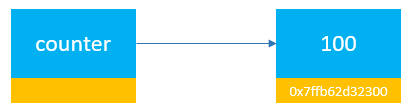
When you access the counter variable, Python looks up the object referenced by the counter and returns the value of that object:
print(counter) # 100So variables are references that point to the objects in the memory.
To find the memory address of an object referenced by a variable, you pass the variable to the built-in id() function.
For example, the following returns the memory address of the integer object referenced by the counter variable:
counter = 100
print(id(counter))Output:
140717671523072The id() function returns the memory address of an object referenced by a variable as a base-10 number.
To convert this memory address to a hexadecimal string, you use the hex() function:
counter = 100
print(id(counter))
print(hex(id(counter)))Output:
140717671523072
0x7ffb62d32300Reference counting #
An object in the memory address can have one or more references. For example:
counter = 100The integer object with the value of 100 has one reference which is the counter variable. If you assign the counter to another variable e.g., max:
counter = 100
max = counterNow, both counter and max variables reference the same integer object. The integer object with the value 100 has two references:
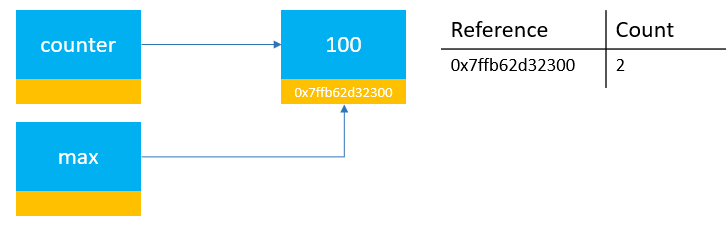
If you assign a different value to the max variable:
max = 999…the integer object with value 100 has one reference, which is the counter variable:
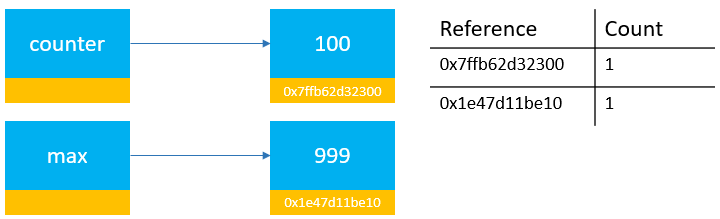
And the number of references of the integer object with a value of 100 will be zero if you assign a different value to the counter variable:
counter = 1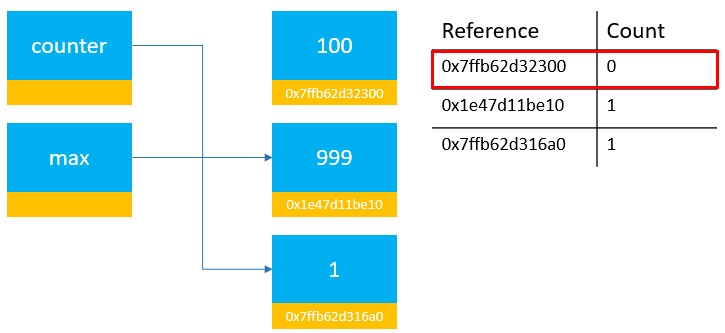
Once an object doesn’t have any reference, Python Memory Manager will destroy that object and reclaim the memory.
Counting references #
To get the number of references of an object, you use the from_address() method of the ctypes module.
ctypes.c_long.from_address(address).valueTo use this method, you need to pass the memory address of the object that you want to count the references. Also, the address needs to be an integer number.
The following defines a function called ref_count() that uses the from_address() method:
import ctypes
def ref_count(address):
return ctypes.c_long.from_address(address).valueNow, you can use a shorter ref_count() function instead of using the long syntax like above.
This example defines a list of three integers:
numbers = [1, 2, 3]To get the memory address of the numbers list, you use the id() function as follows:
numbers_id = id(numbers)The following shows the number of references of the list referenced by the numbers variable:
print(ref_count(numbers_id)) # 1It returns one because only the numbers variable references the list.
This assigns the numbers variable to a new variable:
ranks = numbersThe number of references of the list should be two now because it is referenced by both numbers and ranks variables:
print(ref_count(numbers_id)) # 2If you assign ranks variable None, the reference count of the list will reduce to one:
ranks = None
print(ref_count(numbers_id)) # 1And if you assign the numbers variable None, the number of references of the list will be zero:
numbers = None
print(ref_count(numbers_id)) # 0Put it all together:
import ctypes
def ref_count(address):
return ctypes.c_long.from_address(address).value
numbers = [1, 2, 3]
numbers_id = id(numbers)
print(ref_count(numbers_id)) # 1
ranks = numbers
print(ref_count(numbers_id)) # 2
ranks = None
print(ref_count(numbers_id)) # 1
numbers = None
print(ref_count(numbers_id)) # 0Output:
1
2
1
0Summary #
- Python variables are references to objects located in the memory
- Use the
id()function to get the memory address of the object referenced by a variable.
Thank you for your feedback!
