Summary: in this tutorial, you’ll learn about the Python sequences and their basic operations.
Introduction to Python sequences #
A sequence is a positionally ordered collection of items. And you can refer to any item in the sequence by using its index number e.g., s[0] and s[1].
In Python, the sequence index starts at 0, not 1. So the first element is s[0] and the second element is s[1]. If the sequence s has n items, the last item is s[n-1].
Python has the following built-in sequence types: lists, bytearrays, strings, tuples, range, and bytes. Python classifies sequence types as mutable and immutable.
The mutable sequence types are lists and bytearrays while the immutable sequence types are strings, tuples, range, and bytes.
A sequence can be homogeneous or heterogeneous. In a homogeneous sequence, all elements have the same type. For example, strings are homogeneous sequences where each element is of the same type.
Lists, however, are heterogeneous sequences where you can store elements of different types including integer, strings, objects, etc.
In general, homogeneous sequence types are more efficient than heterogeneous in terms of storage and operations.
Sequence type vs iterable type #
An iterable is a collection of objects where you can get each element one by one. Therefore, any sequence is iterable. For example, a list is iterable.
However, an iterable may not be a sequence type. For example, a set is iterable but it’s not a sequence.
Generally speaking, iterables are more general than sequence types.
Standard Python sequence methods #
The following explains some standard sequence methods:
Counting elements of a Python sequence #
To get the number of elements of a sequence, you use the built-in len function:
len(seq)The following example uses the len function to get the number of items in the cities list:
cities = ['San Francisco', 'New York', 'Washington DC']
print(len(cities))Output:
3Checking if an item exists in a Python sequence #
To check if an item exists in a sequence, you use the in operator:
element in seqThe following example uses the in operator to check if the 'New York' is in the cities list:
cities = ['San Francisco', 'New York', 'Washington DC']
print('New York' in cities)Output:
TrueTo negate the in operator, you use the not operator. The following example checks if 'New York' is not in the cities list:
cities = ['San Francisco', 'New York', 'Washington DC']
print('New York' not in cities)Output:
FalseFinding the index of an item in a Python sequence #
The seq.index(e) returns the index of the first occurrence of the item e in the sequence seq:
seq.index(e)For example:
numbers = [1, 4, 5, 3, 5, 7, 8, 5]
print(numbers.index(5))Output:
2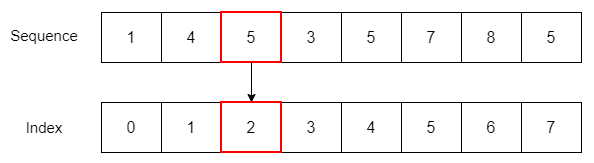
The index of the first occurrence of number 5 in the numbers list is 2. If the number is not in the sequence, you’ll get an error:
numbers = [1, 4, 5, 3, 5, 7, 8, 5]
print(numbers.index(10))Error:
ValueError: 10 is not in listTo find the index of the first occurrence of an item at or after a specific index, you use the following form of the index method:
seq.index(e, i)The following example returns the index of the first occurrence of the number 5 after the third index:
numbers = [1, 4, 5, 3, 5, 7, 8, 5]
print(numbers.index(5, 3))Output:
4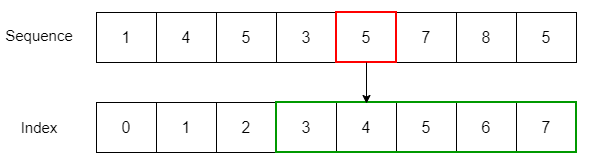
The following form of the index method allows you to find the index of the first occurrence of an item at or after the index i and before index j:
seq.index(e, i, j)For example:
numbers = [1, 4, 5, 3, 5, 7, 8, 5]
print(numbers.index(5, 3, 5))Output:
4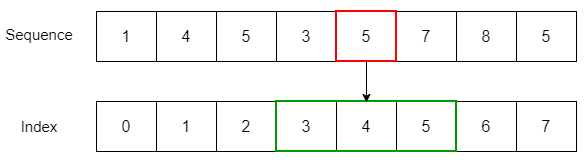
Slicing a sequence #
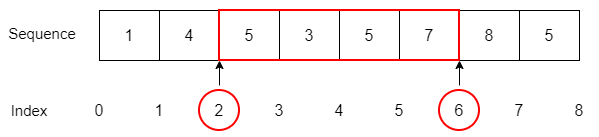
To get the slice from the index i to (but not including) j, you use the following syntax:
seq[i:j]For example:
numbers = [1, 4, 5, 3, 5, 7, 8, 5]
print(numbers[2:6])Output:
[5, 3, 5, 7]When you slice a sequence, it’s easier to imagine that the sequence indexes locate between two items like this:
The extended slice allows you to get a slice from i to (but not including j) in steps of k:
seq[i:j:k]For example:
numbers = [1, 4, 5, 3, 5, 7, 8, 5]
print(numbers[2:6:2])Output:
[5, 5]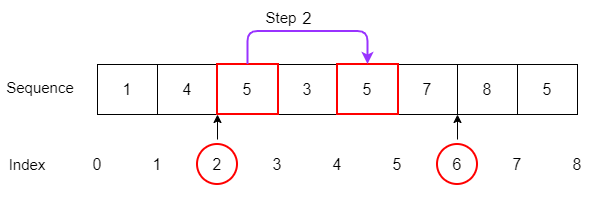
Getting min and max items from a Python sequence #
If the ordering between items in a sequence is specified, you can use the built-in min and max functions to find the minimum and maximum items:
numbers = [1, 4, 5, 3, 5, 7, 8, 5]
print(min(numbers)) # 1
print(max(numbers)) # 8Output:
1
8Concatenating two Python sequences #
To concatenate two sequences into a single sequence, you use the + operator:
s3 = s1 + s2The following example concatenates two sequences of strings:
east = ['New York', 'New Jersey']
west = ['San Diego', 'San Francisco']
cities = east + west
print(cities)Output:
['New York', 'New Jersey', 'San Diego', 'San Francisco']It’s quite safe to concatenate immutable sequences. The following example appends one element to the west list. And it doesn’t affect the cities sequence:
east = ['New York', 'New Jersey']
west = ['San Diego', 'San Francisco']
cities = east + west
west.append('Sacramento')
print(west)
print(cities)Output:
['San Diego', 'San Francisco', 'Sacramento']
['New York', 'New Jersey', 'San Diego', 'San Francisco']However, you should be aware of concatenations of mutable sequences. The following example shows how to concatenate a list to itself:
city = [['San Francisco', 900_000]]
cities = city + city
print(cities)Output:
[['San Francisco', 1000000], ['San Francisco', 1000000]]Since a list is mutable, the memory addresses of the first and second elements from the cities list are the same:
print(id(cities[0]) == id(cities[1])) # TrueIn addition, when you change the value from the original list, the combined list also changes:
city[0][1] = 1_000_000
print(cities)Putting it all together:
city = [['San Francisco', 900_000]]
cities = city + city
print(cities)
print(id(cities[0]) == id(cities[1])) # True
city[0][1] = 1_000_000
print(cities)Output:
[['San Francisco', 900000], ['San Francisco', 900000]]
True
[['San Francisco', 1000000], ['San Francisco', 1000000]]Repeating a Python sequence #
To repeat a sequence a number of times, you use the multiplication operator (*). The following example repeats the string Python three times:
s = 'ha'
print(s*3)Output:
hahahaSummary #
- Python sequences are positionally ordered collections of items.
Thank you for your feedback!
