Summary: in this tutorial, you’ll learn about Python List type and how to manipulate list elements effectively.
What is a List #
A list is an ordered collection of items.
Python uses the square brackets ([]) to indicate a list. The following shows an empty list:
empty_list = []Typically, a list contains one or more items. To separate two items, you use a comma (,). For example:
todo_list = ['Learn Python List','How to manage List elements']
Since a list often contains many items, it’s a good practice to name it using plural nouns e.g., numbers, colors, and shopping_carts.
The following example defines a list of six numbers:
numbers = [1, 3, 2, 7, 9, 4]If you print out the list, you’ll see its representation including the square brackets. For example:
numbers = [1, 3, 2, 7, 9, 4]
print(numbers)Output:
[1, 3, 2, 7, 9, 4]
The following shows how to define a list of strings:
colors = ['red', 'green', 'blue']
print(colors)Output:
['red', 'green', 'blue']
A list can contain other lists. The following example defines a list of lists:
coordinates = [[0, 0], [100, 100], [200, 200]]
print(coordinates)Output:
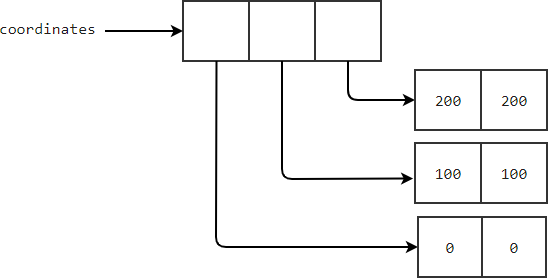
[[0, 0], [100, 100], [200, 200]]Accessing elements in a list #
Since a list is an ordered collection, you can access its elements by indexes like this:
list[index]Lists are zero-based indexes. In other words, the first element has an index of 0, the second element has an index of 1, and so on.
For example, the following shows how to access the first element of the numbers list:
numbers = [1, 3, 2, 7, 9, 4]
print(numbers[0])Output:
1The numbers[1] will return the second element from the list:
numbers = [1, 3, 2, 7, 9, 4]
print(numbers[1])Output:
3The negative index allows you to access elements starting from the end of the list.
The list[-1] returns the last element. The list[-2] returns the second last element, and so on. For example:
numbers = [1, 3, 2, 7, 9, 4]
print(numbers[-1])
print(numbers[-2])Output:
4
9Modifying, adding, and removing elements #
A list is dynamic. It means that you can modify elements in the list, add new elements to the list, and remove elements from a list.
Modifying elements in a list #
To change an element, you assign a new value to it using this syntax:
list[index] = new_valueThe following example shows how to change the first element of the numbers list to 10:
numbers = [1, 3, 2, 7, 9, 4]
numbers[0] = 10
print(numbers)Output:
[10, 3, 2, 7, 9, 4]The following shows how to multiply the second element by 10:
numbers = [1, 3, 2, 7, 9, 4]
numbers[1] = numbers[1]*10
print(numbers)Output:
[1, 30, 2, 7, 9, 4]And the following divides the third element by 2:
numbers = [1, 3, 2, 7, 9, 4]
numbers[2] /= 2
print(numbers)Output:
[1, 3, 1.0, 7, 9, 4]Adding elements to the list #
The append() method appends an element to the end of a list. For example:
numbers = [1, 3, 2, 7, 9, 4]
numbers.append(100)
print(numbers)Output:
[1, 3, 2, 7, 9, 4, 100]The insert() method adds a new element at any position in the list.
For example, the following inserts the number 100 at index 2 of the numbers list:
numbers = [1, 3, 2, 7, 9, 4]
numbers.insert(2, 100)
print(numbers)Output:
[1, 3, 100, 2, 7, 9, 4]Removing elements from a list #
The del statement allows you to remove an element from a list by specifying the position of the element.
The following example shows how to remove the first element from the list:
numbers = [1, 3, 2, 7, 9, 4]
del numbers[0]
print(numbers)Output:
[3, 2, 7, 9, 4]The pop() method removes the last element from a list and returns that element:
numbers = [1, 3, 2, 7, 9, 4]
last = numbers.pop()
print(last)
print(numbers)Output:
4
[1, 3, 2, 7, 9]Typically, you use the pop() method when you want to remove an element from a list and still want to access the value of that element.
To pop an element by its position, you use the pop() with the element’s index. For example:
numbers = [1, 3, 2, 7, 9, 4]
second = numbers.pop(1)
print(second)
print(numbers)Output:
3
[1, 2, 7, 9, 4]To remove an element by value, you use the remove() method. Note that the remove() method removes only the first element it encounters in the list.
For example, the following removes the element with value 9 from the numbers list:
numbers = [1, 3, 2, 7, 9, 4, 9]
numbers.remove(9)
print(numbers)Output:
[1, 3, 2, 7, 4, 9]In this example, the remove() method removes only the first number 9 but it doesn’t remove the second number 9 from the list.
Summary #
- A list is an ordered collection of items.
- Use square bracket notation
[]to access a list element by its index. The first element has an index0. - Use a negative index to access a list element from the end of a list. The last element has an index
-1. - Use
list[index] = new_valueto modify an element from a list. - Use
append()to add a new element to the end of a list. - Use
insert()to add a new element at a position in a list. - Use
pop()to remove an element from a list and return that element. - Use
remove()to remove an element from a list.
Quiz #
Python Lists
Thank you for your feedback!
