Summary: in this tutorial, you’ll learn about the Python __name__ variable and how to use it effectively in modules.
What’s Python __name__? #
If you have gone through Python code, you’ve likely seen the __name__ variable like the following:
if __name__ == '__main__':
main()And you might wonder what the __name__ variable is.
Since the __name__ variable has double underscores at both sides, it’s called a dunder name. The dunder stands for double underscores
The __name__ is a special variable in Python. It’s special because Python assigns a different value to it depending on how its containing script executes.
When you import a module, Python executes the file associated with the module.
Often, you want to write a script that can be executed directly or imported as a module. The __name__ variable allows you to do that.
When you run the script directly, Python sets the __name__ variable to '__main__'.
However, if you import a file as a module, Python sets the module name to the __name__ variable.
Python __name__ variable example #
First, create a new module called billing that has two functions:
calculate_tax()print_billing_doc()
Additionally, add a statement that prints out the __name__ variable to the screen:
def calculate_tax(price, tax):
return price * tax
def print_billing_doc():
tax_rate = 0.1
products = [{'name': 'Book', 'price': 30},
{'name': 'Pen', 'price': 5}]
# print billing header
print(f'NametPricetTax')
# print the billing item
for product in products:
tax = calculate_tax(product['price'], tax_rate)
print(f"{product['name']}t{product['price']}t{tax}")
print(__name__)Second, create a new file called app.py and import the billing module:
import billingWhen you execute the app.py:
python app.py …the __name__ variable shows the following value:
billingIt means that Python does execute the billing.py file when you import the billing module to the app.py file.
The __name__ variable in the app.py set to the module name which is billing.
If you execute the billing.py as a script directly:
python billing.py… you’ll see the following output:
__main__In this case the value of the __name__ variable is '__main__' inside the billing.py.
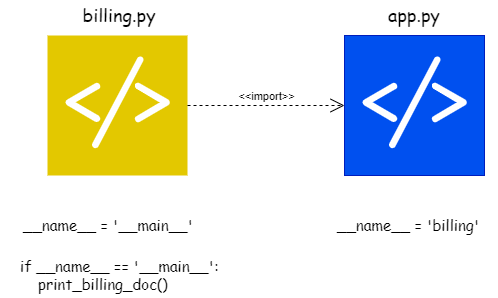
Therefore, the __name__ variable allows you to check when the file is executed directly or imported as a module.
For example, to execute the print_billing_doc() function when the billing.py executes directly as a script, you can add the following statement to the billing.py module:
if __name__ == '__main__':
print_billing_doc()Third, execute the billing.py as a script, you’ll see the following output:
Name Price Tax
Book 30 3.0
Pen 5 0.5However, when you execute the app.py, you won’t see the if block executed because the __name__ variable doesn’t set to the '__main__' but 'billing'.
Summary #
- Python assign the
'__main__'to the__name__variable when you run the script directly and the module name if you import the script as a module.
Quiz #
Understanding Python __name__ Variable
Thank you for your feedback!
