
Summary: in this tutorial, you will learn how to insert rows into a table in the SQLite database from a Python program using the sqlite3 module.
Inserting a new row into a table from Python #
To insert rows into a table in an SQLite database, you use the following steps:
First, import the built-in sqlite3 module:
import sqlite3Second, connect to an SQLite database file by calling the connect() function from the sqlite3 module:
with sqlite3.connect(database) as conn:The connect() function returns a Connection object that represents a database connection to the SQLite database file database.
Third, create a Cursor object by calling the cursor() method of the Connection object:
cursor = conn.cursor()Fourth, execute an INSERT statement that inserts a row into a table:
cursor.execute(insert_statement)Fifth, apply the change permanently to the SQLite database by calling the commit() method of the Connection object:
conn.commit()If you want to pass arguments to the INSERT statement, use the question mark (?) as the placeholder for each. For example:
INSERT INTO table_name(c1, c2)
VALUES(?,?)In this statement, c1 and c2 are columns of the table table_name. The question mark (?) are placeholders for the c1 and c2 columns.
Inserting data into a table in Python example #
We’ll use the projects and tasks tables created in the creating tables tutorial for the demonstration.
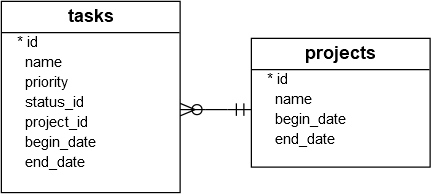
The following program inserts data into the projects and tasks tables:
import sqlite3
def add_project(conn, project):
# insert table statement
sql = ''' INSERT INTO projects(name,begin_date,end_date)
VALUES(?,?,?) '''
# Create a cursor
cur = conn.cursor()
# execute the INSERT statement
cur.execute(sql, project)
# commit the changes
conn.commit()
# get the id of the last inserted row
return cur.lastrowid
def add_task(conn, task):
# insert table statement
sql = '''INSERT INTO tasks(name,priority,status_id,project_id,begin_date,end_date)
VALUES(?,?,?,?,?,?) '''
# create a cursor
cur = conn.cursor()
# execute the INSERT statement
cur.execute(sql, task)
# commit the changes
conn.commit()
# get the id of the last inserted row
return cur.lastrowid
def main():
try:
with sqlite3.connect('my.db') as conn:
# add a project
project = ('Cool App with SQLite & Python', '2015-01-01', '2015-01-30')
project_id = add_project(conn, project)
print(f'Created a project with the id {project_id}')
# add tasks to the project
tasks = [
('Analyze the requirements of the app', 1, 1, project_id, '2015-01-01', '2015-01-02'),
('Confirm with user about the top requirements', 1, 1, project_id, '2015-01-03', '2015-01-05')
]
for task in tasks:
task_id = add_task(conn, task)
print(f'Created task with the id {task_id}')
except sqlite3.Error as e:
print(e)
if __name__ == '__main__':
main()Step 1. Import the sqlite3 module:
import sqlite3Step 2. Define a function called add_project that inserts a new row into the projects table:
def add_project(conn, project):
# insert table statement
sql = ''' INSERT INTO projects(name,begin_date,end_date)
VALUES(?,?,?) '''
# Create a cursor
cur = conn.cursor()
# execute the INSERT statement
cur.execute(sql, project)
# commit the changes
conn.commit()
# get the id of the last inserted row
return cur.lastrowidIn this add_project function:
First, initialize an SQL INSERT statement that inserts a new row into the projects table:
sql = ''' INSERT INTO projects(name,begin_date,end_date)
VALUES(?,?,?) '''The question marks (?) are placeholders that will be replaced by corresponding field values such as name, begin date, and end date.
Next, call the cursor() method of the Connection object to create a new cursor:
cur = conn.cursor()Then, execute the INSERT statement with values provided by the project tuple. The project variable can be a tuple or a list that includes three field values: name, begin date, and end date:
cur.execute(sql, project)After that, apply the change permanently to the database by calling the commit() method of the Connection object:
conn.commit()Finally, return the id in the inserted row using the lastrowid property of the cursor object:
return cur.lastrowidStep 3. Define another function named add_task that inserts a new row into the tasks table:
def add_task(conn, task):
# insert table statement
sql = '''INSERT INTO tasks(name,priority,status_id,project_id,begin_date,end_date)
VALUES(?,?,?,?,?,?) '''
# create a cursor
cur = conn.cursor()
# execute the INSERT statement
cur.execute(sql, task)
# commit the changes
conn.commit()
# get the id of the last inserted row
return cur.lastrowidThe add_task() function works the same as the add_project() function except for the INSERT statement.
Step 4. Define the main() function that opens a connection to the my.db file and inserts rows into the projects and tasks tables:
def main():
try:
with sqlite3.connect('my.db') as conn:
# add a project
project = ('Cool App with SQLite & Python', '2015-01-01', '2015-01-30')
project_id = add_project(conn, project)
print(f'Created a project with the id {project_id}')
# add tasks to the project
tasks = [
('Analyze the requirements of the app', 1, 1, project_id, '2015-01-01', '2015-01-02'),
('Confirm with user about the top requirements', 1, 1, project_id, '2015-01-03', '2015-01-05')
]
for task in tasks:
task_id = add_task(conn, task)
print(f'Created task with the id {task_id}')
except sqlite3.Error as e:
print(e)In the main() function:
First, open a connection to the my.db database using the connect() method of the sqlite3 module:
with sqlite3.connect('my.db') as conn:Second, call the add_project() function to insert a new row into the projects table:
project = ('Cool App with SQLite & Python', '2015-01-01', '2015-01-30')
project_id = add_project(conn, project)
print(f'Created a project with the id {project_id}')The add_project() function uses the Connection object and a tuple that includes the name, beginning date, and ending date of the project.
Third, define a list of tuples representing the tasks and call the add_tasks() function to insert each task into the tasks table:
tasks = [
('Analyze the requirements of the app', 1, 1, project_id, '2015-01-01', '2015-01-02'),
('Confirm with user about the top requirements', 1, 1, project_id, '2015-01-03', '2015-01-05')
]
for task in tasks:
task_id = add_task(conn, task)
print(f'Created task with the id {task_id}')If any error occurs, display its message in the except block:
except sqlite3.OperationalError as e:
print(e)Finally, run the program to insert rows into these tables:
python insert.pyOutput:
Created a project with the id 1
Created task with the id 1
Created task with the id 2Verifying inserts #
First, open your terminal and connect to my.db database file using the sqlite3 tool:
sqlite3 my.dbSecond, run the following commands to format the output:
.header on
.mode columnThird, retrieve data from the projects table using the following query:
select * from projects;Output:
id name begin_date end_date
-- ----------------------------- ---------- ----------
1 Cool App with SQLite & Python 2015-01-01 2015-01-30Finally, query data from the tasks table:
select * from tasks;Output:
id name priority project_id status_id begin_date end_date
-- -------------------------------------------- -------- ---------- --------- ---------- ----------
1 Analyze the requirements of the app 1 1 1 2015-01-01 2015-01-02
2 Confirm with user about the top requirements 1 1 1 2015-01-03 2015-01-05Summary #
- Use the
execute()statement of theCursorobject to execute anINSERTstatement to insert a row into a table. - Use the
commit()method of theConnectionobject to apply the change to the database permanently.
Thank you for your feedback!
