
Summary: in this tutorial, you will learn how to update data in the SQLite database from a Python program using the sqlite3 module.
Updating data in SQLite using Python #
To update data in a table from a Python program, you follow these steps:
First, open a database connection to an SQLite database file by calling the connect() function of the sqlite3 module:
conn = sqlite3.connect(database)The connect() function returns a Connection object that represents a database connection to a specified SQLite database.
Next, create a cursor object from Connection object by calling the cursor() method:
cur = conn.cursor()Then, execute an UPDATE statement by calling the execute() method of the Cursor object:
cur.execute(update_sattement)If you want to bind the arguments to the UPDATE statement, use a question mark (?) for each argument. For example:
UPDATE table_name
SET column1 = ?, column2 = ?
WHERE id = ?In this syntax, the question marks (?) are the placeholders that will be replaced by actual values for the column1, column2, and id.
In this case, you need to pass the second argument as a tuple to the execute() method:
cur.execute(update_statement, (value2, value2, id,))After that, call the commit() method of the Connection object to apply the change to the database permanently:
conn.commit()Finally, close the database connection by calling the close() method of the Connection object:
conn.close()Here are the complete steps:
update_statement = 'UPDATE sample_table SET column1=?, column2=? WHERE id = ?'
conn = sqlite3.connect(database)
cur = conn.cursor()
cur.execute(update_statement, (value1, value2, id,))
conn.commit()
conn.close()If you use a context manager, you can implicitly close the database connection:
import sqlite3
sql = 'UPDATE sample_table SET column1=?, column2=? WHERE id = ?'
with sqlite3.connect(database) as conn:
cur = conn.cursor()
cur.execute(sql, (value1, value2, id,))
conn.commit()An error may occur when deleting the data. To handle it, you can use the try…except statement:
import sqlite3
sql = 'UPDATE sample_table SET column1=?, column2=? WHERE id = ?'
try:
with sqlite3.connect(database) as conn:
cur = conn.cursor()
cur.execute(sql, (value1, value2, id,))
conn.commit()
except sqlite3.OperationalError as e:
print(e)Updating data examples #
We’ll use the tasks table with the following contents:
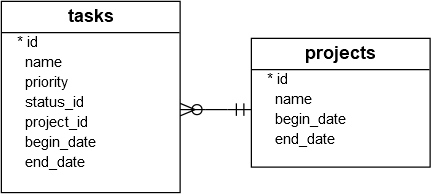
Output:
id name priority project_id status_id begin_date end_date
-- -------------------------------------------- -------- ---------- --------- ---------- ----------
1 Analyze the requirements of the app 1 1 1 2015-01-01 2015-01-02
2 Confirm with user about the top requirements 1 1 1 2015-01-03 2015-01-051) Updating one field of one row in a table #
The following program updates the task id 1 with a new priority 2:
import sqlite3
sql = 'UPDATE tasks SET priority = ? WHERE id = ?'
try:
with sqlite3.connect('my.db') as conn:
cursor = conn.cursor()
cursor.execute(sql, (2,1) )
conn.commit()
except sqlite3.OperationalError as e:
print(e)How it works.
First, import the sqlite3 module:
import sqlite3Second, construct an UPDATE statement that updates the priority of a task specified by an id:
sql = 'UPDATE tasks SET priority = ? WHERE id = ?'The ? is a placeholder that will be substituted by a value.
Third, create a connection to the SQLite database file my.db:
with sqlite3.connect('my.db') as conn:Fourth, create a Cursor object by calling the cursor() method:
cursor = conn.cursor()Fifth, execute the UPDATE statement with the priority and id:
cursor.execute(sql, (2,1) )Sixth, call the commit() method of the Connection object to apply the change permanently to the database:
conn.commit()2) Updating multiple columns of one row in a table #
The following program updates the priority and status_id of the task with a specified id:
import sqlite3
sql = 'UPDATE tasks SET priority = ?, status_id = ? WHERE id = ?'
try:
with sqlite3.connect('my.db') as conn:
cursor = conn.cursor()
cursor.execute(sql, (3,2,1) )
conn.commit()
except sqlite3.OperationalError as e:
print(e)In this example, we update the task id 1 with priority 3 and status_id 2.
The following query retrieves the task with id 1:
SELECT
id,
name,
priority,
status_id
FROM
tasks
WHERE
id = 1;Output:
id name priority status_id
-- ----------------------------------- -------- ---------
1 Analyze the requirements of the app 3 23) Updating multiple columns of multiple rows in a table #
The following program illustrates how to update the end_date columns of all the tasks to 2015-02-03:
import sqlite3
sql = 'UPDATE tasks SET end_date = ?'
try:
with sqlite3.connect('my.db') as conn:
cursor = conn.cursor()
cursor.execute(sql, ('2015-02-03',) )
conn.commit()
except sqlite3.Error as e:
print(e)Verify the update:
SELECT
id,
name,
end_date
FROM
tasks;Output:
id name end_date
-- -------------------------------------------- ----------
1 Analyze the requirements of the app 2015-02-03
2 Confirm with user about the top requirements 2015-02-03The output indicates that the end_date has been updated to 2015-02-03.
Summary #
- Use the
execute()method of theCursorobject to execute anUPDATEstatement to update data in a table.
Thank you for your feedback!
