
Summary: in this tutorial, you will learn how to use the SQLite ceil() function to return an integer greater than or equal to the input number.
Introduction to the SQLite ceil() function #
In SQLite, the ceil() function rounds the input number to an integer greater than or equal to the input number.
Here’s the syntax of the ceil() function:
ceil(x)In this syntax:
xis the input number that you want to round.xcan be a literal number, an expression, or a table column.
If x is positive, the ceil() function rounds away from zero. If x is negative, the ceil() function rounds toward zero.
The ceil() function returns NULL if x is null.
The ceiling() and ceil() are synonyms so you can use them interchangeably.
SQLite ceil() function examples #
Let’s take some examples of using the ceil() function.
1) Using ceil() function with positive number #
The following example uses the ceil() function to round a positive number away from zero:
SELECT ceil(0.4) result;Output:
result
------
1.0In this example, the input number is 0.5, therefore the ceil() function rounds the number away from zero, resulting in one.
2) Using ceil() function with negative number #
The following example uses the ceil() function to round a positive number toward zero:
SELECT ceil(-2.5) result;Output:
result
------
-2.0In this example, the input number is –2.5 so the ceil function rounds it toward zero, resulting in –2.0
3) Using ceil() function with table data #
We’ll use the tracks table from the sample database for the demonstration.
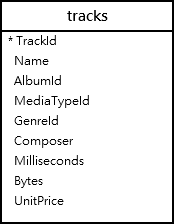
The following example uses the ceil() function to round the average track’s length to a number:
SELECT CEIL(AVG(milliseconds/60000)) average_length
FROM tracks;Output:
average_length
--------------
7.0Summary #
- Use the
ceil()function to return a number greater than or equal to the input number.
Thank you for your feedback!
