
Summary: in this tutorial, you will learn how to use the SQLite trunc() function to return the integer part of a number, rounding toward zero.
Introduction to the SQLite trunc() function #
In SQLite, the trunc() function returns the integer part of a number, rounding toward zero.
Here’s the syntax of the trunc() function:
trunc(x)In this syntax:
xis a number, an expression, or a table column to obtain the integer part.
The trunc() function returns the integer part of x, rounding toward zero. If x is NULL the trunc() function returns NULL.
The trunc() function works like the floor() or ceiling() functions except that it always rounds the input number toward zero whereas the floor() and ceiling() functions round the input number toward zero or away from zero depending on whether the number is positive or negative.
SQLite trunc() function examples #
Let’s take some examples of using the trunc() function.
1) Using SQLite trunc() function with a positive number #
The following example uses the trunc() function to return the integer part of the number 10.99, rounding toward zero:
SELECT trunc(10.99) result;Output:
result
------
10.02) Using the trunc() function with a negative number #
The following example uses the trunc() function to return the integer part of the number –10.99, rounding toward zero:
SELECT trunc(-10.99) result;Output:
result
------
-10.03) Using the trunc() function with table data #
We’ll use the trunc() function with the tracks table from the sample database.
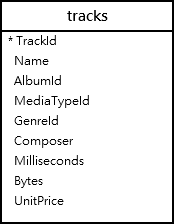
The following query returns the average length of tracks in milliseconds:
SELECT avg(milliseconds)
FROM tracks;Output:
avg(milliseconds)
-----------------
393599.2121039109To get the average length of tracks in milliseconds without the decimal places, you can use the trunc() function as shown in the following query:
SELECT trunc(avg(milliseconds)) length
FROM tracks;Output:
length
--------
393599.0Summary #
- Use the
trunc()function to return the integer part of a number, rounding toward zero.
Thank you for your feedback!
