Image

A 3D Rasterizer For Embedded Devices

Once upon a time, doing graphics on a microcontroller was challenging, to say nothing of the concept of going into three dimensions. But modern microcontrollers are far more powerful, and you might find yourself wanting to do all sorts of graphical wizardry with one. To that end, you might find Jet useful.

Created by [CubeCoders], Jet is a compact 3D rasterizer built for modern chips like the ESP32 and STM32. It’s dependency free, relatively tiny, and is written in C++17 with an eye towards working well on memory-limited platforms. It runs entirely in software, uses only integer arithmetic, and is built around 16-bit RGB565 color — intended to make it easy to use with parts like the ST7796, ILI9488, and other similar displays interfaced via SPI.

As a point of reference, on a ESP32-S3 Jet can render around 650 on-screen triangles (post-culling) at 60 frames per second on a 480×320 display, or 1300 triangles at 30 FPS. The developers note that 3D performance lands somewhere between the Sega 32X and Sega Saturn — not bad for a microcontroller you can buy for under $20. The Wipeout-like demo shows off the capabilities of Jet rather fantastically, we think.

You’d be foolish to expect your next microcontroller project to render Crysis. However, if you want some retro 3D graphics for your next ESP32-based build, you might just consider exploring what Jet can do for you.

Continue reading “A 3D Rasterizer For Embedded Devices”

Image

Pulse: A New VHDL Simulator

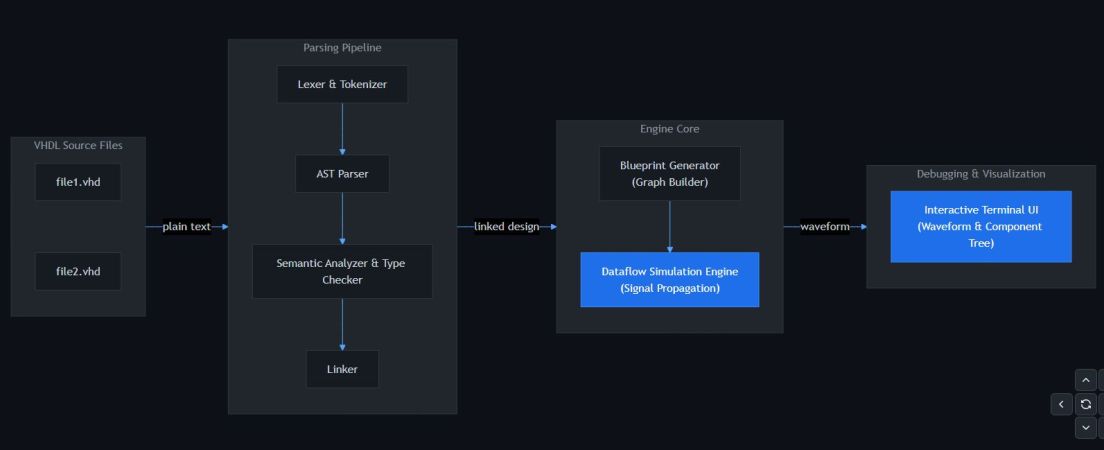
With VHDL being arguably more deterministic and bullet-proof than Verilog, it’s good to see another open source VHDL simulator joining the fray that is not a variation of ghdl. Written by [Óscar Grimal] in C++ with an MIT license, the Pulse project is a still in progress package that provides the entire toolchain, from the compiler to the requisite waveform output.

This waveform output is provided in the form of a text-based user interface (TUI), which at the very least helps a lot with making it cross-platform compatible. As dependencies only a C++20 capable compiler and CMake are indicated.

Of course, with VHDL being a rather hefty language especially once you start piling up the associated standard library, the currently supported language and library features are somewhat limited still so that you’re limited to basic IEEE packages and types, with default values are not supported yet.

Per the roadmap on the GitHub project’s Readme more VHDL language features including generics and additional types will be added, along with an enhanced simulation engine. It’s also said that mixed-language support with Verilog will be added, though SystemVerilog looks to be getting the short end of the stick as usual.

It will definitely be interesting to compare this package to ghdl.

Image

Local LLMs Can Work Better Than Claude, At Least For Some

This is going to be a very personal question, because when you’re talking cloud vs local anything, it comes down to this: how much are you willing to pay for independence? The local option might save you long term, or it might never pay off the capital investment. It will almost certainly cost you your time to set up and maintain your own system — but what you get back is independence. With LLMs, traditionally you lose quite a bit of performance, but as [Anurag Singh] points out on XDA Developers, a lesser model might actually let you get more done, depending on your workflow.

[Anurag] had been on the 20$/month plan with Anthropic when he decided that the scratch just wasn’t worth the sniff– he was hitting usage limits he couldn’t stand at that level, but couldn’t justify a higher tier of access. So he decided to try a local LLM, even though all he had was a 16 GB MacBook Air M5, not a beefy workstation. Since his workflow isn’t so much ‘vibe code the whole thing for me’ as ‘help me find where I went wrong here, electronic rubber duck’, Qwen2.5 Coder 14B proved more than adequate for his use case.

It can’t understand all the moving parts of a large project as well as Claude can — not surprising given how old it is and how much memory it has to work with — but that’s [Anurag]’s job. He’s the programmer, it’s just the assistant. For his use case, he can make use of his existing hardware and having the the LLM right in VS Code is allows for a speedy workflow.

Your millage may vary, but if you want to get into locally running LLMs, we can point you at the easy ways to get started. Depending on your hardware, you might want to grab another GPU.

Image

A 1024 Byte Python Interpreter

Like many of us, [Austin] finds writing code satisfying — especially if it is challenging. His latest challenge: shoehorn something that looks like Python into 512 bytes. Ok, that didn’t work out, but would you believe 1024 bytes of source code?

The goal was to properly execute a fizzbuzz program using a decidedly Python-like syntax. Since he is only interpreting Python, some things were simplified. In addition, he tried hard to minimize things like whitespace and variable names. Still, there were other things to do, and he borrowed from tips for code golfing.

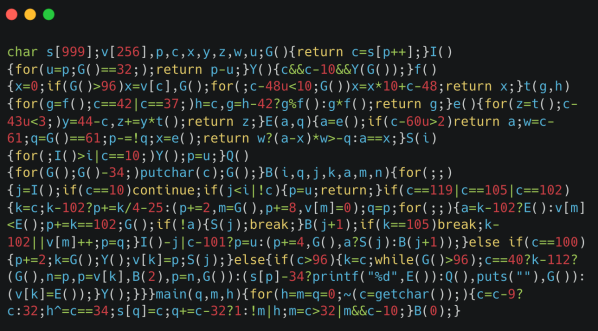
The resulting code is essentially illegible, but it handles integer variables and literals, assignment, arithmetic, many control structures, functions, and even print. Not bad for 1 K.

Despite being tiny, the parser does a lot, but it does cut corners. No bytecode, no syntax tree, and no error handling. Variables have to be a single lowercase letter. So, ok, it isn’t really Python. But it is something.

Naturally, this reminded us of the obfuscated C code contest. If you really want to go small, we appreciate small Forth.

Image

From A Ten-Line Script To A Real Utility With Codex

I’m an experienced programmer, and I’ve worked in many different languages. Sometimes being a programmer is a two-edged sword. You want to accomplish something, and you can do it easily — but it can be a lot of work to do it right. Maybe more work than you want to do.

Normally, I’ll kick out a few lines of script for something I want and be done, accepting that it isn’t production-hardened. This time, however, I decided to try an AI tool to see whether they could do the work I was too lazy to do myself. While I’ve played with chatbots, I wanted to try one of the dedicated coding agents, in this case, Codex. Outside of asking ChatGPT to write a simple function or find the cause of an error message, I haven’t done much coding with AI assistance, so I was interested to see what these agents brought to the table.

A Radio Problem

The problem was simple: I wanted an easy way to put buttons on my Linux desktop that launched Internet radio stations. Sure, I could open a player and paste in a long URL, but I’m far too lazy to remember all those URLs.

I searched for a way to make Shortwave — an Internet radio player — open a URL from the command line. Apparently, you can’t. Google Gemini suggested writing a script that launches cvlc, the command-line VLC player, with the URL as an argument.

That’s easy, so I did it. Of course, then I had to find the stream URLs for all my favorite stations. It turns out that Radio Browser maintains an extensive database of stations. I considered scraping the site or using its API, but honestly, the little script was becoming too much of a project.

Besides, I was already struggling to manage the media player’s lifetime. I didn’t want a new station playing on top of one that was already running, and I wanted a command to stop playback, so the script had already grown larger than I first imagined.

My first version used a temporary file containing the player’s process ID so a future script execution could kill the old player. That usually works, but it isn’t very robust, and I knew it. But how much work did I really want to do here? I decided I had done enough and turned the rest over to Codex, OpenAI’s coding assistant.

Continue reading “From A Ten-Line Script To A Real Utility With Codex”

Image

ShieldFont: Bludgeoning AI Scrapers That Disrespect Robots.txt

In the more innocent days of the World Wide Web you could simply put a robots.txt file in the root of your website that search engine indexing bots and similar would consult for the indexing wishes of the site owner. In this brave new world of LLM training data indexing such pleasantries are however rarely respected, leaving site owners to resort to increasingly more involved ways to bludgeon so-called AI scrapers, with ShieldFont being one of the most recent methods.

Its basic functioning is detailed in the white paper, explaining their use of ligatures. These are normally used to join multiple graphemes or letters into a single glyph which are rendered in the final text. By substituting about a quarter of the words in a text with such ligature-based versions in an intelligent, dictionary-based manner, the HTML version – as typically parsed by a scraper – will read as grammatically valid but nonsensical text, while the rendered font version will look normal.

Naturally, there are some disadvantages to this, such as screen readers for the visually impaired needing to also use the rendered font version, and it’s just as effective on legitimate search engine indexing bots. That said, if you apply this to static, archived content, or content marked as ‘do not follow’ in said robots.txt, then it might just be one way to make ChatGPT and friends spit out really funny output in the future now that the novelty of wood glue on pizza and eating rocks has somewhat worn off.

While LLM scrapers can adapt to this by also parsing the rendered text, this makes the scraping effort significantly more expensive. Together with maze traps like Nepenthes and Cloudflare’s offerings that seek to keep these scrapers busy scraping dynamically generated content through infinite linked pages, the tools available to combat the menace of these scrapers keep developing.

Image

DOOM Using Regular Expressions

Regular expressions (regexes) are an amazingly powerful way to perform operations on collections of e.g. text. Regexss can also be considered to be a programming language, even a Turing complete one. Ergo it’s perfectly acceptable to thus design a way to use regexes to run and play a game of DOOM, as [Artem Lytkin] recently did.

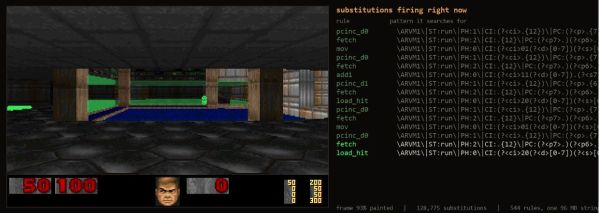
The GitHub project page can be found here, containing the Python-based code that allows the demonstration to run, as well as the other components, including the C runtime and the 96.6 MB text string that defines a CPU’s registers, RAM, a framebuffer, the DOOM engine compiled to this custom CPU’s instruction set and the WAD file for the game itself.

The C-based driver applies the fixed, ordered list of find-and-replace rules to this string, which after more than ten-thousand of such substitutions later results in a single frame of the game. At about 80,000 substitutions per second on the given test system, that gets you to a sort-of playable framerate, even.

Naturally, the practical value of playing DOOM like this is pretty low, but as a demonstration of why regexes are awesome it’s hard to beat.