Elementor Animated Button Widget with Creative Hover Effects
Creative Button is a free Master Addons widget for call-to-action buttons with a built-in hover animation. Pick an effect from the Button Effects list, type the text and an optional second message for hover, add an icon, and style the normal and hover colors. The free plugin includes 6 effects: Default, Winona, Ujarak, Wayra, Tamaya and Rayen. Master Addons Pro adds 15 more, from Pipaluk to Shikoba, for 21 in total.

How to Add an Animated Button in Elementor
You need Elementor and the free Master Addons plugin from WordPress.org.
- Check that Creative Button is switched on under Master Addons, Widgets.
- In the Elementor editor, search for Creative Button and drag it onto the page.
- Pick an effect in Button Effects and hover the button to preview it.
- Type the Button Text, the Alternative Button Text and the Link URL.
- Add an icon and choose Before or After.
- In the Style tab, set padding, border radius and different Normal and Hover colors so the animation is easy to see.
For a longer walkthrough with extensions such as tooltips and reveal animations, read How to Create Elementor Animated Buttons. Every setting is in the Creative Button widget settings.
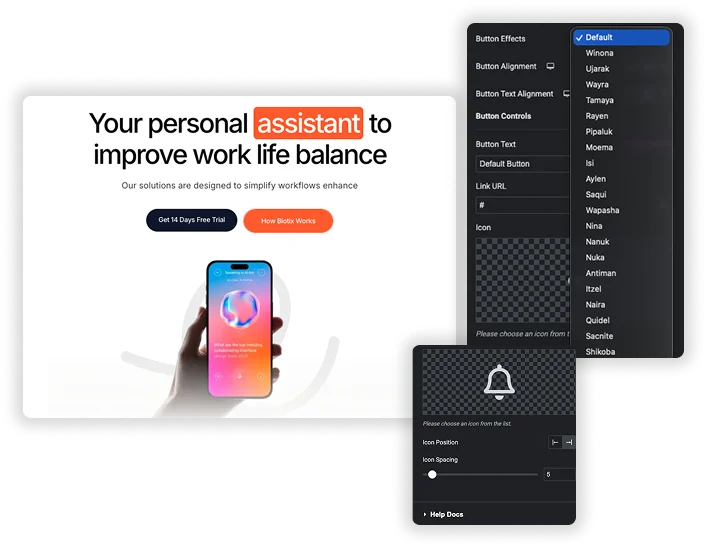
21 Hover Effects: 6 Free, 15 with Pro
Each name in Button Effects is a different CSS hover animation, such as a background that slides in, a border that draws around the button or text that swaps to a second message. Default, Winona, Ujarak, Wayra, Tamaya and Rayen are free. Pipaluk, Moema, Isi, Aylen, Saqui, Wapasha, Nina, Nanuk, Nuka, Antiman, Itzel, Naira, Quidel, Sacnite and Shikoba need Pro. Hover the button on the canvas to preview each one.
- Button Alignment and Button Text Alignment, set per device.
- Extra Before and After background colors for effects that use layered backgrounds.
- Animation speed is fixed by each effect. There is no transition duration setting.
Button Text, Alternative Text, Icon and Styling
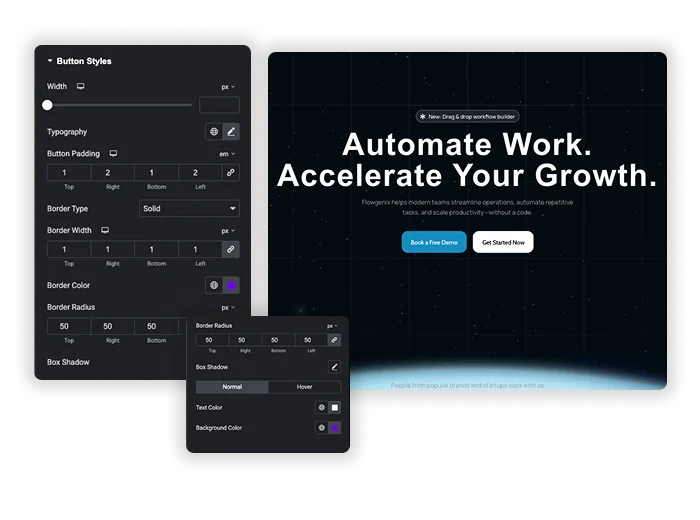
Set the Button Text and a Link URL with the usual new tab and nofollow options. Every effect except Default shows an Alternative Button Text field for the hover message. Add an Icon before or after the text with Icon Spacing. In Button Styles, set Width, Typography, Button Padding, Border, Border Radius, Box Shadow and Icon Size, then choose text, background and icon colors for Normal and Hover.
- “Get Started” that changes to “It’s free” on hover.
- An arrow icon after the text to show direction.
- Rounded pill buttons with a border that changes color on hover.
Elementor Button vs Master Addons Creative Button
The free Elementor Button widget already has hover animations. Here is where each one fits.
| Feature | Elementor Button | Master Addons Creative Button |
|---|---|---|
| Price | Free in Elementor | 6 effects free, 21 with Pro |
| Hover animation | Elementor Hover Animation list, such as Grow, Pulse, Bob and Wobble | Named CSS effects with sliding backgrounds, borders and layered colors |
| Text swap on hover | No | Alternative Button Text |
| Background | Classic or gradient for Normal and Hover | Solid colors, plus Before and After colors on some effects |
| Transition speed | Transition Duration setting | Fixed by each effect |
| Icon | Before or after, with spacing | Before or after, with spacing, size and hover color |
Use the Elementor Button for gradients, a custom transition speed or a simple grow or pulse. Use Creative Button when you want a background sweep or a text swap without custom CSS. For animated text links, see Creative Links.













Frequently Asked Questions For Creative Button
Is the Creative Button widget free?
Yes. The widget and 6 effects (Default, Winona, Ujarak, Wayra, Tamaya and Rayen) are free. The other 15 effects need Master Addons Pro.
Can I use it as a form submit button?
No. Creative Button is a link, not a form button. To style a submit button, use the form widget for your plugin, such as the Contact Form 7 or WPForms widget.
Do the hover effects work on phones?
Touch screens have no hover, so most visitors on phones see the normal state and go straight to the link. Make sure the normal colors and text work on their own.
Can I change the speed of the hover animation?
Not in the panel. Each effect has its own timing. You can change it with custom CSS on the button, or use the Elementor Button widget, which has a Transition Duration setting.
How is this different from the Elementor Button hover animation?
The Elementor Button moves the whole button, for example grow or pulse. Creative Button effects animate the inside of the button, such as a background sliding in or the text changing to your Alternative Button Text.
Trending Elementor Widgets & Extensions
Build sophisticated websites in less time.

Glassmorphism

Container Extras

Patterns
![Master Addons Post/Page Duplicator extension for Elementor: MA Duplicator row link in the WordPress Pages list creating a Landing Page - [Duplicated #128] draft](https://d1asvmc6qcowgk.cloudfront.net/wp-content/uploads/2026/09/15102930/post-page-duplicator-768x403.webp)
Post/Page Duplicator