🚀 Supercharge your YouTube channel's growth with AI.
Try YTGrowAI FreePython range() Function: Start, Stop and Step Explained

Python’s range() hands back a range object instead of a list of numbers, and that single choice explains the stop value that causes off-by-one loops. The object stores three integers and works out each element when something asks for it, so membership stays cheap and two ranges with different stop values can compare equal. I ran that comparison expecting False and got True.
What Python’s range() returns
Calling range() does not build the numbers. The Python documentation lists range as an immutable sequence type rather than a function, and the object keeps only start, stop and step.
print(range(5))
print(type(range(5)))
print(list(range(5)))
print(range(5) == range(0, 5))
The first line prints range(0, 5) and the second prints the type, which is range. Integers appear only when something requests them, and in that sample the list() call is what requests them.
That storage choice produces the equality rule that caught me out, because two range objects compare equal whenever they describe the same sequence of values, even when their stop arguments differ.
print(range(0, 10, 2) == range(0, 9, 2))
print(range(0, 3, 2) == range(0, 4, 2))
print(range(0) == range(2, 1, 3))
print(range(0, 5) == list(range(0, 5)))
I compared those four pairs on the interpreter, and the first three all return True because each pair describes the same sequence of values. The fourth returns False, since a range never equals a list even when both hold 0 through 4.
What you need before you run these examples
Everything here comes from the standard library, so there is nothing to install and no environment to activate. A Python 3 interpreter is the only requirement, and the samples on this page ran on CPython 3.14.7.
Version details matter here, so check your interpreter before comparing output against the samples below.
- Constant-time membership for integers arrived in Python 3.2, along with slicing and negative indices.
- The start, stop and step attributes arrived in Python 3.3, together with sequence-based equality.
- timeit, sys and tracemalloc ship with the interpreter, so the timing and memory samples need no packages.
Run python3 -V before comparing timings, because the elapsed numbers in the membership section move with the machine.
The three arguments and what each one changes
A range takes one, two or three integers, and each extra argument removes a decision from your loop. The stop argument sets how many values you get, and it is never one of them.
range(stop)
A single argument sets the stop. The start defaults to 0 and the step to 1, so passing 5 gives you five entries and not one of them is 5.
for i in range(5):
    print(i)
I ran that loop, and the output is 0 through 4, so the count equals the stop value once the start is 0. Reading range(5) as five items is the habit that keeps the boundary straight.
range(start, stop)
Providing two arguments sets the start and the stop, which changes the count to stop minus start. Negative boundaries follow the same rule.
print(list(range(3, 8)))
print(list(range(-3, 3)))
The first call gives 3 through 7. The second gives -3 through 2, and both stop one short of the second argument without including it.
range(start, stop, step)
The third argument is the distance between values, and the documentation states the contents as r[i] = start + step*i for as long as the value stays inside the boundary. Production stops as soon as the next value would reach or pass the stop, so a step that does not divide evenly ends early instead of rounding.
print(list(range(0, 10, 2)))
print(list(range(5, 26, 5)))
print(list(range(0, 10, 3)))
The last call stops at 9 rather than 10, and nothing is padded to reach the boundary, so the final value is always the last one that satisfied the constraint.
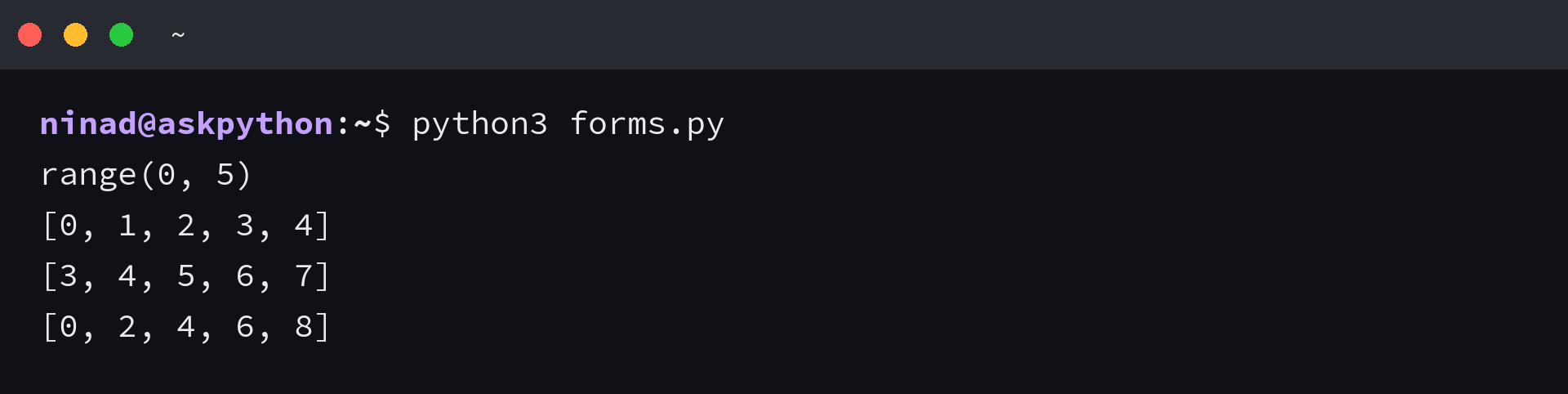
Walking a range backwards
A negative step reverses the direction, and the two boundaries swap roles with it. The start has to be larger than the stop, or the range comes back empty.
Countdowns and reverse index walks are the two places a negative step shows up, and the shortcut below covers the second one without any arithmetic.
print(list(range(10, 0, -1)))
print(list(range(5, -1, -1)))
items = ["first", "second", "third", "fourth"]
print([items[i] for i in range(len(items) - 1, -1, -1)])
print(list(reversed(range(5))))
The countdown runs 10 down to 1, and the index walk reaches “fourth” first. Reading the comprehension takes a moment, because len(items) – 1 is the last valid index and the -1 stop keeps the sequence going until it reaches zero.
reversed() returns the same order as the counting-down step, and it accepts a range object directly because the object is a sequence.
Length, membership and indexing without building the list
A range object knows its own arguments, so it can answer questions about itself arithmetically rather than by walking the values. Membership, length, indexing and slicing all resolve without a loop.
r = range(0, 10, 2)
print(6 in r)
print(7 in r)
print(50 in range(0, 100))
print(150 in range(0, 100))
The value 6 is inside the stepped sequence and 7 is not, because a step of 2 keeps only the even numbers. The larger checks return True and False just as fast, since the interpreter solves an inequality instead of scanning.
Length, indexing and slicing come from the same property, and a slice hands back another range rather than a copy of the values.
numbers = range(0, 1_000_000_000)
print(len(numbers))
print(numbers[500_000])
print(numbers[-1])
print(numbers[0:10])
print(range(0, 20, 2)[1:5])
The negative index resolves to the final element, and the last call slices the stepped sequence into range(2, 10, 2). Nothing was copied to produce either answer.
Membership on a list of comparable size costs far more, and timing the two side by side is the quickest way to see the difference.
import timeit

numbers = range(1_000_000_000)
as_list = list(range(1_000_000))

range_ops = timeit.timeit(lambda: 999_999_999 in numbers, number=100_000)
list_ops = timeit.timeit(lambda: 999_999 in as_list, number=100)

print(f"range membership: {range_ops / 100_000 * 1_000_000:.2f} microseconds")
print(f"list membership:  {list_ops / 100 * 1_000_000:.2f} microseconds")
I measured both tests with timeit, and the range check finished in 0.11 microseconds per call while the list test took about 10 milliseconds. The value sits at the far end of a million entries in the list case, which is where the time goes.

Memory follows from the same design, because a range stores three integers while a list stores every value plus a pointer to each one.
import sys
import tracemalloc

r = range(1_000_000)
tracemalloc.start()
big = list(range(1_000_000))
current, peak = tracemalloc.get_traced_memory()
tracemalloc.stop()
print("range object:", sys.getsizeof(r), "bytes")
print("list values:", current, "bytes")
print("peak during list build:", peak, "bytes")
I measured the object at 48 bytes whether it counts to ten or to a million, while building the million values costs about 40 megabytes. Convert once, at the point where the numbers have to be kept.
What raises an error and what comes back empty
Some argument combinations cannot produce a range at all, and Python rejects them when the call is made rather than when iteration starts. An empty range is the other possible outcome, and that one arrives without a message.
Each error prints with its message rather than stopping at the first traceback, which is how you will meet them in your own script.
try:
    range(0, 1.5)
except TypeError as error:
    print(type(error).__name__, error)

try:
    range(0, 10, 0)
except ValueError as error:
    print(type(error).__name__, error)

| What you wrote | What Python does | Why |
|---|---|---|
| range(0, 1.5) | TypeError about a float that cannot be interpreted as an integer | arguments have to be integers, or objects that implement __index__ |
| range(0, 10, 0) | ValueError about argument three | a step of zero has no next value to move to |
| len(range(0, sys.maxsize + 10)) | OverflowError about a value too large for a C ssize_t | the range is legal on its own, but the length lookup needs a machine-sized integer |
| range(5, 5) | An empty result with no error | start equals stop, so no value satisfies the constraint |
The float case usually arrives through arithmetic, because division in Python 3 returns a float even when the two integers divide evenly. Floor division or an int() call fixes the argument before range receives it.
total = 450

try:
    range(total / 10)
except TypeError as error:
    print(type(error).__name__, error)

print(list(range(total // 10)))
print(list(range(int(total / 10))))
Both working calls print 45 values running from 0 to 44, which is what 450 divided by 10 gives once the argument is an integer.
The zero step is worth recognising on sight, because the message names argument three rather than the step itself. A step you computed at runtime is the usual cause, so guarding that value before the call beats reading a traceback.
A range larger than sys.maxsize is legal as long as you never ask for its length, since only the length lookup needs to return a machine-sized integer.
I ran the empty cases too, and nothing raises when the boundaries simply do not line up, because an empty result is the honest answer rather than a failure.
print(list(range(5, 5)))
print(list(range(0, 10, -1)))
print(len(range(5, 5)))
print(bool(range(5, 5)))
The second call is the one to look at, because a negative step with the boundaries the wrong way round produces nothing at all. An empty range is also falsy, so a plain if test on the object is enough to catch it.
Decide once whether you need the values twice
The choice between a range and a list comes down to one question, and answering it before the loop saves a rewrite later. If the numbers have to outlive the loop, build them once.
Index arithmetic inside the loop argument is what hides that decision, so pairing values with positions is the first place to look.
items = ["apple", "banana", "cherry"]
for index, item in enumerate(items):
    print(index, item)
I reach for enumerate when I need the position alongside the value, and the loop body stays short without a range call. Keep range for the cases where the numbers themselves matter to the loop.
When the values do have to survive the loop, convert once at the top instead of converting inside the condition.
readings = [12, 15, 9]
positions = list(range(len(readings)))

print(positions)
for position in positions:
    print(position, readings[position])
print("last index:", positions[-1])
The last index is one less than the count, and positions keeps the whole sequence around for anything that runs after the loop. I keep the range object while I am counting and convert it once when something later needs the numbers again.
Frequently asked questions about range()
Is range() inclusive in Python?
No. The stop value is excluded, so range(1, 11) yields 1 through 10. Use range(1, 12) when you want 11 to appear in the loop.
Does range() start at 0?
Start defaults to 0 and the step defaults to 1 when you pass a single argument. Pass two arguments and the first one becomes the start, so range(3, 8) begins at 3.
Can range() count backwards?
Yes, with a negative step, as long as the start is larger than the stop. range(10, 0, -1) counts down to 1, and reversed() produces the same order without arithmetic.
Why does range(len(items) – 1) skip the last item?
The stop is excluded, so subtracting one more leaves the final index out. Use range(len(items)) to reach every position from 0 to the last one.
Is range() a list?
No, it is an immutable sequence type that computes each value on demand. A range never compares equal to a list, even when the two hold the same numbers.
What happens if you pass a float to range()?
Python raises a TypeError saying the float object cannot be interpreted as an integer. Convert the value with int() or integer division first, since a division in Python 3 always returns a float.