Search the Community
Showing results for tags 'air'.
Found 10 results
-
Version 1.0.0
151 downloads
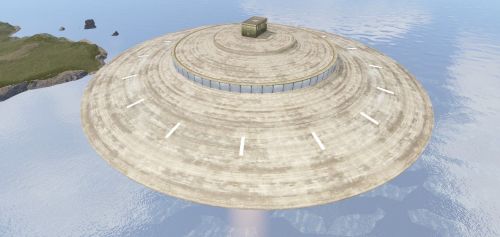
This is a standalone prefab. This is a simple UFO with high radiation and 1 elite crate. Made of 114 prefabs. Place this at 100 on the Y axis to make sure minicopters can get to it.Free -
Version 0.0.6
551 downloads
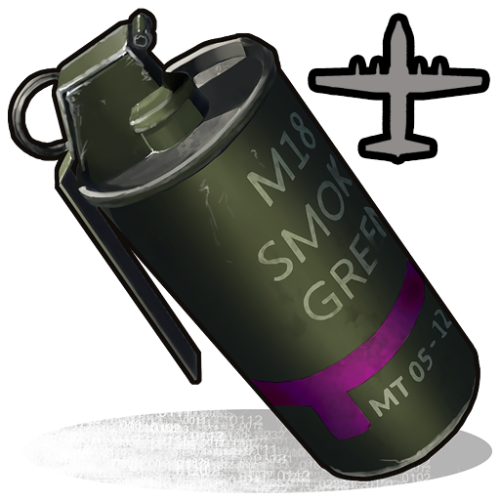
Limits the amount of active Supply Signals on the server. Prevents players from calling an Airdrop if the amount of deployed Supply Signals, or the amount of spawned Cargo Planes or the amount of Supply Drops with a parachute still attached is over the limit defined in the config. Config: { "Max": 10, "BypassPermission": "supplysignallimit.bypass" } Lang: { "Limit": "There can only be {0} active Supply Signals at any time, please wait a few seconds." }$3.00 -
Version 1.0.1
20 downloads
xInFlightHeliRepair xInFlightHeliRepair is a Rust plugin that allows players to repair an attack helicopter while mounted or in the air as a passenger, using a hammer and consuming a configurable resource (e.g., metal fragments). It includes plenty of customization options. This overrides the new behavior introduced in the “Pivot or Die” update that prevents players from repairing the attack helicopter while in flight. Features In-Flight Helicopter Repair Players/Passengers can repair an attackhelicopter by hitting it with a hammer while in flight. Resource-Based Repair Each repair “hit”: Costs a configurable item (Default: 30 metal fragments). Restores a configurable amount of health (Default: 50 HP). Automatically removes the required items from player inventory. Recent Damage Cooldown If the helicopter was recently damaged by explosive sources, repair is blocked for a set duration (Default cooldown: 10 seconds) Message informs the player how long they must wait. Player Feedback Configurable message system: Supports UI toast notifications or chat messages. Visual Repair Effect Plays a configurable FX prefab on successful repair (Default metal upgrade effect). Permission xinflighthelirepair.use Config { "RequirePermission": false, "Permission": "xinflighthelirepair.use", "EnableRecentlyExplosiveDamageRepairCooldown": true, "RecentlyExplosiveDamageRepairCooldown": 10.0, "ItemUsedForRepair": "metal.fragments", "ItemCostPerRepair": 30, "HealPerHit": 50.0, "PlayEffectOnRepair": true, "Effect": "assets/bundled/prefabs/fx/build/promote_metal.prefab", "MessagesType": "ui", // Use 'ui' for toast notifications and anything else (e.g., 'chat') for chat messages "ShowMessages": true, "NotReadyMessage": "<color=#ff5555>Heli was damaged recently. Wait {0} seconds before repairing.</color>", "FullyRepairedMessage": "<color=#ffcc00>This helicopter is already fully repaired.</color>", "NotEnoughMetalMessage": "<color=#ff5555>You need {0} {2} to repair ({1} available).</color>", "RepairedMessage": "<color=#55ff55>Repaired heli by {0} HP for {1} {2}.</color>" }$8.99 -
Version 2.3.6
3,639 downloads
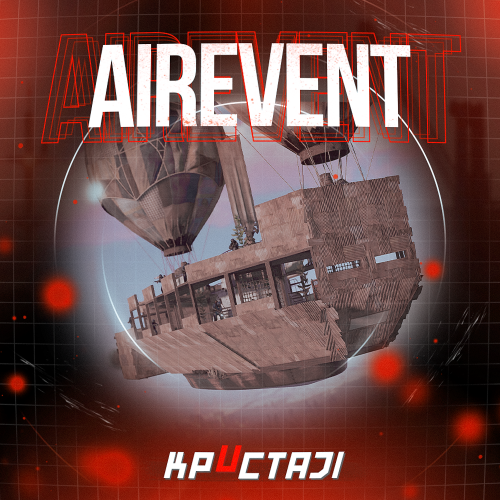
The event is an alternative to the usual cargoship, but it is only in the air Description The chat notification about the airship with scientists arrival to the island begins the event A smoke screen appears in the air after the time is up (it is possible to deactivate the smoke screen in the configuration), then the airship with scientists appears There are 2 locked, 2 elite, 2 military, 2 standard crates and 16 NPCs on the airship as the default The location and loot of all the crates/NPCs can be changed in the configuration, you can add or remove unnecessary crates/NPCs There are 2 CCTV cameras by which you can track the availabilities of locked crates on the airship (the name of the cameras can be changed in the configuration) The looting of both locked crates is the condition for the completion of the event. After that the players have time to depart the airship. They can use the transport that they arrived on it or use hot air balloons on the airship (you need be inside the basket of the hot air balloon) Dependencies Required NpcSpawn Dependencies (optional, not required) True PVE PveMode GUI Announcements Notify Discord Messages AlphaLoot CustomLoot NTeleportation Economics Server Rewards IQEconomic Kits Chat commands (only for administrators) /airstart – starting of the event /airstop – ending of the event /airpos – determining the position and rotation coordinates for changing the location of NPCs and crates.It should write in the configuration (Attention! The event must be started, the current position of the administrator in relation to the cargoship is read) Console commands (RCON only) airstart – starting of the event airstop – ending of the event Plugin Config en - example of plugin configuration in English ru - example of plugin configuration in Russian Hooks void OnAirEventStart(HashSet<BaseEntity> entities) – called when the event starts void OnAirEventEnd() – called when the event ends void OnAirEventWinner(ulong winnerId) – called at the end of the event, where the winnerId is the player who did more actions to complete the event My Discord: KpucTaJl#8923 Join the Mad Mappers Discord here! Check out more of my work here! The airship is designed by Jtedal$25.00 -
Version 1.0.3
527 downloads
The plugin allows players to summon supplies to one point and collect items from them inside after the unlock time has passed. Manage your supplies conveniently and efficiently! Default Config: { "Supply capacity (1-42)": 42, "Range": 15.0, "Time to unlock supply item": 150.0 } Demo:Free -
Version 1.0.7
324 downloads
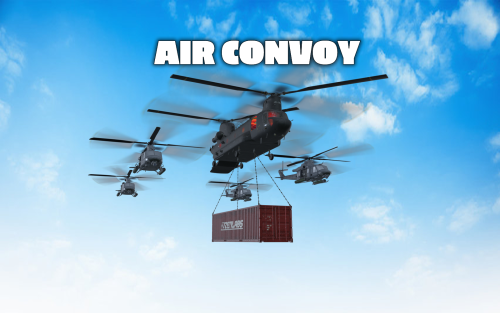
The goal of this event is to take down the cargo helicopter carrying a container filled with valuable loot. The helicopter is protected by 1-4 patrol helicopters. The patrol helicopters can be destroyed with special anti-air rockets. Features: NPCs parachute out of the helicopters when they are destroyed Configurable loot The convoy does not attack players unless they attack the convoy Patrol Helicopters shoot homing missiles to defend the convoy Fully customizable Anti Air Rocket: This is a special rocket designed to take down helicopters. They can be fired both from the ground or from a player attack helicopter and travel 4x faster than a normal HV rocket. To take down a helicopter (with default health) 5 Anti Air Rockets are needed. Shortname: ammo.rocket.smoke Skin ID: 3020346473 Loot Api: This plugin supports the Loot Api of https://codefling.com/plugins/loot-table-stacksize-gui. This means that the loot of every crate can be configured directly in the Loottable UI - no need to edit config files! Commands: airconvoy start - Start the air convoy airconvoy stop - Stop the air convoy aarocket.give <amount> <optional player> - Give anti-air rockets to the specified player or yourself Permissions: airconvoy.admin - Required to use start/stop commands airconvoy.give - Required to use aarocket.give Hooks: void OnAirConvoyStart(); void OnAirConvoyEnd(); Default Configuration: { "Time between events (minutes; set to -1 to disable scheduled events)": 60, "Event duration (minutes)": 30, "Patrol Helicopter count (0 - 4)": 4, "Custom chat prefix": null, "Patrol Helicopter options": { "Health multiplier": 1.0, "Crate count": 2, "Turret range": 80.0, "Time between homing missiles (seconds)": 5, "Time after which a player is not considered hostile anymore (seconds)": 60 }, "Pilot NPC configuration": { "name": "Pilot", "health": 100.0, "enableRadio": true, "roamRange": 10.0, "chaseRange": 20.0, "senseRange": 50.0, "visionCone": 135.0, "damageScale": 1.0, "memoryDuration": 60.0, "removeCorpseAfterDeath": true, "kit": "", "Clothing items": [ { "shortName": "hazmatsuit_scientist", "amount": 1, "skinId": 0 } ], "Belt items": [ { "shortName": "pistol.prototype17", "amount": 1, "skinId": 0 } ], "lootTable": { "Enabled": false, "Item list": [ { "Short name": "scrap", "Min amount": 10, "Max amount": 20, "Chance (1 = 100%)": 1.0, "Skin id": 0, "Custom name": "" } ] } }, "Soldier NPC configuration": { "name": "Soldier", "health": 200.0, "enableRadio": true, "roamRange": 40.0, "chaseRange": 40.0, "senseRange": 50.0, "visionCone": 135.0, "damageScale": 1.0, "memoryDuration": 60.0, "removeCorpseAfterDeath": true, "kit": "", "Clothing items": [ { "shortName": "scientistsuit_heavy", "amount": 1, "skinId": 0 } ], "Belt items": [ { "shortName": "lmg.m249", "amount": 1, "skinId": 0 } ], "lootTable": { "Enabled": false, "Item list": [ { "Short name": "scrap", "Min amount": 10, "Max amount": 20, "Chance (1 = 100%)": 1.0, "Skin id": 0, "Custom name": "" } ] } }, "Container Loot Configuration (Max. 6 Crates)": [ { "Crate prefab": "assets/bundled/prefabs/radtown/crate_normal_2.prefab", "Loot preset name (requires Loottable plugin)": "Container Normal Crate", "Custom loot table": { "Enabled": false, "Item list": [ { "Short name": "scrap", "Min amount": 10, "Max amount": 20, "Chance (1 = 100%)": 1.0, "Skin id": 0, "Custom name": "" } ] } }, { "Crate prefab": "assets/bundled/prefabs/radtown/crate_normal.prefab", "Loot preset name (requires Loottable plugin)": "Container Military Crate", "Custom loot table": { "Enabled": false, "Item list": [ { "Short name": "scrap", "Min amount": 10, "Max amount": 20, "Chance (1 = 100%)": 1.0, "Skin id": 0, "Custom name": "" } ] } }, { "Crate prefab": "assets/prefabs/deployable/chinooklockedcrate/codelockedhackablecrate.prefab", "Loot preset name (requires Loottable plugin)": "Container Locked Crate", "Custom loot table": { "Enabled": false, "Item list": [ { "Short name": "scrap", "Min amount": 10, "Max amount": 20, "Chance (1 = 100%)": 1.0, "Skin id": 0, "Custom name": "" } ] } }, { "Crate prefab": "assets/bundled/prefabs/radtown/crate_elite.prefab", "Loot preset name (requires Loottable plugin)": "Container Elite Crate", "Custom loot table": { "Enabled": false, "Item list": [ { "Short name": "scrap", "Min amount": 10, "Max amount": 20, "Chance (1 = 100%)": 1.0, "Skin id": 0, "Custom name": "" } ] } }, { "Crate prefab": "assets/bundled/prefabs/radtown/dmloot/dm ammo.prefab", "Loot preset name (requires Loottable plugin)": "Container Ammo Crate", "Custom loot table": { "Enabled": false, "Item list": [ { "Short name": "scrap", "Min amount": 10, "Max amount": 20, "Chance (1 = 100%)": 1.0, "Skin id": 0, "Custom name": "" } ] } }, { "Crate prefab": "assets/bundled/prefabs/radtown/crate_normal_2.prefab", "Loot preset name (requires Loottable plugin)": "Container Normal Crate", "Custom loot table": { "Enabled": false, "Item list": [ { "Short name": "scrap", "Min amount": 10, "Max amount": 20, "Chance (1 = 100%)": 1.0, "Skin id": 0, "Custom name": "" } ] } } ] }$30.00- 56 comments
- 1 review
-
- 6
-

-

-
- #convoy
- #helicopter
- (and 9 more)
-
Version 1.0.0
205 downloads
This is an extension of the Magic Panel plugin that shows an icon for the Air Convoy Event plugin. The icon's color and position can be set individually in the configuration file. Please note: The MagicAirConvoyPanel only works in conjunction with the "MagicPanel" and "AirConvoy" plugins. Make sure you have installed these plugins before using the Event Panel. The plugin also automatically checks if any of the required plugins are missing. If the plugins are not present, it will not be loaded. #Configuration The settings and options can be configured in the MagicAirConvoyEventPanel file under the config directory. The use of an editor and validator is recommended to avoid formatting issues and syntax errors. { "Active Color": "#00FF00FF", "Inactive Color": "#FFFFFF1A", "Panel Settings": { "Dock": "center", "Width": 0.02, "Order": 1, "BackgroundColor": "#FFF2DF08" }, "Panel Layout": { "Image": { "Url": "https://data.mgcdrp.de/images/rust/rustplugins/magicpanel/AirConvoyIcon.png", "Enabled": true, "Color": "#FFFFFFFF", "Order": 0, "Width": 1.0, "Padding": { "Left": 0.1, "Right": 0.1, "Top": 0.05, "Bottom": 0.05 } } } } #Credits Thanks to MJSU for the Magic Panel plugin. We reworked one of the plugin extensions so that MagicPanel now also supports the Air Convoy Event plugin. If you're not satisfied with the icon, take a look here – you might find something more suitable.Free -
Version 1.0.0
31 downloads
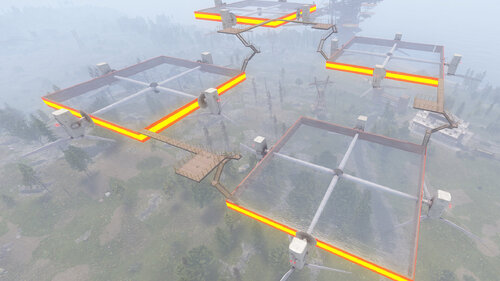
An original air zone for players on your server to build. Air Build Zone consists of 4 zones to build in, these zones will light up your night skies.$3.28 -
Version 1.0.0
28 downloads
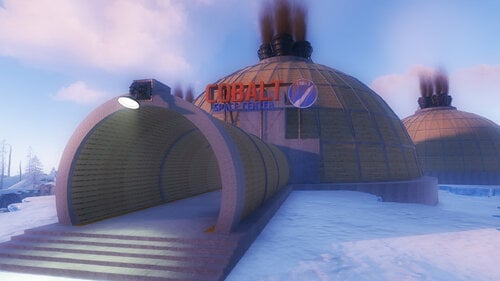
Players will be able to build inside this dome. Build Zone Dome is a safe dome for players to build inside. It contains a door that you can open and close, as well as its own lighting and vertical signs to draw on.$5.47 -
Version 1.0.0
26 downloads
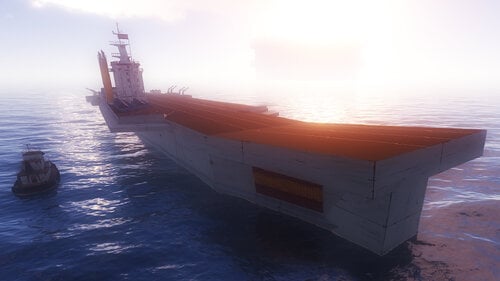
Decorate the ocean with this Aircraft Carrier, although it is not necessary, this Aircraft Carrier was created for the BiPlane plugin. Aircraft Carrier contains a large space to place helicopter, or spawn points for the BiPlane plugin. It also contains NPC, helicopter respawn and a hackable box.$8.75



.thumb.png.d8730004887666a2775699ef18eb252c.png)
.thumb.png.ccf8a947948c9eb1445ad21a7931247b.png)