
Search the Community
Showing results for tags 'blacksmith'.
Found 3 results
-
Version 1.0.5
59 downloads
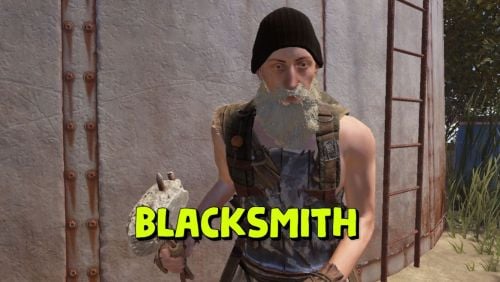
Adds a blacksmith to your server who can repair your items and add slots to your armor or backpack. By default, you can find a blacksmith at the outpost and bandit camp monuments. The plugin is ready to use right out of the box. You can also customize it with great flexibility. Commands (only for admin): balacksmith_add_spawnpoint -adds a blacksmith spawn point to your current location and links it to the nearest monument; balacksmith_add_kit - writes to the config the kit of clothes for the blacksmith that you are currently wearing. Config: { "Repair cost multiplier(For example, if the multiplier is 0.5f, then a full repair will require half the resources required for crafting. The less damaged the item, the lower the repair cost.)": 0.5, "Cost to add the first armor slot": [ { "Resource name": "scrap", "Amount": 100 } ], "Cost to add a second armor slot": [ { "Resource name": "scrap", "Amount": 200 } ], "Cost to add a third armor slot": [ { "Resource name": "scrap", "Amount": 300 }, { "Resource name": "metal.fragments", "Amount": 500 } ], "Cost to add a fourth armor slot": [ { "Resource name": "scrap", "Amount": 500 }, { "Resource name": "metal.refined", "Amount": 50 } ], "Cost to add a backpack slot": [ { "Resource name": "scrap", "Amount": 50 }, { "Resource name": "metal.fragments", "Amount": 100 } ], "Blacksmith's clothing list": [ { "Short name of the item": "woodarmor.gloves", "Item SkinID": 0 }, { "Short name of the item": "metal.plate.torso", "Item SkinID": 0 }, { "Short name of the item": "santabeard", "Item SkinID": 0 }, { "Short name of the item": "attire.hide.pants", "Item SkinID": 0 }, { "Short name of the item": "wood.armor.pants", "Item SkinID": 0 }, { "Short name of the item": "hat.beenie", "Item SkinID": 0 }, { "Short name of the item": "attire.hide.boots", "Item SkinID": 0 }, { "Short name of the item": "parachute", "Item SkinID": 0 } ], "Object in hands": { "Short name of the item": "concretehatchet", "Item SkinID": 0 }, "List of blacksmith spawn points": [ { "Monument name": "assets/bundled/prefabs/autospawn/monument/medium/bandit_town.prefab", "Spawn point parameters": [ { "x": -2.49, "y": 1.758, "z": -16.743, "w": 47.0 } ] }, { "Monument name": "assets/bundled/prefabs/autospawn/monument/medium/compound.prefab", "Spawn point parameters": [ { "x": -16.3726, "y": 0.1346, "z": 13.543, "w": -3.0 } ] } ] }$6.99- 17 comments
-
- 1
-

-
- #blacksmith
- #pve
- (and 5 more)
-
Version 1.0.4
32 downloads
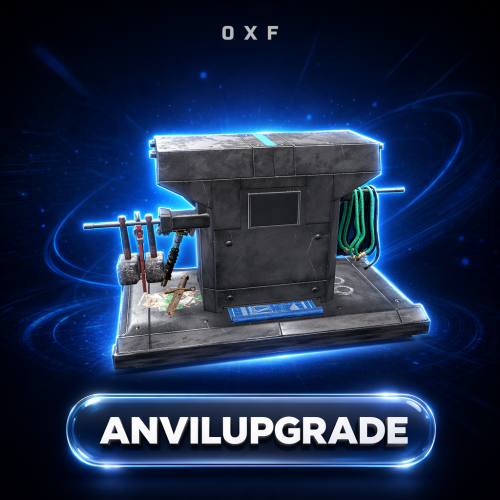
Add a working Anvil and a Metal Hammer to your server and let players reforge their gear. Drop an item onto the anvil, strike it with the hammer, and it transforms into an upgraded or reskinned version — with resource costs and chance-based outcomes you fully control. Key Features Adds a custom Anvil deployable and a Metal Hammer tool as real in-game items Reforge system — place an item in the anvil and strike it with the hammer to convert it Chance-based results: one input can roll into several possible outputs (the default recipe turns an AK into ice, jungle, medical, diver, or a skinned variant) Fully configurable recipes — define the input item (shortname, skin, name, amount), its resource cost, the number of hammer strokes required, and the weighted result table Optional Metal Hammer durability, measured in strikes, with a found-condition range and repair support (can be turned off entirely) Tunable anvil entity: health, per-damage-type protection, optional invulnerability, and a lootable toggle Anvil decay with delay, duration, indoor decay, heal rate, and tick controls Anvil repair and pickup rules — require the hammer, require building privilege, and carry condition over on pickup Per-item world-model transform overrides so each item sits correctly on the anvil In-world UI that shows the resources needed for the current upgrade Localized into 31 languages out of the box Permissions & Commands None — AnvilUpgrade has no permissions or chat/console commands. Everything happens in the world: whoever holds the Anvil and Metal Hammer items can use them. Control access by choosing who receives those items. Configuration A full config is generated on first load at oxide/config/AnvilUpgrade.json. Excerpt of the key sections (the per-damage-type protection table is generated automatically with sensible defaults): { "Config Version": 1, "Metal Hammer Item": { "Enable Condition": true, "Max Condition (durability / strikes)": 500.0, "Found Condition Fraction Min (0-1)": 0.1, "Found Condition Fraction Max (0-1)": 0.4, "Repairable": true, "Maintain Max Condition": true }, "Anvil Entity": { "Health": 1000.0, "Lootable": true, "Invulnerable": false, "Base Protection (per damage type, 0-1)": { "Generic": 0.98, "Bullet": 0.9999, "Explosion": 0.4998, "...": "remaining damage types generated automatically" }, "Decay": { "Enabled": true, "Decay Delay (hours)": 8.0, "Decay Duration (hours)": 8.0, "Decay Indoors": false, "Override Heal Rate": false, "Heal Rate": 1.0, "Decay Tick Override (seconds, 0 = default)": 0.0 }, "Repair": { "Enabled": true, "Resources": [ { "Short Name": "metal.refined", "Skin ID": 0, "Amount": 25 } ] } }, "Anvil Pickup": { "Enabled": true, "Require Hammer": true, "Require Building Privilege": true, "Item Count": 1, "Set Condition From Health": true, "Subtract Condition (0-1)": 0.25 }, "Configs": [ { "Requirements": { "Short Name": "rifle.ak", "Skin ID": 0, "Text": null, "Amount": 1, "Number of strokes (Min 1)": 10, "Resources": [ { "Short Name": "metal.refined", "Skin ID": 0, "Amount": 30 } ] }, "Collect resources on success only": false, "Result Items": [ { "Short Name": "rifle.ak.ice", "Skin ID": 0, "Chance (0-100)": 20.0 }, { "Short Name": "rifle.ak.jungle", "Skin ID": 0, "Chance (0-100)": 20.0 }, { "Short Name": "rifle.ak.med", "Skin ID": 0, "Chance (0-100)": 20.0 }, { "Short Name": "rifle.ak.diver", "Skin ID": 0, "Chance (0-100)": 20.0 }, { "Short Name": "rifle.ak", "Skin ID": 2436647042, "Chance (0-100)": 20.0 } ] } ], "World Item Transform Override": {} } Each result item also supports amount ranges and a condition range; add as many recipes to "Configs" as you like. Localization Ships with 31 languages, including English, Russian, German, French, Spanish, Portuguese, Italian, Polish, Turkish, Ukrainian, Chinese (Simplified & Traditional), Japanese, Korean, and more. Every message is editable under oxide/lang. Dependencies CustomItemDefinitions (required) — library that provides the custom Anvil and Metal Hammer items ServerPrefabs (required) — library that provides the custom anvil entity and hammer prefab Installation Install the required libraries CustomItemDefinitions and ServerPrefabs. Drop AnvilUpgrade.cs into your oxide/plugins/ folder. Edit the generated config to define your recipes, then reload the plugin. Distribute the custom items to players — the Anvil (anvil) and Metal Hammer (hammer.metal) — through your kits, shop, or give system. Credits Prefab created by m1t1ngg. Support Questions, ideas, or issues? Leave a comment or send me a DM here on Codefling.$15.00 -

Version 1.0.0
5 downloads
This monument serves as an excellent medieval point of interest Use it as a standalone monument or combine it with other structures to create a village or town—the possibilities are endless. I left out NPCs so you can easily add your own later, such as guards or a shopkeeper vendor. The loot is kept minimal to give you the flexibility to customize it as you see fit. Quick Start Extract the zip file into your RustEdit install folder. Start Rust Edit. Click on Prefabs at the top & open up your Prefab List. Under the Custom category, you will now find RobJs Premium Prefabs. Double-click on the prefab file, which will spawn it into the map for you. Drag it to the general area you want to place it. Apply the Height Mask, Topology Mask, and Splat Mask. Contact And Help If you need to contact me discord is best: RobJ2210#2553 For help/support my discord group is best: Join Rust Maps By RobJ Discord$13.99-
- 3
-

-
-
- #medieval
- #robj medieval collection
- (and 4 more)
.thumb.png.ccf8a947948c9eb1445ad21a7931247b.png)
.thumb.gif.b68fcc45abe70ab7d7235dffc8a0c770.gif)
