Search the Community
Showing results for tags 'fruster'.
Found 3 results
-
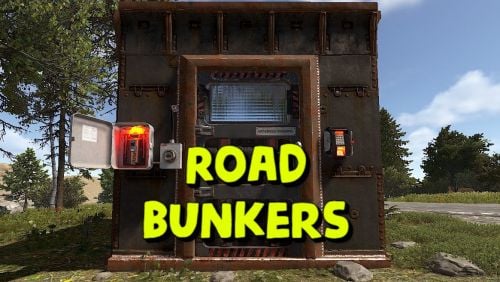
Version 1.0.9
319 downloads
This plugin adds bunkers to your server that spawn along roads. It doesn't require any complex setup or additional plugins; just launch it and it's ready to use. You can also configure bunker types: building grade, security door color, and whether to use a fuse. You can also customize the loot in crates and their quantity. Config: { "Bunker removal time after opening(in seconds)": 180, "Types of bunkers": [ { "Number of bunkers of this type on the map": 60, "Access level (from 1 to 3)": 1, "Fusebox spawn chance (0 to 100)": 0, "Minimum number of crates": 1, "Maximum number of crates (no more than 3)": 1, "Grade type (0 - twigs, 1 - wood, 2 - stones, 3 - metal, 4 - topTier)": 2, "Use own loot table": false, "SimpleLootTable name": "" }, { "Number of bunkers of this type on the map": 30, "Access level (from 1 to 3)": 2, "Fusebox spawn chance (0 to 100)": 50, "Minimum number of crates": 1, "Maximum number of crates (no more than 3)": 2, "Grade type (0 - twigs, 1 - wood, 2 - stones, 3 - metal, 4 - topTier)": 3, "Use own loot table": false, "SimpleLootTable name": "" }, { "Number of bunkers of this type on the map": 10, "Access level (from 1 to 3)": 3, "Fusebox spawn chance (0 to 100)": 100, "Minimum number of crates": 3, "Maximum number of crates (no more than 3)": 3, "Grade type (0 - twigs, 1 - wood, 2 - stones, 3 - metal, 4 - topTier)": 4, "Use own loot table": false, "SimpleLootTable name": "" } ], "Own loot table(there can be a maximum of 12 items in a crate)": { "minAmount": 2, "maxAmount": 4, "itemsList": [ { "name": "metal.fragments", "dropChance": 100, "minAmount": 50.0, "maxAmount": 300.0, "displayName": "", "skinID": 0 }, { "name": "metal.refined", "dropChance": 100, "minAmount": 5.0, "maxAmount": 10.0, "displayName": "", "skinID": 0 }, { "name": "scrap", "dropChance": 100, "minAmount": 10.0, "maxAmount": 20.0, "displayName": "", "skinID": 0 }, { "name": "techparts", "dropChance": 50, "minAmount": 1.0, "maxAmount": 2.0, "displayName": "", "skinID": 0 } ] } }$8.99 -
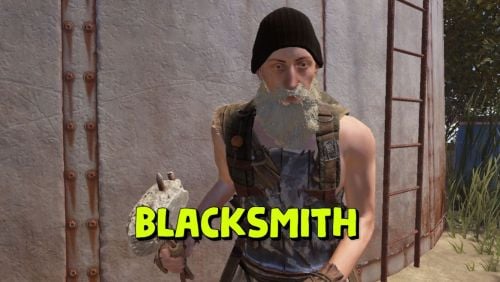
Version 1.0.5
59 downloads
Adds a blacksmith to your server who can repair your items and add slots to your armor or backpack. By default, you can find a blacksmith at the outpost and bandit camp monuments. The plugin is ready to use right out of the box. You can also customize it with great flexibility. Commands (only for admin): balacksmith_add_spawnpoint -adds a blacksmith spawn point to your current location and links it to the nearest monument; balacksmith_add_kit - writes to the config the kit of clothes for the blacksmith that you are currently wearing. Config: { "Repair cost multiplier(For example, if the multiplier is 0.5f, then a full repair will require half the resources required for crafting. The less damaged the item, the lower the repair cost.)": 0.5, "Cost to add the first armor slot": [ { "Resource name": "scrap", "Amount": 100 } ], "Cost to add a second armor slot": [ { "Resource name": "scrap", "Amount": 200 } ], "Cost to add a third armor slot": [ { "Resource name": "scrap", "Amount": 300 }, { "Resource name": "metal.fragments", "Amount": 500 } ], "Cost to add a fourth armor slot": [ { "Resource name": "scrap", "Amount": 500 }, { "Resource name": "metal.refined", "Amount": 50 } ], "Cost to add a backpack slot": [ { "Resource name": "scrap", "Amount": 50 }, { "Resource name": "metal.fragments", "Amount": 100 } ], "Blacksmith's clothing list": [ { "Short name of the item": "woodarmor.gloves", "Item SkinID": 0 }, { "Short name of the item": "metal.plate.torso", "Item SkinID": 0 }, { "Short name of the item": "santabeard", "Item SkinID": 0 }, { "Short name of the item": "attire.hide.pants", "Item SkinID": 0 }, { "Short name of the item": "wood.armor.pants", "Item SkinID": 0 }, { "Short name of the item": "hat.beenie", "Item SkinID": 0 }, { "Short name of the item": "attire.hide.boots", "Item SkinID": 0 }, { "Short name of the item": "parachute", "Item SkinID": 0 } ], "Object in hands": { "Short name of the item": "concretehatchet", "Item SkinID": 0 }, "List of blacksmith spawn points": [ { "Monument name": "assets/bundled/prefabs/autospawn/monument/medium/bandit_town.prefab", "Spawn point parameters": [ { "x": -2.49, "y": 1.758, "z": -16.743, "w": 47.0 } ] }, { "Monument name": "assets/bundled/prefabs/autospawn/monument/medium/compound.prefab", "Spawn point parameters": [ { "x": -16.3726, "y": 0.1346, "z": 13.543, "w": -3.0 } ] } ] }$6.99- 17 comments
-
- 1
-

-
- #blacksmith
- #pve
- (and 5 more)
-
Version 1.0.0
154 downloads
This is an extension of the Magic Panel plugin that shows an icon for the Helipad Event plugin. The icon's color and position can be set individually in the configuration file. Please note: The Magic Heli Event Panel only works in conjunction with the "MagicPanel" and "LaunchSiteHelipadEvent" plugins. Make sure you have installed these plugins before using the Event Panel. The plugin also automatically checks if any of the required plugins are missing. If this is the case, the "LaunchSiteHelipadEvent" plugin will be automatically unloaded. #Configuration The settings and options can be configured in the MagicLaunchSiteHelipadEventPanel file under the config directory. The use of an editor and validator is recommended to avoid formatting issues and syntax errors. { "Active Color": "#00FF00FF", "Inactive Color": "#FFFFFF1A", "Panel Settings": { "Dock": "center", "Width": 0.02, "Order": 1, "BackgroundColor": "#FFF2DF08" }, "Panel Layout": { "Image": { "Url": "https://www.dropbox.com/scl/fi/3rjja8h81fp51o87okz31/helipadicon.png?rlkey=yr768krapvk9wx5867ogt56oe&dl=1", "Enabled": true, "Color": "#FFFFFFFF", "Order": 0, "Width": 1.0, "Padding": { "Left": 0.1, "Right": 0.1, "Top": 0.05, "Bottom": 0.05 } } } } #Credits Thanks to MJSU for the Magic Panel plugin. We reworked one of the plugin extensions so that MagicPanel now also supports the Helipad Event plugin. #Trailer If you're not satisfied with the icon, take a look here – you might find something more suitable.Free