Search the Community
Showing results for tags 'currency'.
Found 12 results
-
Version 2.1.6
3,133 downloads
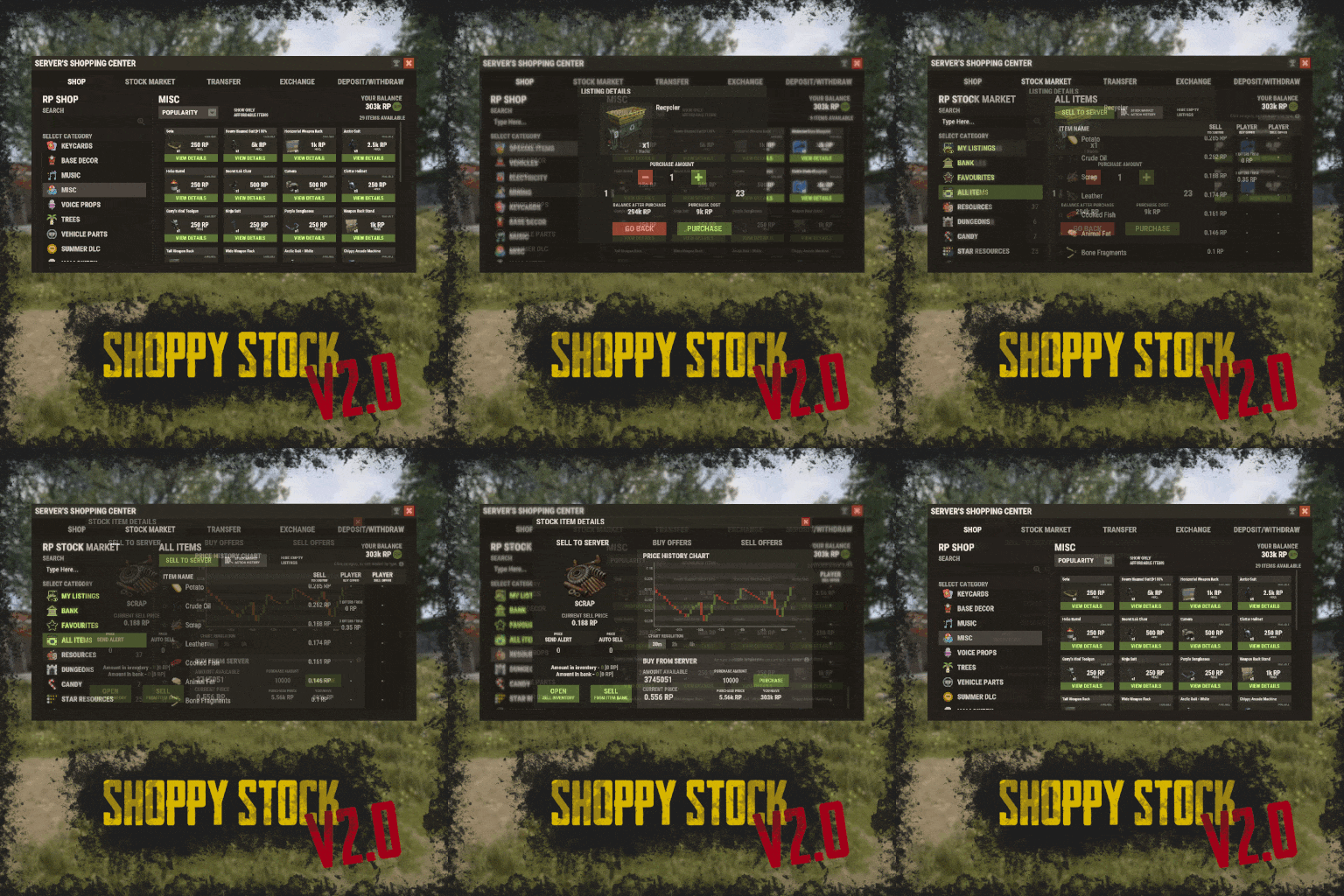
RUST Plugin Test Server TEST MY PLUGINS THERE! connect play.thepitereq.ovh:28050 Shoppy Stock is a powerful and versatile economy system designed to enrich your Rust server with shops, stock markets, transfers, exchanges, and deposit features. This plugin makes it easy to create multiple shops with unique currencies, set up dynamic stock markets with item listings, and manage a fully customizable server selling center—plus many more advanced options. Plugin package (zip) contains: ShoppyStock plugin ShoppyConverter plugin (Converts 1.x config to 2.0 config) Global Includes over 17 detailed Rust-themed GUI windows. Optimized for performance—actions are lightweight and won’t burden your server. Highly expandable, limited only by your imagination. Fully customizable popup messages through the PopUp API. Comprehensive command and API support for currency management. Full language support for all messages and items. Supports NoEscape integration. Complete UI color customization. NPC interaction support for shops and stock markets. Page memory feature remembers your position in the shop when reopened. Deposit and withdraw currencies to and from items. Currency exchange between different types. Built-in currency leaderboard. Shops Create multiple shops, each using different currencies. Easily import your old currency from other economy plugins. Organize items into categories with custom icons for seamless browsing. Unified search bar across all categories. Buy exactly the amount of items you need. Full custom item support. If currency is item-based, allow deposits into the shop as virtual currency and withdrawals back to items. Granular permission system configurable for each action. Daily or wipe purchase limits. Purchase cooldowns. Configurable discount system. Random offer rotations with customizable listings. Progressive pricing — prices can increase by set values or multipliers on each purchase. Stock Market Create multiple markets with different currencies. Favorite items tab for quick access. Automatic listing of all vanilla Rust items with blacklist support. Multiple sorting options for better market management. Buy and sell request creation. Configurable server sell price history. Permission-based limits on how many listings each player can create. Listings can be canceled, refunded, or returned to the market at no cost. Customizable taxes on market actions. Support for extra item info like durability and plant genes. Timed price rolls to adjust prices at set hours. Demand-based pricing that adjusts based on item popularity (DiscordCore required for messages). Advanced selling center with a price calculator using over 15 variables (e.g., amount sold, online player count). Stock Market Broker system—players can store or refund items, set alert prices, and even auto-sell resources while offline. Custom categories and full custom item support. Web API support for price checks or integration into server tools (requires web server). Statistics module for fine-tuning your economy. Timed listings with configurable availability durations. Ability to buy back resources sold to the market. Listing taxes based on listing time. Dynamic price history graphs. Individual configuration for server buy/sell offers per item. Generation of historical price data. Transfer Send currencies to other players, whether they’re online or offline. Configurable transfer limits and taxes. The following core permission is static and cannot be changed. However, the configuration files include hundreds of customizable permissions covering nearly every action. shoppystock.admin - Grants full access to admin commands and management tools. All commands can be fully customized in the configuration. Below are the default commands included with the plugin: /shop or /s — Opens the main Shoppy Stock interface. /adminshop — Opens the admin shop management panel. (Available in version 2.1) /deposit — Opens the currency deposit inventory. /mshop or /goldshop — Opens a specific shop. /market — Opens the stock market interface for a specific currency (defaults to “money”). /sell — Opens the sell inventory to sell items directly to the server (defaults to “money”). /list — Opens the interface to list a new item on the stock market (defaults to “money”). /bank — Opens the bank interface for a specific stock market (defaults to “money”). /stockcode <code> — Displays a private listing using a code shared by the listing owner. updateprices — Console command showing details on rolling or updating item prices in the stock market. Shoppy Stock is packed with powerful features, and configuring everything the first time can feel overwhelming. This guide provides a quick walkthrough to help you get started and understand key parts of the plugin. Optional Supported Currency Plugins Economics ServerRewards BankSystem IQEconomic Moving from V1 to V2. Shoppy Stock V2 has been almost completely rewritten from scratch, reusing less than 10% of the old code. The new configuration is redesigned to be more intuitive and feature-rich. To help you migrate, use the provided ShoppyConverter, which can convert about 95% of your old configs and data files to the new format. After converting, always review your new configs carefully — V2 includes dozens of new options that won’t automatically adjust to your preferred settings. How to convert: Place ShoppyConverter.cs in your plugins folder. Follow console instructions to move files to the required location. Run the conversion command as instructed. Once converted, place the new files in the correct folders as indicated. Configuration Files The plugin’s extensive features are divided across several files and folders: /config/ShoppyStock.json Main config containing default settings for currencies, shops, stock markets, and global options. /data/ShoppyStock/playersData.json Stores global plugin data and player currencies. /data/ShoppyStock/Shops/Configs/<shopName>.json Shop configs, including available categories and items. /data/ShoppyStock/Shops/Statistics/ Data on daily limits, unique purchases, and more. /data/ShoppyStock/StockMarkets/Configs/<stockName>.json Stock market configs. /data/ShoppyStock/StockMarkets/Listings/ Player buy and sell offers. /data/ShoppyStock/StockMarkets/PlayerData/ Alert data, favorites, banked items, etc. /data/ShoppyStock/StockMarkets/PriceCache/ Historical price data and current server sell prices. /data/ShoppyStock/StockMarkets/Statistics/ Data on items sold to the server and total currency earned. Main Config Highlights Web API You can use the Web API to show market prices on your website. Requires web hosting with PHP support. Download apiupdate.php by CLICKING HERE. Place it in the directory set by your “Web Price API - Link” config. Make sure it has permission to create api.html. The generated file will be accessible at <Web Price API - Link>/api.html. Server-Selling Items → Default Sell Amount Calculation (DSAC) DSAC helps define the average number of items sold in a period, based on your server’s player activity. The period is an one price roll time. Example: a PvE x10 server with ~20–30 players might set wood’s DSAC to 1,800,000 — based on my some calculations, but adjust based on your own stats and server needs. Always Run Timer on Hour Minute Controls when the plugin rolls stock prices. For example: Values: 0, 30, 60 → rolls at x:00 or x:30. Values: 0, 20, 40, 60 → rolls at x:00, x:20, or x:40. Stock Market - Default Categories By default, the stock market includes these categories: Favourites MyListings Bank AllItems Use these codenames in your configs to customize display order. Stock Market Item Text Info Display Method If your server supports item.text, you can toggle this option to show listed item text info. Currently plugin supports two ways of displaying data. You can enable them based on the config number: 0 - Disabled 1 - Reads raw item.text field and shows on screen 2- Reads item.text as Dictionary<string, string> and supports key translation, currently experimental. If your plugin works on item.text info and any of the solutions above doesn't fit you, feel free to message me to create another implementation! Items - Custom Detail Info (skinId: languageKey) You can add custom info tags in listings (similar to showing tool condition or clone genes). For example, tag certain items as “Upgrade Ingredients.” Redeem Inventory Name Make sure to create a storage with this name in RedeemStorageAPI — otherwise, items from certain actions could disappear, and errors may occur. Generating Shop Config With All Vanilla Items To automatically add all vanilla RUST items to a shop: In /config/ShoppyStock.json, set Generate Config With All Default RUST Items to true in the desired shop section. Delete the existing shop config file in /data/ShoppyStock/Shops/Configs/. Reload the plugin—this will generate a new config containing all default items. Shop Data Config Highlights Shop Items - Commands Supports few types of dynamic variables in commands: {userId} → buyer’s Steam ID {userName} → buyer’s nickname {userPosX}, {userPosY}, {userPosZ} → buyer’s coordinates A collection of answers to common questions about demand systems, price multipliers, stock market trends, and developer API. Multiplier Events & Demand System Q: How does the demand system work? What is “weight”? A: The demand system uses “Multiplier Events” defined in the main config. Each event has a weight that determines its chance to be chosen during a price roll. How often demands appear is configured in your stock market file at: /data/ShoppyStock/StockMarket/Configs/<shopName>.json. Make sure names in the main config and stock market config match exactly. Q: How do “minimal” and “maximal” work? A: These define a range for random price multipliers. Example: if minimal is 1.4 and maximal is 1.8, and the original price is 1.4, the final rolled multiplier might be ~1.685 → final price becomes ≈ 2.359. If the random roll goes above max or below min, it’s clamped to min/max. Stock Market - Timestamps & Trends Q: What are timestamps used for? A: The plugin stores historical price data which appears in charts for players with the correct permission. Tip: set a reasonable timestamp retention value even if you don't plan to show players now—this lets you start collecting useful data early. Data Folder, Stock Market Config Q: Blocked Multiplier Listing Keys A: Certain items you want excluded from permission price multipliers. Price Calculator Q: Price Change - Price Fluctuation Percentage A: Adds random small price changes to keep the market realistic when no other events run. Q: Price Change - Same Price Actions Min/Max A: Controls how many rolls prices must go up or down in sequence, making trends look more natural. Q: Price Change - Chances To Increment Based On Current Price Percentage A: It's the chance to run the action listed above. It's made in "<price percentage>": <price increase chance (percentage)> format. It's made to make prices go higher more easily when they are low and harder when they are high. Q: Price Drop - Amount Sell Values Penalty Multiplier A: When many items are sold fast, price roll becomes negative × penalty multiplier, making it drop quicker. Q: Price Drop - Amount Sold Max Price Penalty A: If a huge amount of an item (e.g., 10000% of DSAC) is sold, price is locked to e.g., 25% of original value for a period (e.g., 24 price rolls). Q: Price Increase - DSAC Not Achieved A: When item demand is too low (<100% DSAC sold), price increases faster to encourage farming, e.g., by x1.5. Q: Default Sell Amount Calculation - Players Online Multiplier A: Automatically scales DSAC based on current player count (checked each price roll). Useful if online population varies greatly. Q: Price Multipliers - Minimal Time Distance Between Events A: Sets a cooldown between multiplier events to avoid price spikes. Q: Price Multipliers - Chance To Appear Based On Sold Amount A: Lets multipliers trigger more often when few or many items are sold. Q: Price Multiplier Events A: Defines how many price rolls the price-increase/decrease event should last. Server Sell Items Q: What is the price parent system? A: Lets you set base items (e.g., Metal Ore) and refined items (e.g., Metal Fragments) so that fragments always stay more valuable than ore by a set difference, encouraging refining. int GetCurrencyAmount(string shopName, BasePlayer player) - Returns player's balance rounded down to integeer. If not found returns 0. int GetCurrencyAmount(string shopName, ulong userId) - Returns player's balance rounded down to integeer. If not found returns 0. float GetCurrencyAmountFloat(string shopName, BasePlayer player) - Returns player's balance. If not found returns 0. float GetCurrencyAmountFloat(string shopName, ulong userId) - Returns player's balance. If not found returns 0. bool TakeCurrency(string shopName, BasePlayer player, int amount) - Takes player currency. Returns true if taken and false if not. bool TakeCurrency(string shopName, BasePlayer player, float amount) - Takes player currency. Returns true if taken and false if not. bool TakeCurrency(string shopName, ulong userId, int amount) - Takes player currency. Returns true if taken and false if not. bool TakeCurrency(string shopName, ulong userId, float amount) - Takes player currency. Returns true if taken and false if not. void GiveCurrency(string shopName, ulong sellerId, int amount) - Gives player currency. void GiveCurrency(string shopName, ulong sellerId, float amount) - Gives player currency. string FormatCurrency(string shopName, BasePlayer player) - Returns player's formatted balance. Video Configuration Contains all configuration files shown on video. My private configuration created for my purposes. Note: many custom item features won’t work directly on your server—they're specific to the author’s private setup. Example Configuration.zip Default Main Config CLICK HERE! Default Shop Data Config CLICK HERE! Default Stock Market Data Config CLICK HERE!$49.99 -

Version 2.8.0
124 downloads
Personal Heli Give your players the power to summon their own personal patrol helicopter! This plugin lets players call in a customizable helicopter with tiered permissions, configurable costs (Scrap, Economics, ServerRewards), and advanced privacy controls (Owner, Team, Friends, Clan, PVE, Public). Features include: Multiple helicopter tiers with unique cooldowns, health, speed, and costs In-game UI for easy heli requests and status Announcements in chat and Discord (optional) Full support for Economics, ServerRewards, Friends, and Clans plugins Advanced privacy: restrict who your heli can attack or protect Admin override and full configuration support Perfect for VIP perks, events, or just adding a new layer of fun and strategy to your Rust server! personalheli.use.default personalheli.use.vip personalheli.admin$9.99 -

Version 2.14.2
41 downloads
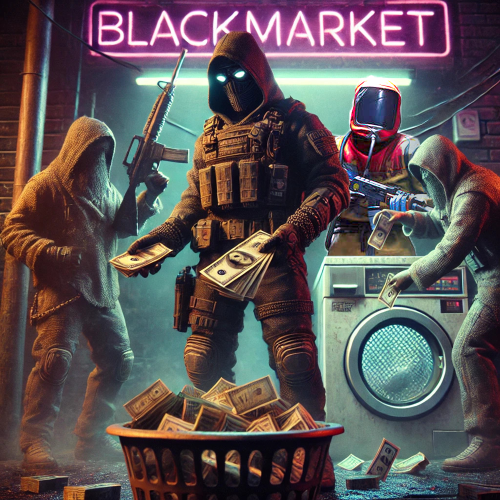
BlackMarket is a complex plugin that awakens the dark dealings of the underground. It offers players a completely new gaming experience by introducing illegal trading activities with special currencies. Thanks to the various customization options, the plugin can be perfectly adapted to individual needs. ⇨ MoneyWash Dealer: ➤ The MoneyWash Dealer offers the possibility to exchange black money for a special currency. By default, Scrap is exchanged for Golden Scrap - my exclusive currency that is used on my server. Players can thus safely launder their illegal winnings to use them for other transactions. ⇨ Black Market Merchant: The Black Market Merchant provides access to various stores: ➤ Weapons Shop: Players can purchase exclusive weapons here. ➤ Ammoshop: A place to stock up on ammunition. ➤ Special Items & Fun Items: Players can purchase unique items or fun items that can only be paid for with special currencies such as Golden Scrap. You can, of course, customize the stores to suit your needs. ⇨ Dynamic dealer behavior: ➤ The two dealers don't stay in one place for long. To avoid being caught, they change their position every X minutes. As a result, they always remain hidden and ensure an immersive and dynamic gaming experience. ➤ no Commands ➤ blackmarket.moneywash - Allows basic use of the Money Wash Dealer. ➤ blackmarket.dealer - Allows basic use of the Black Market Dealer. ➤ The plugin offers numerous configuration options so that it can be easily customized to the needs of each server. See this one: How can I set up BlackMarket? load, run, enjoy Support Discord ⇽ Free Download GoldenScrap Plugin *Attention because there are frequent questions after the purchase I would like to explain 1-2 things here! If you buy the plugin, it is naked! You must define your monuments before putting it into operation. Since everyone has different needs, I have made the plugin simple so that everyone can adjust these settings with copy/paste and numbers. I have made you an example using airfield. You can set this for each monument. You make these settings only once! The dealers spawn at a map wipe regardless of the direction of the monument, how high it is or how it is inclined again at this point. Do the work for yourself. If you find great spots, please share them on discord via ticket. Maybe I’ll make a long list of choices if enough people get in touch$39.99 -
.thumb.png.06e250aa2c356a516da990256f034174.png)
Version 1.1.0
226 downloads
FreeMoneyTimer Give money to players with a configurable timer and when they first spawn. Features Give money to players when they first spawn. Give money to players with a configurable timer. Choose how much money they get. Choose how long the timer is. Compatible with TC Bank, Economics, and ServerRewards. Enable or disable chat message to player. Configurable currency symbol. Dependencies TC Bank - Optional plugin for paying players. Economics - Optional plugin for paying players. ServerRewards - Optional plugin for paying players. Documentation Permissions ConfigurationFree -

Version 1.0.8
7 downloads
PVP Money Earn and risk money during PVP combat. Dependencies TC Bank - Required for reward payout and currency system. Features Allow players to earn and risk money during PVP combat. When they get a kill they gain money, when they die they lose money. Grant base amount of money to players when they respawn after dying. Cooldown option supported. Incentives for risking money Players risking base respawn amount or more will receive all of their victim's wallet balance when killed. Players risking less than base respawn amount will only gain up to as much as the base respawn amount allowing them to receive full payment on their next kill. Players risking more than base respawn amount will gain a bonus. The more they are currently risking, the greater the bonus. Static reward option. You can set constant reward values to add and take from player's balances during PVP combat instead of using the full balance and bonus. Configurable bonus multiplier. /toprisk command to display GUI of top ten highest risking players online. Configurable labels and minimum amounts for risk levels. Configurable currency symbol. Documentation Permissions Commands Configuration Language File Support Discord Click here for Discord support$10.00 -
Version 1.0.13
23 downloads
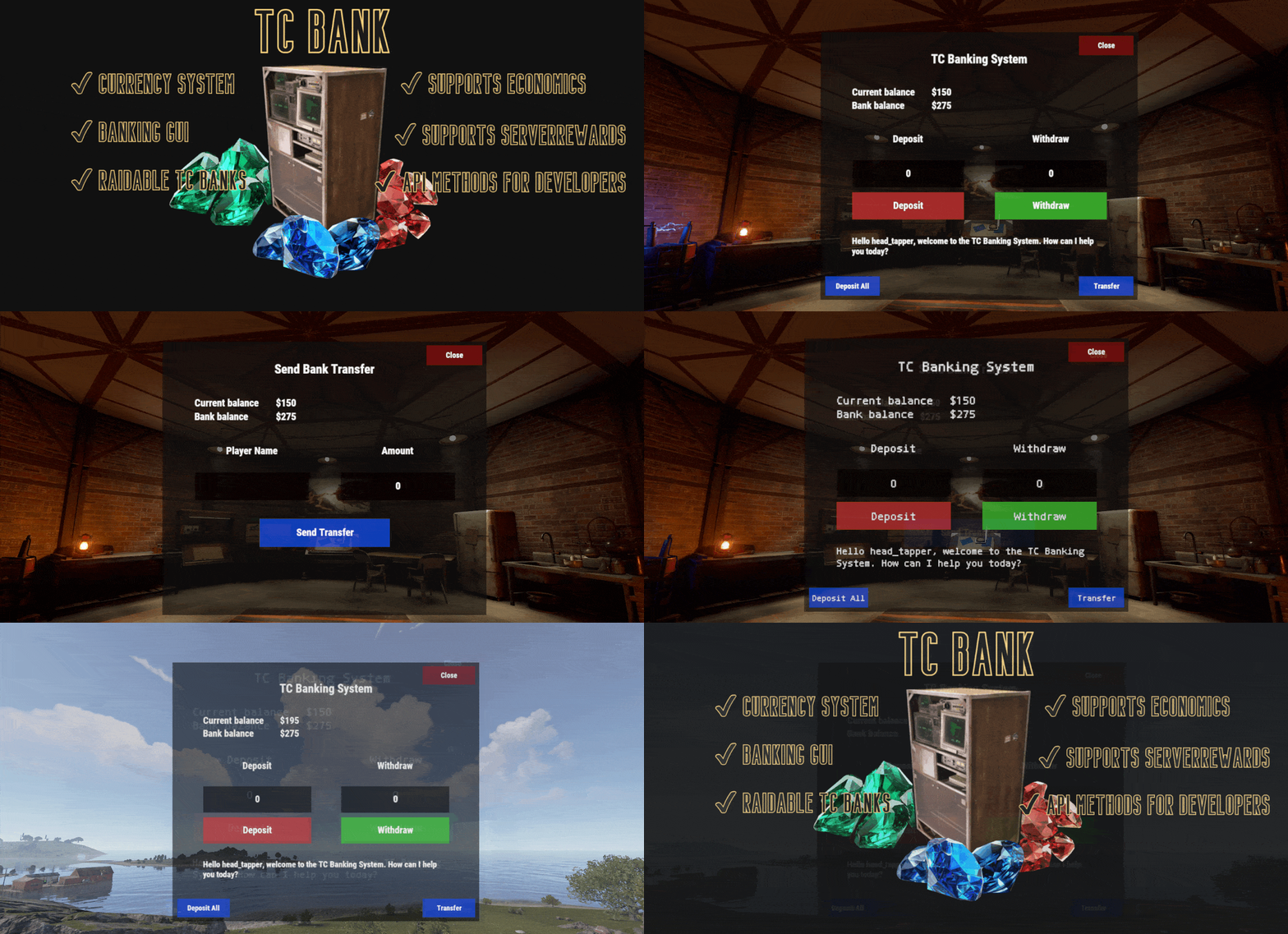
TC Bank In-game currency and banking system with GUI. Option to use tool cupboard as bank and risk currency to raiders. Features Currency system with wallet (on person) balance and bank balance. Banking system with Banking GUI. (/bank). Economics and ServerRewards support but not required. Enable TC Raid Mode: Tool cupboards will be used as banks themselves. Players will be required to be in tool cupboard range to use the bank. Players can have as many TC banks as they have tool cupboards. (Each tool cupboard can store money). Teammates sharing a tool cupboard will have individual balances and not a shared balance. When a tool cupboard is raided the raider gets all of the currency stored inside of the TC by either solos or teams. The players storing money inside the tool cupboard that was raided in turn lose the money they had stored in that individual TC. Disable TC Raid mode: Tool cupboards will not be used to store money and players will not lose their bank balance when their tool cupboard is raided. You may configure RequireTCPrivilege* options to require players to be within tool cupboard range to use the bank. Even if players are required to have tool cupboard privilege to use the bank, all tool cupboards will share the same bank account. You may configure countdown options to set a delay when a player tries to preform an action at the bank (deposit, withdraw, transfer). Banking commands: /bal (check balance), /depo (deposit), /take (withdraw), /send (transfer). Admin commands: /addbal, /addbank, /removebal, /removebank. Configurable currency symbol. Configurable wallet and bank balance overlay GUI. Options to require TC Privilege for opening bank GUI, depositing, withdrawing, transferring (for when not using TC raid mode). Countdown options for depositing, withdrawing, transferring. NoEscape support for blocking bank transfers during raid block. Developer API with API methods for banking. NEW: Currency Adapter plugin now ships free with TC Bank. This drag and drop plugin lets you use TC Bank with most plugins that support Economics. Tested with Shop UI by David. This means that you don't need to run TC Bank's Economics integration feature, and instead you can use TC Bank's native currency system with popular economy plugins. You can message me to inquire if TC Bank will be compatible with your plugin or another plugin you're using Plugin Documentation Configuration Permissions Commands How to wipe bank data Language File Developer API Support Discord Click here for Discord support TC Bank Bundle Get all 3 of my economy plugins for a discounted bundle price: TC Bank - Currency and Banking System PVP Money - Players risk and earn money by engaging in combat with each other Money Farm - Players earn money farming$20.00 -
Version 0.1.8
384 downloads
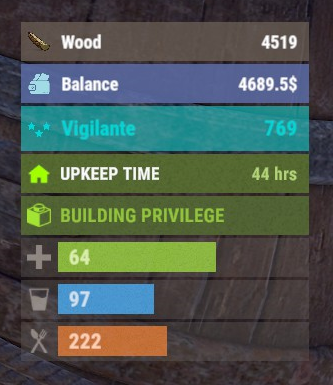
The plugin displays the player's balance in the status bar. Depends on AdvancedStatus plugin. The ability to add and modify any economic plugins; The ability to automatically generate code for balance update hooks; The ability to automatically generate language files for different languages(filled in English); The ability to display the status bar to everyone or only based on permissions; The ability to display the status bar always or only in safe zones and building privileges; The ability to display the status bar via a command for a short period if permanent display is disabled; The ability to display the status bar when the balance is non-zero; The ability to display all or part of the bars simultaneously; The ability to customize the bar for each plugin; The ability to specify the currency symbol; The ability to specify the display side of the currency symbol; The ability to display text if the balance exceeds a specified value(useful for very large balances); The ability to specify the order of the bar; The ability to change the height of the bar; The abillity to customize the color and transparency of the background; The ability to set a material for the background; The ability to switch between CuiRawImageComponent and CuiImageComponent for the image; The ability to get images from the local folder(*SERVER*\oxide\data\AdvancedStatus\Images); The abillity to set own image and customize the color, transparency and outline of the image; The abillity to set sprite instead of the image; The ability to customize the color, size, font and outline of the text. balancebar.use - Grants the right to display the status bar if display is enabled only for permissions. { "Chat command": "balances", "Is it worth enabling GameTips for messages?": true, "Is it worth generating update hooks? 0 - disabled, 1 - one-time activation, 2 - always enabled": 2, "Is it worth displaying the status bar only when players are in the safe zone or have building privilege?": true, "Is it worth displaying the status bar at a 0 balance?": true, "Is it worth displaying the status bar without permission?": true, "Value after which text will be displayed instead of balance": 1000000000.0, "List of language keys for creating language files": [ "en" ], "The list of economy plugins for displaying the balance bar. Note: After modifying hooks, do not forget to toggle hook generation": [ { "Plugin's name": "Economics", "Is it worth enabling the plugin for display?": true, "Language key for the main text": "BarEconomics", "Balance format": "${0}", "Language key for the subtext when the balance is high": "BarEconomicsOverLimit", "API method for retrieving the balance": "Balance", "Hook that triggers on balance update": "OnEconomicsBalanceUpdated", "List of argument types in the hook in order": [ "string", "double" ], "BarSettings": { "Order": 20, "Height": 26, "BackgroundColor(HEX or RGBA)": "#6375B3", "BackgroundTransparency": 0.8, "BackgroundMaterial(leave empty to disable)": "", "ImageUrl": "https://i.imgur.com/jKeUqSD.png", "ImageLocal(leave empty to use URL)": "BalanceBar_Default", "ImageSprite(leave empty to use local or URL)": "", "IsRawImage": false, "ImageColor": "#A1DBE6", "ImageTransparency": 1.0, "ImageOutlineColor": "0.1 0.3 0.8 0.9", "ImageOutlineTransparency": 1.0, "ImageOutlineDistance(leave empty to disable). Example '0.75 0.75'": "", "TextSize": 12, "TextColor": "#FFFFFF", "TextTransparency": 1.0, "TextFont(https://umod.org/guides/rust/basic-concepts-of-gui#fonts)": "RobotoCondensed-Bold.ttf", "TextOffsetHorizontal": 0, "TextOutlineColor": "#000000", "TextOutlineTransparency": 1.0, "TextOutlineDistance": "", "SubTextSize": 12, "SubTextColor": "#FFFFFF", "SubTextTransparency": 1.0, "SubTextFont": "RobotoCondensed-Bold.ttf", "SubTextOutlineColor": "0.5 0.6 0.7 0.5", "SubTextOutlineTransparency": 1.0, "SubTextOutlineDistance": "" } }, { "Plugin's name": "ServerRewards", "Is it worth enabling the plugin for display?": true, "Language key for the main text": "BarServerRewards", "Balance format": "{0} RP", "Language key for the subtext when the balance is high": "BarServerRewardsOverLimit", "API method for retrieving the balance": "CheckPoints", "Hook that triggers on balance update": "OnPointsUpdated", "List of argument types in the hook in order": [ "ulong", "int" ], "BarSettings": { "Order": 20, "Height": 26, "BackgroundColor(HEX or RGBA)": "#6375B3", "BackgroundTransparency": 0.8, "BackgroundMaterial(leave empty to disable)": "", "ImageUrl": "https://i.imgur.com/jKeUqSD.png", "ImageLocal(leave empty to use URL)": "BalanceBar_Default", "ImageSprite(leave empty to use local or URL)": "", "IsRawImage": false, "ImageColor": "#A1DBE6", "ImageTransparency": 1.0, "ImageOutlineColor": "0.1 0.3 0.8 0.9", "ImageOutlineTransparency": 1.0, "ImageOutlineDistance(leave empty to disable). Example '0.75 0.75'": "", "TextSize": 12, "TextColor": "#FFFFFF", "TextTransparency": 1.0, "TextFont(https://umod.org/guides/rust/basic-concepts-of-gui#fonts)": "RobotoCondensed-Bold.ttf", "TextOffsetHorizontal": 0, "TextOutlineColor": "#000000", "TextOutlineTransparency": 1.0, "TextOutlineDistance": "", "SubTextSize": 12, "SubTextColor": "#FFFFFF", "SubTextTransparency": 1.0, "SubTextFont": "RobotoCondensed-Bold.ttf", "SubTextOutlineColor": "0.5 0.6 0.7 0.5", "SubTextOutlineTransparency": 1.0, "SubTextOutlineDistance": "" } }, { "Plugin's name": "BankSystem", "Is it worth enabling the plugin for display?": true, "Language key for the main text": "BarBankSystem", "Balance format": "${0}", "Language key for the subtext when the balance is high": "BarBankSystemOverLimit", "API method for retrieving the balance": "Balance", "Hook that triggers on balance update": "OnBalanceChanged", "List of argument types in the hook in order": [ "ulong", "int" ], "BarSettings": { "Order": 20, "Height": 26, "BackgroundColor(HEX or RGBA)": "#6375B3", "BackgroundTransparency": 0.8, "BackgroundMaterial(leave empty to disable)": "", "ImageUrl": "https://i.imgur.com/jKeUqSD.png", "ImageLocal(leave empty to use URL)": "BalanceBar_Default", "ImageSprite(leave empty to use local or URL)": "", "IsRawImage": false, "ImageColor": "#A1DBE6", "ImageTransparency": 1.0, "ImageOutlineColor": "0.1 0.3 0.8 0.9", "ImageOutlineTransparency": 1.0, "ImageOutlineDistance(leave empty to disable). Example '0.75 0.75'": "", "TextSize": 12, "TextColor": "#FFFFFF", "TextTransparency": 1.0, "TextFont(https://umod.org/guides/rust/basic-concepts-of-gui#fonts)": "RobotoCondensed-Bold.ttf", "TextOffsetHorizontal": 0, "TextOutlineColor": "#000000", "TextOutlineTransparency": 1.0, "TextOutlineDistance": "", "SubTextSize": 12, "SubTextColor": "#FFFFFF", "SubTextTransparency": 1.0, "SubTextFont": "RobotoCondensed-Bold.ttf", "SubTextOutlineColor": "0.5 0.6 0.7 0.5", "SubTextOutlineTransparency": 1.0, "SubTextOutlineDistance": "" } }, { "Plugin's name": "IQEconomic", "Is it worth enabling the plugin for display?": true, "Language key for the main text": "BarIQEconomic", "Balance format": "${0}", "Language key for the subtext when the balance is high": "BarIQEconomicOverLimit", "API method for retrieving the balance": "API_GET_BALANCE", "Hook that triggers on balance update": "OnBalanceUpdated", "List of argument types in the hook in order": [ "BasePlayer", "int" ], "BarSettings": { "Order": 20, "Height": 26, "BackgroundColor(HEX or RGBA)": "#6375B3", "BackgroundTransparency": 0.8, "BackgroundMaterial(leave empty to disable)": "", "ImageUrl": "https://i.imgur.com/jKeUqSD.png", "ImageLocal(leave empty to use URL)": "BalanceBar_Default", "ImageSprite(leave empty to use local or URL)": "", "IsRawImage": false, "ImageColor": "#A1DBE6", "ImageTransparency": 1.0, "ImageOutlineColor": "0.1 0.3 0.8 0.9", "ImageOutlineTransparency": 1.0, "ImageOutlineDistance(leave empty to disable). Example '0.75 0.75'": "", "TextSize": 12, "TextColor": "#FFFFFF", "TextTransparency": 1.0, "TextFont(https://umod.org/guides/rust/basic-concepts-of-gui#fonts)": "RobotoCondensed-Bold.ttf", "TextOffsetHorizontal": 0, "TextOutlineColor": "#000000", "TextOutlineTransparency": 1.0, "TextOutlineDistance": "", "SubTextSize": 12, "SubTextColor": "#FFFFFF", "SubTextTransparency": 1.0, "SubTextFont": "RobotoCondensed-Bold.ttf", "SubTextOutlineColor": "0.5 0.6 0.7 0.5", "SubTextOutlineTransparency": 1.0, "SubTextOutlineDistance": "" } } ], "Version": { "Major": 0, "Minor": 1, "Patch": 8 } } EN: { "CmdMain": "Available commands:\n\n<color=#D1CBCB>/balances</color> <color=#D1AB9A>show *seconds*(optional)</color> - Temporarily display the balance bar with an optional duration(1-10 seconds)\n<color=#D1CBCB>/balances</color> <color=#D1AB9A>toggle</color> - Toggle the balance bar display\n<color=#D1CBCB>/balances</color> <color=#D1AB9A>ignore</color> - Toggle ignoring balance bar display zones\n\n--------------------------------------------------", "CmdDisplayEnabled": "Balance bar display enabled!", "CmdDisplayDisabled": "Balance bar display disabled!", "CmdIgnoreZonesEnabled": "Ignoring balance bar display zones enabled!", "CmdIgnoreZonesDisabled": "Ignoring balance bar display zones disabled!", "BarEconomics": "Balance", "BarEconomicsOverLimit": "> $1kkk", "BarServerRewards": "Points", "BarServerRewardsOverLimit": "> 1kkk RP", "BarBankSystem": "Balance", "BarBankSystemOverLimit": "> $1kkk", "BarIQEconomic": "Balance", "BarIQEconomicOverLimit": "> $1kkk" } RU: { "CmdMain": "Доступные команды:\n\n<color=#D1CBCB>/balances</color> <color=#D1AB9A>show *секунды*(опционально)</color> - Временно отобразить баланс бар с возможностью указать время отображения(1-10 секунд)\n<color=#D1CBCB>/balances</color> <color=#D1AB9A>toggle</color> - Переключить отображение баланс бара\n<color=#D1CBCB>/balances</color> <color=#D1AB9A>ignore</color> - Переключить игнорирование зон отображения баланс бара\n\n--------------------------------------------------", "CmdDisplayEnabled": "Отображение баланс бара включено!", "CmdDisplayDisabled": "Отображение баланс бара выключено!", "CmdIgnoreZonesEnabled": "Игнорирование зон отображения баланс бара включено!", "CmdIgnoreZonesDisabled": "Игнорирование зон отображения баланс бара выключено!", "BarEconomics": "Баланс", "BarEconomicsOverLimit": "> $1 млрд", "BarServerRewards": "Очки", "BarServerRewardsOverLimit": "> 1 млрд RP", "BarBankSystem": "Баланс", "BarBankSystemOverLimit": "> $1 млрд", "BarIQEconomic": "Баланс", "BarIQEconomicOverLimit": "> $1 млрд" } show *seconds*(optional) - Temporarily display the balance bar with an optional duration(1-10 seconds) ; toggle - Toggle the balance bar display; ignore - Toggle ignoring balance bar display zones. Example: /balances show 5 /balances toggle /balances ignore$3.99 -
Version 1.0.2
35 downloads
Sync your currency system across multiple servers. Question & Answer: Config: { "General Settings": { "Debug": false }, "Sync Settings": { "Economics": true, "ServerRewards": true, "UploadTimer": 10.0 }, "Mysql Settings": { "MySqlIp": "127.0.0.1", "MySqlPort": 3899, "MySqlUsername": "", "MySqlPasword": "", "MySqlDatabase": "" }, "Version": { "Major": 1, "Minor": 0, "Patch": 0 } }$9.99 -
Version 1.0.3
46 downloads
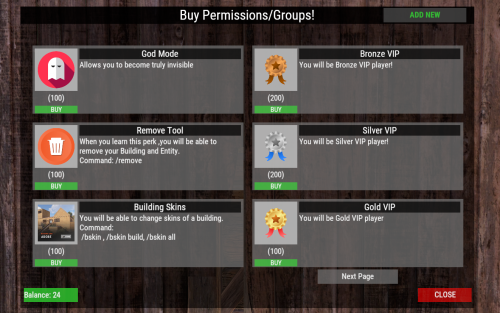
This plugin allows players to buy permissions and groups true UI. Very simple to use , all can be done true UI ... No need to hard placing perms ,groups in config . All modification work can be done true UI : Adding or removing perms/groups . Customize the permissions/groups . Changeable Perm/Group Title , ImageUrl, Description, What Perm/Group they will get , Cost . Flexible Economy : Item-Based Economy: Use in-game items as the currency for purchases. Plugin-Based Economy: Economics, ServerRewards, and CustomCurrency. Commands : Chat Command : /buyperms - Opens UI (Changeable chat command in config). Console Command : open_perms_ui - opens UI. Console Command : remove_perm <player_id or all> <permission or group_ or title> - remove from player or from all players that specific perm/group/title. Console Command : wipe_perms <player_id> or <all> - with this console command you wipe for that player , or for all players buyed perms/groups. Perms : "permbuy.buy" : required to open UI. "permbuy.admin" : required to be able to add/remove ,modify perms/groups true UI . "permbuy.bypasscost" : required for not taking any cost when you buying . Lang File Supported - you can change all texts there ! Data file - you can see there who buyed what ! Example Config : "Open UI Command": "buyperms", "UI Title Text": "Buy Permissions/Groups!", "Show Purchased Permissions in UI": true, "Cost Configuration": { "Economy Type [Item, Plugin]": "Item", "Plugin Cost Type [CustomCurrency, Economics, ServerRewards]": "CustomCurrency", "Item Shortname (if using Item-based)": "scrap", "Item Skin ID (if using Item-based)": 0, "Item Display Name (if using Item-based)": "" }, "Available Perms/Groups": [ { "Perm/Group Title": "God Mode", "Image URL": "https://www.dropbox.com/scl/fi/18yy55g7bfcz8tj4yhnkr/5e2c4da074770.png?rlkey=24zmukgzu3rll382s6wpkbd65&st=e1bi9i7k&dl=1", "Description": "Allows you to become truly invisible", "What Perm/Group": "vanish.allow", "Cost Amount": 100 }, { "Perm/Group Title": "Bronze VIP", "Image URL": "https://www.dropbox.com/scl/fi/ir8e03hvw0wtv59ofbey1/bronze-badge.png?rlkey=9gq4axhg5swt92dgqar6jk97e&st=8rz8iqh9&dl=1", "Description": "You will be Bronze VIP player!", "What Perm/Group": "group_VIP", "Cost Amount": 200 },$10.00 -

Version 1.0.5
82 downloads
Custom Currency plugin for Rust lets you create your own virtual currency and seamlessly exchange it for items or custom items through a user-friendly interface. You can choose in config whether you will use your new custom currency or use those well-known economy and server rewards. For both of those plugins, you will be able to exchange it for an item/custom item true UI. The plugin comes with IconUI, your custom image URL, and the balance of custom currency, eco, or SR. You can turn it on and off in the config, and you have a command to turn it on/off. There is a UI for exchange and the command for exchange, and you can press on the icon (if you have a visible icon) to open the exchange UI. Admin Commands: /addcurrency <playerID/name> <amount>: Add currency to a player's balance. /subcurrency <playerID/name> <amount>: Subtract currency from a player's balance. /givecurrencyitem <playerID/name> <amount>: Give a currency item to a player. /wipecurrency <playerID/name|all>: Wipe the currency balance for a player or all players. All those commands work with custom currency and also with economics and server rewards, so with these commands, you can also control eco and SR . Player Commands /toggleui: Toggle the visibility of the currency UI. /exchange: Open the currency exchange UI to convert the virtual currency to items and vice versa. Exchange works with custom currency and also with economic and server rewards so that you can change eco, rp to custom item. Suitable for trade or VIP or shops. Console Commands: addcurrency <playerID/name> <amount>: Add currency to a player's balance. subcurrency <playerID/name> <amount>: Subtract currency from a player's balance. givecurrencyitem <playerID/name> <amount>: Give a currency item to a player. wipecurrency <playerID/name|all>: Wipe the currency balance for a player or all players. All those commands work with custom currency and with eco and SR. Permissions: customcurrency.admin: Allows use of admin commands. customcurrency.exchange: Allows use of the exchange command Config: { "Currency Type [0-CustomCurrency, 1-Economics, 2-ServerRewards]": 0, "Currency Name": "RealBlood", "Currency UI Visible": true, "Icon Image URL": "https://www.dropbox.com/scl/fi/apo1ukopeuavdln77a70b/512x512.png?rlkey=vujn178mozhm5o93wq5cgd771&st=96xo0sf5&dl=1", "Currency Item": { "Short Name": "scrap", "Skin ID": 0, "Display Name": "Scrap" }, "Version": { "Major": 1, "Minor": 0, "Patch": 0 } } API: [HookMethod("AddCustomCurrency")] public void API_AddCustomCurrency(string playerID, int amount) { AddCustomCurrency(playerID, amount); } [HookMethod("SubtractCustomCurrency")] public void API_SubtractCustomCurrency(string playerID, int amount) { SubtractCustomCurrency(playerID, amount); } [HookMethod("GetCustomCurrencyBalance")] public int API_GetCustomCurrencyBalance(string playerID) { return GetCustomCurrencyBalance(playerID); }$5.00 -

Version 1.0.0
16 downloads
You will receive a PSD File with 6 custom made currency renders You can add in your logo which will be applied to all images$10.00 -
A plugin that will cause the system to ignore equipped clothing. Either it needs to forget slot 0, or I need to be able to add a list of items to a cfg file that are ignored. By ignored I mean that it will not affect what other clothing items can be worn. So I'd be able to wear a mummy suit, but wear other items *with* it. The cfg file options is so one can add other clothing items to the list of items that do not affect the ability to don other items. Done 2. I need a plugin that makes licence plates for minicopters. So it would have a "database" config file that stores some data. Flow : A minicopter spawns -> Checks Data file for last 2 digit number -> Increment by 1 (Numbers Wrap : 99->00 ) -> Translates the number to an image url -> Adds a "Small Wooden Board" prefab to the front of the minicopter -> Uploads the image URL to the board -> Adds the number to the cfg file, with player SteamID if spawned by a player. Rolled my own. 3. I need a plugin that "wraps" the map. So instead of reaching the edge, you wrap around to the opposite end of the map. But not right now 4. I need a plugin that checks for a permission, and if not present, displays a string of text across the screen that will not go away without the permission. (It would be nice if it used a 1x1 grid to reference the middle of the message so 0.5, 0.5 would be the middle of the screen. Done