Search the Community
Showing results for tags 'sam'.
Found 6 results
-
Version 1.1.1
27 downloads
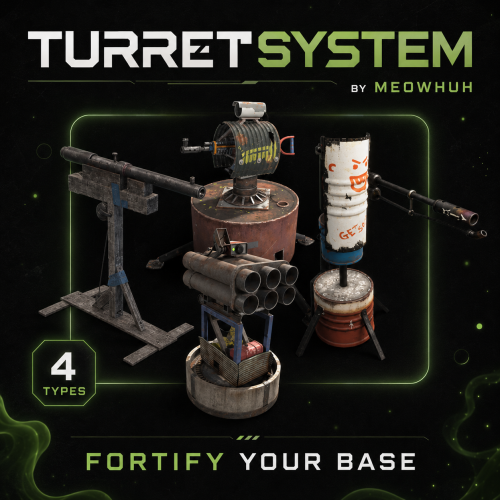
TurretSystem Complete turret and base-defense management for Rust servers. Managing a defended base should not mean running from turret to turret, opening every inventory, searching for missing ammo, or trying to remember which defenses still need weapons. TurretSystem lets players manage Auto Turrets, SAM Sites, Shotgun Traps, and Flame Turrets from one clean UI or simple chat commands. Quickly add weapons, refill ammunition and fuel, clear inventories, change ammo types, control power, and manage multiple defenses across an entire TC base. Perfect for PvE, PvP, Vanilla+, modded, RPG/RP, and high-population servers. Features Clean TC-based UI with filters for every supported defense type. Single and bulk power control, refill, clear, weapon change, ammo change, inventory access, and mode control. Manage Auto Turret authorization lists and view owner, weapon, ammo, and power information. Separate placement limits for Auto Turrets, SAM Sites, Shotgun Traps, and Flame Turrets. Custom Auto Turret interference limits with permission overrides. VIP Auto Turret profiles: rotation, viewing angle, health, range, bullet speed, aim cone, damage, and infinite ammo. Automatic weapon, skin, attachment, and ammo loadouts based on permissions. Automatic SAM, Flame Turret, and Shotgun Trap ammo/fuel. Optional physical switches/buttons for Auto Turrets and SAM Sites. Optional Auto Turret placement on boats with count and distance limits. Optional SAM protection for aircraft carrying TC-authorized players. Detailed admin statistics by player, base, looked-at turret, or nearby radius. Configurable command aliases, UI colors, chat messages, and GameTips. Full English and Russian localization included. No dependencies. Showcase Video Commands /ts or /turretmenu → Open the turret management UI. /ts help → Show command help. /turret or /turrets [on|off] → Control one looked-at Auto Turret or all Auto Turrets in the current TC. /turret(s) fill <amount> <ammo> → Add ammo. /turret(s) fill <weapon> → Install a weapon. /turret(s) clear ammo|guns [weapon] → Clear ammo or weapons. /turret(s) change guns <weapon> → Replace weapons. /turret(s) change ammo <ammo> → Replace ammo types. /sam or /sams [clear|fill <amount>] → Control and refill SAM Sites. /trap or /traps fill <amount>|clear → Refill or clear Shotgun Traps. /fturret or /fturrets fill <amount>|clear → Refill or clear Flame Turrets. /ts storage or /ts box → Show storage box command help. /ts storage set or /ts box set → Link the storage box you are looking at for refilling and changing turret weapons or ammunition. When boat placement is enabled, hold an Auto Turret and left-click a valid flat boat floor/foundation. Command aliases are fully configurable. Admin Commands /tsadmin help — Show admin help. /tsadmin player <steamid|name> — List a player’s defenses. /tsadmin base — Show statistics for the current TC/base. /tsadmin turret — Inspect the defense you are looking at. /tsadmin nearby [radius] — List nearby defenses. Console: ts.admin player <steamid|name> Permissions turretsystem.use → Required to open the `/ts` UI and use normal TurretSystem player commands. turretsystem.admin → Full plugin and admin-statistics access. Bypasses `turretsystem.use`, all command permissions, placement limits, Auto Turret interference limits, and the active-without-electricity limit. It also uses free item-management mode. turretsystem.free → Allows refill, weapon, ammo, change, and clear commands without taking resources from the player. Items cleared from a defense are removed instead of returned. Command Permissions turretsystem.cmd.toggle → Toggle looked-at or bulk Auto Turrets and SAM Sites. turretsystem.cmd.on → Use Auto Turret `on` commands. turretsystem.cmd.off → Use Auto Turret `off` commands. turretsystem.cmd.refill → Refill SAM Sites, Shotgun Traps, and Flame Turrets, and add weapons/ammo to Auto Turrets. turretsystem.cmd.clear → Clear weapons, ammo, rockets, shells, or fuel. turretsystem.cmd.changegun → Replace Auto Turret weapons. turretsystem.cmd.changeammo → Replace Auto Turret ammo types. Physical Switch/Button Permissions turretsystem.autoturret → Allows the configured physical switch/button to be attached to the owner’s Auto Turrets. turretsystem.samsite → Allows the configured physical switch/button to be attached to the owner’s SAM Sites. These are only required when the physical-control feature and per-type permission requirement are enabled. Configurable Limit & Profile Permissions turretsystem.place.autoturret.X → Sets the owner/building Auto Turret placement limit. turretsystem.place.samsite.X → Sets the SAM Site placement limit. turretsystem.place.shotguntrap.X → Sets the Shotgun Trap placement limit. turretsystem.place.flameturret.X → Sets the Flame Turret placement limit. turretsystem.interference.autoturret.X → Sets how many Auto Turrets may be active in the configured player/building scope. turretsystem.custom.autoturret.<name> → Applies the configured health, range, rotation, scanning, bullet speed, aim cone, damage, and infinite-ammo profile. When several profiles match, the highest `Priority` wins. turretsystem.weapon.<name> → Automatically installs the configured weapon, skin, attachments, and ammo when the owner deploys an Auto Turret. When several weapon permissions match, the first matching profile in the config is used. turretsystem.X → Sets the maximum number of attached-control defenses that may be active without normal electricity. Default examples include placement tiers, interference `.12/.20/.30`, custom profiles `vip/king/ultra`, weapon profiles `vip/premium/king/ultra`, and no-electricity tiers `.3/.6/.12`. Limit Note For numeric limit permissions, the plugin uses the highest value between the default limit and every permission the player has. Set the default below your upgrade tiers. In the supplied config, the no-electricity default is `13`, so the example `.3/.6/.12` permissions will not change it until you lower the default or raise those permission values. Example Configuration English Language File Russian Language File Why Choose TurretSystem? Because managing a defended base should not mean running between every turret and opening every inventory manually. TurretSystem combines a clean UI, powerful bulk controls, fair limits, VIP upgrades, automatic loadouts, boat defenses, and admin inspection in one standalone plugin.$21.95 -
Version 1.0.5
79 downloads
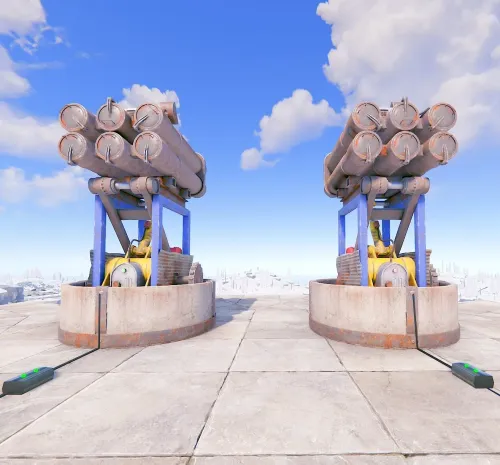
SamSiteLimiter allows you to change the SAM site turret limit for the individual player or for the entire CLAN/TEAM, based on the configurations and assigned roles. You can limit the number of SAM site turrets per TC (Tool Cupboard) or by range. You can configure the plugin to disable all server and/or player SAM site turrets with the ability to bypass these limitations via roles and/or configurations. It also offers commands to view SAM site turret statistics and the ability to turn SAM site turrets on and off via commands. Basically, 4 groups are configured: Default, VIP1, VIP2, VIP3, in this way you can decide the limit of the SAM site turrets based on the TC (Tool Cupboard) or the radius, based on the group assigned to the player or CLAN/TEAM. Permissions: samsitelimiter.admin -- Allows you to execute some commands reserved for administrators samsitelimiter.bypass.force -- Allows you to bypass limits forcibly, regardless of configuration samsitelimiter.default -- Assign configurations: Default samsitelimiter.vip1 -- Assign configurations: VIP1 samsitelimiter.vip2 -- Assign configurations: VIP2 samsitelimiter.vip3 -- Assign configurations: VIP3 COMMANDS Commands can be typed in chat (by putting the / character in front of the command), or from console. /ssl status or /ssl st -- This command allows the player to see his SAM site turret statistics and limits /ssl status <steamID> or /ssl st <steamID> -- This command allows the administrator to see another player's SAM site turret and limit statistics. To use this command you must have permission: samsitelimiter.admin /ssl start or /ssl stop -- This command allows the player to turn all of your SAM site turrets ON or OFF. To use this command, you must enable the AllowCommandsToStartAndStop = true property in your configuration or have permission: samsitelimiter.admin /ssl start <steamID> or /ssl stop <steamID> -- This command allows you to turn ON or OFF all SAM site turrets of a player based on its SteamID. To use this command you must have permission: samsitelimiter.admin NB: The commands start or stop turns all player SAM site turrets ON or OFF. If the player is part of a clan/team, all SAM site turrets of all members of the clan/team will be turned ON or OFF. Commands can be added or modified in the configuration file: /oxide/config/SamSiteLimiter.json Command output example (/ssl status or /ssl st) CLAN/TEAM If you are part of a clan/team and there are 1 more members who have the VIP/ROLE, then all members of the clan/team will benefit. Example: a clan/team member has the VIP/ROLE to be able to place 5 SAM site turrets, in this case all clan/team members will be able to place 5 SAM site turrets, but this does not mean that the total number of turrets you can place are added, the limit in in this case there are still 5 SAM site turrets, but they can be positioned by all members of the clan/team, rather than just the player who has the VIP/ROLE (in this case we assumed that the VIP/ROLE limited to 5 SAM site turrets). If there are multiple clan/team members who have different VIPs/ROLEs, the best VIP/ROLE will be taken, usually VIP3 You can enable this setting from the configuration file: "Share Group With Clan/Team members. Default FALSE": false": true Configuration The settings and options can be configured in the SamSiteLimiter under the config directory. The use of an editor and validator is recommended to avoid formatting issues and syntax errors. { "Share Group With Clan/Team members. Default FALSE": false, "DisableAllServerSamSite (Disables all server SAM Site turrets). Default False.)": false, "DisableAllPlayerSamSite (Disables all player SAM Site turrets). Default False.)": false, "AllowAdminBypass (Allows admin to bypass SAM Site turret limitations). Default False.)": false, "PlayerShowSamSiteCountInfoMessage (Show the player, when he places a SAM site, a message with the number of turrets that are placed in the TC range or Radius he is in. Default true.)": true, "AllowCommandsToStartAndStop (If set to TRUE, enables commands to allow the player or clan/team to turn their all SAM site ON or OFF. Default FALSE)": false, "EnableMessageInfo (If set to TRUE, it shows a message info to the player, when he takes hold of an electricity cable or SAM Site, of the commands that the plugin makes available to him)": true, "Chat Command": [ "ssl", "samsitelimiter" ], "RolePermission": { "default": { "Type of limitation, Global, TC-based or Radius-based. Value [Global | Tc | Radius] (Default RADIUS)": "Tc", "SAM Site limit for global limitation. Maximum number of SAM sites that can be deployed.": 0, "SAM Site limit for TC-based limitation": 2, "SAM Site limit for Radius-based limitation": 0, "Radius (meters) within which the system checks for other SAM Site (lower = more SAM sites in the same area) (Default 40)": 0 }, "vip1": { "Type of limitation, Global, TC-based or Radius-based. Value [Global | Tc | Radius] (Default RADIUS)": "Radius", "SAM Site limit for global limitation. Maximum number of SAM sites that can be deployed.": 0, "SAM Site limit for TC-based limitation": 0, "SAM Site limit for Radius-based limitation": 4, "Radius (meters) within which the system checks for other SAM Site (lower = more SAM sites in the same area) (Default 40)": 40 }, "vip2": { "Type of limitation, Global, TC-based or Radius-based. Value [Global | Tc | Radius] (Default RADIUS)": "Radius", "SAM Site limit for global limitation. Maximum number of SAM sites that can be deployed.": 0, "SAM Site limit for TC-based limitation": 0, "SAM Site limit for Radius-based limitation": 8, "Radius (meters) within which the system checks for other SAM Site (lower = more SAM sites in the same area) (Default 40)": 20 }, "vip3": { "Type of limitation, Global, TC-based or Radius-based. Value [Global | Tc | Radius] (Default RADIUS)": "Global", "SAM Site limit for global limitation. Maximum number of SAM sites that can be deployed.": 40, "SAM Site limit for TC-based limitation": 0, "SAM Site limit for Radius-based limitation": 0, "Radius (meters) within which the system checks for other SAM Site (lower = more SAM sites in the same area) (Default 40)": 40 } }, "VersionNumber": { "Major": 1, "Minor": 0, "Patch": 4 } } Share Group With Clan/Team members: If set to TRUE, the group assigned to a player is shared with all members of the clan/team. The group with the lowest priority is shared, then all members of the clan/team will benefit. Default FALSE DisableAllServerSamSite (Disables all server SAM Site turrets). Default False.): Disables all server SAM site turrets but not player SAM turrets. Default: FALSE DisableAllPlayerSamSite (Disables all player SAM Site turrets). Default False.): Disables all player SAM site turrets. Default: FALSE AllowAdminBypass (Allows admin to bypass SAM Site turret limitations). Default False.): If enabled you can bypass the SAM site turret limit with the role: samsitelimiter.admin. However, if you have the samsitelimiter.bypass.force role, you can forcibly bypass the SAM site turret limit, regardless of this configuration. Default: FALSE PlayerShowSamSiteCountInfoMessage (Show the player, when he places a SAM site, a message with the number of turrets that are placed in the TC range or Radius he is in. Default true.): Show the player, when he places a SAM site turret, a message with the number of SAM site turrets that are placed. Default: TRUE. AllowCommandsToStartAndStop (If set to TRUE, enables commands to allow the player or clan/team to turn their all SAM site ON or OFF. Default FALSE): If set to TRUE, enables commands to allow the player or clan/team to turn their all SAM site turrets ON or OFF. Default FALSE. EnableMessageInfo (If set to TRUE, it shows a message info to the player, when he takes hold of an electricity cable or SAM Site, of the commands that the plugin makes available to him): If set to TRUE, it shows a message info to the player, when he takes hold of an electricity cable or SAM site turret, of the commands that the plugin makes available to him. Default: TRUE. Chat Command: Here you can add, edit or delete Commands can be typed in chat (by putting the / character in front of the command), or from console. RolePermission Type of limitation, Global, TC-based or Radius-based. Value [Global | Tc | Radius] (Default RADIUS): Specify the type of limitation: enable limitation based on Global, TC (Tool Cupboard) or Radius. SAM Site limit for global limitation. Maximum number of SAM sites that can be deployed: Maximum number of SAM sites that can be deployed globally. SAM Site limit for TC-based limitation: If TC (Tool Cupboard) limit is enabled, specifies how many SAM site turrets can be placed around that TC (the entire building covered by the TC). SAM Site limit for Radius-based limitation: If Radius Limiting is enabled, specifies how many SAM site turrets can be placed in that specific Radius. Radius (meters) within which the system checks for other SAM Site (lower = more SAM sites in the same area) (Default 40): Set the radius size in meters. PlayerShowSamSiteCountInfoMessage EXAMPLE: EnableMessageInfo EXAMPLE: Localization The plugin, therefore the automatic messages and statistics, are translated into the following languages: English Italian Spanish French German Dutch Turkish Russian Ukrainian Translation files are located in the /oxide/lang folder, here is an example of a /oxide/lang/en/SamSiteLimiter.json translation file. You can add translations for other languages by adding them to the folder: /oxide/lang$8.99 -
Version 1.6.3
81 downloads
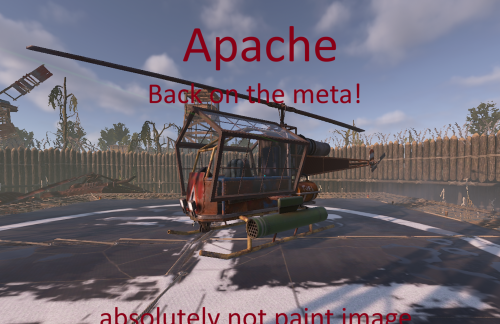
Apache (Attack Heli Rocket Selector + Armored Windows + Player Cooldown) The Apache plugin turns the Rust attack helicopter into a fully customizable, player-controlled combat platform with advanced weapon systems, smart rocket handling, and experimental features you won’t find anywhere else. Apache is a lightweight, server-friendly Rust plugin that upgrades the Attack Helicopter rocket pod into a configurable multi-ammo system with clean in-game controls and full balancing options. Players can cycle rocket types with the USE key (E) while piloting, and the helicopter will fire the selected rocket type as long as ammo is available. When a type runs out, Apache will announce “out of ammo” and automatically switch to the next available enabled type. Features Rocket type selector (Pilot only) Press E to cycle through enabled rocket types Shows chat feedback: selected type, remaining ammo, and cooldown Gunner support The gunner can also fire the rockets The gunner can aim the rockets using the built-in helicopter monitor Supported ammo types HV Basic Incendiary MLRS SAM Out-of-ammo intelligence Warns at 0 ammo Announces what rocket type will be used next Automatically switches to the next available enabled type Per-rocket balancing Separate cooldown, launch speed, and up-bias (trajectory lift) for each rocket type Configurable Helicopter HP Server owners can control how durable the Apache is by adjusting the helicopter's max health in the configuration. Alternating launch positions Uses Left/Right local offsets (configurable) so you can align firing to your pod locations Optional armored windows Toggle armored window on/off from config Permission system apache.admin → unlimited spawns + admin tools apache.player → cooldown-limited spawns Player spawn cooldown Configurable X hours per spawn for players with apache.player Stores cooldown data in a data file Admin reset /apache reset wipes cooldown data and starts fresh Works with /shop plugin You can use spawn.apache %steamid% Default Configuration Behavior (Important) On first run, Apache auto-generates the config with most rocket types disabled by default. Enabled by default: HV Disabled by default (must be enabled manually in the JSON if you want them): Basic MLRS SAM Incendiary This is intentional for safety/balance: the server owner enables only the rocket types they want by editing the .json configuration file. Commands F1 Console: spawn.apache Spawns an Apache for yourself (with admin permission without cooldown). spawn.apache <steamid|name> Spawns an Apache for a target player (admin only without cooldown). Chat commands: /apache Same behavior as spawn.apache (for players with cooldown configured in .json). /apache reset (admin only) Wipes stored cooldown data and resets all player spawn timers. Permissions apache.admin Admin usage: unlimited spawning, spawning for others, and reset command. apache.player Player usage: allows self-spawn with configurable cooldown. Configuration Apache generates a JSON config with: Enable/disable each rocket type (also blocks inserting disabled ammo into the pod) Armored windows on/offLeft & Right launch offsets (local heli space) Local offset axis reminder: X = left(-) / right(+) Y = up(+) Z = forward(+) Per-rocket: Cooldown (seconds) Launch speed Up bias (adds a small upward lift to trajectory) Notes / Compatibility Designed to be server-friendly: only affects plugin-spawned helicopters Works without requiring players to bind keys (uses E / USE) Your first configs: { "EnableArmoredWindows": true, "HelicopterMaxHealth (min: 850, max: 9999)": 850.0, "PlayerSpawnCooldownHours": 6.0, "HV": { "Enabled": true, "CooldownSeconds": 1.0, "LaunchSpeed": 65.0, "UpBias": 0.02 }, "Incendiary": { "Enabled": false, "CooldownSeconds": 1.0, "LaunchSpeed": 40.0, "UpBias": 0.02 }, "Basic": { "Enabled": false, "CooldownSeconds": 1.0, "LaunchSpeed": 40.0, "UpBias": 0.02 }, "MLRS": { "Enabled": false, "CooldownSeconds": 1.0, "LaunchSpeed": 70.0, "UpBias": 0.03 }, "SAM": { "Enabled": false, "CooldownSeconds": 0.8, "LaunchSpeed": 85.0, "UpBias": 0.02 }, "LeftOffsetLocal": { "x": -2.0, "y": -0.5, "z": 3.0 }, "RightOffsetLocal": { "x": 2.0, "y": -0.5, "z": 3.0 } }$24.00 -

Version 1.3.7
1,293 downloads
Team HUD · Rust · Oxide Rust tells you who your teammates are, and nothing about what is happening to them BetterTeams puts a live panel on screen with every mate's health, state, held weapon and grid square. It adds a team-only voice channel that ignores distance, a map ping on one key, and automatic authorization on every cupboard, lock, turret and SAM site your team builds. Every part is a config switch, and every player decides what they use. See it What it looks like on the server How it goes From dropping the file in to the night the server dies MINUTE ONE Nothing to set up The panel is already there Drop the file in and anyone who is in a team sees their mates on screen. Where it sits, how large it is and how many rows before it starts a second column are config values. Everything else is each player's own choice. Health as a bar, not a number. It slides toward red as they lose health, and it redraws the moment their health actually changes rather than on a timer. State takes over when it matters. WOUNDED, DEAD and OFFLINE replace the bar on that row, so a mate who is down is unmistakable without reading anything. What they are holding. The active item's icon, with its skin, sits at the end of every row and follows each weapon swap. Grid square, on your own refresh rate. Five seconds by default. A player who would rather not broadcast theirs switches it off for themselves. The leader keeps a star. One glance tells you who can change the team's settings, and offline mates stay listed instead of vanishing. IN A FIGHT Nobody types grids Talk across the map, ping what you are looking at Team voice replaces the vanilla proximity channel for the players who switch it on. Distance stops mattering, nobody outside the team hears it, and a speaker icon lights up on the row of whoever is talking. bind h ftmark Voice at any range, team only. Off per player until they enable it, so nobody has their voice chat changed without asking for it. One key, no binoculars. Bind the command once and the ping lands wherever you are aiming, up to fifty metres by default. The ping knows what it hit. An enemy player, an ore node, a storage box and a dropped gun each get their own marker icon and colour. Anything else drops a plain point. On a cooldown you set. Ten seconds by default, and the time left comes back as a game tip instead of the key doing nothing. SOMEONE JOINS One shared list Authorized everywhere, in one pass The moment an invite is accepted that player is added to every cupboard, code lock, turret and SAM site the rest of the team owns, and everyone else is added to theirs. Leaving or being kicked takes all of it back in the same pass. Five places, five switches. Tool cupboards, code locks, key locks, auto turrets and SAM sites, each turned on or off for the whole server. Key locks without the key. A teammate opens a key-locked door because they are on the team, not because you handed them anything. SAM sites check who is aboard. A teammate's SAM holds fire on a helicopter with an authorized member in a seat, instead of shooting down your own minicopter. Bases that already exist are picked up on boot. Everything placed before the install is registered when the plugin loads, so this works on a server mid-wipe and not only on what gets built next. THE LEADER Decided in game The random you just invited is not automatically trusted Taking a stranger into the team is where convenience turns into risk, so the whole authorization list is editable per ally from the menu. No config file, no restart. Revoke without breaking the rest. A blocked ally loses access everywhere except the locks and cupboards they placed themselves, and the team keeps access to those. Kick from the same screen. Pick the ally, kick, and every authorization they were given through the team is pulled as they go. Friendly fire off with one toggle. Only the leader can flip it; everyone else sees it locked and is told why rather than wondering if it is broken. A team skin per item type. The leader picks it, and anything a mate picks up gets it automatically. Thirty-five item types ship in the config with their own skin lists, and both are yours to cut or extend. AFTER A CRASH Teams survive it A bad shutdown should not disband half the server Rust loses teams when a server goes down badly, and the tickets land on you. This one writes the roster and the leader to disk and puts them back on start. Rosters restored on boot. Members and leader are recreated, including the players who are offline at the time, so nobody logs in teamless. Optional leader hand-off. If the leader disconnects the next online member is promoted, and the original takes it back when they return. Off by default, because not every server wants it. A wipe clears it properly. A new wipe id drops the saved teams and skin choices rather than dragging last wipe's data onto a fresh map. While you are not looking Built to be left alone The parts you will never notice unless they are missing. ✓ ImageLibrary is the only dependency, and Clans is used if you have it ✓ A missing dependency is named in console and the plugin unloads, instead of half-running ✓ Switching a feature off unsubscribes its hooks rather than leaving them running ✓ Panel updates are batched into one message per team per tick, not one per player ✓ Grid squares only redraw for the players who actually changed square ✓ A burst of joins and kicks collapses into a single data file write ✓ Every player choice is stored by Steam ID and survives restarts and reloads ✓ Clan tags are stripped from names in the panel when the Clans plugin is loaded Reference One command in chat, one to bind Each permission is only enforced if you switch its requirement on. All four are off by default, which means the feature is simply available to everyone. Chat /bt Open the menu: info, allies, skins, settings. The command name is a config value. Console ftmark Drop a team ping where you are looking. Meant to be bound to a key. Permission betterteams.hud The on-screen panel Permission betterteams.voice Team voice chat Permission betterteams.skins Choosing the team skin. One player in the team holding it is enough for the whole team. Permission betterteams.marker Easy team markers Straight answers The questions people ask before buying Do my players have to install anything? No. It runs entirely on the server and the panel is drawn through the normal game UI. The only install is ImageLibrary, on the server, once. Does team voice take over normal voice chat? Only for a player who turns it on themselves, and it is off by default. Everyone else keeps vanilla proximity voice untouched. Can a random I invite loot everything I own? Only if you leave them authorized. The leader can revoke any of the five places for one specific ally from the menu, and they keep access to nothing but what they placed themselves. Will the panel sit on top of my other UI? Its offset from the top and left, its scale and how many rows it stacks before starting a new column are all config values, so it can be moved out of the way. What if I do not want half of these features? Panel, voice, skins, markers, friendly-fire toggle, grid positions, team restore and each of the five authorization places are separate switches. Turning one off also stops the hooks behind it. What happens if ImageLibrary is missing? It waits and retries a few times in case load order put it second, then prints the download link in server console and unloads itself rather than throwing errors on every hook. 5 authorization places covered 35 item types with team skins 50m default ping range, configurable 1 dependency, ImageLibrary$14.99 -

Version 1.21.37
771 downloads
IQTurrets is a plugin that adds turrets to your server without electricity! There will be an additional "switch" on the turrets, which will start and turn it off without electricity. It also supports the ability to connect electricity to the turret without electricity, the plugin is synchronized and everything will work according to the mechanics of the game Opportunities : - Support SAM-Site - There are limits on the cabinet and specifically for the player - It is possible to set limits on privileges - IQChat support is available - There are console and chat commands for controlling turrets with the ability to bind them - The ability to use 2 types of switches: Buttons and tublers API : Object OnSetupTurret(BaseEntity entityTurret) /// - return null to ignore and continue the installation, otherwise nothing will be installed on the turret$12.99 -

Version 4.2.10
122 downloads
A unique system of friends Here you can configure everything Turn on/Disable damage Turn on/Disable authorization in the turret Turn on/Disable authorization in the door Turn on/Disable authorization in the TC Turn on/Disable authorization in the turret Turn on/Disable authorization in SAM Beautiful interface You can disable all these settings in the interface The settings can be disabled uniquely for each friend Search for players in the interface. You can delete or add friends in the interface. Everything is very simple and convenien Setting on chat: Config { "Enable save during map save?": true, "Enable auto-authorization in single locks?": true, "Disable air defense attack on a copter without a pilot?": true, "Enable turret auto-authorization setting?": true, "Enable friendly damage setting?": true, "Enable auto authorization setting in doors?": true, "Enable auto authorization setting in air defense?": true, "Enable auto authorization setting in the TC?": true, "What is the maximum number of people you can be friends with?": 5, "Default friendly-fire setting": false, "Default turret-auth setting": true, "Default door-auth setting": true, "Default air defense setting": true, "Default TC auth": false, "Friend request response timeout (in seconds)": 10, "Enable air defense settings?": true } Lang { "SYNTAX": "/fmenu - Open friends menu\n/f(riend) add - Add friend\n/f(riend) remove - Remove friend\n/f(riend) list - Friend list\n/f(riend) team - Add all team to friends\n/f(riend) set - Set up friends individually\n/f(riend) setall - Setting up friends all at once", "NPLAYER": "Player not found!", "CANTADDME": "you cant add yourself!!", "ONFRIENDS": "The player is already your friend!", "MAXFRIENDSPLAYERS": "The player has a lot of friends!", "MAXFRIENDYOU": "You have the maximum number of friends!", "HAVEINVITE": "The player already has a friend request!", "SENDADD": "You sent a request, waiting for response!", "YOUHAVEINVITE": "You received a friend request write /f(riend) accept", "TIMELEFT": "You didn't answer the request!", "HETIMELEFT": "Your request has not been answered!", "DONTHAVE": "You have no requests!", "ADDFRIEND": "Successful addition as a friend!", "DENYADD": "Decline friend request!", "PLAYERDHAVE": "You do not have such a player in your friends!", "REMOVEFRIEND": "Successful unfriending!", "LIST": "The list is empty!", "LIST2": "Friend list", "SYNTAXSET": "/f(riend) set damage [Name] - Damage per person\n/f(riend) set door [NAME] - Damage per person\n/f(riend) set turret [NAME] - Authorization in turrets for a person\n/f(riend) set sam [NAME] - Authorization in air defense for a person", "SETOFF": "Setting disabled", "DAMAGEOFF": "Damage to player {0} disabled!", "DAMAGEON": "Damage to player {0} enabled!", "AUTHDOORON": "Authorization in the doors for {0} is enabled!", "AUTHDOOROFF": "Authorization in the doors for {0} is disabled!", "AUTHTURRETON": "Authorization in turrets for {0} is enabled!", "AUTHTURRETOFF": "Authorization in turrets for {0} is disabled!", "AUTHBUILDOFF": "Authorization in the closet for {0} is disabled!", "AUTHSAMON": "Air defense authorization for {0} enabled!", "AUTHSAMOFF": "Authorization in air defense for {0} is disabled!", "SYNTAXSETALL": "/f(riend) setall damage 0/1 - Damage on all friends\n/f(riend) setall door 0/1 - Authorization in the door for all friends\n/f(riend) setall turret 0/1 - Authorization in turrets for all friends\n/f(riend) setall sam 0/1 - Authorization in air defense for all friends", "DAMAGEOFFALL": "Damage to all friends is disabled!", "DAMAGEONALL": "Damage to all friends is enabled!", "AUTHDOORONALL": "Authorization in the door for all friends is enabled!", "AUTHDOOROFFALL": "Authorization in the door for all friends is disabled!", "AUTHBUILDONALL": "Locker authorization for all friends is enabled!", "AUTHBUILDOFFALL": "Authorization in the closet for all friends is disabled!", "AUTHTURRETONALL": "Authorization in the turrets for all friends is enabled!", "AUTHTURRETOFFALL": "Authorization in the turrets for all friends is disabled!", "AUTHSAMONALL": "Air defense authorization for all friends is enabled!", "AUTHSAMOFFALL": "Air defense authorization for all friends is disabled!", "SENDINVITETEAM": "Invitation sent: ", "SENDINVITE": "You received an invitation to the team from", "DAMAGE": "Can't attack {0} it's your friend!", "SYSTEMFRIENDS": "SYSTEM FRIENDS", "SENDACCEPTFRIENDS": "FRIEND REQUEST FROM {0}", "UIREMOVEFRIEND": "Remove from friends", "UISETTINGS": "SETTING", "UIDAMAGE": "Damage to players", "UIDOOR": "Access to door", "UIBUILD": "Access to cupboard", "UITURRET": "Access to turret", "UISAM": "Access to SAM", "FRIENDINFO": "Information about", "LISTFRIEND": "Friend list", "NOTFOUNS": "Not in base", "NOFRIEND": "No friends", "UIFIND": "Search", "UIINFOPLAYER": "WRITE NAME/STEAMID" }$19.99