
Summary: in this tutorial, you will learn about the SQLite IIF() function that allows you to add the if-else logic to queries.
Overview of SQLite IIF() function #
SQLite introduced the IIF() function since version 3.32.0. The following shows the syntax of the IIF() function:
IIF(expression, true_expression, false_expression);In this syntax, the IIF() function evaluates the expression first. If the result is true, the IIF() function returns the value of the second expression (true_expression). Otherwise, it returns the value of the third expression (false_expression).
The IIF() function is equivalent to the following CASE expression:
CASE
WHEN expression
THEN true_expression
ELSE
false_expression
ENDIn practice, you use the IIF() function to add the if-else logic to queries to form more flexible queries.
SQLite IIF() function examples #
Let’s take some example of SQLite IIF() function.
1) Simple SQLite IIF() function example #
The following query illustrates how to use the IIF() function in a simple SELECT statement:
SELECT IIF(1 < 2, 'Yes', 'No' ) result;Output:
result
----------
yes2) Using SQLite IIF() function to classify information #
See the following tracks table from the sample database:
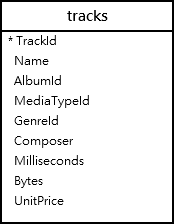
The following statement uses the IIF() function to classify tracks in the tracks table by their lengths:
SELECT
name,
milliseconds,
IIF(milliseconds <= 300000, 'Short',
IIF(milliseconds > 300000 AND milliseconds <= 600000, 'Medium',
IIF(milliseconds > 600000, 'Long','N/A')
)
)
FROM
tracks;In this tutorial, you have learned how to use the SQLite IIF() function to add if-else logic to the query.
Thank you for your feedback!
