
Summary: in this tutorial, you will learn how to use the SQLite IN operator to determine whether a value matches any value in a list of values or a result of a subquery.
Introduction to the SQLite IN operator #
The SQLite IN operator determines whether a value matches any value in a list or a subquery. The syntax of the IN operator is as follows:
expression [NOT] IN (value_list|subquery);The expression can be any valid expression or a column of a table.
A list of values is a fixed value list or a result set of a single column returned by a subquery. The returned type of expression and values in the list must be the same.
The IN operator returns true or false depending on whether the expression matches any value in a list of values or not. To negate the list of values, you use the NOT IN operator.
SQLite IN operator examples #
We will use the Tracks table from the sample database for the demonstration.
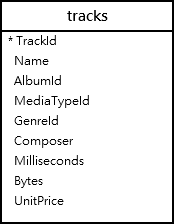
The following statement uses the IN operator to query the tracks whose media type id is 1 or 2.
SELECT
TrackId,
Name,
Mediatypeid
FROM
Tracks
WHERE
MediaTypeId IN (1, 2)
ORDER BY
Name ASC;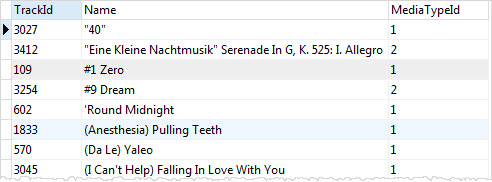
This query uses the OR operator instead of the IN operator to return the same result set as the above query:
SELECT
TrackId,
Name,
MediaTypeId
FROM
Tracks
WHERE
MediaTypeId = 1 OR MediaTypeId = 2
ORDER BY
Name ASC;As you can see from the queries, using the IN operator is much shorter.
If you have a query that uses many OR operators, you can consider using the IN operator instead to make the query more readable.
SQLite IN operator with a subquery example #
The following query returns a list of album id of the artist id 12:
SELECT albumid
FROM albums
WHERE artistid = 12;
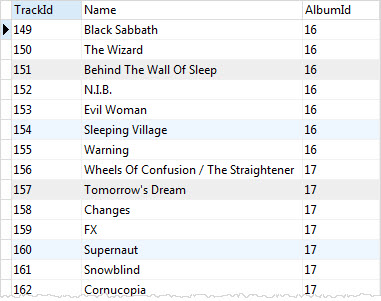
To get the tracks that belong to the artist id 12, you can combine the IN operator with a subquery as follows:
SELECT
TrackId,
Name,
AlbumId
FROM
Tracks
WHERE
AlbumId IN (
SELECT
AlbumId
FROM
Albums
WHERE
ArtistId = 12
);
In this example:
- First, the subquery returns a list of album ids that belong to the artist id 12.
- Then, the outer query return all tracks whose album id matches with the album id list returned by the subquery.
SQLite NOT IN examples #
The following statement returns a list of tracks whose genre id is not in a list of (1,2,3).
SELECT
trackid,
name,
genreid
FROM
tracks
WHERE
genreid NOT IN (1, 2,3);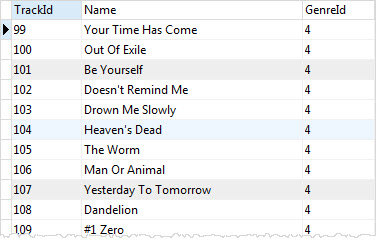
In this tutorial, you have learned how to use the SQLite IN operator to match a value with a list of values or a subquery.
Thank you for your feedback!
