
Summary: in this tutorial, you’ll learn how to use the SQL INSERT statement to insert a row into a table.
Introduction to the SQL INSERT statement #
In SQL, the INSERT statement allows you to insert one or more rows into a table.
Here’s the syntax of the INSERT statement:
INSERT INTO table_name(column1, column2, column3)
VALUES(value1, value2, value3);In this syntax:
- First, specify the name of the table to which you want to add data in the
INSERT INTOclause. - Second, define a comma-separated list of columns of the table within parentheses after the table name.
- Third, provide a comma-separated list of values for the corresponding columns in the
VALUESclause. The number of values in theVALUESclause must be the same as the number of columns in theINSERT INTOclause.
If you don’t provide a column in the INSERT statement, it will take a default value.
The default value of a column is NULL or a value defined by a DEFAULT constraint.
SQL INSERT statement examples #
We’ll use the dependents table in the sample database:
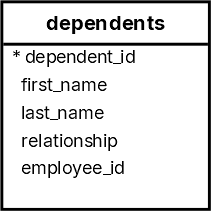
The following INSERT statement inserts a new row into the the dependents table:
INSERT INTO
dependents (first_name, last_name, relationship, employee_id)
VALUES
('Dustin', 'Johnson', 'Child', 178);The INSERT statement inserts a new row with the values in the first_name, last_name, relationship, and employee_id columns.
The INSERT statement does not include the dependent_id column because it is an identity column; the database system automatically generates an integer for it.
To verify the insert, you can query data from the dependents table using the following statement:
SELECT
*
FROM
dependents
WHERE
employee_id = 178;dependent_id | first_name | last_name | relationship | employee_id
--------------+------------+-----------+--------------+-------------
31 | Dustin | Johnson | Child | 178Insert multiple rows into a table #
To insert multiple rows using a single INSERT statement, you use place multiple row values in the VALUES clause as follows:
INSERT INTO
table_name (column1, column2, column3)
VALUES
(value11, value12, value13),
(value21, value22, value23),
(value31, value32, value33);For example, the following INSERT statement inserts two rows into the dependents table:
INSERT INTO
dependents (first_name, last_name, relationship, employee_id)
VALUES
('Cameron', 'Bell', 'Child', 192),
('Michelle', 'Bell', 'Child', 192);To verify the inserts, you can query data from the dependents table:
SELECT
*
FROM
dependents
WHERE
employee_id = 192;Output:
dependent_id | first_name | last_name | relationship | employee_id
--------------+------------+-----------+--------------+-------------
32 | Cameron | Bell | Child | 192
33 | Michelle | Bell | Child | 192Summary #
- Use the
INSERTstatement to insert a new row into a table. - Use multiple row in the
VALUESclause to insert multiple rows into a table once.
Quiz #
SQL INSERT Statement
Databases #
- PostgreSQL INSERT Statement
- MySQL INSERT Statement
- MariaDB INSERT Statement
- SQLite INSERT Statement
- Oracle INSERT Statement
- SQL Server INSERT Statement
- Db2 INSERT Statement
Thank you for your feedback!
