
Summary: In this tutorial, you’ll learn how to use SQL subqueries to form flexible queries for retrieving data from the database.
Introduction to SQL subquery #
A subquery is an SQL query nested inside another query. The query that contains a subquery is known as an outer query.
To write a subquery, you need to have a deep understanding of the SELECT statement:
SELECT
select_list
FROM
table1
INNER JOIN table2 ON join_condition
WHERE
filter_condition;Note that the join can be INNER JOIN, LEFT JOIN, RIGHT JOIN, or FULL JOIN.
In this syntax:
- The
SELECTclause can accept a single value, which can be a column or an expression. - The
FROMandINNER JOINclauses can accept a result set such as a table. - The
WHEREcan accept a single value, which can be a column or an expression.
Based on the shape of the data each clause accepts, you can embed the appropriate subquery:
- The subquery in the
SELECTclause can return a single value. - The subquery in the
FROMorINNER JOINclauses can return a result set. - The subquery in the
WHEREclause can return a single value.
SQL subquery in the WHERE clause #
We’ll use the employees table from the HR sample database:
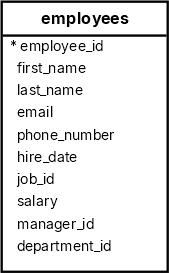
The following statement uses a subquery to find the employees who have the highest salary:
SELECT
first_name,
salary
FROM
employees
WHERE
salary = (
SELECT
MAX(salary)
FROM
employees
);Output:
first_name | salary
------------+----------
Steven | 24000.00How the query works.
First, the subquery returns the max salary from the salary column of the employees table:
SELECT
MAX(salary)
FROM
employeesSecond, the outer query uses the value returned by the subquery and returns the employee with the highest salary.
The following example uses a subquery to find employees with a salary greater than the average salary:
SELECT
first_name,
salary
FROM
employees
WHERE
salary > (
SELECT
AVG(salary)
FROM
employees
)
ORDER BY
salary;Output:
first_name | salary
------------+----------
John | 8200.00
Adam | 8200.00
William | 8300.00
Jack | 8400.00
Jonathon | 8600.00
...SQL Subquery with the IN operator #
The IN operator returns true if a value equals any value in a list of values. You can use a subquery to return a list of values for the IN operator:
IN subqueryFor example, the following query uses a subquery with the IN operator to find all employees with the job titles related to Sales:
SELECT
first_name,
last_name
FROM
employees
WHERE
job_id IN (
SELECT
job_id
FROM
jobs
WHERE
job_title LIKE '%Sales%'
);Output:
first_name | last_name
------------+------------
John | Russell
Karen | Partners
Jonathon | Taylor
Jack | Livingston
Kimberely | Grant
Charles | JohnsonHow the query works.
First, the subquery returns a list of job IDs with the job titles have the word "Sales":
SELECT
job_id
FROM
jobs
WHERE
job_title LIKE '%Sales%'Output:
job_id
--------
15
16Second, the outer query selects the employees with the job_id in the job id list (15, 16).
Subquery in the SELECT clause #
The following example uses a subquery in the SELECT clause to retrieve the first name, salary, and average salary of all employees:
SELECT
first_name,
salary,
(
SELECT
ROUND(AVG(salary),2) average_salary
FROM
employees
)
FROM
employees
ORDER BY
salary;first_name | salary | average_salary
-------------+----------+----------------
Karen | 2500.00 | 8060.00
Guy | 2600.00 | 8060.00
Irene | 2700.00 | 8060.00
Sigal | 2800.00 | 8060.00
Shelli | 2900.00 | 8060.00
...Subquery in the FROM clause #
The following example shows how to use a subquery in the FROM clause:
SELECT
ROUND(AVG(department_salary), 0) average_department_salary
FROM
(
SELECT
department_id,
SUM(salary) department_salary
FROM
employees
GROUP BY
department_id
);Output:
average_department_salary
---------------------------
29309How it works.
First, the subquery returns a result set that includes department_id and total salary for each department:
SELECT
department_id,
SUM(salary) department_salary
FROM
employees
GROUP BY
department_id;Second, the outer query calculates the average total salary of all departments and rounds it off with zero decimal places.
Subquery in the INNER JOIN clause #
The following example uses a subquery in the INNER JOIN clause of the outer query to retrieve employees who earn above the company’s average salary:
SELECT
first_name,
last_name,
salary,
s.avg_salary
FROM
employees e
INNER JOIN (
SELECT
ROUND(AVG(salary), 0) AS avg_salary
FROM
employees
) s ON e.salary > s.avg_salary
ORDER BY
salary;Output:
first_name | last_name | salary | avg_salary
------------+------------+----------+------------
John | Chen | 8200.00 | 8060
Adam | Fripp | 8200.00 | 8060
William | Gietz | 8300.00 | 8060
Jack | Livingston | 8400.00 | 8060
Jonathon | Taylor | 8600.00 | 8060
...How the query works.
- First, the subquery calculates the company’s average salary.
- Second, the outer query retrieves employees earning above that average salary.
Summary #
- A subquery is a query nested in an outer query.
- Embed an appropriate subquery in the
SELECT,FROM,WHERE, andINNER JOINclauses of a query.
Quiz #
SQL Subquery
Databases #
Thank you for your feedback!
