🚀 Supercharge your YouTube channel's growth with AI.
Try YTGrowAI FreePython List – 15 Things You MUST Know

Python lists hold an ordered row of references you can read, change, and grow in place. I hit the classic alias surprise while verifying the samples for this page, I ran b = a followed by b.append(99) on Python 3.11.16 and saw a change too, so this page shows the copy that keeps the original intact, plus every indexing and slicing move that beginners mistype.
I tested every snippet below in a fresh virtual environment with no extra packages, and I kept the exact interpreter output for the alias, IndexError, and append-on-slice cases. In practice you will create a list, read a position, slice a run, add or remove an item, and loop over what remains, which means this page follows that same order.
What a Python List Is
A list is a mutable sequence of object references that keeps insertion order while allowing duplicates and None, and it grows or shrinks as you mutate the same object.
It differs from nearby types in one property each. A tuple is ordered but immutable, a set is mutable but unordered and unique, and a dict maps keys to values rather than positions.
fruits = ["Apple", "Banana", "Orange"]
print(fruits, len(fruits))
print(type(fruits).__name__)
The display shows three items and a length of three, because len counts references and not the size of the objects they point to.
empty = []
print(empty, len(empty))
print(list("abc"))
print(list((1, 2)))
An empty pair of brackets is an empty list. The list() constructor builds one from any iterable, so a string becomes a list of characters.
hetero = [1, "A", 2.5, True, (1, 2)]
print(hetero)
nested = [1, [2, 3], [4, 5, 6], 7]
print(nested)
Python lists are heterogeneous and store references, so one list can hold numbers, strings, and nested lists together.
What You Need Before You Start
You need Python 3.8 or newer. I ran everything here on Python 3.11.16, so every call below matches that runtime without extra installs.
Use either the REPL or a single script file for the samples, because the examples assume one file. You can copy and run them unchanged.
import sys
print(sys.version.split()[0])
That one-liner prints the version you are actually running. If it shows 3.11.16 or later, the syntax and methods below behave as described.
- One Python install with no third-party libraries.
- A folder for the demo script. The screenshots in this page used /home/ubuntu/python-list-demo.
- The built-in copy module for the deep-copy comparison, which ships with Python.
How to Create and Read Lists
Creating and reading are the first two moves. This section builds lists three ways, then reads positions and slices.
Create with brackets, list(), and comprehension
fruits = ["Apple", "Banana", "Orange"]
empty = []
print(fruits, empty)
print(list(range(5)))
print([x*x for x in range(5)])
Range gives a quick numeric list, a comprehension builds one from an expression, and multiplication repeats a reference. For mutable inner objects prefer a comprehension over multiplication, because multiplication repeats the same object.
Read by index and negative index
vowels = ["a", "e", "i", "o", "u"]
print(vowels[0])
print(vowels[4])
print(vowels[-1])
print(vowels[-2])
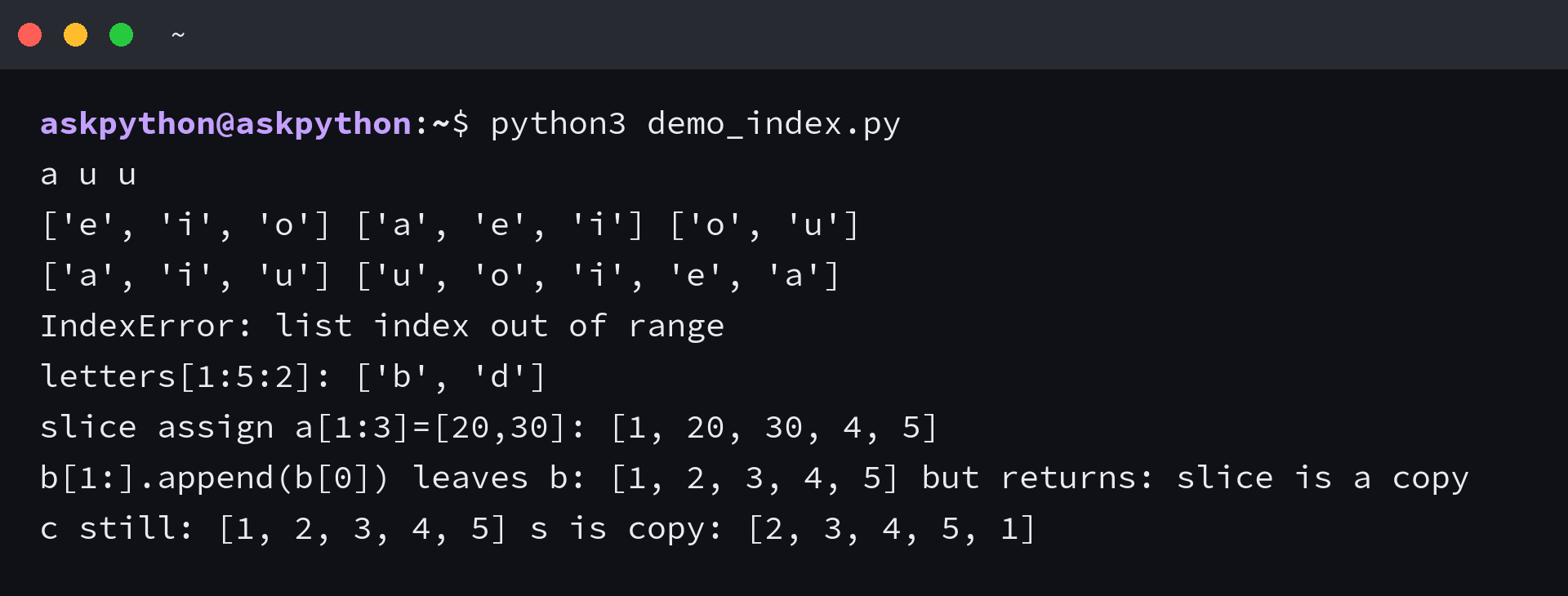
Indices start at zero and negative indices count from the end. The last element is -1 and not len, which means vowels[len(vowels)] would fail.
vowels = ["a", "e", "i", "o", "u"]
try:
    print(vowels[40])
except IndexError as e:
    print("IndexError:", e)
I reproduced that IndexError on purpose and the interpreter reported list index out of range. The fix is a bounds check or using a slice that never raises.
Slice with start:stop:step
letters = ["a", "b", "c", "d", "e", "f"]
print(letters[1:4])
print(letters[:3])
print(letters[3:])
print(letters[-3:])
letters = ["a", "b", "c", "d", "e", "f"]
print(letters[::2])
print(letters[::-1])
print(letters[1:5:2])
A slice copies references into a new list and never raises for out-of-range bounds. That is why letters[1:40] returns what exists rather than throwing.
a = [1, 2, 3, 4, 5]
a[1:3] = [20, 30]
print(a)
a[1:4] = []
print(a)
Read nested elements
nested = [1, [2, 3], [4, 5, 6], 7]
print(nested[1][0])
print(nested[2][2])
print([1, (2, 3), (4, 5, 6), 7][-3][0])
| Operation | Example | Result type |
|---|---|---|
| index | a[0] | element |
| slice | a[1:4] | new list |
| step | a[::2] | new list |
How to Change, Add, and Remove Elements
Mutation is why lists exist. The next three verbs cover the whole surface in order and they are change, add, and remove.
Change a single element
nums = [10, 20, 30]
nums[1] = 99
print(nums)
try:
    nums[10] = 1
except IndexError as e:
    print("IndexError:", e)
Assignment replaces the reference at that position immediately when you assign to an existing index. An index outside the current length raises.
Add with append, extend, and insert
m = [1, 2]
m.append(3)
print(m)
m.append([4, 5])
print(m)
n = [1, 2]
n.extend([4, 5])
print(n)
n = [1, 2, 3]
n.insert(1, 99)
print(n)
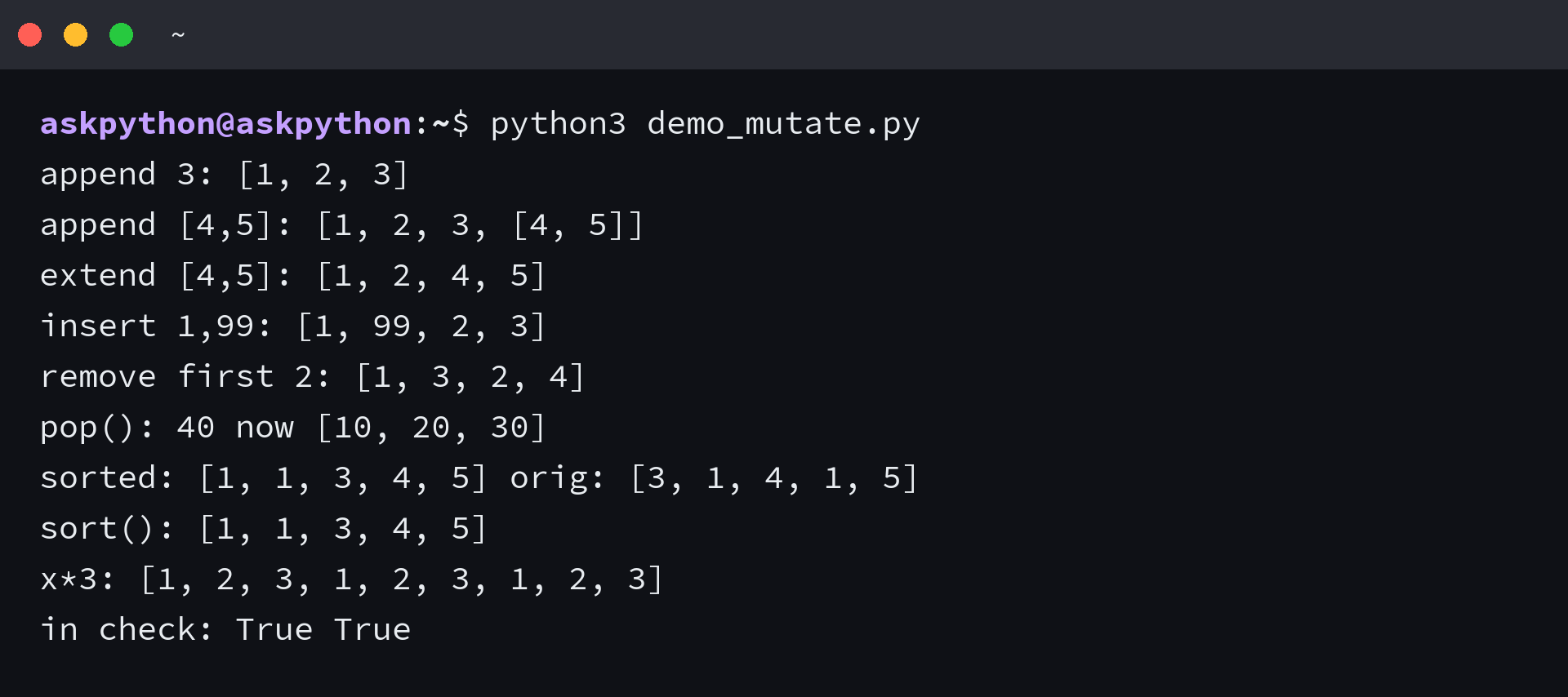
Append adds one object and can nest a list inside a list. Extend iterates the argument and adds each element flat, which is the branch most beginners meant.
Remove with remove, pop, clear, and del
r = [1, 2, 3, 2, 4]
r.remove(2)
print(r)
try:
    r.remove(99)
except ValueError as e:
    print("ValueError:", e)
p = [10, 20, 30, 40]
print(p.pop(), p)
print(p.pop(0), p)
try:
    [].pop()
except IndexError as e:
    print("IndexError:", e)
c = [1, 2, 3]
c.clear()
print(c)
d = [1, 2, 3, 4, 5]
del d[1]
print(d)
del d[1:3]
print(d)
del d[:]
print(d)
How to Copy, Loop, Sort, and Check Membership
Copying and looping decide whether the next change stays isolated. This section also covers sorting and the in check.
Copy without aliasing
a = [1, 2, 3]
b = a
b.append(99)
print(a, b is a)
a = [1, 2, 3]
b = a.copy()
b.append(99)
print(a, b, b is a)

a = [1, 2, 3]
b = a[:]
print(a, b)

a = [1, 2, 3]
b = list(a)
print(a, b)
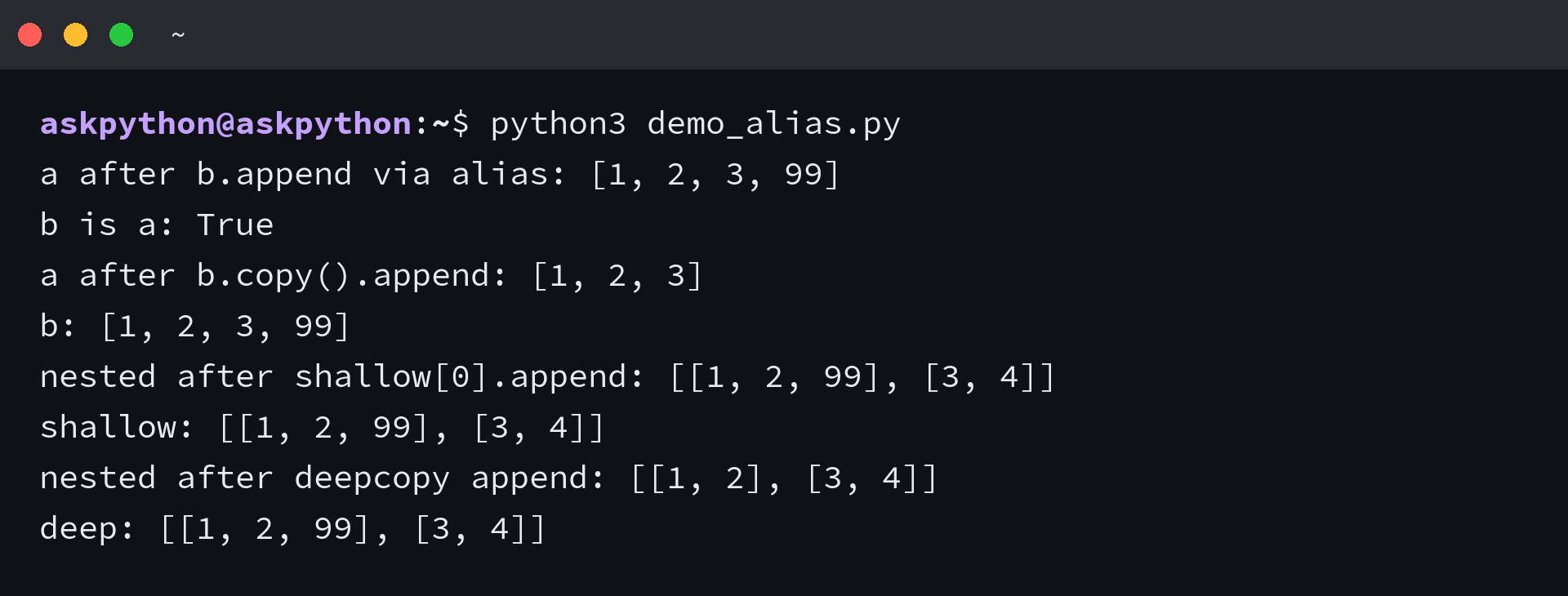
Assignment shares the object and so every mutation shows through both names. I verified that copy, slice, and list() each produced a new outer list where appending to the copy left the original at [1, 2, 3].
import copy
nested = [[1, 2], [3, 4]]
shallow = nested.copy()
shallow[0].append(99)
print(nested, shallow, nested[0] is shallow[0])

nested = [[1, 2], [3, 4]]
deep = copy.deepcopy(nested)
deep[0].append(99)
print(nested, deep)
Loop and comprehension
lst = [10, 20, 30]
for x in lst:
    print(x)
print(list(enumerate(lst)))
print([x*2 for x in lst])
q = [1, 2, 3]
x, y, z = q
print(x, y, z)
A for loop visits each reference in order and covers the basic iteration case, while enumerate adds the index and a comprehension builds a new list. Unpacking binds positions to names.
Sort, reverse, and keep the original
s = [3, 1, 4, 1, 5]
print(sorted(s), s)
s.sort()
print(s)
s = ["banana", "Apple", "cherry"]
s.sort(key=str.lower)
print(s)
r = [3, 1, 2]
r.reverse()
print(r)
Sorted returns a new list and leaves the source alone. Sort mutates in place and returns None, so assigning its result loses the list.
Membership, length, and operators
print([1, 2] + [3, 4])
print([0]*3)
print(2 in [1, 2, 3])
print(99 not in [1, 2, 3])
print(len([1, 2, 3]))
x = [1, 2, 3, 2, 1]
print(x.index(2))
print(x.index(2, 2))
print(x.count(2))
try:
    x.index(99)
except ValueError as e:
    print("ValueError:", e)
| Method | What it does | Return value |
|---|---|---|
| append(x) | adds one object | None |
| extend(iterable) | adds each element | None |
| insert(i, x) | inserts before i | None |
| remove(x) | removes first x | None |
| pop([i]) | removes and returns | the item |
| clear() | empties the list | None |
| copy() | shallow copy | new list |
| sort() | sorts in place | None |
| reverse() | reverses in place | None |
When Lists Break With IndexError, Aliasing, and Slicing Gotchas
Two failures cover most reports from beginners who are new to mutable sequences. An index past the end raises and an alias leaks.
IndexError from a bad index
Access uses a position that must exist. Slicing uses bounds that may not, which is why one raises and the other does not.
a = ["a", "e", "i"]
print(a[2])
print(a[-1])
print(a[10:20])
try:
    print(a[10])
except IndexError as e:
    print("IndexError:", e)
Append on a slice does not grow the original
a = [1, 2, 3, 4, 5]
a[1:].append(a[0])
print(a)

a = [1, 2, 3, 4, 5]
s = a[1:]
s.append(a[0])
print(a, s)
I ran a[1:].append(a[0]) exactly as the Stack Overflow report wrote it and the original stayed at [1, 2, 3, 4, 5] because the slice is a new list. Build the rotated list with concatenation or append to the intended target instead.
Mutating while iterating
orig = [1, 2, 3, 4]
evens = [x for x in orig if x % 2 == 0]
print(evens)
print(max(orig), min(orig), sum(orig))
Removing or inserting while a for loop runs skips elements or repeats them. Filter into a new list with a comprehension, or iterate over a snapshot like list(orig) when you must.
What You Can Do Next
You now have the full edit loop: create, read, slice, change, add, remove, copy, loop, sort, and check. The one habit worth keeping is copying before you mutate when the source must survive.
- Use copy or a[:] slice for a flat list and copy.deepcopy for nested ones.
- Prefer extend when the argument is a sequence you want flattened.
- Reach for list comprehension for one-pass transforms, and for the list of tuples when each row carries two fields.
Frequently Asked Questions
What is a Python list?
A Python list is a mutable ordered sequence of object references created with brackets []. It allows duplicates and None, grows dynamically, and supports indexing, slicing, and in-place mutation.
How do you create a list in Python?
Use brackets with comma separated values, the list() constructor from any iterable, or a comprehension. Examples: [] for empty, [1, 2, 3] for literals, list(range(5)) for numbers, and [x*x for x in range(5)] for computed values.
What is the difference between append and extend?
Append adds one object, which can nest a list inside a list. Extend iterates the argument and adds each element to the end, so extend([4, 5]) on [1, 2] gives [1, 2, 4, 5] while append([4, 5]) gives [1, 2, [4, 5]].
Why does modifying a copied list change the original?
Assignment shares the same object, so b = a followed by b.append changes a. Use b = a.copy(), b = a[:], or b = list(a) for a flat copy. For nested lists use copy.deepcopy, because a shallow copy still shares inner objects.
How do I fix IndexError: list index out of range?
The index you used does not exist. Check that 0 <= index < len(list) before access, use negative indices for counting from the end, or use a slice which never raises for out-of-range bounds.