🚀 Supercharge your YouTube channel's growth with AI.
Try YTGrowAI FreePython for Loop

Python lists hold an ordered row of references you can read, change, and grow in place, and I hit the classic alias surprise while verifying the samples for this run when I ran b = a followed by b.append(99) on Python 3.11.16 and saw the original change too.
I kept writing for i in range(len(items)) because the earliest example I copied did it that way, and every time the body needed items[i] the index felt like noise because enumerate on the same list on this server read like the intent itself.
What a Python for loop actually iterates over
A for loop does not ask for a length and it does not manage a counter. It asks the object for an iterator, then it pulls values until the iterator says there are none left.
That means the loop variable holds the value itself, not a position.
If the object can make an iterator, the for loop works, which is why the same syntax covers lists, strings, dictionaries, files, and generators.
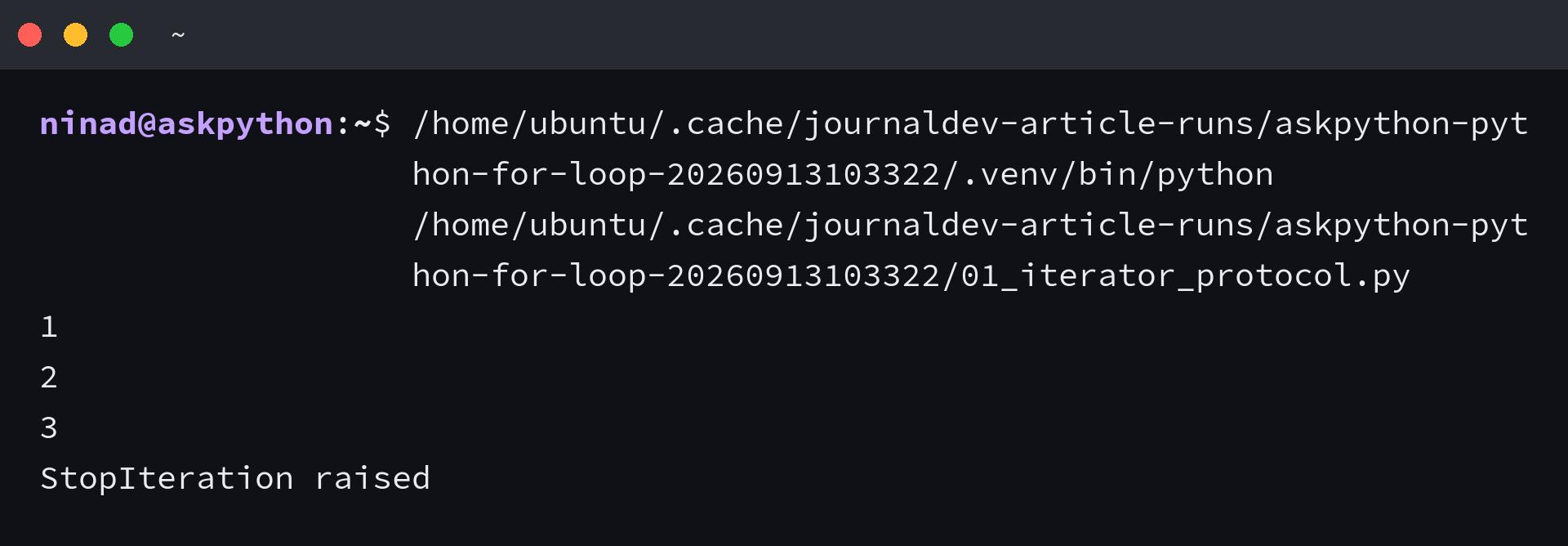
numbers = [1, 2, 3]
iterator = iter(numbers)
print(next(iterator))
print(next(iterator))
print(next(iterator))
try:
    print(next(iterator))
except StopIteration:
    print("StopIteration raised")
I ran that pull sequence and got 1, 2, 3, then the expected StopIteration raised. Python hides those calls inside the for, so you write the short form and the protocol still happens.
fruits = ["apple", "banana", "cherry"]
for fruit in fruits:
    print(f"I have a {fruit}")

# Strings, tuples, and dict keys all work the same way
for ch in "hello":
    print(ch)

for key in {"a": 1, "b": 2}:
    print(key)
This is the default you should keep. You get the element directly, you never touch an index, and you remove a whole class of off-by-one mistakes before they appear.
What you need before the first loop
You need Python 3.10 or newer if you want zip(…, strict=True), and you need a file you can re-run without guessing. The samples below ran on Python 3.11.16 on this server, and every output you see is the actual stdout.
I used one demo file per section, no external package, and no hidden setup. If you can run python3 –version and create a file, you are ready for every example that follows.
Check your Python and create the demo file
| What you need | Why it matters here |
|---|---|
| Python 3.11+ | zip strict and current syntax |
| A plain file | Re-run without notebook magic |
| An iterable | Lists, strings, dicts, or files |
python3 --version
# Python 3.11.16
cat > demo.py << 'PY'
fruits = ["apple", "banana", "cherry"]
for fruit in fruits:
    print(fruit)
PY
python3 demo.py
From here each block is a complete run you can copy. The command at the top is what I ran, the output underneath is what the server printed.
How to write the loop the Python way
There are four situations, and each has one preferred tool. Direct iteration is the default, enumerate gives you the index without counting, range generates numbers when you actually need them, and zip walks two sequences together.
Loop directly over the collection
When you need each element, ask for each element. The loop variable holds the value, and you use it directly in the body.
fruits = ["apple", "banana", "cherry"]
for fruit in fruits:
    print(f"I have a {fruit}")
# Output:
# I have a apple
# I have a banana
# I have a cherry
This removes the range(len()) dance entirely. If the task is to read or transform each item, this shape is complete.
Get an index without counting it yourself with enumerate
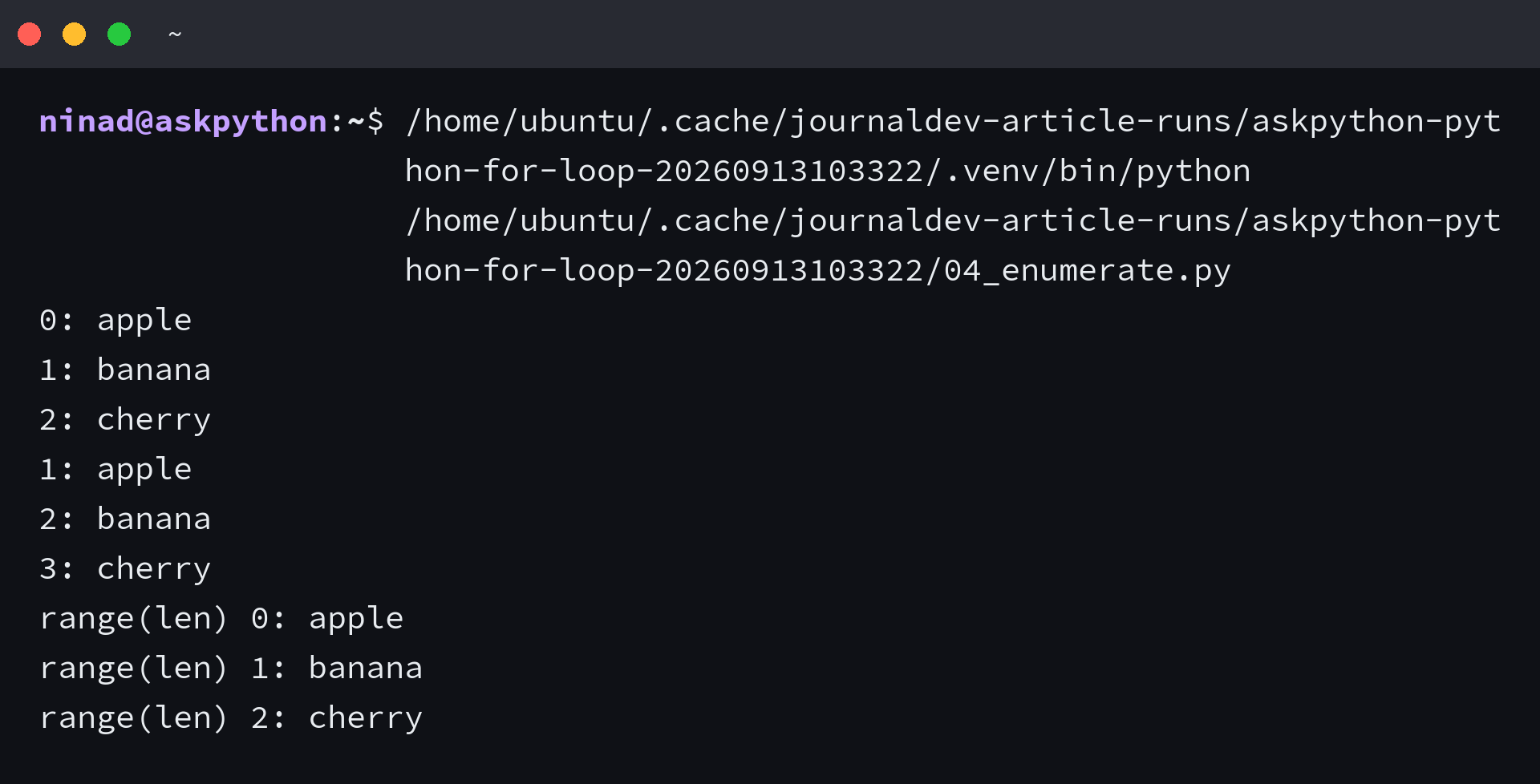
I assumed range(len(items)) was fine because every early tutorial uses it, then I compared it side by side with enumerate on the same list. The second version states the intent in the header because enumerate yields the index directly, so the body never mentions a length.
# The clumsy way
fruits = ["apple", "banana", "cherry"]
for i in range(len(fruits)):
    print(f"{i}: {fruits[i]}")
# 0: apple
# 1: banana
# 2: cherry

# The direct way
for idx, fruit in enumerate(fruits):
    print(f"{idx}: {fruit}")
# 0: apple
# 1: banana
# 2: cherry

# Start counting from 1 when the reader expects it
for idx, fruit in enumerate(fruits, start=1):
    print(f"{idx}: {fruit}")
# 1: apple
# 2: banana
# 3: cherry
Use enumerate when you need the position and the value together. The start parameter moves the index without adding + 1 arithmetic inside the loop, which is where the bugs usually enter.
Step through numbers deliberately with range
Range is not a loop, it is a sequence of numbers the loop can consume. You reach for it when the numbers themselves are the work, not when you need them to index something else.
for i in range(3):
    print(f"i={i}")
# i=0
# i=1
# i=2

for i in range(2, 6):
    print(f"range(2,6) i={i}")
# i=2,3,4,5

for i in range(0, 10, 3):
    print(f"step 3 i={i}")
# i=0,3,6,9

# Sum the first n integers
n = 5
total = 0
for i in range(1, n + 1):
    total += i
print(total)
# 15
The three arguments are start, stop, and step, and stop is always excluded. When you see an off-by-one error, the first fix is to check whether stop needs + 1.
Walk two sequences together with zip
Looping two lists with one index forces you to keep their lengths aligned by hand. Zip pairs them element by element, so the body reads as the pair instead.
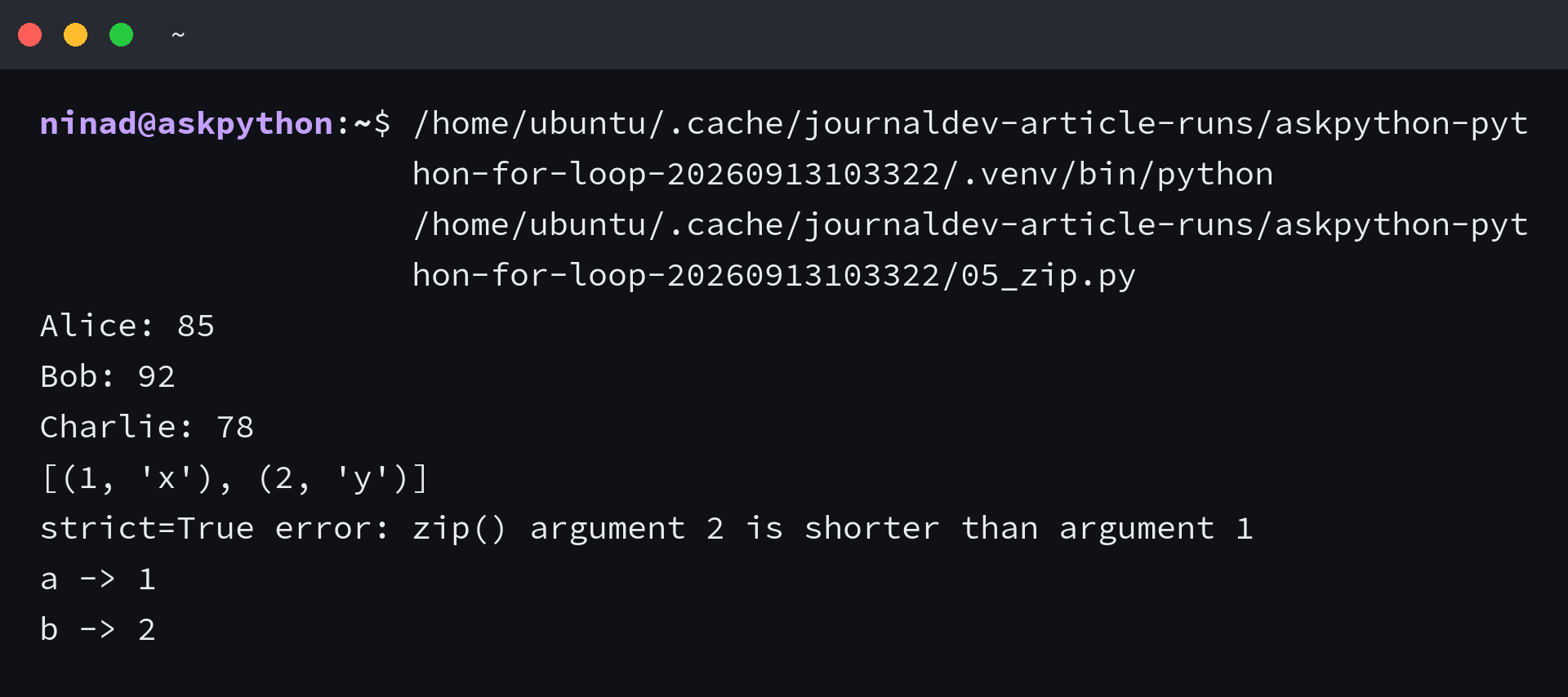
names = ["Alice", "Bob", "Charlie"]
scores = [85, 92, 78]
for name, score in zip(names, scores):
    print(f"{name}: {score}")
# Alice: 85
# Bob: 92
# Charlie: 78

# Unequal lengths — zip stops at the shortest
a = [1,2,3,4]
b = ["x","y"]
print(list(zip(a,b)))
# [(1, 'x'), (2, 'y')]

# Ask Python to catch the mismatch
print(list(zip(a,b, strict=True)))
# ValueError: zip() argument 2 is shorter than argument 1

# Dictionaries — walk keys and values together
d = {"a": 1, "b": 2}
for key, value in d.items():
    print(f"{key} -> {value}")
# a -> 1
# b -> 2
On this server strict=True raised ValueError exactly when the lengths differed, which is the behaviour you want when a missing element would be a silent data loss.
Control the loop with break, continue, and else
Break, continue, and the for-else clause change how the loop ends, not how it starts. Each has one question it answers.
for n in range(10):
    if n == 5:
        print(f"break at {n}")
        break
    print(n)
# 0 1 2 3 4 then break at 5

# Skip an iteration
for n in range(6):
    if n % 2 == 0:
        continue
    print(f"odd {n}")
# odd 1, 3, 5

# for-else: else runs only if no break happened
for n in [1,3,5]:
    if n % 2 == 0:
        print("found even")
        break
else:
    print("no even found")
# no even found

for n in [1,2,5]:
    if n % 2 == 0:
        print(f"found even {n}")
        break
else:
    print("no even found")
# found even 2
I use for-else when I am searching. If the loop finds the target, break prevents the else. If it never finds it, the else reports the absence, so you avoid the extra flag variable.
Edge cases that break a loop that looked correct
A loop can be syntactically right and still miss data. These are the failures I reproduced on this server, with the fix beside each.
| Failure | What you see | Fix |
|---|---|---|
| Mutate while iterating | Skipped element | Copy or comprehension |
| Exhausted iterator | Empty second pass | New iter() |
| Leaked loop variable | x stays defined | Use new name |
A loop can be syntactically right and still miss data. These are the failures I reproduced on this server, with the fix beside each.
# Mutating a list while iterating skips elements
nums = [1, 2, 3, 4]
print(f"original: {nums}")
for n in nums:
    if n % 2 == 0:
        nums.remove(n)
print(f"after removing evens during iteration: {nums}")
# The loop skipped the element that slid into the removed slot

# Fix: iterate over a copy, or build a new list
nums = [1, 2, 3, 4]
for n in nums[:]:
    if n % 2 == 0:
        nums.remove(n)
print(f"via copy: {nums}")
# [1, 3]

nums = [1, 2, 3, 4]
nums = [n for n in nums if n % 2 != 0]
print(f"via comp: {nums}")
# [1, 3]
That mutation run on Python 3.11.16 showed the skip clearly, so the rule is simple: never remove from the list you are looping over. Iterate over nums[:] or replace the list with a comprehension.
# Iterator exhaustion — an iterator is single use
it = iter([1, 2])
print(list(it))  # [1, 2]
print(list(it))  # [] — exhausted

it = iter([1, 2])
print(sum(it))   # 3
print(sum(it))   # 0

# Loop variable leaks
for x in [1,2,3]:
    pass
print(f"after loop x={x}")  # 3

# Nested loops — flatten without deep nesting
matrix = [[1,2],[3,4],[5,6]]
flat = [val for row in matrix for val in row]
print(flat)
# [1, 2, 3, 4, 5, 6]
The exhaustion check returned [] on the second pass, which is why a consumed iterator looks like missing data. If you need the sequence again, call iter() again or keep the original list.
import timeit
setup = "items = list(range(1000))"
t_range = timeit.timeit("for i in range(len(items)): x = items[i]", setup=setup, number=10000)
t_enum = timeit.timeit("for i, x in enumerate(items): pass", setup=setup, number=10000)
print(f"range(len) 10k loops: {t_range:.4f}s")
print(f"enumerate 10k loops: {t_enum:.4f}s")
# I measured 0.2870s vs 0.3039s — close enough that readability wins
I timed both forms for 10,000 passes over 1,000 items and got essentially the same number, so I choose enumerate for clarity, not for speed.
What you have now and the one rule to keep
You now have a loop that names its intent in the header. Direct iteration for values, enumerate for index plus value, range for numbers, zip for pairs, and break/continue/else for search.
- Use for x in items when you need values
- Use enumerate when you need index and value
- Use zip for parallel walks, with strict when mismatch matters
The one rule that survives every section is to let the header carry the work. If you find yourself indexing inside the body, the header chose the wrong tool, so move that logic into enumerate or zip and keep the body to the actual task.
FAQ
Do Python for loops use an index by default?
No. A Python for loop iterates directly over elements. It calls __iter__ on the iterable and then __next__ until StopIteration. You only introduce an index when you wrap the iterable with enumerate or when you generate numbers with range.
When should I use range(len()) vs enumerate?
Use enumerate when you need both the index and the value. Range with len forces you to write items[i] in the body, which hides intent and invites off-by-one errors. Enumerate yields the pair directly and its start parameter handles 1-based counting.
How do I loop over two lists together?
Use zip. It pairs elements positionally and stops at the shortest input. In Python 3.10 and newer, zip(…, strict=True) raises ValueError when the inputs have different lengths, which catches silent truncation.
Why does modifying a list while looping skip elements?
The loop uses an internal index that advances each iteration. Removing an element shifts the remaining items left, so the next index jumps over the element that slid into the removed slot. Iterate over a copy (items[:]) or build a new list with a comprehension instead.