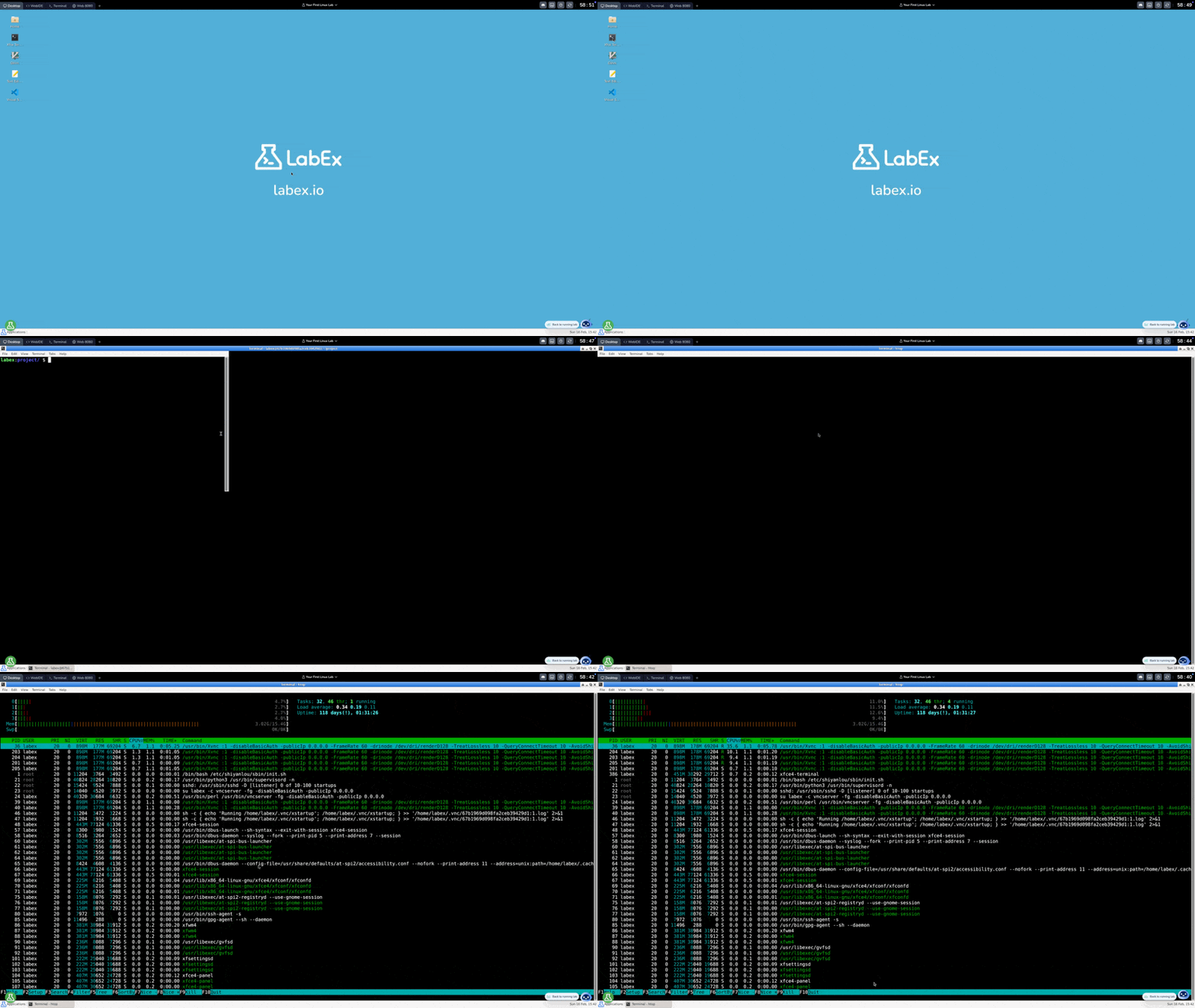
The LabEx Online PostgreSQL Terminal offers a comprehensive online PostgreSQL terminal and sandbox environment, providing users with a full PostgreSQL experience without local setup requirements. This versatile platform caters to PostgreSQL beginners, database administrators, and developers alike, offering an ideal space for exploration and experimentation with various PostgreSQL technologies.
Using the LabEx Online PostgreSQL Terminal
The LabEx PostgreSQL terminal and playground online provides a user-friendly interface for interacting with a complete PostgreSQL environment. Here's an overview of the key features and how to navigate the interface:
Key Features and Navigation
Multiple User Interfaces:
Desktop: A graphical desktop environment for a familiar experience
WebIDE: A web-based Visual Studio Code interface for efficient coding
Terminal: A command-line interface for direct system interaction
Web 8080: For viewing web applications running on port 8080
Environment Controls:
Located in the top right corner, providing options to:
Save your environment state
Restart the environment
Access additional settings
Full PostgreSQL Experience:
Complete PostgreSQL system with full access to resources and functionalities
Ability to install and configure software packages
Support for database administration tasks
AI-Powered Assistance:
Labby, our AI assistant, is available in the bottom right corner to:
Answer questions about the environment
Help debug code or command errors
Provide guidance on PostgreSQL concepts and commands
Versatility and Convenience:
No local setup required
Accessible from any device with a web browser
Ideal for learning, testing, and development across various skill levels
The LabEx PostgreSQL online terminal combines the power of a full PostgreSQL environment with cloud accessibility and AI assistance. Whether you're a beginner taking your first steps in PostgreSQL or an experienced user honing your skills, this platform provides the tools and support needed for your PostgreSQL journey.
PostgreSQL Skill Tree on LabEx
The PostgreSQL Skill Tree on LabEx covers a wide range of essential PostgreSQL skills, organized into several skill groups. Here's a detailed overview:
Basics
Fundamental PostgreSQL concepts and commands:
SQL Fundamentals: Basic SQL commands for data manipulation (e.g., SELECT, INSERT, UPDATE, DELETE).
Database Design: Concepts of relational database design, normalization, and data types.
Table Management: Creating, altering, and dropping tables.
Data Integrity: Constraints (PRIMARY KEY, FOREIGN KEY, UNIQUE, NOT NULL).
Basic Queries: Filtering, sorting, and joining data.
Functions: Using built-in and custom functions.
Advanced SQL
Advanced SQL techniques for complex data operations:
Subqueries: Nested queries for more complex data retrieval.
Window Functions: Performing calculations across sets of table rows.
Common Table Expressions (CTEs): Organizing complex queries for readability.
Transactions: Ensuring data consistency with BEGIN, COMMIT, ROLLBACK.
Views: Creating virtual tables for simplified data access.
Indexes: Optimizing query performance.
Database Administration
Tools and techniques for managing PostgreSQL systems:
Installation and Configuration: Setting up and configuring PostgreSQL instances.
User and Role Management: Creating and managing database users and their permissions.
Backup and Recovery: Implementing strategies for data backup and restoration.
Monitoring and Performance Tuning: Tools and techniques for monitoring database health and optimizing performance.
Replication: Setting up and managing database replication for high availability.
Security: Securing PostgreSQL databases, including authentication and encryption.
Advanced PostgreSQL
Specialized PostgreSQL skills and concepts:
Stored Procedures and Functions: Writing custom procedural code within the database.
Triggers: Automating actions based on database events.
Extensions: Utilizing PostgreSQL extensions for added functionality.
JSONB: Working with JSON data types in PostgreSQL.
Geospatial Data (PostGIS): Handling spatial data with the PostGIS extension.
Foreign Data Wrappers: Accessing external data sources from PostgreSQL.
Hands-on Labs
Practical, interactive labs to reinforce your PostgreSQL skills:
Lab Exercises: Guided, step-by-step labs covering various PostgreSQL topics.
Challenges: Open-ended problems to test your problem-solving abilities.
Projects: Comprehensive projects to apply your PostgreSQL knowledge.
For more detailed information and to start your PostgreSQL learning journey, visit the PostgreSQL Skill Tree on LabEx.
Begin Your PostgreSQL Journey with LabEx Courses
For those new to PostgreSQL, LabEx offers an excellent starting point with the "PostgreSQL for Beginners" course. This beginner-friendly course is designed to provide a solid foundation in PostgreSQL fundamentals through practical, hands-on experience.
PostgreSQL for Beginners
This course comprises labs that cover essential PostgreSQL topics:
Introduction to PostgreSQL
Basic SQL Queries
Data Types and Constraints
Table Creation and Manipulation
Inserting and Updating Data
Deleting Data
Filtering and Sorting Data
Joins and Relationships
Aggregate Functions
Subqueries
What sets LabEx courses apart is their hands-on approach to learning. Unlike traditional video courses or theoretical lectures, LabEx leverages the Online PostgreSQL Terminal to provide an immersive, interactive learning experience. This method of learning-by-doing is supported by cognitive science research:
Active Learning: Studies have shown that active engagement in the learning process leads to better retention and understanding. The hands-on approach of LabEx courses encourages active participation, allowing learners to immediately apply new concepts.
Experiential Learning: Psychologist David Kolb's Experiential Learning Theory emphasizes the importance of concrete experiences in the learning process. LabEx's practical labs provide these experiences, allowing learners to observe and reflect on the outcomes of their actions.
Cognitive Load Theory: By breaking down complex PostgreSQL concepts into manageable, practical tasks, LabEx courses align with Cognitive Load Theory. This approach helps prevent cognitive overload, making it easier for beginners to grasp and retain new information.
Immediate Feedback: The PostgreSQL Playground provides instant feedback on commands and operations, supporting the principle of immediate reinforcement in learning, which has been shown to enhance skill acquisition and retention.
Advanced PostgreSQL Practical Labs
For those looking to further enhance their PostgreSQL proficiency, LabEx also offers the "Advanced PostgreSQL Practical Labs" course. This comprehensive course covers advanced topics across various PostgreSQL categories:
Advanced Querying (Window Functions, CTEs)
Database Administration (Backup, Restore, Users)
Performance Tuning (Indexes, Explain Analyze)
Stored Procedures and Triggers
JSONB and PostGIS
Replication and High Availability
This course is excellent for both beginners looking to solidify their database skills and database administrators seeking to improve their efficiency.
By combining theoretical knowledge with practical application, LabEx courses provide an effective and engaging way to master PostgreSQL. The PostgreSQL Playground serves as your personal sandbox, allowing you to experiment, make mistakes, and learn in a safe, controlled environment. This approach not only accelerates learning but also builds confidence in using PostgreSQL in real-world scenarios.
Whether you're just starting out or looking to refine your PostgreSQL skills, LabEx's courses offer a scientifically-backed, hands-on approach to mastering this powerful database system. Begin your PostgreSQL journey today with the "PostgreSQL for Beginners" course and experience the benefits of practical, interactive learning firsthand.
Learn PostgreSQL with a comprehensive learning path designed for beginners. These PostgreSQL courses provide a structured roadmap to master the powerful, open-source relational database system. Progress through topics like fundamental SQL, database design, and administration. Gain practical, real-world experience through hands-on, non-video tutorials and interactive exercises in a dedicated SQL playground focused on database management and querying.
Online PostgreSQL Terminal FAQ
To help you better understand and utilize the LabEx Online PostgreSQL Terminal, here are answers to some frequently asked questions:
What are the advantages of using PostgreSQL over other database systems?
PostgreSQL offers numerous advantages, including:
High degree of customization and extensibility
Robust security features
Exceptional stability and reliability
Open-source nature, allowing for extensive community support
Vast ecosystem of tools and applications
Cost-effectiveness (it's free and open-source)
Advanced features like JSONB, PostGIS, and full-text search
ACID compliance for data integrity
These features make PostgreSQL a popular choice for web applications, data warehousing, and complex data management across various industries.
Why use an Online PostgreSQL Terminal?
An online PostgreSQL Playground like LabEx offers several benefits:
Immediate access without the need for local setup or installation
Risk-free environment for experimentation and learning
Consistent and pre-configured environment, eliminating compatibility issues
Accessibility from any device with a web browser
Ability to practice PostgreSQL skills without dedicated hardware
Easy reset and clean slate for new projects or experiments
How does the LabEx PostgreSQL Playground differ from other online PostgreSQL environments?
The LabEx PostgreSQL Playground stands out due to:
Multiple user interfaces (VS Code, Desktop, Web Terminal)
Full-fledged PostgreSQL environment
Seamless integration with LabEx courses and learning materials
Support for a wide range of development and database administration tasks
Regular updates to ensure a current and relevant learning environment
Can I use the PostgreSQL Playground for professional development?
Yes, the LabEx PostgreSQL Playground is suitable for professional development:
It provides a professional-grade environment for working on complex PostgreSQL-based projects
Supports various programming languages and development tools
Allows practice of database administration tasks in a safe environment
Facilitates learning and experimentation with database design and optimization.
Is the PostgreSQL Playground suitable for beginners?
Absolutely. The PostgreSQL Playground is designed to cater to users of all skill levels:
Intuitive interface makes it accessible for beginners
Integrated help and documentation provide guidance
Progressive learning path through associated LabEx courses
Safe environment for experimentation without fear of system damage
Immediate feedback helps reinforce learning
How can I make the most of the PostgreSQL Playground for learning?
Regularly practice commands and concepts learned in the Playground
Experiment with different scenarios and configurations
Utilize all available interfaces (VS Code, Desktop, Web Terminal) to gain a comprehensive understanding
Complement your Playground practice with LabEx courses and external resources
Set personal projects or goals to apply your skills in practical contexts
By leveraging the LabEx Online PostgreSQL Terminal and associated courses, you can gain practical, hands-on experience with PostgreSQL, accelerating your learning and preparing you for real-world applications of these valuable skills.
Summary
The LabEx Online PostgreSQL Terminal offers a comprehensive, accessible, and powerful environment for learning and working with PostgreSQL. Its multiple interfaces, full PostgreSQL system, and integration with structured courses make it an ideal platform for beginners and experienced users alike.
Key takeaways:
Provides a risk-free environment for PostgreSQL experimentation and learning
Offers multiple user interfaces for diverse learning preferences
Integrates seamlessly with LabEx courses for structured, hands-on learning
Suitable for various skill levels and professional development needs
Eliminates the need for local setup, making PostgreSQL accessible from any device