Showing posts with label Java IO. Show all posts

Monday, January 3, 2022

Modern file input/output with Java Path API and Files helper methods

Oracle Java Exam Prep, Oracle Java Certification, Oracle Java Career, Java Skills, Java Jobs, Java Prep, Java Preparation

They’ve been around since Java 7, but not everyone knows how to use the NIO.2 file I/O facilities.

Download a PDF of this article

When developers need to write file input or output code in Java, the situation can seem quite complex, especially because several APIs are available. It is not always obvious to newcomers which API they should use for common operations—or what the other APIs do.

This situation is because Java has had I/O support since the very first version. These earliest versions of I/O functionality emphasized portability due to Java’s strong desire for platform independence. As a result, they were not always easy to work with and some key functionality was missing.

Subsequent versions of Java introduced other APIs to make developers’ lives easier, but it wasn’t until Java 7 arrived that Java’s I/O capabilities became streamlined and easy to use.

For modern Java development, you should go straight to these modern APIs (known as NIO.2 or just the Path API) for simple tasks. All the other APIs—including low-level I/O handling—are still there if you need them, but for most day-to-day tasks the simple Path API should suffice.

There are two parts to the simple API, which lives in the package java.nio.file. Most importantly, there’s the Path interface itself. There are also a bunch of helper methods to implement common file-handling tasks, which are mostly contained in the Files class.

Let’s meet the API, starting with the fundamental abstraction, the Path itself.

Introducing Java’s Path API

An instance of Path is an object that may be used to locate a file in a file system. It represents a file system location that

◉ Is hierarchical

◉ Is composed of a sequence of path elements

◉ Is system-dependent in its implementation

◉ May or may not correspond to an existing file

It’s important to note that the Path API can be used to reference files that have not yet been created or that have already been deleted; hence, the last point above.

These aspects make a Path fundamentally different from the other common (but much older) Java abstraction for I/O: the File object.

In fact, Path is an interface not a class. This enables different operating systems and other file system providers to create different implementations of the Path interface. This provides a shared abstraction but also allows for system-dependent capabilities that do not have to be supported on all file systems.

All Path instances can be thought of as consisting of zero or more directory names and then one name element. In addition, some paths have a root component (such as / or C:\), but this is not mandatory because some instances (such as objects representing relative paths) do not have a root.

The name element is the element “furthest” from the root of the directory hierarchy and represents the name of the file or directory. You can intuitively think of a Path as consisting of the elements joined together by a delimiter. That delimiter is whatever is appropriate for the operating system.

Java 7 shipped with a Paths class that provides factory methods for creating Path objects. In Java 11 and later, these methods are also available as static methods directly on the Path interface.

The factories provide methods (Paths.get () and Path.of()) for creating Path objects. The usual overload of those methods takes a String and uses the default file system provider. An alternative version takes a URI instead; this provides a hook for the ability of NIO.2 to plug in providers of custom or nonstandard file system implementations, such as network-aware file systems or zip files.

Once you have a Path object, you can use it to perform common operations by means of the convenience and utility methods to deal with files and file systems, many of which are contained as static methods in the Files class.

The helper methods

Zealous proponents of other languages sometimes complain that Java has too much boilerplate. Historically, this may have been somewhat accurate for Java I/O, but times have changed for the better. For example, in modern Java a straightforward copy operation is now as simple as the following:

var input = Path.of("input");

var output = Path.of("output");

try {

  Files.copy(input, output);

} catch(IOException ex) {

  ex.printStackTrace();

}

This is roughly the same amount of code as one would expect in a supposedly more-compact language. What’s more, this code is safer, because the checked exception forces the programmer to confront the all-too-common situation that the copy might fail, rather than just permitting a silent failure to cause further downstream problems.

Warning: You will notice that the only checked exception thrown by methods in Path is an IOException. This aids the goal of coding simplicity, but it can obscure an underlying problem sometimes. You may need to write some extra exception handling if you want to deal with an explicit subtype of IOException.

The Files class is huge, and it’s worth getting familiar with the methods in it. (There are also variants that make use of the older APIs, including File, but let’s start by just using the modern API.)

Here’s my suggestion: Before writing a file I/O method from scratch, check to see whether Files already has a method that does what you want (or something close to it).

The code below shows some of the major methods in Files. Their operation is generally self-explanatory. Some of the Files methods provide the opportunity to pass optional arguments so you can provide additional (possibly implementation-specific) behavior for the operation.

In the comments below, I am explicit about the return types for those methods where the return type is important. Some of the other methods, such as copy(), do not have particularly useful return types. The point of those methods is the side effects, that is, actually copying the file.

Path source, target;

Attributes attr;

// Creating files

//

// Example of path --> /home/ben/.profile

// Example of attributes --> rw-rw-rw-

Files.createFile(target, attr);

// Deleting files

Files.delete(target);

boolean deleted = Files.deleteIfExists(target);

// Copying/moving files

Files.copy(source, target);

Files.move(source, target);

// Utility methods to retrieve information

long size = Files.size(target);

FileTime fTime = Files.getLastModifiedTime(target);

System.out.println(fTime.to(TimeUnit.SECONDS));

Map<String, ?> attrs = Files.readAttributes(target, "*");

System.out.println(attrs);

// File metadata

boolean isDir = Files.isDirectory(target);

boolean isSym = Files.isSymbolicLink(target);

// Reading and writing

Charset cs = StandardCharsets.UTF_8;

List<String> lines = Files.readAllLines(source, cs);

byte[] b = Files.readAllBytes(source);

// You should, of course, never store a stream in a temp variable.

// This example is just to indicate the return type, and in real

// code would be used as the source of a stream pipeline.

Stream<String> tmp = Files.lines(source, cs);

Some of the methods above have default behavior you need to be aware of. For example, by default, a copy operation will not overwrite an existing file, so you need to specify this behavior as a copy option, as follows:

Files.copy(Path.of("input.txt"), Path.of("output.txt"),

           StandardCopyOption.REPLACE_EXISTING);

StandardCopyOption is an enum that implements an interface named CopyOption. This interface is implemented by an enum called LinkOption. The former case is for regular files, while the link form is to specify how symbolic links should be handled—provided the underlying OS supports symbolic links, of course.

This slight bit of extra complexity is used to allow Files.copy() and other methods to have a final, variadic argument of CopyOption allowing the developer to have a very flexible way of specifying the required copy behavior. A version of this pattern is seen in a couple of other places in the API.

A brief yet relevant history of Java I/O

One reason why Java is so popular is because its rich libraries offer powerful and concise APIs to solve most of your programming needs. However, there are a few areas in which older versions of Java weren’t quite up to scratch. One example of this type of headache for developers was traditionally in I/O APIs. There have been several attempts to resolve this issue, leading to several different I/O APIs.

◉ Java 1.0: The File, InputStream, and OutputStream APIs

◉ Java 1.1: The Readers and Wrtiers API

◉ Java 1.4: The New I/O (NIO) API

◉ Java 7: The Path API (NIO.2)

The original java.io.File class, in particular, had significant limitations.

◉ It did not deal with filenames consistently across all platforms.

◉ It failed to have a unified model for file attributes.

◉ It was difficult to use it to traverse directories.

◉ It didn’t allow the use of platform-specific features (such as symbolic links).

The older APIs also failed to address nonblocking operations for file systems. These limitations, and the need to provide support for modern approaches to I/O, led to the work that became NIO.2 in Java 7 (as specified in JSR 203: More New I/O APIs for the Java Platform “NIO.2”). This project had three major goals.

◉ A new file system interface

◉ An API for asynchronous (as opposed to polled, nonblocking) I/O operations on both sockets and files

◉ The completion of the socket-channel functionality (previously defined in JSR 51), including the addition of support for binding, option configuration, and multicast datagrams

The first goal further broke down into three subgoals.

◉ Full access to file attributes

◉ Ability to access file system–specific APIs

◉ A service provider interface (SPI) for pluggable file system implementations

These are recognizably the fundamental capabilities that the Path API delivers, and it’s no surprise that the API has been enthusiastically adopted by developers. Despite this, however, it is sometimes necessary to interact with older code—or with relatively new code written by a developer who prefers the older file I/O methods. That’s why familiarity with the other APIs that the JDK provides will pay dividends for the thoughtful programmer.

Fundamental to these older APIs is the File class—and it’s there that I turn to next. (Remember: This is entirely different from the Files class of helper applications that work with Path.)

The old File class

The File class is the cornerstone of Java’s original way to do file I/O. The abstraction represents metadata about a file system’s location, that is, both files and directories.

The good news is that File provides an extensive set of methods for querying the file system metadata that the object represents, for example

// Permissions management

boolean canX = f.canExecute();

boolean canR = f.canRead();

boolean canW = f.canWrite();

boolean ok;

ok = f.setReadOnly();

ok = f.setExecutable(true);

ok = f.setReadable(true);

ok = f.setWritable(false);

// Different views of the file's name

File absF = f.getAbsoluteFile();

File canF = f.getCanonicalFile();

String absName = f.getAbsolutePath();

String canName = f.getCanonicalPath();

String name = f.getName();

String pName = getParent();

URI fileURI = f.toURI(); // Create URI for File path

// File metadata

boolean exists = f.exists();

boolean isAbs = f.isAbsolute();

boolean isDir = f.isDirectory();

boolean isFile = f.isFile();

boolean isHidden = f.isHidden();

long modTime = f.lastModified(); // millis since epoch

boolean updateOK = f.setLastModified(updateTime); // millis

long fileLen = f.length();

// File management operations

boolean renamed = f.renameTo(destFile);

boolean deleted = f.delete();

// Create won't overwrite existing file

boolean createdOK = f.createNewFile();

// Temporary file handling

File tmp = File.createTempFile("my-tmp", ".tmp");

tmp.deleteOnExit();

// Directory handling

boolean createdDir = dir.mkdir();

String[] fileNames = dir.list();

File[] files = dir.listFiles();

The bad news: Despite the large number of methods in the File class, some basic functionality is not, and never has been, provided directly. Famously, File does not provide a way to read the contents of a file directly.

Not only that but the way File abstracts over files and directories can be cumbersome to deal with, and leads to code like the following:

// Get a file object to represent the user's home directory

var homedir = new File(System.getProperty("user.home"));

// Create an object to represent a config file that is present in homedir

var f = new File(homedir, "app.conf");

// Check that the file exists, really is a file, and is readable

if (f.exists() && f.isFile() && f.canRead()) {

  // Create a file object for a new configuration directory

  var configdir = new File(f, ".configdir");

  configdir.mkdir();

  // Finally, move the config file to its new home

  f.renameTo(new File(configdir, ".config"));

}

This demonstrates some of the problems with the File abstraction, specifically that it is very general and requires a lot of work to interrogate a File object. In the example, to determine what a File object represents and its capabilities takes far too much code.

As noted above, by itself, the File class does not provide all needed functionality for I/O. Instead, it must be paired with the I/O stream abstraction (which is not to be confused with the Java streams that were introduced in Java 8 to facilitate a more functional approach to handling collections).

The I/O stream API was present in the very first version of Java as a way of dealing with sequential streams of bytes from disks or other sources.

The core of this API is a pair of abstract classes, InputStream and OutputStream. These are very widely used, and all subclasses must provide a method that returns or else returns the next byte of input. It should be no surprise that the standard input and output streams, System.in and System.out (which are Java’s representations of STDIN and STDOUT), are streams of this type.

The major drawback of this API is that using the streams is often inconvenient and usually requires developers to use byte arrays and other low-level abstractions.

For example, to count all the times that lowercase a (ASCII value 97) appears in the book Alice in Wonderland requires code like the following:

try (var is = new FileInputStream("/Users/ben/alice.txt")) {

  var buf = new byte[4096];

  int len, count = 0;

  while ((len = is.read(buf)) > 0) {

    for (var i = 0; i < len; i = i + 1)

      if (buf[i] == 97) {

        count = count + 1;

      }

  }

  System.out.println("'a's seen: "+ count);

} catch (IOException e) {

  e.printStackTrace();

}

This takes you far too far down the byte-handling rabbit hole and uses some C-style tricks that should be left in the past. By contrast, the corresponding code using the Path API is far more declarative and flexible.

var alice = Path.of("/Users/ben/alice.txt");

try {

  long count = Files.lines(alice)

                    .flatMap(l -> Stream.of(l.split("")))

                    .filter(s -> s.equals("a"))

                    .count();

  System.out.println("'a's seen: "+ count);

} catch (IOException e) {

  e.printStackTrace();

}

It should now be no surprise that I can’t recommend using the old, low-level APIs. Instead, the more modern APIs based on Path will be a far better fit most of the time. However, there are circumstances in which using a blend of the modern APIs and some of the older alternatives is required.

Bridging the File and Path APIs

Here’s an example that shows the easy interoperation between Path and File objects. First, notice how the Path factory methods can be used to access the same path in different ways.

var p = Path.of("/Users/ben/cluster.txt");

var p2 = Path.of(new URI("file:///Users/ben/cluster.txt"));

System.out.println(p2.equals(p));

Unsurprisingly, this prints true. Let’s now convert a path to a File object and use it normally.

File f = p.toFile();

System.out.println(f.isDirectory());

The addition of a toPath() method to File allows you to go in the other direction.

Path p3 = f.toPath();

System.out.println(p3.equals(p));

This pair of methods allows effortless motion between the two APIs and allows for easy refactoring of code based on File so it uses Path instead.

You can use other bridge methods in the new Files helper class to access the older I/O APIs such as FileInputStream.

var inputFile = new File("input");

try (var in = new FileInputStream(inputFile)) {

  Files.copy(in, Paths.get("output"));

} catch(IOException ex) {

  ex.printStackTrace();

}

There are also convenience factory methods for creating readers, writers, and file streams.

BufferedReader br = Files.newBufferedReader(target, cs);

BufferedWriter bwr = Files.newBufferedWriter(target, cs);

InputStream is = Files.newInputStream(target);

OutputStream os = Files.newOutputStream(target);

You can use these methods to write code like the following, which uses specified Path locations:

var logFile = Path.of("/tmp/my.log");

try (var writer =

       Files.newBufferedWriter(logFile, StandardCharsets.UTF_8,

                               StandardOpenOption.WRITE)) {

  writer.write("Hello World!");

  // ...

} catch (IOException e) {

  // ...

}

This provides a simple bridge to older code that uses the Readers and Writers API.

Extensibility with FileSystem and FileStore

The Path API was designed with extensibility in mind for future types of file I/O. For example, the OpenOption and CopyOption interfaces can be extended to provide additional options for opening and copying files or filelike entities. Regarding this extensibility, three of the most important types in the java.nio.file package are

◉ Path: The concept of a directory path on the file system

◉ FileSystem: Interfaces with file systems

◉ FileStore: Deals with the underlying devices, partitions, and so on

You have already seen how the fact that Path is an interface lends itself to extensibility.

These are the two other classes.

◉ FileSystem is essentially a factory for creating objects to access files and other objects in the file system, whether that file system is the default file system or an alternative file system retrieved by its URI. It has associated helper methods in FileSystems that create new file systems via a service provider interface (SPI) mechanism. A default FileSystem object is always available, and it corresponds to the local file system on the machine where the JVM was started.

◉ An instance of FileStore handles the low-level concrete details for how to interact with the bits and bytes of a FileSystem. This class is not often needed by the end user; instead, the higher-level abstractions suffice for almost all applications.

Source: oracle.com

Friday, October 15, 2021

Java IO FileReader Class

Oracle Java Tutorial and Material, Oracle Java Certification, Java Preparation, Java Exam Prep, Java Learning, Java Certified

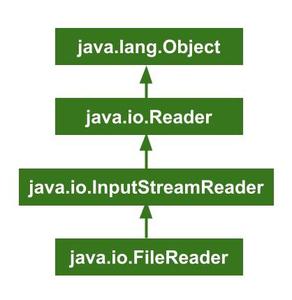
FileReader is a class in the java.io package which can be used to read a stream of characters from the files. This class uses either specified charset or the platform’s default charset for decoding from bytes to characters.

Charset: The Charset class is used to define methods for producing encoders and decoders and for recovering several names combined with the charset.

Default Charset: The default charset is defined during implicit computer start-up and it depends on the locale and charset of the underlying operating system.

The following image shows the Hierarchical Flow of FileReader class.

Oracle Java Tutorial and Material, Oracle Java Certification, Java Preparation, Java Exam Prep, Java Learning, Java Certified

Constructors 


The Constructors inside FileReader are shown in the table below.

Constructor Description
FileReader(File file)   Creates a new FileReader with given File to read (using default charset)
FileReader(FileDescriptor fd)  Creates a new FileReader with given FileDescriptor to read (using default charset) 
FileReader(File file, Charset charset)  Creates a new FileReader with given File to read (using given charset) 
FileReader(String filename)  Creates a new FileReader with given FileName to read (using default charset) 
FileReader(String filename, Charset charset)  Creates a new FileReader with given File to read (using given charset) 

Methods


The methods under FileReader are shown in the table below.

◉ read(): The read() method reads and passes a single character or -1 if the stream is ended.

◉ read(char[] charBuffer, int offset, int length): It reads a stream of characters and stores them in the given Character Buffer. Offset is the position at which it starts reading and Length is the total number of characters to be read. It passes plenty of characters read or -1 if the stream is ended.

◉ ready(): It tells whether the stream is ready to be read. A stream is said to be ready if its input buffer is not blank or empty.

◉ getEncoding(): The getEncoding() is used to return the title of the character encoding which is being used by the stream.

◉ close(): It closes the stream and releases the system resources associated with it.

// Java program to show the usage of
// IO FileReader Class
import java.io.*;

class OJC {
public static void main(String[] args)
{
try {
FileReader fileReader
= new FileReader("ojc.txt");

System.out.println("Reading char by char : \n");
int i;
while ((i = fileReader.read()) != -1) {
System.out.print((char)i);
}

System.out.println("Reading using array : \n");
char[] charArray = new char[10];
fileReader.read(charArray);
System.out.print(charArray);

fileReader.close();
System.out.println("FileReader closed!");
}
catch (Exception e) {
System.out.println(e);
}
}
}

Output:

Reading char by char :
OracleJavaCertified
Reading using array : 
OracleJavaCertified
FileReader closed!

Source: geeksforgeeks.org

Saturday, June 13, 2020

Java - Files and I/O

The java.io package contains nearly every class you might ever need to perform input and output (I/O) in Java. All these streams represent an input source and an output destination. The stream in the java.io package supports many data such as primitives, object, localized characters, etc.

Stream


A stream can be defined as a sequence of data. There are two kinds of Streams −

◉ InPutStream − The InputStream is used to read data from a source.

◉ OutPutStream − The OutputStream is used for writing data to a destination.

Oracle Java Tutorial and Material, Oracle Java Exam Prep, Oracle Java Certification

Java provides strong but flexible support for I/O related to files and networks but this post covers very basic functionality related to streams and I/O. We will see the most commonly used examples one by one −

Byte Streams

Java byte streams are used to perform input and output of 8-bit bytes. Though there are many classes related to byte streams but the most frequently used classes are, FileInputStream and FileOutputStream. Following is an example which makes use of these two classes to copy an input file into an output file −

Example

import java.io.*;
public class CopyFile {

   public static void main(String args[]) throws IOException {
      FileInputStream in = null;
      FileOutputStream out = null;

      try {
         in = new FileInputStream("input.txt");
         out = new FileOutputStream("output.txt");
       
         int c;
         while ((c = in.read()) != -1) {
            out.write(c);
         }
      }finally {
         if (in != null) {
            in.close();
         }
         if (out != null) {
            out.close();
         }
      }
   }
}

Now let's have a file input.txt with the following content −

This is test for copy file.

As a next step, compile the above program and execute it, which will result in creating output.txt file with the same content as we have in input.txt. So let's put the above code in CopyFile.java file and do the following −

$javac CopyFile.java
$java CopyFile

Character Streams

Java Byte streams are used to perform input and output of 8-bit bytes, whereas Java Character streams are used to perform input and output for 16-bit unicode. Though there are many classes related to character streams but the most frequently used classes are, FileReader and FileWriter. Though internally FileReader uses FileInputStream and FileWriter uses FileOutputStream but here the major difference is that FileReader reads two bytes at a time and FileWriter writes two bytes at a time.

We can re-write the above example, which makes the use of these two classes to copy an input file (having unicode characters) into an output file −

Example

import java.io.*;
public class CopyFile {

   public static void main(String args[]) throws IOException {
      FileReader in = null;
      FileWriter out = null;

      try {
         in = new FileReader("input.txt");
         out = new FileWriter("output.txt");
       
         int c;
         while ((c = in.read()) != -1) {
            out.write(c);
         }
      }finally {
         if (in != null) {
            in.close();
         }
         if (out != null) {
            out.close();
         }
      }
   }
}

Now let's have a file input.txt with the following content −

This is test for copy file.

As a next step, compile the above program and execute it, which will result in creating output.txt file with the same content as we have in input.txt. So let's put the above code in CopyFile.java file and do the following −

$javac CopyFile.java
$java CopyFile

Standard Streams


All the programming languages provide support for standard I/O where the user's program can take input from a keyboard and then produce an output on the computer screen. If you are aware of C or C++ programming languages, then you must be aware of three standard devices STDIN, STDOUT and STDERR. Similarly, Java provides the following three standard streams −

◉ Standard Input − This is used to feed the data to user's program and usually a keyboard is used as standard input stream and represented as System.in.

◉ Standard Output − This is used to output the data produced by the user's program and usually a computer screen is used for standard output stream and represented as System.out.

◉ Standard Error − This is used to output the error data produced by the user's program and usually a computer screen is used for standard error stream and represented as System.err.

Following is a simple program, which creates InputStreamReader to read standard input stream until the user types a "q" −

Example

import java.io.*;
public class ReadConsole {

   public static void main(String args[]) throws IOException {
      InputStreamReader cin = null;

      try {
         cin = new InputStreamReader(System.in);
         System.out.println("Enter characters, 'q' to quit.");
         char c;
         do {
            c = (char) cin.read();
            System.out.print(c);
         } while(c != 'q');
      }finally {
         if (cin != null) {
            cin.close();
         }
      }
   }
}

Let's keep the above code in ReadConsole.java file and try to compile and execute it as shown in the following program. This program continues to read and output the same character until we press 'q' −

$javac ReadConsole.java
$java ReadConsole
Enter characters, 'q' to quit.
1
1
e
e
q
q

Reading and Writing Files


As described earlier, a stream can be defined as a sequence of data. The InputStream is used to read data from a source and the OutputStream is used for writing data to a destination.

Here is a hierarchy of classes to deal with Input and Output streams.

Oracle Java Tutorial and Material, Oracle Java Exam Prep, Oracle Java Certification

The two important streams are FileInputStream and FileOutputStream, which would be discussed in this post.

FileInputStream

This stream is used for reading data from the files. Objects can be created using the keyword new and there are several types of constructors available.

Following constructor takes a file name as a string to create an input stream object to read the file −

InputStream f = new FileInputStream("C:/java/hello");

Following constructor takes a file object to create an input stream object to read the file. First we create a file object using File() method as follows −

File f = new File("C:/java/hello");
InputStream f = new FileInputStream(f);

Once you have InputStream object in hand, then there is a list of helper methods which can be used to read to stream or to do other operations on the stream.

Sr.No. Method & Description
public void close() throws IOException{}
This method closes the file output stream. Releases any system resources associated with the file. Throws an IOException.
protected void finalize()throws IOException {}
This method cleans up the connection to the file. Ensures that the close method of this file output stream is called when there are no more references to this stream. Throws an IOException. 
public int read(int r)throws IOException{}
This method reads the specified byte of data from the InputStream. Returns an int. Returns the next byte of data and -1 will be returned if it's the end of the file.
public int read(byte[] r) throws IOException{}
This method reads r.length bytes from the input stream into an array. Returns the total number of bytes read. If it is the end of the file, -1 will be returned.
public int available() throws IOException{}
Gives the number of bytes that can be read from this file input stream. Returns an int. 

FileOutputStream


FileOutputStream is used to create a file and write data into it. The stream would create a file, if it doesn't already exist, before opening it for output.

Here are two constructors which can be used to create a FileOutputStream object.

Following constructor takes a file name as a string to create an input stream object to write the file −

OutputStream f = new FileOutputStream("C:/java/hello")

Following constructor takes a file object to create an output stream object to write the file. First, we create a file object using File() method as follows −

File f = new File("C:/java/hello");
OutputStream f = new FileOutputStream(f);

Once you have OutputStream object in hand, then there is a list of helper methods, which can be used to write to stream or to do other operations on the stream.

Sr.No. Method & Description
public void close() throws IOException{}
This method closes the file output stream. Releases any system resources associated with the file. Throws an IOException.
protected void finalize()throws IOException {}
This method cleans up the connection to the file. Ensures that the close method of this file output stream is called when there are no more references to this stream. Throws an IOException.
public void write(int w)throws IOException{}
This methods writes the specified byte to the output stream.
public void write(byte[] w)
Writes w.length bytes from the mentioned byte array to the OutputStream.

Example

Following is the example to demonstrate InputStream and OutputStream −

import java.io.*;
public class fileStreamTest {

   public static void main(String args[]) {
   
      try {
         byte bWrite [] = {11,21,3,40,5};
         OutputStream os = new FileOutputStream("test.txt");
         for(int x = 0; x < bWrite.length ; x++) {
            os.write( bWrite[x] );   // writes the bytes
         }
         os.close();
     
         InputStream is = new FileInputStream("test.txt");
         int size = is.available();

         for(int i = 0; i < size; i++) {
            System.out.print((char)is.read() + "  ");
         }
         is.close();
      } catch (IOException e) {
         System.out.print("Exception");
      }
   }
}

The above code would create file test.txt and would write given numbers in binary format. Same would be the output on the stdout screen.

File Navigation and I/O


There are several other classes that we would be going through to get to know the basics of File Navigation and I/O.

◉ File Class

◉ FileReader Class

◉ FileWriter Class

Directories in Java


A directory is a File which can contain a list of other files and directories. You use File object to create directories, to list down files available in a directory. For complete detail, check a list of all the methods which you can call on File object and what are related to directories.

Creating Directories

There are two useful File utility methods, which can be used to create directories −

◉ The mkdir( ) method creates a directory, returning true on success and false on failure. Failure indicates that the path specified in the File object already exists, or that the directory cannot be created because the entire path does not exist yet.

◉ The mkdirs() method creates both a directory and all the parents of the directory.

Following example creates "/tmp/user/java/bin" directory −

Example

import java.io.File;
public class CreateDir {

   public static void main(String args[]) {
      String dirname = "/tmp/user/java/bin";
      File d = new File(dirname);
      
      // Create directory now.
      d.mkdirs();
   }
}

Compile and execute the above code to create "/tmp/user/java/bin".

Note − Java automatically takes care of path separators on UNIX and Windows as per conventions. If you use a forward slash (/) on a Windows version of Java, the path will still resolve correctly.

Listing Directories


You can use list( ) method provided by File object to list down all the files and directories available in a directory as follows −

Example

import java.io.File;
public class ReadDir {

   public static void main(String[] args) {
      File file = null;
      String[] paths;
  
      try {      
         // create new file object
         file = new File("/tmp");

         // array of files and directory
         paths = file.list();

         // for each name in the path array
         for(String path:paths) {
            // prints filename and directory name
            System.out.println(path);
         }
      } catch (Exception e) {
         // if any error occurs
         e.printStackTrace();
      }
   }
}

This will produce the following result based on the directories and files available in your /tmp directory −

Output

test1.txt
test2.txt
ReadDir.java
ReadDir.class

Thursday, February 13, 2020

How to Create File and Directory in Java Example - Java IO

Oracle Java Tutorial and Materials, Oracle Java Guides, Oracle Tutorial and Material, Oracle Java Prep

How to create File and directory in Java is probably the first things come to mind when we exposed to the file system from Java. Java provides rich IO API to access contents of File and Directory in Java and also provides lots of utility method to create a file, delete a file, read from a file, and write to file or directory. Anybody who wants to develop an application in Java should have a solid understanding of IO and Networking package. In this Java File Tutorial, we will basics of File and Directory in Java, How to Create File and Directory in Java, Utility methods provided by File API and Common Exception or Error you will face during File and Directory Creation or access time. Creating File is different than creating Thread in java as you don’t have to implement any interface for making a Class as File in Java.

File in Java is also getting its place on various core java interviews questions especially after the introduction of java.nio package and concepts like In Memory Files, we will discuss those in probably another blog post but what it confirms is the importance of knowledge of File IO for java programmer.

How to Create File and Directory in Java Example


What is File in Java

create file and directory in java example tutorialLet’s start with first basic questions “What is File in Java”, File is nothing but a simple storage of data, in java language we call it one object belongs to Java.io package it is used to store the name of the file or directory and also the pathname. An instance of this class represents the name of a file or directory on the file system. Also, this object can be used to create, rename, or delete the file or directory it represents.

An important point to remember is that java.io.File object can represent both File and Directory in Java.  You can check whether a File object is a file in filesystem by using utility method isFile() and whether its directory in file system by using isDirectory(). Since File permissions is honored while accessing File from Java, you can not write into a read-only files, there are utility methods like canRead() and CanWrite().

PATH Separator for File in Java


Oracle Java Tutorial and Materials, Oracle Java Guides, Oracle Tutorial and Material, Oracle Java Prep
Path Separator for file in Java depends on which operating system you are working , in Microsoft Windows platform its “\”  while in Unix and Linux platform its forward slash “/”. You can access file system separator in Java by system property file.separator and its also made available from File Class by public static field separator.

Constructors for creating File in Java

◉ File(String PathName) :it will create file object within the current directory

◉ File(String dirName,string name):it will create file object inside  a directory which is passed as the first argument  and the second argument is child of that directory which can be a file or a directory

◉ File(File dir,String name):create new file object inside the dir as a parent of the second argument which can be a file name or a directory name.

Java File Class Method Summary

Before you start creating files and directory in Java its good to get familiar with what kind of operations are exposed via File Class API.l Here I have described only some important method which is commonly used while dealing with File and Directory in Java

◉ Public string getName(): returns the name of a file.

◉ Public boolean exists():returns true if file exist or return false

◉ Public boolean createNewFile():this method create new empty file if file not exist.return false if file not created and already exist.

◉ Public boolean delete():delete the file and return true.

◉ Public boolean mkdirs(): return true if directory created successfully or false

◉ Public string getPath() :return the path or location of file object

◉ CanRead() and CanWrite() for checking whether File or Directory is read-only or not.

◉ setReadOnly(), listFiles() for making the file as read only in Java and listing files from a directory in Java.

Common Exception occurs during File Handling:

Some common exception related with the method of File object and their operation which we need to take care when to deal with files. You can get these exceptions while opening File in Java, While Creating Files in Java or during reading and writing from File or Directory in Java. Whole File System is protected by SecurityManager in Java and Applets or other Java program from untrusted source is not allowed to access File System from Java to protect User from any Internet threat.

◉ IOException: if anyI/O error occurred we got this Exception

◉ SecurityException: this exception we get when security Manger exist its checkWrite or checkRead method denies to access the file

◉ IllegalArgumentException: if method argument we are passing is invalid then we get this exception

◉ MalFormedUrlException: this kind of exception is generated if path cannot be parsed a URL

Example of How to Create File in Java


Here is a simple example of how to create file in Java:

import java.io.*;

public class FileExample {

public static void main(String[] args) {
boolean flag = false;

// create File object
File stockFile = new File("d://Stock/stockFile.txt");

try {
    flag = stockFile.createNewFile();
} catch (IOException ioe) {
     System.out.println("Error while Creating File in Java" + ioe);
}

System.out.println("stock file" + stockFile.getPath() + " created ");

}
}

In this example of creating File in Java we have created one new file called stock file inside the stock directory on d drive first time when we execute this program
 it will check for the file if it will not get that file simply create the new file and flag will become true, next time when we again run this program the file is already get created inside d:\\stock folder so it will not create the file and flag value will be false.

Example of How to Create Directory in Java


Just like above example of creating file in Java we can create directory in Java, only difference is that we need to use mkdir() method to create directory in Java

import java.io.*;

public class DirectoryExample {

public static void main(String[] args) {
boolean dirFlag = false;

// create File object
File stockDir = new File("d://Stock/ stockDir ");

try {
   dirFlag = stockDir.mkdir();
} catch (SecurityException Se) {
System.out.println("Error while creating directory in Java:" + Se);
}

if (dirFlag)
   System.out.println("Directory created successfully");
else
   System.out.println("Directory was not created successfully");
}
}

That’s all on how to create File and Directory in Java , as I suggest Java IO package is an important package both for beginners in Java and with others and giving time to understand methods and operations of file  Class in Java and overall IO package in Java is worth effort.